



TMetric Reports vs MCP Server: When to Use Each

TMetric Reports give you structured, repeatable reporting, while the TMetric MCP Server lets you ask questions about your time data in natural language. Use Reports for formal reporting, billing, and recurring workflows, and MCP for quick questions, comparisons, and data summaries.

Fully functional 14-day trial | No credit card needed

Trusted by over 10 000 companies worldwide

  • Endygo
  • ITsyndicate
  • Pulso
  • 050media
  • JOT Digital
  • Freshlab
  • Mvad
  • Swaven

TMetric Reports vs MCP

Criteria

TMetric Reports

TMetric MCP Server

Main purpose

Structured reporting and review

Conversational analysis of TMetric data

Interface

Reports UI with filters, tables, and charts

Natural-language prompts in an AI assistant

Best for

Billing, client reports, and recurring team or project reporting

Ad hoc questions, summaries, and pattern analysis

Output

Structured report

AI-generated answer, summary, or analysis

Repeatability

Standardized recurring reports

Flexible one-off questions

Filters

Predefined report filters and dimensions

Conditions described in natural language

Export

Formal report and export workflows

Conversational output and analysis

Interpretation

User reviews the report

AI can summarize and interpret retrieved data

Data access

Native TMetric reporting

Read-only access through MCP

Final verification

Preferred for verifying formal numbers

Important figures can be verified against TMetric Reports

How to get answers from your TMetric data

Without TMetric MCP

  • Building a new report for every one-off question
  • Manually combining filters to compare unusual data
  • Writing weekly summaries by hand before meetings
  • Spotting changes in time allocation by scanning tables

With TMetric MCP

  • Ask questions about your time data in plain language
  • Compare any combination of projects, clients, and people
  • Get a ready summary of the past week in seconds
  • Verify, export, and share final results with Reports

When to use TMetric Reports and MCP Server

Billing and client reporting

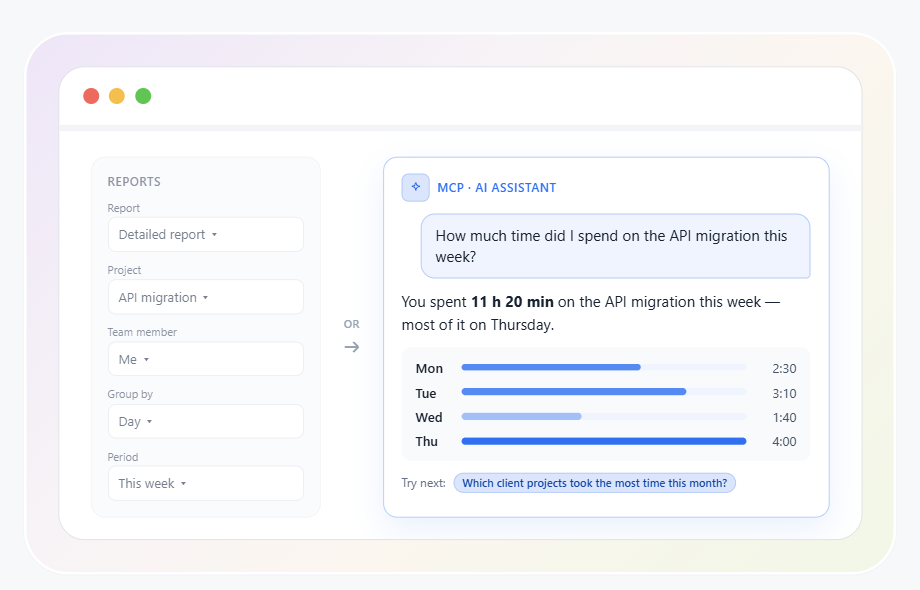
Use Reports when time data needs to support billing, invoicing, or formal client reporting and must follow a consistent, verifiable workflow. MCP can help you investigate or summarize data before billing. When it comes to TMetric Reports vs MCP for billing, Reports remain the final step, and AI analysis supports the workflow rather than replacing it.

Billing and client reporting

Recurring team and project reports

Reports work well when teams regularly review the same dimensions, such as tracked time by employee, project, client, or task. If you’re choosing between traditional reports or MCP for recurring reviews, Reports are the better fit: the same filters and dimensions give consistent results across reporting periods.

Recurring team and project reports

Ask ad hoc questions in plain language

With MCP, you can describe what you need in natural language instead of manually defining every combination of filters first. For example, you can ask, How much time did I spend on the API migration this week? or Which client projects took the most time this month?

Ask ad hoc questions in plain language

Turn time data into summaries and insights

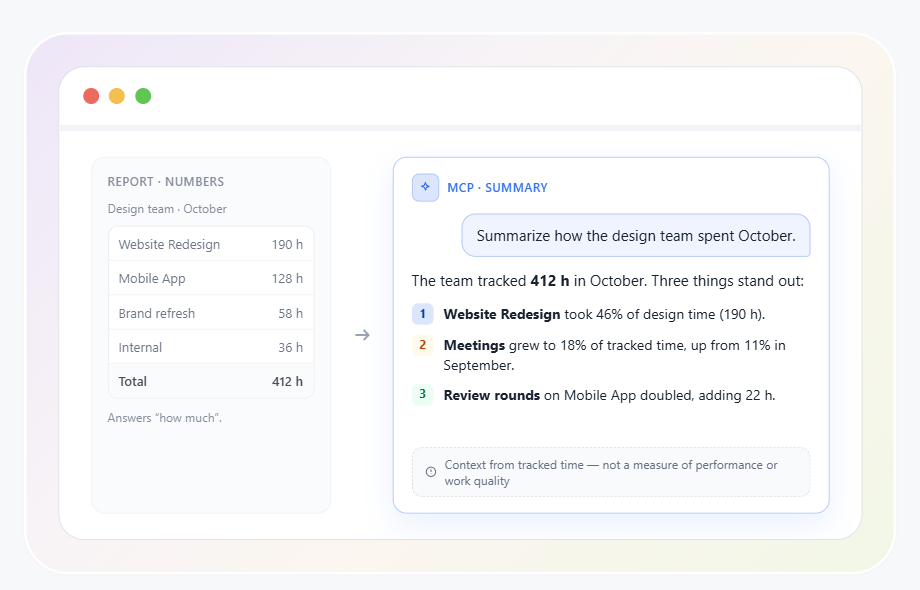
MCP is useful when you need an explanation or narrative summary rather than another table of numbers. While Reports answer structured "how much" questions, MCP can help surface patterns and provide context around the underlying time data without treating it as a complete measure of employee performance or productivity quality.

Turn time data into summaries and insights

Analyze questions you did not plan for in advance

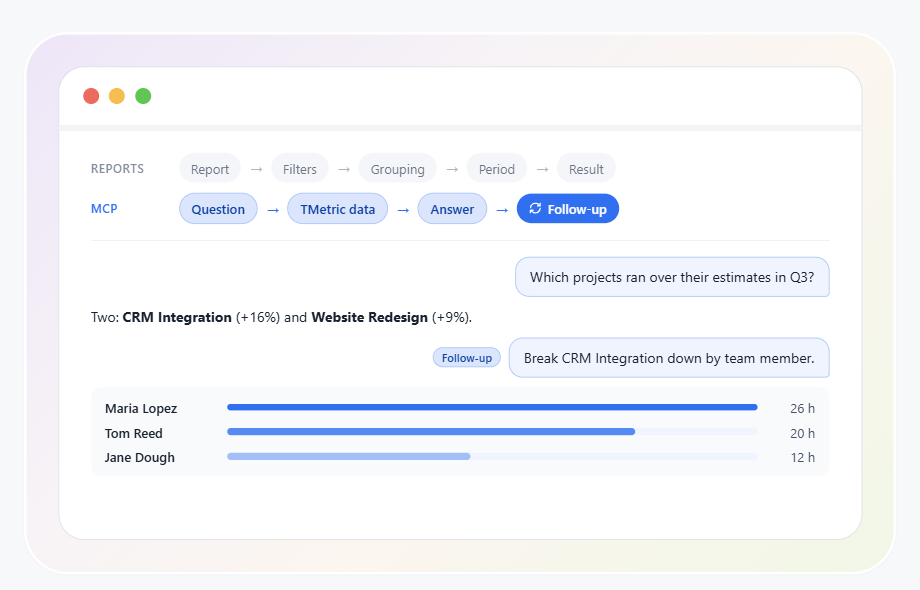
The key difference in MCP reporting vs traditional reports is the workflow. Reports follow report → filters → grouping → period → result, while MCP follows question → relevant TMetric data → answer → follow-up question. This makes MCP useful for one-off questions, combining several dimensions, refining a question conversationally, or getting a summary instead of a standard report.

Analyze questions you did not plan for in advance

How TMetric Reports and MCP work together

  • Step 1

    Track and structure work in TMetric

    Start by tracking time and organizing it by projects, tasks, clients, and other relevant categories in TMetric. Accurate, well-structured data gives AI a reliable foundation for analysis.

  • Step 2

    Ask AI questions through TMetric MCP

    Use TMetric MCP to give your AI assistant read-only access to relevant TMetric data and ask questions in natural language. The assistant can then retrieve and analyze the data based on your request.

  • Step 3

    Use Reports for formal output and verification

    Use TMetric Reports when you need to verify the final result, keep it consistently formatted, or export it for billing and formal reporting. Reports are also useful when sharing time data with clients or stakeholders.

Frequently asked questions

Does TMetric MCP replace reports?

No. Reports vs MCP is not an either-or choice: TMetric Reports provide structured, repeatable reporting, while MCP lets you query and analyze TMetric data through AI tools.

What is the difference between TMetric reports and MCP?

The difference between reports and MCP is mainly in how you work with time data: Reports provide predefined reporting workflows and filters, while MCP enables natural-language queries and AI-assisted analysis.

Can TMetric MCP create custom time reports?

MCP can retrieve TMetric data based on your request and help analyze or summarize it. This is the main difference in MCP reporting vs traditional reports: MCP answers a specific question, while TMetric Reports handle structured report building.

Can I use MCP for billing data?

Yes. MCP can provide TMetric time data for analyzing billable hours, projects, and clients. The MCP and reports difference shows up at the final step: recurring billing and formal reporting stay in TMetric Reports.

Is TMetric MCP Server read-only?

Yes. TMetric MCP Server only retrieves TMetric data for analysis and does not modify or delete your time entries. So traditional reports vs MCP is a choice between two ways to analyze your data, not a question of who can edit it.

Can MCP analyze TMetric data in natural language?

Yes. MCP lets compatible AI assistants work with TMetric data through natural-language questions, such as how much time was tracked on a project. This is the main advantage in MCP reporting vs dashboards: you ask a question instead of reading charts and tables.

Can I use TMetric reports and MCP together?

Yes. Use TMetric Reports for structured, repeatable reporting and MCP for flexible, conversational analysis. You don’t have to choose between traditional reports or MCP: most tasks call for one or the other, and many workflows use both.

Are TMetric reports more suitable for client reporting?

Yes. TMetric Reports are built for structured workflows, so they fit client reports that need consistent filters, formats, and recurring data. In the TMetric Reports vs MCP comparison, MCP is more useful for exploring the data before you prepare the formal report.

Can MCP summarize project and time tracking data?

Yes. MCP can retrieve TMetric data and use an AI assistant to summarize tracked time, projects, clients, and other available data in natural language.

Does MCP change or delete TMetric time entries?

No. MCP does not change or delete TMetric time entries; it provides access to TMetric data for querying and analysis.

Get more from your TMetric data

Use TMetric Reports for structured reporting and MCP for flexible, AI-powered analysis of your time tracking data.

Start free trial
Get more from your TMetric data