





Employee Productivity Tracker for Teams

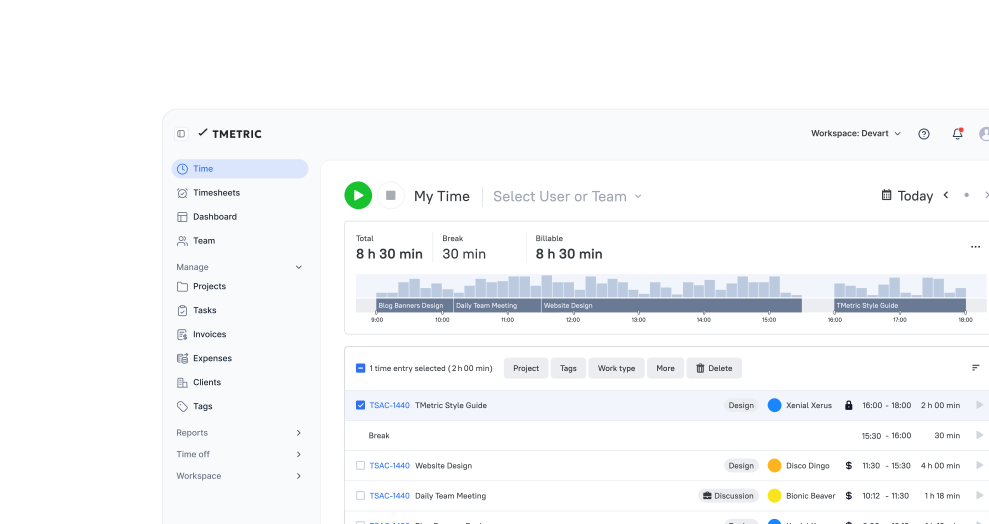
TMetric is an employee productivity tracker that combines time tracking, activity monitoring, screenshots, timesheets, and detailed reports in one workspace. It helps teams monitor work progress, understand how time is spent, and improve productivity without relying on manual updates or disconnected tools.

Fully functional 14-day trial | No credit card needed

Trusted by over 10 000 companies worldwide

  • Endygo
  • ITsyndicate
  • Pulso
  • 050media
  • JOT Digital
  • Freshlab
  • Mvad
  • Swaven

What Is a TMetric Productivity Tracker?

A TMetric productivity tracker is a time tracking and activity monitoring tool that helps teams understand how work hours are spent. It combines automatic and manual time logging with activity monitoring, app and website usage tracking, screenshots, and productivity reports to give a clear picture of daily work across projects and teams.

For managers, it provides real-time visibility into workload distribution, project progress, and team accountability. They can see how time is allocated, identify bottlenecks, and use productivity reports to improve planning, resource management, and project profitability. This level of insight also helps ensure accurate reporting and better control over deadlines and budgets.

For employees, it simplifies work tracking by reducing the need for manual timesheets and helping them focus on priorities. They can review their own activity patterns, understand how time is spent across tasks and apps, and improve personal productivity through clearer self-awareness.

Productivity Problems
TMetric Helps Solve

Without TMetric

  • Work hours are estimated instead of tracked, leading to blurred accountability
  • Productivity is judged by busyness, not by real output
  • Managers rely on gut feeling instead of data
  • Team members struggle to understand where their time actually goes

With TMetric

  • Every work hour is captured automatically and accurately
  • Clear visibility into how time is spent across tasks and projects
  • Data-driven insights replace guesswork in performance reviews
  • Teams build healthier, more focused work habits

Key Features of TMetric Productivity Tracking Software

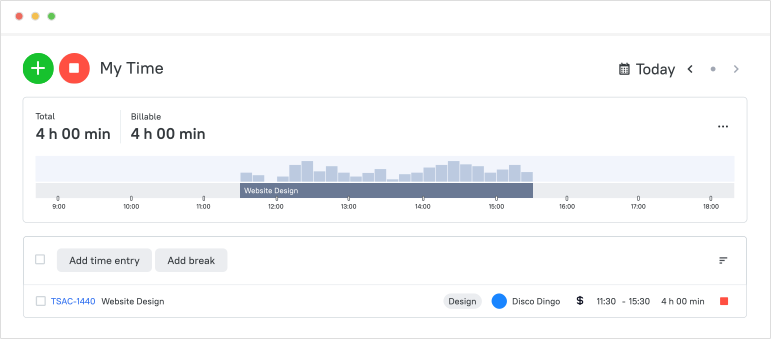
Productivity Dashboard

A productivity dashboard is a central view of team activity, tracked time, task progress, and productivity indicators. It brings all key work data into one place, allowing managers and teams to quickly understand what is happening across projects without switching between multiple reports or tools. This matters because it enables faster, more informed decision-making based on real-time data rather than delayed updates. Managers can allocate resources more effectively by seeing where time and effort are concentrated, while also identifying overload or underutilized capacity. At the same time, early visibility into task progress helps detect delays before they become critical issues, improving planning and delivery. Overall, a productivity dashboard supports better control over workflows and more predictable project outcomes.
Productivity Dashboard

App & Website Usage Insights

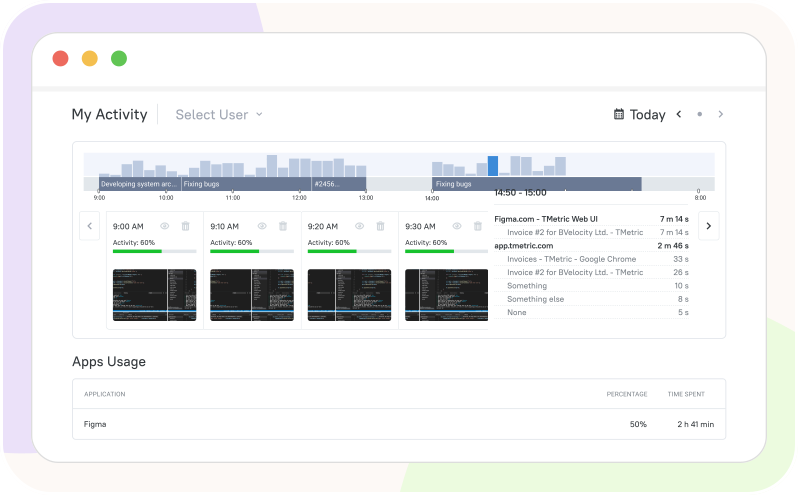
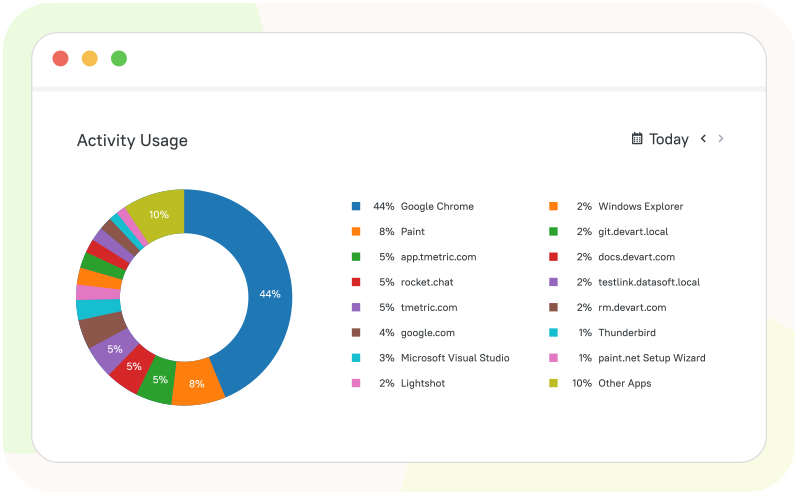
App and website usage insights show which digital tools employees use during tracked work time. This helps teams understand workflows in a transparent way by revealing how different apps and websites support specific tasks and project stages, rather than simply measuring activity levels. The goal is workflow analysis, not control. Managers can see which tools improve efficiency, reduce unnecessary switching, and better align software use with project needs. To maintain trust, teams should use the data with clear policies and employee awareness, keeping usage tracking transparent and responsible.

App & Website Usage Insights

Screenshot Capture

Screenshot capture in TMetric helps verify work sessions by taking screen images during tracked time. It provides context for activity without requiring constant manual reporting, helping teams understand how work is progressing across tasks and projects. This feature should be used with clear boundaries and trust-based policies rather than as a surveillance tool. Screenshot settings are fully configurable, allowing teams to adjust frequency, blur sensitive content, or disable capture for specific tasks or users when needed. Organizations should define transparent rules so employees understand when and why screenshots are taken. It is also important to consider sensitive data, such as passwords, personal messages, or confidential documents, and ensure capture settings respect privacy and compliance requirements.

Screenshot Capture

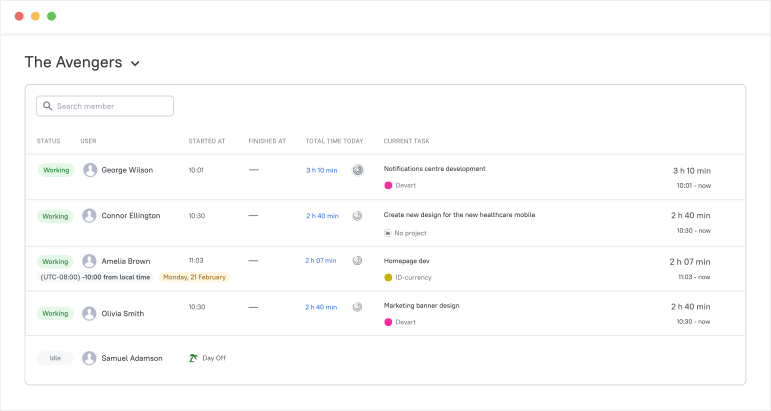
Team Dashboard

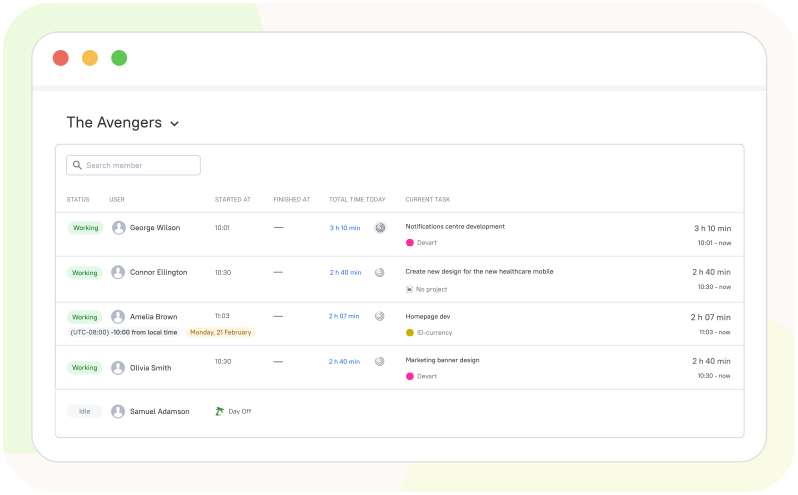
The Team Dashboard gives managers a real-time view of who is working, what tasks are active, and how time is being spent. It consolidates key productivity data into one place, making it easier to monitor ongoing work without switching between multiple reports or tools. Managers use it for quick daily check-ins to understand team progress at a glance and ensure everyone is aligned with priorities. It also helps with workload balancing by showing who is over capacity and who has available bandwidth, allowing tasks to be redistributed more effectively. In addition, the dashboard makes it easier to spot delays early, so managers can adjust timelines, remove blockers, and keep projects on track before issues escalate.

Team Dashboard

Active vs. Idle Time & Activity Levels

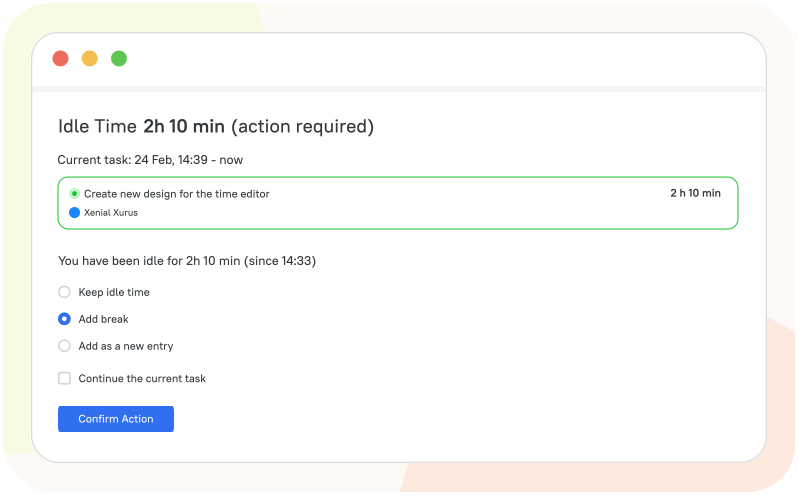
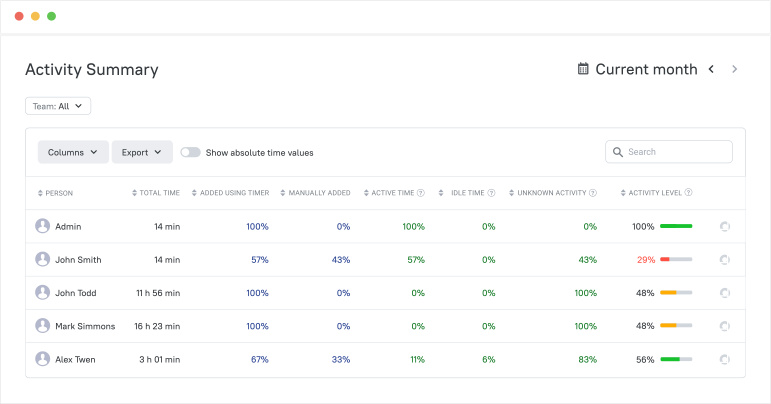
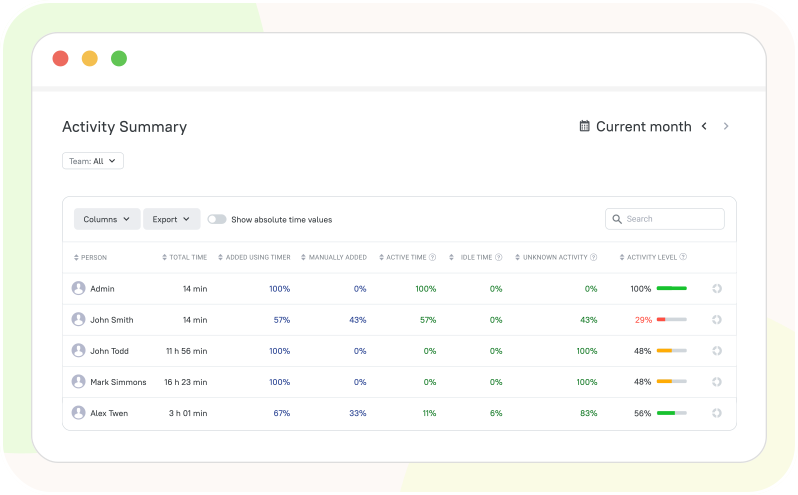
TMetric distinguishes active and idle time by detecting periods of keyboard and mouse activity or inactivity during tracked sessions. When there is consistent interaction with input devices, time is recorded as active, while longer periods without interaction are classified as idle time. This distinction helps provide context about work patterns, but it should not be treated as a standalone measure of productivity. Activity levels can vary depending on the type of work—such as reading, thinking, or attending meetings, so they need to be interpreted alongside tasks, projects, and outcomes. For this reason, activity data is most useful as supporting context within broader productivity reports rather than as the sole indicator of performance.

Active vs. Idle Time & Activity Levels

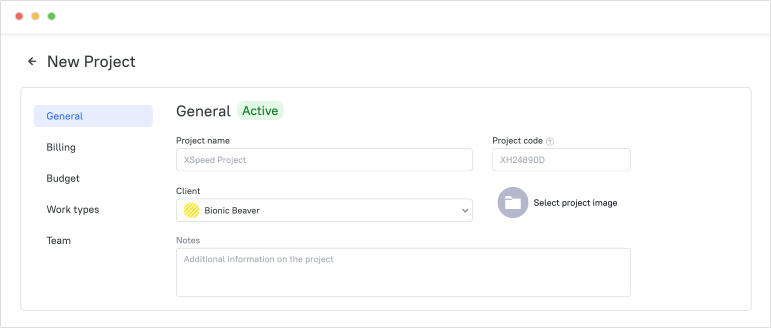
Project Progress & Delivery Control

TMetric helps control project delivery by connecting tracked time, task progress, team workload, and budget visibility. This gives managers a complete view of how work is moving through each stage of a project, not just how many hours are logged. With this connected data, teams can improve resource allocation by assigning the right people to the right tasks and balancing workloads more effectively. It also strengthens project health monitoring, making it easier to track delivery progress against deadlines and planned milestones. Managers can spot early signs of scope creep when time or effort starts exceeding initial estimates, and adjust plans before it impacts outcomes. Budget monitoring is also tightly linked to delivery control, helping ensure projects stay financially on track while maintaining predictable timelines and consistent output quality.

Project Progress & Delivery Control

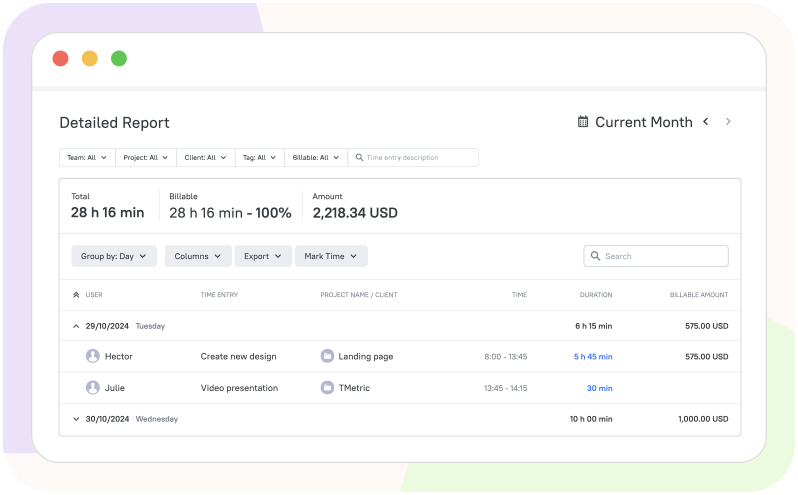
Productivity Reports and Exports

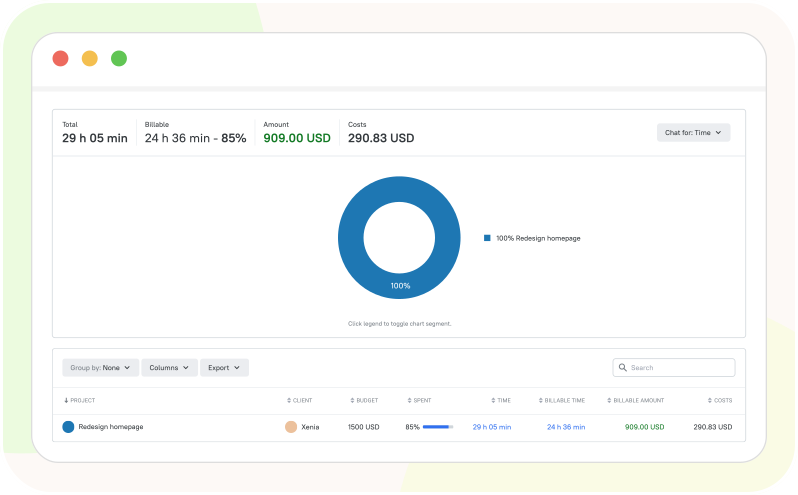
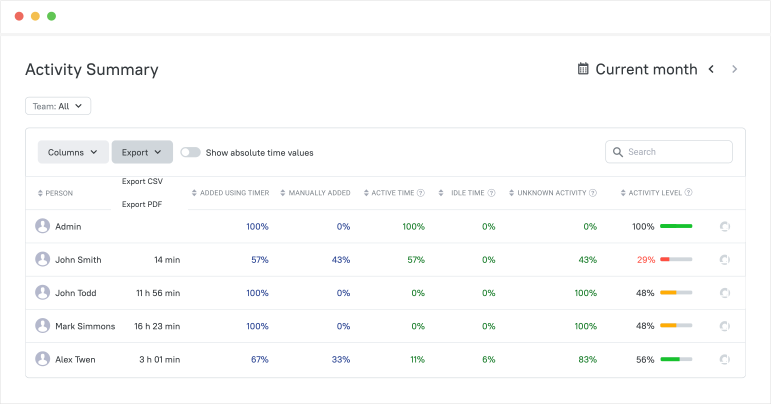
TMetric productivity reports show how work time, activity, and app usage are distributed across people, tasks, and projects. These reports help teams understand where time is spent, how workloads are balanced, and which projects require additional attention or resources. Managers can use the data for payroll review by validating tracked work hours and attendance records. The reports also support accurate client billing by connecting billable time to specific tasks and projects. In addition, productivity analysis becomes easier through visibility into activity patterns, workload trends, and project performance over time. Exportable reports simplify management reporting by making it easy to share structured data with stakeholders, finance teams, or clients for planning, budgeting, and operational reviews.

Productivity Reports and Exports

How the Productivity Tracker App Works

  • Step 1

    Set Up Workspace

    Create a workspace, invite team members, and configure projects and tasks

    Set Up Workspace

  • Step 2

    Track work time

    Employees track time with a timer while working on tasks and projects

    Track work time

  • Step 3

    Monitor team's work

    View your team’s work in real time using the Team Dashboard

    Monitor team's work

  • Step 4

    Analyze productivity data

    Managers view reports to understand productivity, utilization, and progress

    Analyze productivity data

  • Step 5

    Export report data

    Export reports in CSV or PDF formats for analysis and sharing

    Export report data

TMetric Integrations for Productivity Tracking

TMetric integrates with project management, communication, calendar, and accounting tools so teams can track time where work already happens. By connecting everyday platforms into one workflow, teams can reduce manual data entry, improve reporting accuracy, and keep productivity data linked to real tasks and projects.

See all integrations

Frequently Asked Questions

These answers explain what TMetric tracks, how productivity data is used, and how teams can roll out productivity tracking with transparency. They also cover activity monitoring, reporting, screenshots, privacy considerations, workload visibility, and ways to use productivity insights to improve project management and team performance.

What exactly does TMetric track for productivity insights?

The TMetric desktop client collects and records user activity, including websites and applications that a user accesses during work hours, user activity levels on the computer, and screenshots of each monitor.

Can employees see their own productivity data and activity reports?

Yes, employees can view their own productivity data and activity reports in the TMetric time tracking productivity app. They can monitor their daily work using the Dashboard and see their work results in the Activity Summary report.

How does idle time detection work, and how should teams interpret it?

You install the desktop client to track user productivity at work, monitor activity levels, and measure time spent online during work hours. When you are away from your computer, the desktop client records this time, and when you return, you can decide how to classify it, either as working time or as a break. 

Is TMetric suitable for remote and hybrid teams across different time zones?

Yes, TMetric productivity software with activity tracking is suitable for remote and hybrid teams across different time zones. It allows team members to track time and activity from anywhere, while managers can view reports and productivity data regardless of location or time zone.

How quickly can a team roll out TMetric, and what does onboarding look like?

Teams can start using TMetric productivity time tracking software within hours by setting up a workspace, adding projects and members, installing the apps, and beginning time tracking.

Why choose TMetric over other productivity monitoring tools?

TMetric stands out because it’s easy to set up and use, tracks time, activity, and app usage in one place, and offers flexible reports in CSV, XLSX, or PDF formats. It’s also ideal for remote and hybrid teams at an affordable, competitive price.

What integrations does TMetric offer?

TMetric integrates with popular tools like Jira, Asana, Trello, GitHub, Slack, Gmail, Outlook, Notion, and QuickBooks. It also supports Google/Outlook Calendar and offers browser extensions that works with the tools you use every day.

What’s included in the 14-day trial?

The 14-day trial gives full access to all TMetric features, including time and activity tracking, reports, project management, integrations, and data exports, letting teams try everything before choosing a plan.

Turn time into your competitive advantage

Start tracking productivity with TMetric and give your team the clarity to work smarter.

Start free trial
Turn time into your competitive advantage