Xero Invoice Integration

TMetric is a time tracking and billing app that integrates with Xero. Track billable hours, create an invoice, and send it to Xero in one click.
Fully functional 14-day trial No credit card needed
Xero Invoice Integration

Why Send Invoices from TMetric to Xero

One-click invoice copy

One-click invoice copy

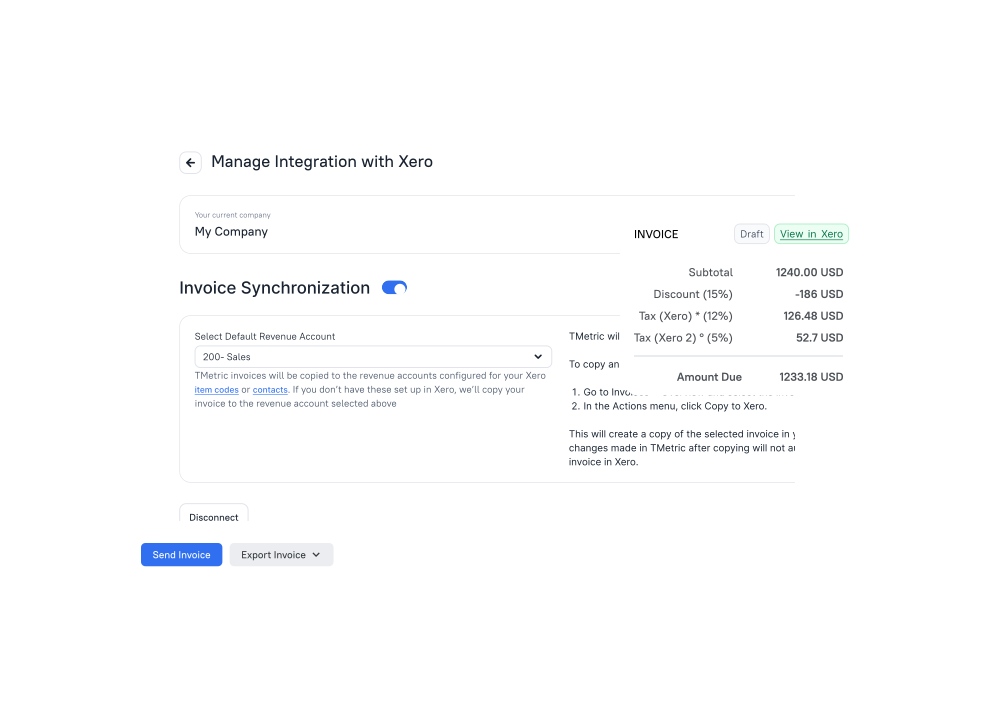
Sending an invoice from TMetric to Xero in one click.

Automatic field mapping

Automatic field mapping

Invoice fields are transferred to Xero without manual entry.

Push invoice updates to Xero via Re-sync

Push invoice updates to Xero via Re-sync

Edits in TMetric sync to Xero (TMetric → Xero).

Auto-created clients

Auto-created clients

If the client doesn't exist in Xero, it's created automatically and assigned the invoice's currency.

Xero tax rates

Xero tax rates

Applying Xero tax rates directly on the TMetric invoice.

Track time & invoice

Track time & invoice

Built for freelancers and teams using TMetric and Xero. Automatically turn tracked hours into Xero invoices.
How to Connect TMetric to Xero

  • Sign Up to TMetric

    Sign Up to TMetric

    Create a free TMetric account using the same email you use for Xero

    Sign Up
  • Connect Xero

    Connect Xero

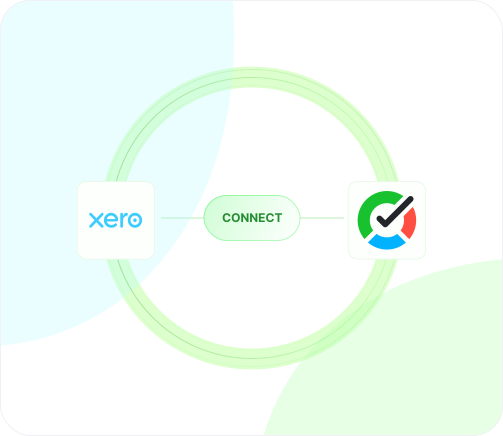
    On the Integrations page, click Connect to Xero, select the organization, and click Allow access
  • Copy to Xero

    Copy to Xero

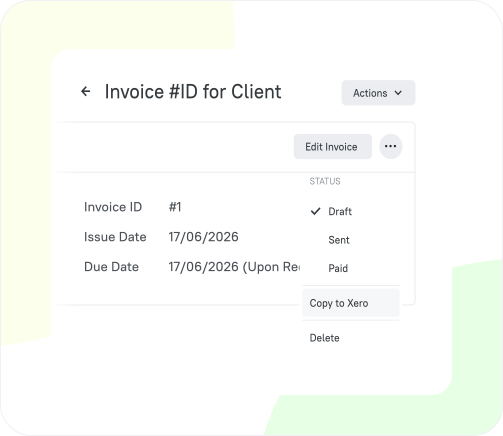
    Copy your first invoice to Xero

Why Xero Users Trust Us for Invoicing

Time Tracking for Developers

TMetric is a perfect solution to meet the needs of software developers.

  • Improve productivity and time management
  • Ensure accurate billing and invoicing
  • Essential for individual developers and development teams
Use this solution
  • Task tracking and time estimates
  • Productivity peaks and activity tracking
  • Project planning and budgeting
  • Track progress and share time data with clients for billing
Linda Förster

Linda Förster

Project manager at Medudy

5 out of 5 stars rating

TMetric helps provide us with valuable insights into our work patterns, which has resulted in increased efficiency and productivity.

Time Tracking for Agencies

TMetric can help marketers optimize campaigns and improve overall marketing effectiveness.

  • Track all marketing activities and meetings
  • Manage client billing
  • Gain insights into your processes by reporting data
Use this solution
  • Use of time tracking data to analyze where time goes
  • Budget management
  • Project planning, task estimation, and deadlines
  • Detailed reporting for clients
Brian Reilly

Brian Reilly

Financial Marketer at BankBound

5 out of 5 stars rating

We’ve found TMetric to be both user-friendly and robust. It was easy to set up which allowed us to begin leveraging the tool immediately.

Time Tracking for Designers

Connect time tracking to creative freedom and focus on efficiency across the entire design process.

  • Track billable hours to manage income
  • Increase client satisfaction
  • Get a profitable designer career
Use this solution
  • Time tracking on client’s project
  • Reporting
  • Inviting a client representative to TMetric workspace to see reports
  • By-the-hour payments
Swen Roethlisberger

Swen Roethlisberger

CEO & Founder of Floowedit

5 out of 5 stars rating

TMetric is faster, more convenient, and cheaper, the support is responsive and they fixed some bugs quickly.

Time Tracking for Accountants

Produce printable invoices for your clients with just a single click.

  • Effortless time tracking per client
  • Printable invoices with one click
  • Detailed time analysis for accurate billing
Use this solution
  • Track billable hours with precision
  • Set up budgets and hourly rates effortlessly
  • Seamless integration with accounting tools
Julie Lunn

Julie Lunn

Small Business Bookkeeper

5 out of 5 stars rating

TMetric's Chrome add-on makes time tracking easier and streamlines accounting procedures by integrating with QuickBooks Online with ease.

Time Tracking for Consulting Business

Increase the profitability of your consulting business and ensure timely payments.

  • Create invoices effortlessly
  • View detailed time reports
  • Identify time-consuming activities
Use this solution
  • Time tracking and timesheets
  • Billable and cost rates
  • Project budgeting
  • QuickBooks time synchronization
Galeno Chua

Galeno Chua

Founder, Strategist and Coach at The Idea Founding Principal

5 out of 5 stars rating

It’s been pivotal for helping us gather better decision-making information, grow our topline and reduce our bottomline.

How to Copy Invoices from TMetric to Xero

This guide describes how to connect your TMetric workspace to Xero organization and synchronize the invoices
  • Step 1

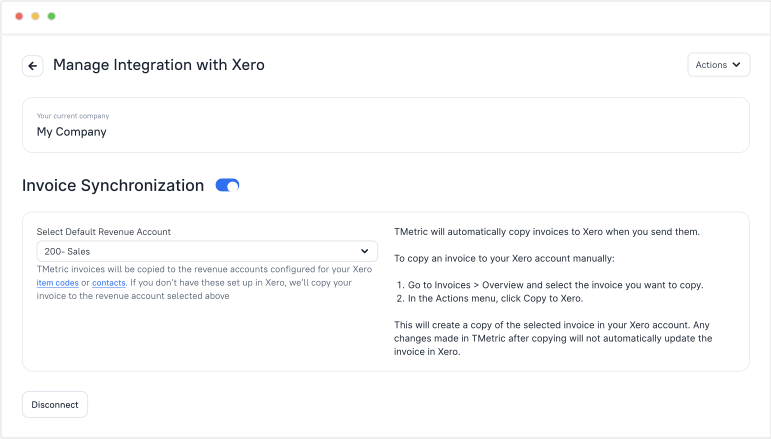
    Create Integration with Xero

    • Sign up for TMetric or log in to your account if you already have one.
    • Go to the Integrations page and click Connect to Xero.
    • Log in to Xero, select your organization, and click Allow access.
    • Once connected, Invoice Synchronization is enabled automatically.

    Invoice Synchronization Xero

    Note: Invoice synchronization with Xero is available only on the Business plan. Only workspace owners and admins can configure the integration. Before syncing invoices with Xero, make sure that the Invoice Synchronization option for QuickBooks is disabled. 

  • Step 2

    Copy Invoice to Xero

    • On the Invoices page, open the invoice you want to copy to Xero. 
    • Click the invoice overflow menu and select Copy to Xero. 
    • The invoice appears in Xero. 

    Note: When Invoice Synchronization is enabled, the invoice is automatically copied to Xero when you click Send.
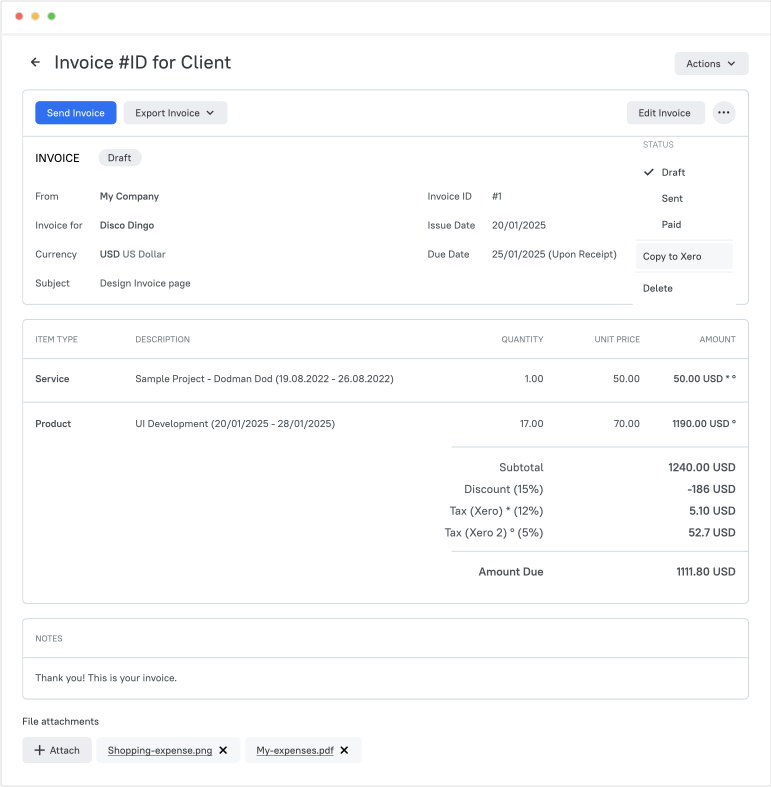
    Copy To Xero

  • Step 3

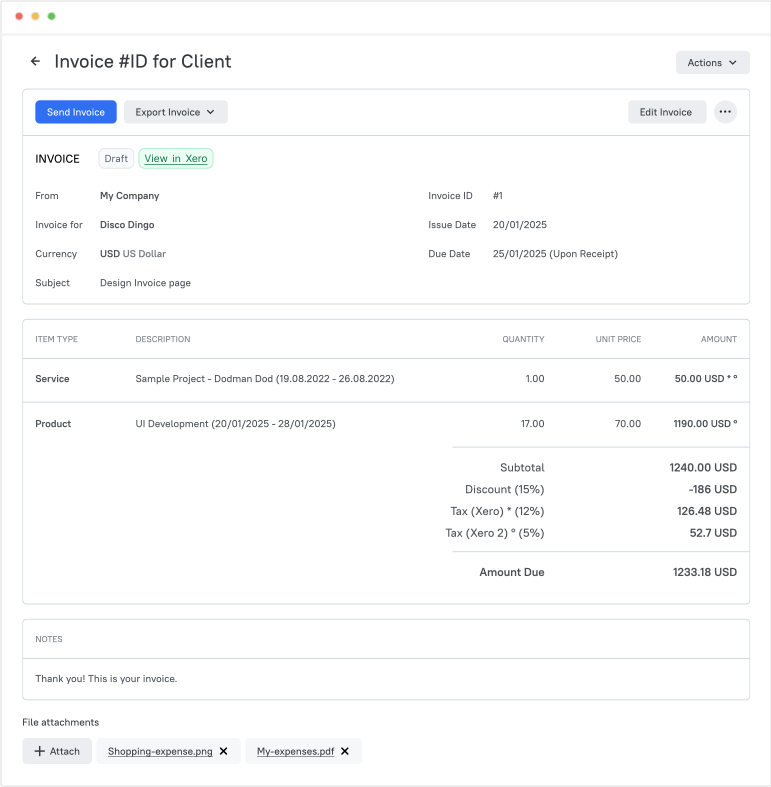
    View Invoice and Resync Changes

    • When the invoice is copied to Xero, the Copy to Xero option changes to Resync to Xero to sync subsequent edits.
    • On the invoice, you will see the View in Xero link. Click it to open the invoice in Xero and continue working with it there.

    View In Xero

  • Step 4

    Invoice Data Mapping

    When an invoice from TMetric is synced to Xero, its data is mapped to the corresponding fields in Xero. The list below shows the field mapping between TMetric and Xero.

    • Client is matched to Contact;
    • Due Date is matched to Due Date;
    • Issue date is matched to Issue date;
    • Text ID is matched to Invoice number;
    • Item Type is matched to Item;
    • Description is matched to Description;
    • Quantity is matched to Quantity;
    • Unit Price is matched to Price;
    • Discount is matched to Discount;
    • Tax is matched to Tax rate;
    • Subject is matched to Reference;
    • PO Number is matched to Reference;
    • Default Revenue Account is matched to Account;
    • Currency Invoices is matched to Currency Invoices;
    • Client Name is matched to Contact Name;
    • Preferred currency is matched to Currency.
  • Step 5

    Adding Taxes with Xero

    The Tax (Xero) field replaces the Tax field when the integration is enabled. Apply a tax rate using the Apply Tax from Xero link. This field is optional and is hidden if taxes are entered manually.
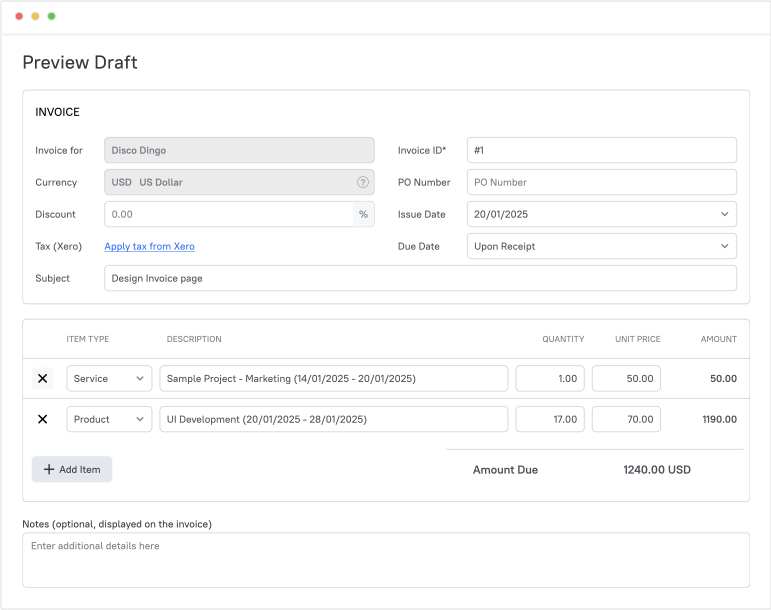
    Add Xero Tax


Frequently Asked Questions

Does Xero do invoices?

Yes, TMetric can also send its invoices to Xero, making invoicing with Xero faster and more efficient.

Which TMetric plan is required for the Xero invoice integration?

Business Plan. It's configured by the owner or admin.

How do I copy an invoice from TMetric to Xero?

You can copy an invoice from TMetric to Xero in just a couple of steps:

  1. On the Integrations page, click Connect to Xero.
  2. Log in to Xero, select your organization, and click Allow access.
  3. The Invoice Synchronization option is enabled automatically.
  4. On the Invoices page, open the overflow menu for the invoice you want to export to Xero, and select Copy to Xero.
  5. The invoice appears in Xero.

What happens if the client doesn't exist in Xero?

The customer is created automatically and assigned the currency of the invoice.

Can I sync changes to an invoice already copied to Xero?

Yes, using the Re-sync to Xero option available in the overflow menu for each TMetric invoice copied to Xero.

Can I apply Xero tax rates to a TMetric invoice?

Yes, using the Tax (Xero) field and Apply Tax from Xero in the invoice.

Does Xero have time tracking?

Xero's built-in tracking is limited to its Projects feature. TMetric is a dedicated time tracker with billing that sends the invoices you create to Xero. Besides, TMetric offers QuickBooks time tracking integration.

Turn tracked time into

Xero invoices

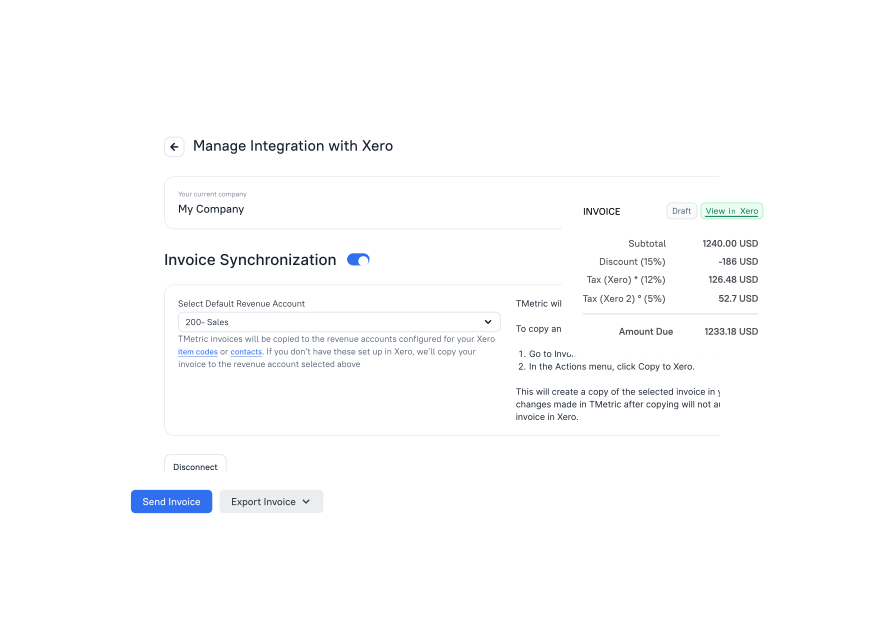
Streamline your billing and accounting workflow. Invoices sync to Xero automatically.
Bottom cta section image