AI Time Tracking That Works With Your Data

TMetric’s AI time tracking and AI-powered time tracking connect with Claude, ChatGPT, or Gemini so you can ask about your tracked hours in plain language, without building dashboards or reports manually. Your data stays read-only: AI can analyze it, but it cannot edit or delete anything, and only the workspace owner can connect the integration.


Fully functional 14-day trial | No credit card needed

Trusted by over 10 000 companies worldwide

  • Endygo
  • ITsyndicate
  • Pulso
  • 050media
  • JOT Digital
  • Freshlab
  • Mvad
  • Swaven

What Is AI Time Tracking?

The term can describe two different approaches: an AI time tracker can automatically detect and categorize work activity in the background, or time tracking AI can analyze time data that has already been collected and turn it into answers, insights, and reports. TMetric takes the second approach. Instead of replacing your existing tracking workflow, the TMetric AI time tracking app works with your tracked data, helping you explore hours, projects, clients, and team activity using natural-language questions.

Why Choose TMetric for AI Time Tracking?

Without TMetric

  • AI conversations generate ideas and complete tasks, but time spent on them is hard to track.
  • Manual time entries make AI timesheets incomplete and easy to forget.
  • Switching between ChatGPT, Claude, Gemini, and a separate time tracker disrupts your workflow.
  • No clear data on AI-assisted work makes project reporting and billable hours less accurate.

With TMetric

  • Connect ChatGPT, Claude, and Gemini to TMetric through MCP Server for a more seamless AI time tracking workflow.
  • Use AI-powered time tracking to log work and manage time with less manual effort.
  • Keep AI timesheets organized with time entries linked to your projects and tasks.
  • Turn tracked hours into clear reports for smarter billing, project planning, and productivity insights.

What You Can Ask Your AI

Reports and breakdowns

  • Show me billable hours by client for last month.
  • Break down project time by team member for Q3.
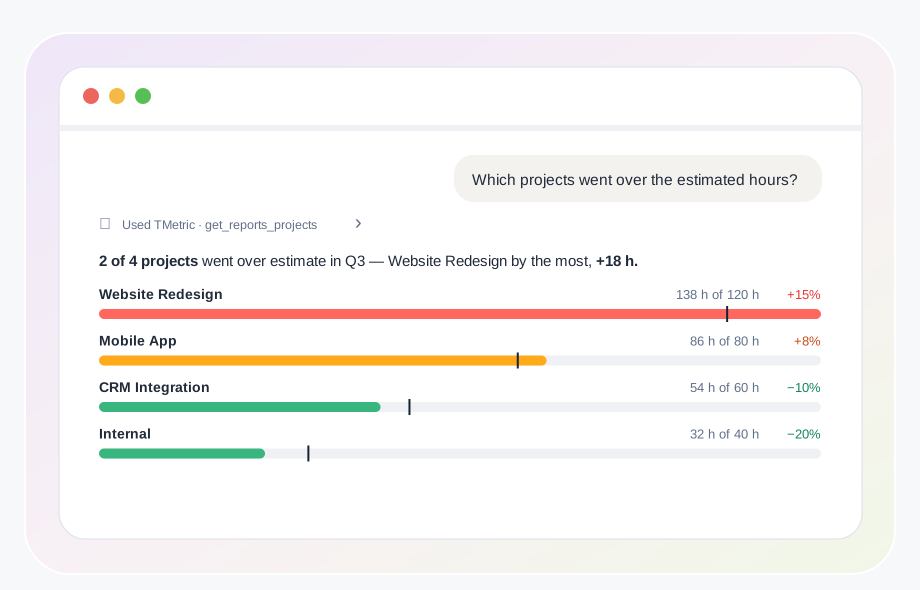
  • Which projects went over the estimated hours?
  • Compare tracked hours across projects this month.
Reports and breakdowns

Productivity and workload

  • Where did most of my time go last week?
  • Compare this month to last month by project.
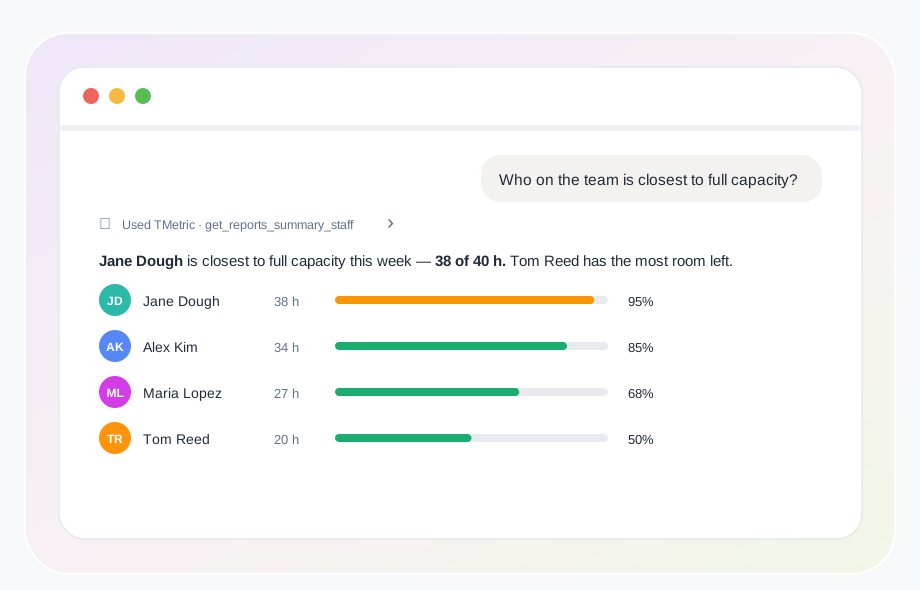
  • Who on the team is closest to full capacity?
  • How are tracked hours distributed across the team this week?
Productivity and workload

Clients and billing

  • How many billable hours did we log for Acme in August?
  • What share of our tracked time was non-billable last quarter?
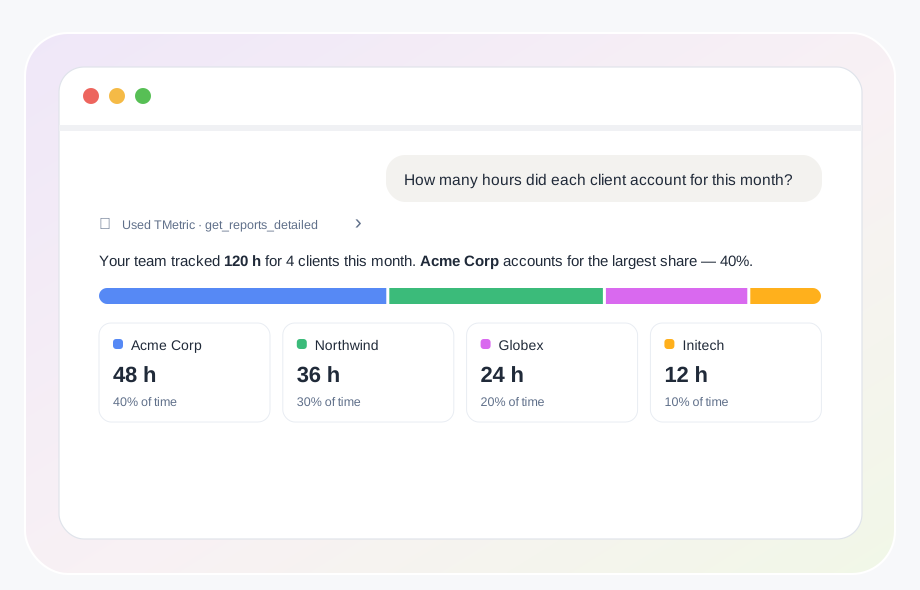
  • How many hours did each client account for this month?
  • Which clients generated the most billable hours last quarter?
Clients and billing

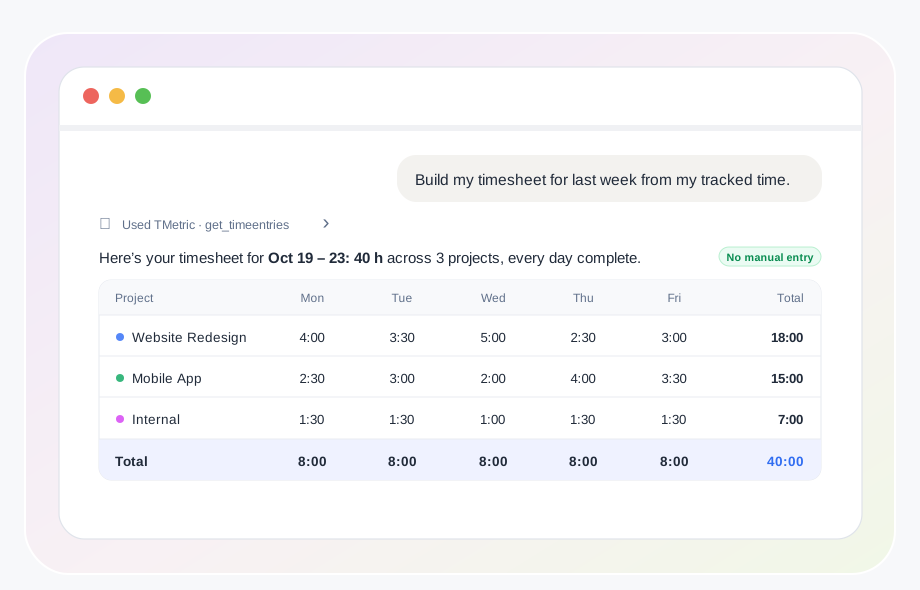
AI timesheet without the manual work

  • Can you review our timesheets and flag missing or inconsistent time entries?
  • How many hours did each team member log this week?
  • Can you summarize our timesheets and explain discrepancies between tracked and reported hours?
  • Which timesheets are ready for approval, and which need corrections before invoicing?
AI timesheet without the manual work

How to Connect

Connect TMetric to your AI assistant in three simple steps.
  • Step 1

    Enable MCP in TMetric

    The workspace owner turns on MCP in TMetric settings.

  • Step 2

    Connect your AI assistant

    Connect TMetric to Claude, ChatGPT, or Gemini through OAuth.

  • Step 3

    Ask your first question

    Ask your AI assistant about your tracked time, projects, clients, or team data.

Who It's For

Freelancers

Freelancers

AI time tracking for freelancers makes it easier to see where your time goes across projects and clients. Ask, "Where did most of my time go last week?" to quickly understand your workload.

Agencies & consultants

Agencies & consultants

AI time tracking for agencies helps teams explore client hours and billing data without manually building reports. Ask, "Show me billable hours by client for last month."

Product & IT teams

Product & IT teams

Use AI to understand team workload and project time at a glance. Ask, "Who on the team is closest to full capacity?" to review how tracked hours are distributed.

Frequently Asked Questions

What is AI time tracking?

AI time tracking can mean either AI that automatically records and categorizes activity or AI that analyzes time data already collected by a tracker. TMetric uses the second approach: its AI time tracker connects to existing data and helps you explore it with natural-language questions.

Does TMetric track my time automatically with AI?

No. TMetric’s time tracker records your work time, while time tracking AI connects to the data you already have and helps analyze it. This approach lets you use AI time tracking software without replacing TMetric’s existing tracking workflow.

Does TMetric have AI time intelligence?

TMetric does not use a background AI agent to automatically categorize your activity. Instead, its MCP integration gives AI assistants read-only access to your TMetric data, so you can use AI powered time tracking to explore tracked hours, projects, teams, and reports.

Can AI track billable hours automatically?

No. Billable and non-billable status is set through your TMetric tracking and project settings, not by AI. The AI time tracking app can then analyze those hours, summarize them by client, calculate shares, and help explain differences.

Which AI assistants work with TMetric?

TMetric’s AI time tracking integration works with supported AI assistants such as Claude, ChatGPT, and Gemini. The available assistant list may change as integrations are updated.

Is my time tracking data safe with AI access?

TMetric provides read-only AI access through MCP: AI can analyze your data but cannot edit or delete time entries or other TMetric data. The connection is authorized by the workspace owner and can be revoked at any time, providing a controlled approach to AI timekeeping.

Make more of your tracked time

Connect your TMetric data to AI and get answers about your hours, projects, clients, and team workload without building reports manually. Start using AI time tracking with TMetric today.

Start free trial
Make more of your tracked time