7 Best Billable Hours Trackers for 2026 to Maximize Profitability
A billable hours tracker is software that records work time, separates billable vs non-billable hours, applies project rates, and generates invoice-ready reports. It helps businesses improve billing accuracy, capture every billable minute, and maximize profitability.

By Dereck Mushingairi | February 27, 2026
In this article, you'll discover the 7 best billable time tracking tools for 2026 and learn how they simplify time capture, reporting, and client billing.
Compare:
How we evaluated these trackers
We evaluated each billable hours tracker by how well it captures time, supports billing, integrates with business tools, and scales for teams.
Our assessment focused on the features that directly impact revenue generation and operational efficiency. We looked at time capture options, including manual entries, timers, automated tracking, and mobile access, as well as each platform’s ability to distinguish billable vs non-billable hours. We also evaluated support for project rates, budgeting, invoicing, and invoice-ready reports to determine how effectively each solution fits into a complete billing workflow.
Beyond core billable time tracking capabilities, we reviewed reporting depth, usability, customization options, and integration with project management, accounting, payroll, and collaboration tools. We considered adoption friction for both managers and employees, since even feature-rich software delivers limited value if teams struggle to use it consistently.
Finally, we assessed pricing, scalability, customer feedback, and overall ROI for service teams. The trackers that ranked highest combined accurate time tracking, strong reporting, streamlined billing processes, and the flexibility to support growing businesses.
Key Evaluation Criteria for Billable Time Trackers
The best billable time trackers should help teams capture work accurately, apply the right rates, review entries, and turn approved time into invoices. They should also provide visibility into project performance, improve billing accuracy, and reduce the administrative effort required to manage client work.
To compare solutions consistently, we evaluated each platform using six key criteria that reflect the needs of service-based businesses. These criteria form the framework for our comparison and focus on the capabilities that have the greatest impact on productivity, revenue, and profitability.
Our assessment covers time capture methods, billable and non-billable hour management, billing and invoicing features, reporting and analytics, integrations with business tools, and overall ease of use. Together, these factors determine how effectively a tracker supports daily workflows, scales with growing teams, and helps organizations convert tracked time into accurate, invoice-ready revenue.
#1 Time Tracking Essentials
Time tracking essentials are the features that prevent forgotten hours, inflated entries, and billing disputes. They ensure that billable time is captured accurately and consistently, creating a reliable foundation for invoicing and project reporting.
Core expectations include:
- One-click start/stop timer: Enables users to start and stop tracking instantly with minimal effort. This reduces friction and increases the likelihood that all billable work is recorded.
- Idle detection: Identifies periods of inactivity and prompts users to review or remove unproductive time. This helps prevent overbilling and improves billing accuracy.
- Retroactive logging: Allows users to add time entries after work has been completed. This helps correct missed entries and reduces lost billable hours.
- Rounding: Automatically rounds tracked time according to company or client billing requirements. This ensures time records match established billing policies.
- Bulk editing: Makes it possible to update multiple time entries at once. This speeds up administrative review and reduces time spent on manual corrections.
#2 Client & Project Management
Client and project management features connect tracked hours to the right customer, project, task, rate, and approval flow. These capabilities help teams organize billable work, apply accurate pricing, and maintain control over project budgets and invoicing.
Key features to look for include:
- Client and project organization: Keeps all tracked time linked to the correct customer, engagement, and task, making reporting and billing more accurate.
- Flexible billing rates: Supports different rates based on roles, services, or team members. For example, senior consultants can be billed at a higher rate than junior specialists working on the same project.
- Billable codes and categories: Allows teams to separate billable activities by client, service type, or project phase, making invoices easier to review and validate.
- Project budgets and alerts: Tracks progress against planned hours and costs. Budget notifications can warn managers when a project reaches 80–90% of its allocated hours, helping prevent overruns.
- Approval workflows: Enables managers to review and approve time entries before they are included in invoices, improving billing accuracy and reducing disputes.
#3 Billing & Reporting
Billing and reporting features show whether tracked work can be converted into accurate invoices and useful financial insight. These capabilities help businesses move seamlessly from time capture to billing while providing visibility into revenue, utilization, and project performance.
Reporting is especially important for agencies, consultants, and service businesses because it reveals where time is spent, which clients generate the most value, and whether projects remain profitable.
| Area | Capabilities |
|---|---|
| Invoicing | Ability to generate branded invoices directly from approved billable time, reducing manual data entry and billing errors. |
| Reporting | Customizable reports with filters for client, project, team member, date range, and billable vs non-billable hours. |
| Profitability | Metrics such as realization rate, the percentage of billable work that ultimately becomes collected revenue, as well as project margins and utilization rates. |
| Accounting | Exports and integrations with accounting platforms such as QuickBooks and Xero, plus CSV and Excel export options for financial analysis. |
The best billable time trackers combine detailed reporting with streamlined invoicing, helping teams improve billing accuracy, monitor financial performance, and make informed business decisions.
#4 Mobile & Integrations
Mobile access and integrations help teams capture billable time at the moment work happens, not after the fact. This reduces forgotten entries, improves billing accuracy, and ensures that time records remain complete regardless of where work takes place.
For example, remote consultants can track time from mobile devices while traveling or meeting clients, eliminating the need to recreate timesheets later. Managers can review entries, monitor project progress, and approve timesheets from centralized dashboards. Finance teams can export approved time directly to accounting tools, speeding up invoicing and revenue reporting.
Key capabilities to look for include:
- Cross-platform tracking across desktop, web, and mobile devices.
- Offline sync that records time without an internet connection and updates automatically when connectivity returns.
- Calendar-based time entries that convert meetings and scheduled work into billable time records.
- Accounting integration with platforms such as QuickBooks and Xero for streamlined billing and financial workflows.
- Connections to project management, calendar, and email tools to reduce manual data entry and improve workflow efficiency.
- API access for organizations that need custom integrations, automation, or data synchronization between business systems.
Strong mobile and integration capabilities help teams spend less time on administration and more time on billable work.
#5 Administrative Controls
Administrative controls define who can edit, approve, lock, export, and audit time records. These features are essential for maintaining auditability, strengthening financial control, enforcing permission management policies, and supporting risk mitigation across billing and payroll processes.
Without proper controls, organizations may face inaccurate invoices, unauthorized changes to time records, and limited visibility into who modified billing data. Strong administrative features help ensure that tracked time remains accurate, compliant, and ready for review.
| Control Area | Purpose |
|---|---|
| Role-based permissions | Restricts access based on responsibilities, ensuring employees, managers, finance teams, and administrators only see or modify the data relevant to their roles. |
| Time locking after billing | Prevents changes to approved or invoiced time entries, helping maintain data integrity and financial control. |
| Audit trails | Records who created, edited, approved, or deleted time entries, providing complete auditability and supporting compliance requirements. |
| Data Export Controls | Manages how time and billing data can be exported, shared, or integrated with external systems, reducing operational and security risks. |
#6 Productivity & Performance Monitoring
Productivity and performance monitoring helps managers understand billable utilization, workload distribution, and missed billing opportunities. These features provide visibility into how time is spent across teams and projects, helping organizations improve resource planning, optimize utilization rates, and make more data-driven decisions.
Helpful tools include:
- Dashboards: Give managers a real-time view of team performance, making it easy to compare billable targets against actual tracked hours. Dashboards also help identify underutilized employees, overloaded team members, and emerging project risks before they affect profitability.
- Recent activity quick-select: Allows users to quickly create time entries from recently used projects, tasks, or clients. This reduces manual entry effort, speeds up time capture, and helps prevent billable work from being overlooked.
- Bulk approval: Enables managers to review and approve multiple timesheets at once. This reduces administrative workload, increases billing cycle speed, and helps invoices reach clients faster.
- End-of-day reminders: Prompts employees to submit missing time before the workday ends. These reminders reduce forgotten entries, improve billing accuracy, and increase the amount of billable work captured.
Strong productivity and performance monitoring features help organizations balance team workload, improve utilization rates, accelerate billing cycles, and uncover opportunities to increase revenue from existing client work.
7 Best Billable Time Trackers in 2026
Here’s a breakdown of the top tools in 2026. Each of these seven options stands out for a specific strength, whether it’s automating time capture or providing deeper reporting.
1. TMetric: Best for structured billing
🌟 4.7/5
Best for: Agencies and budget-conscious teams that need structured project billing and built-in invoicing.
Price: Free-for-life plan available; paid plans start at $7 per user/month.
Available on: Web, Windows, macOS, Linux, iOS, Android.
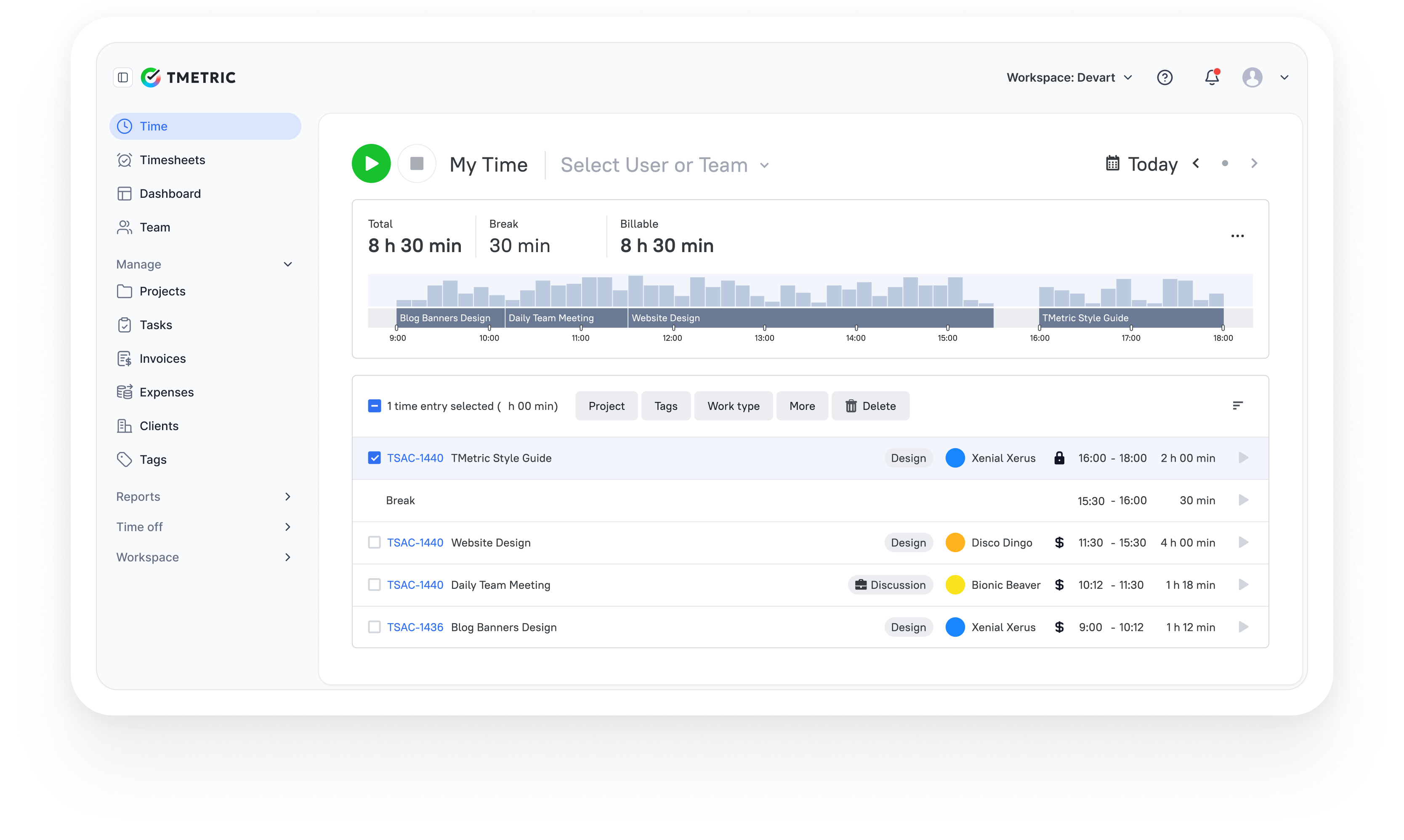
TMetric is a time tracking and billing platform designed to help teams record work hours accurately, manage billable rates, and generate reports for invoicing and performance analysis. It combines tracking, reporting, and project visibility in a single workspace, making it suitable for service businesses that rely on precise time data.
Overview
| Category | Details |
|---|---|
| Company | Devart |
| Best for | Agencies & budget-conscious teams needing structured billing |
| Tracking method | Manual timer + optional automatic tracking (hybrid) |
| Billing support | Built-in invoicing, billable rates, project budgets |
| Platforms | Web, Windows, macOS, Linux, iOS, Android |
Key Features
- Automatic time tracking and timesheets.
- Idle detection to prevent over-billing.
- Project and task hierarchy management.
- Built-in invoicing with custom billing rates.
- Reporting dashboards and templates.
- Role-based team permissions.
- Integrations with 50+ business tools.
- Mobile apps with offline tracking.
- Attendance and workload monitoring.
- Productivity analytics.
- Time-off tracking module.
Pros
- Free plan available for small teams.
- Easy onboarding and intuitive interface.
- Strong reporting capabilities.
- Wide integration ecosystem.
- Flexible billing configurations.
Cons
- Advanced customization options are limited.
- Occasional sync delays reported.
- Some reporting tools require onboarding time.
Pricing
Free-for-life
Available
Premium plans
Start at $7 per seat/month
What users say
“TMetric helps me with time tracking, accountability, and screenshots. A very convenient tool to use.” — G2 reviewer
Why TMetric is #1
- Legal precision: Matter tracking, rounding, and detailed narratives
- Financial clarity: Rates, budgets, expenses, profitability
- Trusted: Used by 10,000+ organizations worldwide

2. Toggl Track: Best for simple time tracking
🌟 4.6/5

Best for: Individuals and teams needing simple, flexible time tracking with strong reporting.
Price: Free for up to 5 users; paid plans start at $9 per user/month.
Available on: Web, Windows, macOS, Linux, iOS, Android, browser extensions.
Toggl Track is a time tracking tool designed to help individuals and teams record work hours, monitor billable time, and generate reports for analysis and billing. Its straightforward interface and flexible tracking methods make it suitable for users who want accurate time logs without complex setup.
Overview
| Category | Details |
|---|---|
| Company | Toggl OÜ |
| Best for | Individuals & teams needing simple tracking |
| Tracking method | Manual timer + calendar suggestions |
| Billing support | Billable rates & reports (no full invoicing) |
| Platforms | Web, Windows, macOS, Linux, iOS, Android, browser extensions |
Key Features
- One-click time tracking via browser or desktop app.
- Project organization by client and task.
- Detailed reporting with shareable summaries.
- Role-based team permissions.
- Calendar integrations for timesheet suggestions.
- Built-in Pomodoro timer.
- Billable rate tracking and profitability insights.
- Mobile apps with offline tracking.
- Open API for custom integrations.
Pros
- Simple interface with minimal learning curve.
- Free plan available for small teams.
- Reliable cross-platform tracking.
- Clear reporting with filters and visual charts.
- Strong documentation and support resources.
Cons
- Limited project management functionality.
- Advanced billing features require paid plans.
- Customization options are basic.
Pricing
Free for up to 5 users, with paid plans starting at $9 per user per month (advanced reporting and billing features in paid tiers).
3. Memtime: Best for automatic tracking
🌟 4.6/5

Best for: Professionals who want fully automatic background tracking without manual timers.
Price: Free trial available; paid plans start at €10 per user/month (annual discounts available).
Available on: Windows, macOS, Linux.
Memtime is an automatic time tracking tool that records activity across applications, documents, and browser sessions to create a detailed timeline of work. It operates locally and runs in the background, helping users generate accurate time records without manual input.
Overview
| Category | Details |
| Company | Memtime |
| Best for | Automatic background tracking without timers |
| Tracking method | Fully automatic activity tracking |
| Billing support | Billable classification (invoicing via integrations) |
| Platforms | Windows, macOS, Linux |
Key Features
- Fully automatic time tracking.
- Adjustable tracking intervals (1–60 minutes).
- Auto-generated activity timeline.
- Local offline data storage.
- Integrations with project and billing tools.
- Billable vs. non-billable classification.
Pros
- No manual tracking required.
- High accuracy of time logs.
- Minimal-distraction interface.
- Privacy-focused design with local storage.
- Available on Windows, macOS, and Linux.
Cons
- No dedicated mobile app.
- Invoicing requires external integrations.
- Higher price point than basic trackers.
Pricing
No permanent free plan (trial available), with paid plans starting at €10 per user per month for the Basic plan (discounts available for annual or multi-year billing).
4. Harvest: Best for invoicing
🌟 4.5/5
Best for: SMBs that require integrated time tracking, invoicing, and expense management.
Price: Free for 1 user and 2 projects; paid plans start at $11 per user/month.
Available on: Web, Windows, macOS, iOS, Android.
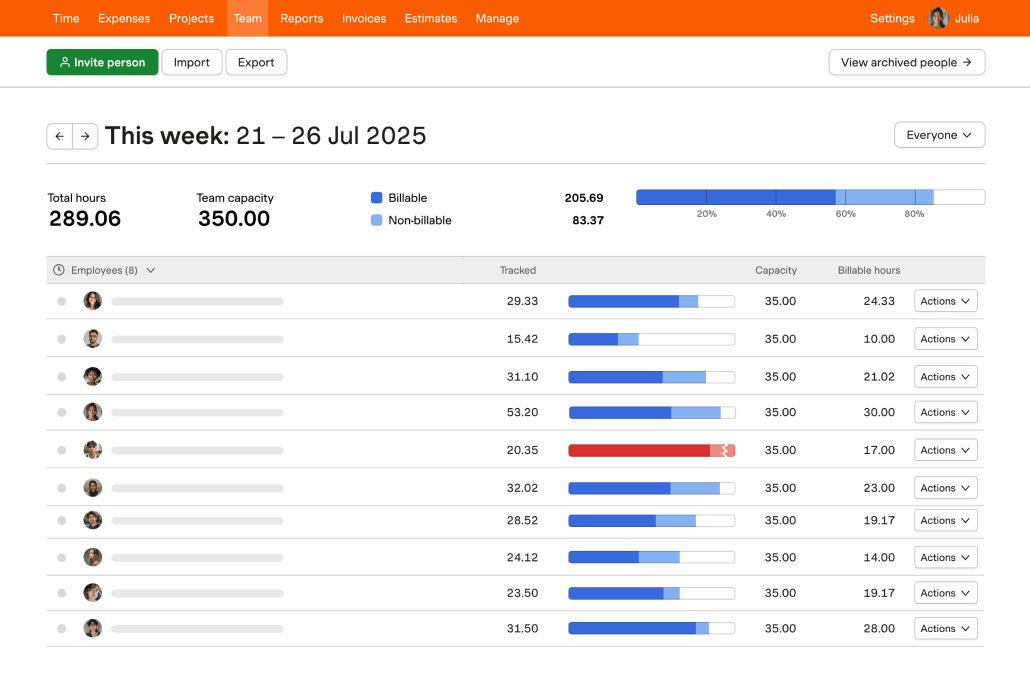
Harvest is a time tracking and billing platform designed to help teams record hours, monitor project costs, and generate invoices from tracked time. It combines tracking, reporting, and expense management features in a single system, making it suitable for businesses that rely on accurate billing and financial visibility.
Overview
| Category | Details |
|---|---|
| Company | Harvest |
| Best for | SMBs needing tracking + invoicing |
| Tracking method | Manual timer |
| Billing support | Full invoicing, expenses, and project budgets |
| Platforms | Web, Windows, macOS, iOS, Android |
Key Features
- Automated time tracking.
- Project timeline tracking.
- Invoice creation with customizable templates.
- Expense and cost tracking.
- Budget alerts and project cost monitoring.
- Team time tracking tools.
- Client portal for project visibility.
- Advanced financial reports.
- Integrations with 50+ business apps.
- Mobile apps with GPS tracking.
- Accounting integrations (QuickBooks, Xero).
Pros
- Strong connection between time tracking and invoicing.
- Detailed project cost monitoring.
- Useful client management features.
- Clear financial reporting tools.
- Simple interface for quick adoption.
Cons
- Higher pricing than basic trackers.
- The reporting interface may require adjustment for new users.
- Limited features on the free plan.
Pricing
Free for 1 user and 2 projects, with paid plans starting at $11 per user per month (includes invoicing and online payments).
5. Clockify: Best free option
🌟 4.5/5
Best for: Teams that need unlimited free time tracking with scalable upgrades.
Price: Free for unlimited users; paid plans start at $5.49 per user/month.
Available on: Web, Windows, macOS, Linux, iOS, Android.
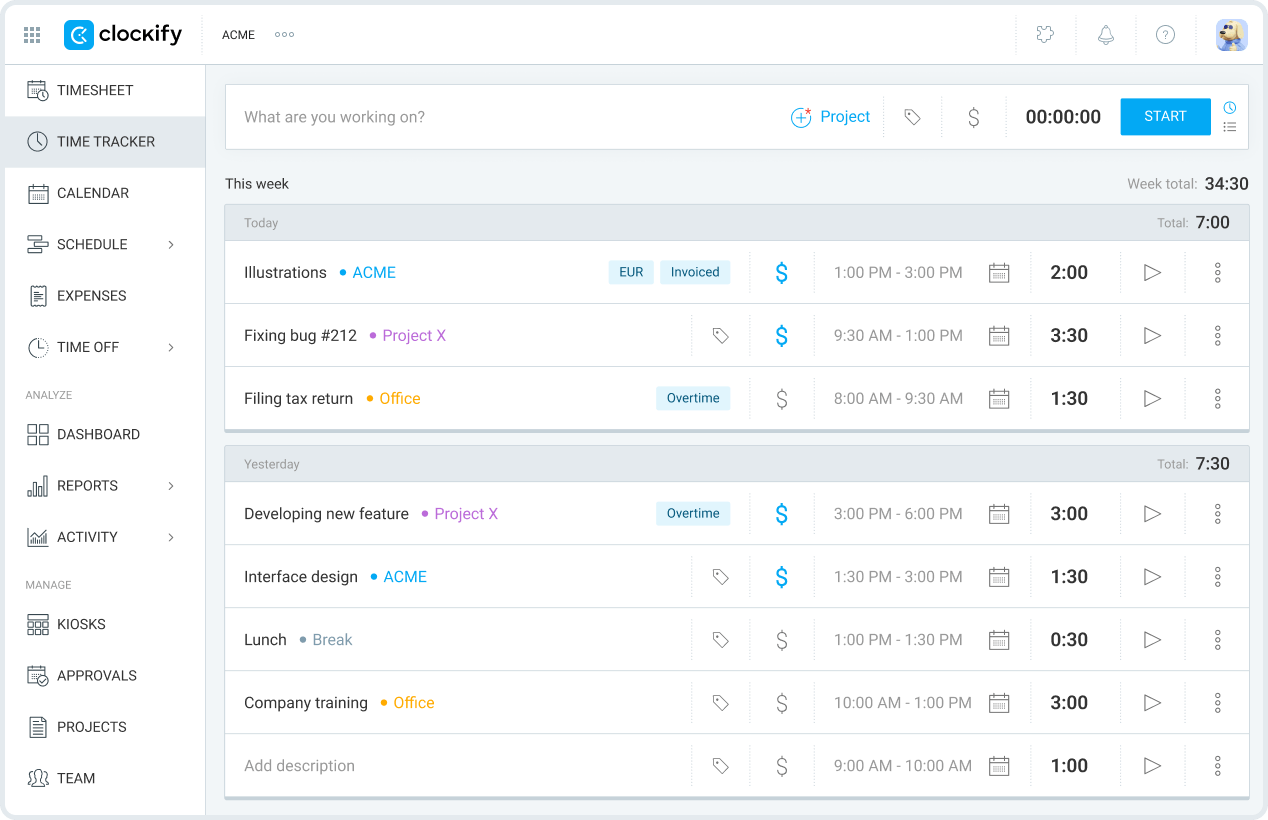
Clockify is a time tracking platform designed to help teams log hours, monitor billable time, and generate reports across projects and clients. It supports multiple tracking methods and provides structured visibility into time usage, making it suitable for organizations that want scalable tracking without upfront costs.
Overview
| Category | Details |
|---|---|
| Company | CAKE.com |
| Best for | Teams needing unlimited free tracking |
| Tracking method | Manual timer + kiosk mode (hybrid) |
| Billing support | Billable rates; invoicing in paid tiers |
| Platforms | Web, Windows, macOS, Linux, iOS, Android |
Key Features
- Unlimited time tracking across projects.
- Task and project organization hierarchy.
- Role-based team permissions.
- Detailed reports with templates.
- Calendar-based time view.
- Dashboard with work analytics.
- Cross-platform tracking (desktop, mobile, browser).
- Integrations with project tools.
- Kiosk mode for shared workstations.
- 80+ app integrations.
- Billable rate tracking.
Pros
- Free plan supports unlimited users and projects.
- Clean interface with simple navigation.
- Wide range of tracking methods.
- Strong mobile apps with offline support.
- Frequent updates and feature improvements.
Cons
- Advanced approvals require paid plans.
- Customization options are limited on the free tier.
- Fewer enterprise features than premium tools.
- Reporting depth varies by plan.
Pricing
Free for unlimited users, with paid plans starting at $5.49 per user per month (invoicing features available in paid plans).
6. QuickBooks Time: Best for QuickBooks users
🌟 4.5/5
Best for: Businesses using QuickBooks that want payroll and accounting connected to time tracking.
Price: Starts at $20/month base fee plus $8 per user/month (requires QuickBooks Online).
Available on: Web, Windows, macOS, iOS, Android.
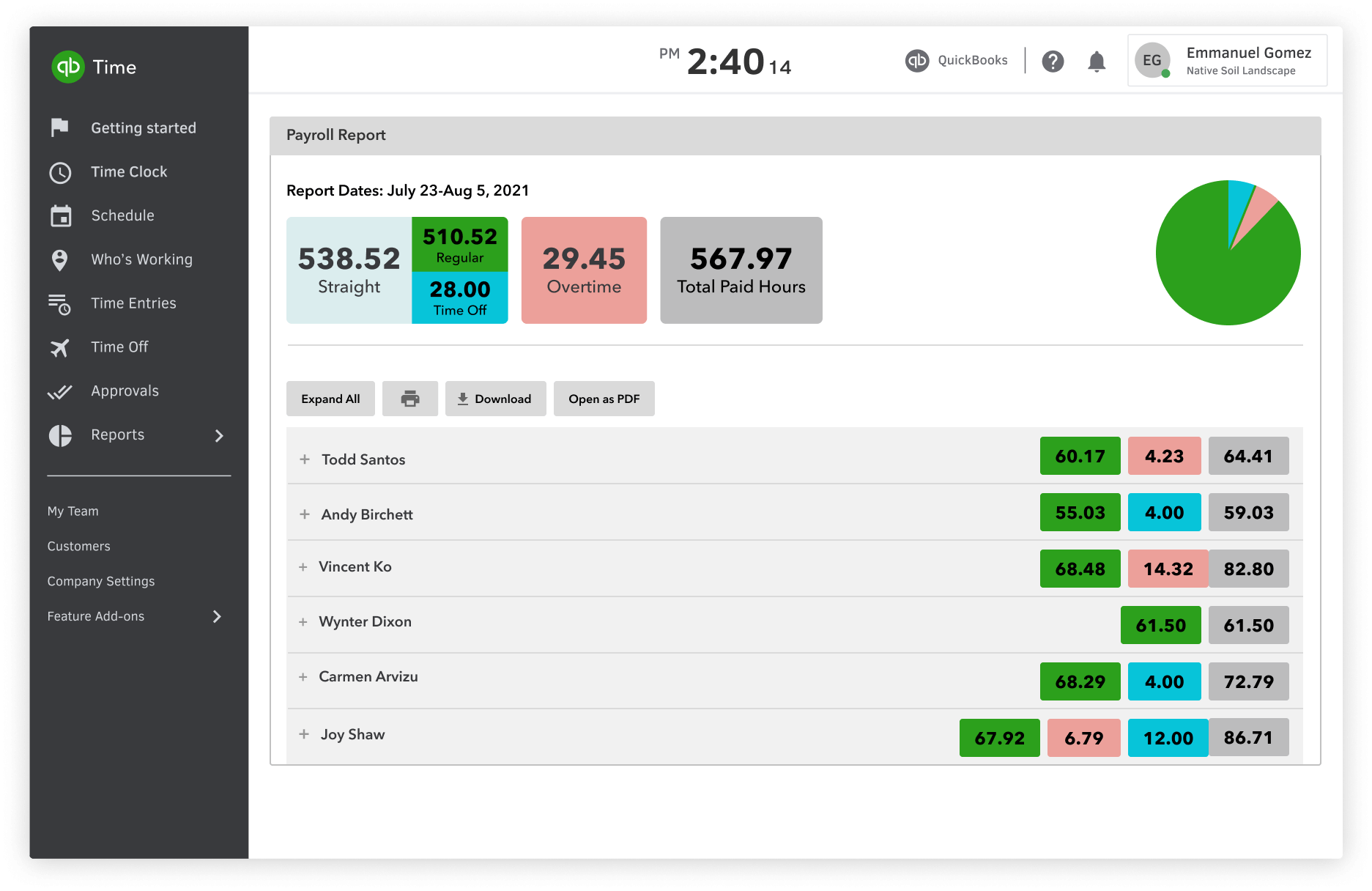
QuickBooks Time is a time tracking and workforce management platform designed to connect employee time data directly with accounting, payroll, and job costing systems. Its integration with QuickBooks makes it suitable for organizations that want synchronized financial and operational reporting.
Overview
| Category | Details |
|---|---|
| Company | Intuit |
| Best for | Businesses using QuickBooks for payroll/accounting |
| Tracking method | Manual tracking + GPS workforce tracking |
| Billing support | Payroll integration & job costing |
| Platforms | Web, Windows, macOS, iOS, Android |
Key Features
- Native QuickBooks integration with real-time sync.
- GPS time tracking for mobile teams.
- Job scheduling and costing tools.
- Payroll automation based on tracked time.
- Job profitability tracking.
- Mobile app with offline functionality.
- Reporting tied to accounting data.
- Employee scheduling and workforce management.
- Custom job codes and tracking fields.
- Compliance and security monitoring.
Pros
- Smooth integration with the QuickBooks ecosystem.
- Strong mobile functionality for field teams.
- Built-in payroll and cost tracking tools.
- Reliable performance and enterprise-level security.
- Flexible configuration options.
Cons
- Best suited for QuickBooks users.
- Higher pricing than standalone trackers.
- The interface may feel complex for basic use cases.
Pricing
No free plan, with paid plans starting at a $20 per month base fee plus $8 per user per month for the Time Premium plan (requires QuickBooks Online).
7. RescueTime: Best for productivity insights
🌟 4.4/5

Best for: Individuals and teams focused on productivity insights through automatic activity monitoring.
Price: Free trial available; paid plans start at $7 per month (billed annually).
Available on: Windows, macOS, Linux, Android, iOS.
RescueTime is an automatic time tracking platform that records activity across apps, websites, and devices to provide detailed insights into how time is spent. It focuses on productivity analysis and behavior trends, making it suitable for users who want visibility into work patterns alongside time tracking.
Overview
| Category | Details |
|---|---|
| Company | RescueTime, Inc. |
| Best for | Productivity insights & automatic tracking |
| Tracking method | Fully automatic activity monitoring |
| Billing support | Minimal billing functionality |
| Platforms | Windows, macOS, Linux, Android, iOS |
Key Features
- Automatic time tracking across devices.
- Custom productivity categories and scoring.
- Website and app monitoring with limits.
- Focus mode with distraction alerts.
- Trend reports and activity analysis.
- Goal tracking and performance metrics.
- Team insights and benchmarking.
- Integrations with calendar and project tools.
- Mobile app with optional manual tracking.
- Data export and API access.
Pros
- Fully automated tracking requires minimal input.
- Detailed productivity analytics.
- Useful for identifying inefficient workflows.
- Includes focus and distraction management tools.
- Cross-platform syncing.
Cons
- Privacy concerns for some users.
- Limited billing and invoicing functionality.
- May feel complex for users wanting simple tracking.
Pricing
No permanent free plan (trial available), with paid plans starting at $7 per month (billed annually) for the Solo plan.
Billable Hours Tracker Comparison Table (2026)
The following table summarizes the core billing-related capabilities that matter most in 2026.
Editor's Picks
- Best Overall: TMetric
- Best Free Plan: Clockify
- Best for Invoicing: Harvest
- Best for QuickBooks Users: QuickBooks Time
- Best for Automatic Tracking: Memtime
| Tool | Best for | Billable vs non-billable | Task-based tracking | Team reporting | Invoicing support | Platforms |
|---|---|---|---|---|---|---|
| TMetric | Team & project billing | Yes | Yes | Strong team reporting | Native invoicing | Web, Desktop, Mobile |
| Toggl Track | Simple tracking | Yes | Yes | Strong team reporting | Via integration | Web, Desktop, Mobile |
| Memtime | Automatic tracking | Yes | Yes | Strong team reporting | Via integration | Desktop |
| Harvest | Client billing | Yes | Yes | Strong team reporting | Native invoicing | Web, Desktop, Mobile |
| Clockify | Unlimited free tracking | Yes | Yes | Strong team reporting | Native invoicing | Web, Desktop, Mobile |
| QuickBooks Time | Accounting integration | Yes | Yes | Strong team reporting | Native invoicing | Web, Desktop, Mobile |
| RescueTime | Productivity insights | Yes | Limited | Strong team reporting | No | Web, Desktop, Mobile |
Takeaway: Choose based on billing workflow first, interface preference second.
How to Choose the Right Billable Time Tracker
To choose the right billable time tracker, check whether it can capture time accurately, connect entries to real client work, apply billing rates, support approvals, and export invoice-ready reports.
Start by identifying the biggest challenges in your current workflow. If employees frequently forget to track time or rely on reconstructed timesheets at the end of the week, prioritize tools with automatic tracking, reminders, and simple time capture. If billing disputes are a recurring issue, look for detailed audit trails, approval workflows, and clear records of billable vs non-billable hours.
The right solution should also support project-based rates, client-specific billing rules, and accurate reporting. Teams that spend hours on manual invoice cleanup will benefit from software that converts approved time directly into invoices or integrates with accounting platforms.
Finally, consider administrative controls and scalability. Strong approval processes, permission settings, and reporting capabilities help maintain billing accuracy as your team grows and workflows become more complex.
What to look for in a billable time tracker
| What to evaluate | What you should look for | Why it matters in practice |
|---|---|---|
| Manual vs. Automatic Tracking | A mix of automatic timers (with idle detection) and structured manual entry | Manual-only tracking often leads to forgotten hours or reconstructed timesheets. Automation improves consistency and billing reliability. |
| Connection to Real Tasks | Time linked directly to tasks, projects, and billing codes — not just running timers | If time isn’t tied to actual work, invoices require manual cleanup. Structured task tracking reduces billing ambiguity. |
| Billable Controls | Clear separation of billable vs non-billable time, with custom rates per client or project | This ensures that every billable hour invoice reflects accurate rates and protects margins. |
| Exports & Invoice-Ready Formats | Filterable summaries, branded invoice generation, and clean PDF/Excel exports | The best way to track billable hours includes thinking ahead to reporting. If exports need reformatting, errors increase, and billing slows down. |
| Review & Approval Workflows | Timesheet approvals, role-based permissions, audit trails, and entry locking after billing | Managers need visibility before invoices go out. Structured reviews reduce disputes and strengthen financial control. |
| Pricing & Scalability | Transparent per-user pricing, practical free tiers, and no critical billing features locked behind higher plans | As teams grow, feature gating can create unexpected costs or workflow limits. Evaluate long-term scalability, not just starting price. |
Making the Right Choice for Your Business
Editorial Conclusion
The best billable hours tracker is the one that your team uses consistently and that turns approved time into accurate invoices. When you track billable time with a timer, you eliminate guesswork, improve billing accuracy, and ensure every billable minute is accounted for.
While features and pricing vary, the most effective solutions share a common goal: helping businesses capture billable time accurately, reduce administrative work, and improve billing accuracy. When evaluating your options, focus on how well each tool supports your actual workflow, from time capture and approvals to reporting and invoicing, rather than choosing based on interface preferences alone.
Whether you're a freelancer, agency, consultancy, law firm, or professional services team, the right platform should help eliminate forgotten hours, reduce billing disputes, and provide clear visibility into project profitability.
Why Many Teams Choose TMetric
TMetric combines billable time tracking, project budgeting, team management, reporting, and invoicing tools in a single platform. It helps businesses track billable vs non-billable hours, apply project rates, generate invoice-ready reports, and monitor project performance without adding unnecessary complexity.
Trusted by thousands of teams worldwide, TMetric is particularly well suited for organizations that need a balance of ease of use, reporting depth, and billing workflow support. If you're looking for a solution that can support accurate time capture and help convert tracked work into revenue, TMetric is a strong place to start.
Over to you
The best billable hours tracker is the one your team uses consistently, not the one with the longest feature list.
Start with a free trial or no-cost tier to evaluate real adoption. Observe how easily your team logs time, how managers review entries, and how smoothly reports convert into a billable hours invoice before committing to a paid plan.
Remember, tracking time is not the end goal. The objective is predictable revenue, stronger client trust, and a more efficient billing process. The right tool should support profitability and operational clarity, not just record hours.
10,000+ companies, teams, and individuals worldwide use TMetric to track time, manage work, and bill with confidence.