What Is an MCP Server? Definition, How It Works, and Use Cases
Discover what an MCP server is, how it connects AI agents to your tools and data, and how to use one safely and effectively.
What Is an MCP Server?
An MCP server is a lightweight program that gives AI applications controlled access to external tools, data, and ready-made prompts through the Model Context Protocol (MCP). MCP is an open standard, introduced by Anthropic in November 2024, that defines one common way for AI models to talk to the outside world: calendars, databases, file systems, project trackers, time tracking apps, and more.
In simple terms, an MCP server is a translator and gatekeeper. It sits in front of a system (for example, a time tracker or a code repository), describes what that system can do in a format any compatible AI app understands, and carries out requests safely when the AI asks for something.
This glossary page explains the meaning of the term, the architecture behind it, the main capabilities, common use cases, security considerations, and how to choose and set up an MCP server.
What Is MCP Server in AI?
Large language models are powerful, but on their own they only know what was in their training data and what you paste into the chat. They cannot check your project budget, read today's tasks, or start a timer. To do that, an AI needs a connection to real systems.
Before MCP, every AI application needed a custom integration for every tool. Ten AI apps and twenty tools meant up to two hundred separate connectors, each built and maintained differently. MCP replaces that tangle with a single standard: build one MCP server for a tool, and any MCP-compatible AI app can use it. Many people compare it to USB-C for AI: one connector shape that works across devices.
So an MCP server in AI is the standardized "plug" that lets assistants, copilots, and autonomous agents read information from and take actions in the software you already use.
Model Context Protocol MCP Server: What Is It?
The two terms are often mixed up, so it helps to separate them:
Model Context Protocol (MCP) is the rulebook: a specification for how AI apps and external systems exchange messages.
An MCP server is a program that follows that rulebook to expose one system's capabilities.
If the protocol is the language, the server is a speaker of that language who represents a specific tool.
What Is an MCP Server and How Does It Work?
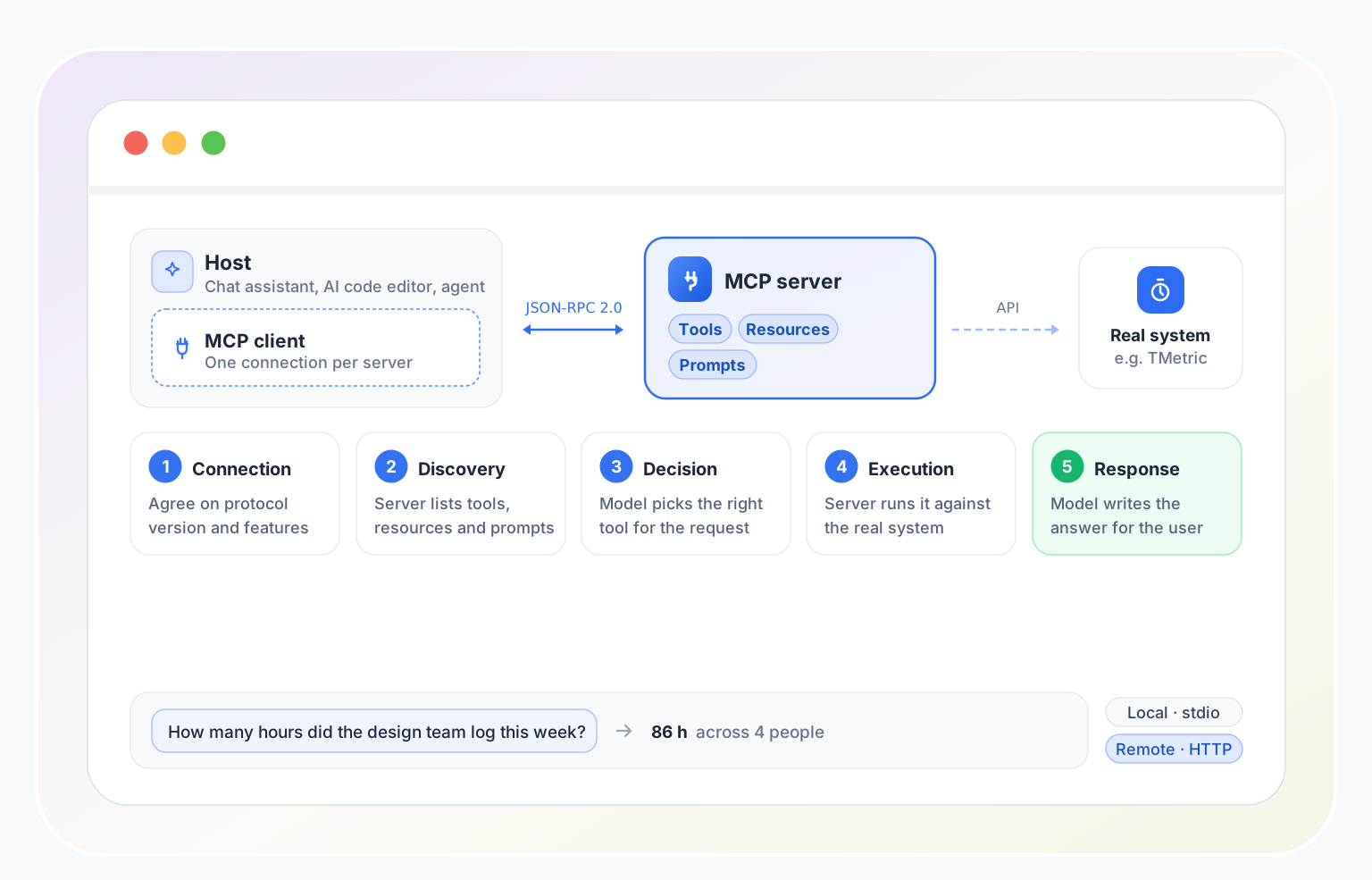
MCP uses a simple client–server model with three roles:
Host: the AI application the person uses, such as a chat assistant, an AI-powered code editor, or a custom agent.
MCP client: a component inside the host that keeps a dedicated connection to one MCP server.
MCP server: the program that exposes a tool, data source, or service.
A typical interaction looks like this:
Connection: the host starts or connects to the MCP server and the two sides agree on the protocol version and supported features.
Discovery: the client asks the server what it offers. The server replies with a list of tools, resources, and prompts, each with a name, a description, and the inputs it expects.
Decision: when a user makes a request ("How many hours did the design team log this week?"), the AI model reads the available tool descriptions and decides which one to use.
Execution: the client sends a structured request to the server, which runs the action against the real system, often through that system's API.
Response: the server returns the result, the model uses it to write an answer, and the user sees the outcome.
Under the hood, messages are exchanged in JSON-RPC 2.0 format. Servers can run in two main ways: locally on the user's machine (communicating over standard input/output), or remotely over the network using HTTP, which suits shared, team-wide, and cloud-hosted services.
Core Capabilities of an MCP Server
Tools
Tools are actions the AI can ask the server to perform, such as "create a task," "start a timer," or "run a query." Because tools can change things, well-designed clients ask the user to approve sensitive calls.
Resources
Resources are read-only pieces of context the server can provide: files, database records, reports, or documentation. They give the model facts to work with instead of guesses.
Prompts
Prompts are reusable templates for common workflows, such as "summarize this week's project activity." They help users get consistent results without writing instructions from scratch.
What Is MCP Server for AI Agents?
An AI agent is software that pursues a goal across several steps: it plans, calls tools, checks results, and adjusts. Agents are only as useful as the tools they can reach. This is where an MCP server for AI agents becomes essential.
Dynamic discovery: an agent can ask a server what it can do at run time, instead of relying on hard-coded integrations.
Consistent tool calling: every server describes its tools in the same structure, so an agent can use new ones without custom code.
Multi-system workflows: one agent can connect to several servers at once, for example reading a task from a project tool, logging time in a tracker, and drafting an invoice summary.
Control and auditability: the server defines exactly what the agent may do, which makes behavior easier to limit, review, and log.
In short, an MCP server turns an AI agent from something that only talks into something that can safely do work in your systems.
MCP Server vs. API: What's the Difference?
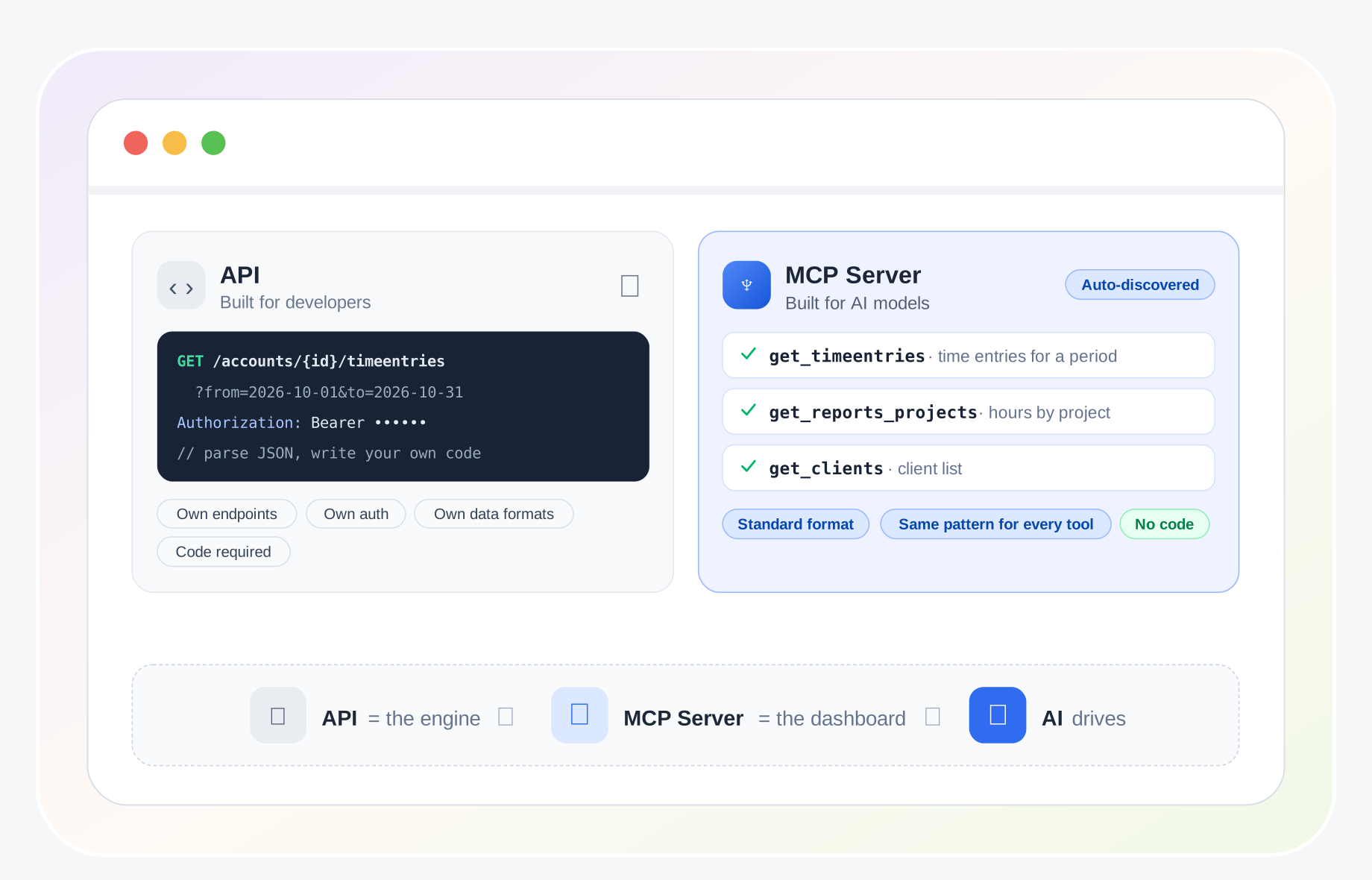
An MCP server usually wraps an existing API, but the two solve different problems.
An API is built for developers. Each one has its own endpoints, authentication, and data formats, and someone must write code to use it.
An MCP server is built for AI models. It describes capabilities in a standard, machine-readable way so a model can discover and use them on its own, with the same pattern for every tool.
Think of the API as the engine and the MCP server as the standard dashboard that lets an AI drive it.
Common Use Cases of MCP Servers
Software development: AI coding assistants read repositories, search documentation, open pull requests, and check build results.
Data and analytics: assistants query databases and spreadsheets in plain language and return summaries.
Project and task management: agents create tasks, update statuses, and summarize progress across tools like Jira, Asana, or Trello.
Time tracking and reporting: assistants start and stop timers, pull timesheets, and answer questions about hours, budgets, and utilization.
Customer support: agents look up customer records and ticket history before drafting a reply.
Knowledge management: assistants search internal wikis, notes, and shared drives for accurate answers.
Security, Privacy, and Governance
Because an MCP server can read data and trigger actions, it should be treated like any other integration that touches business systems.
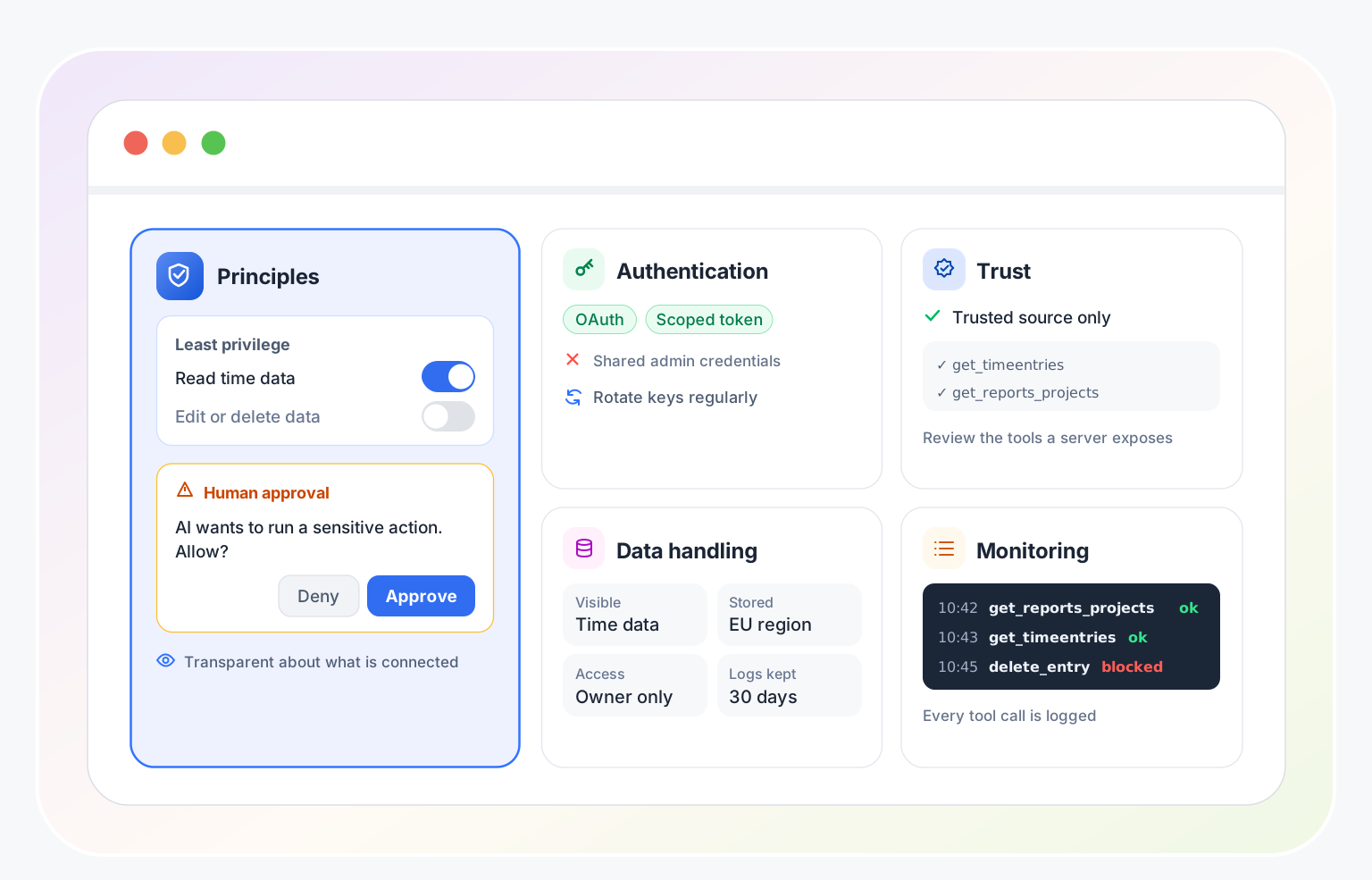
Principles: least privilege (grant only the permissions needed), transparency about what is connected, and human approval for sensitive or irreversible actions.
Authentication: use scoped tokens or OAuth rather than shared admin credentials, and rotate keys regularly.
Trust: install servers only from sources you trust and review what tools they expose. A malicious or poorly written server can leak data or mislead the model.
Data handling: define what data the server can see, where it is stored, who has access, and how long logs are kept.
Monitoring: log tool calls so you can review what the AI did and when.
How to Set Up and Use an MCP Server (Step-by-Step)
Define the goal: which task or workflow should the AI help with, and which system holds the data?
Pick a compatible AI host (a chat assistant, code editor, or agent framework that supports MCP).
Choose an existing MCP server for your tool, or build one with an official SDK if none exists.
Create credentials with the minimum permissions required, such as a read-only API token to start.
Add the server to the host's configuration, either as a local command or a remote URL.
Test with simple, low-risk requests and check that the tools and results look correct.
Turn on approval prompts for actions that change data, then expand access gradually.
Review logs, collect feedback from users, and refine the setup.
How to Choose an MCP Server
Source and Maintenance
Prefer servers published by the tool's vendor or by actively maintained projects with clear documentation, a visible update history, and an open license.
Coverage
Check that the tools it exposes match your needs. A server that only lists data is not enough if you want the AI to create or update records.
Security and Permissions
Look for scoped authentication, read-only modes, and clear documentation of what data the server can access.
Deployment Model
Local servers are simple for individual use. Remote servers are better for teams that need shared access, central control, and easier updates.
Compatibility
Confirm that your AI host supports the transport (local or remote) and features the server uses.
MCP Servers and Time Tracking with TMetric
Time and project data are a natural fit for AI assistants. Instead of opening reports and filtering by hand, a person can simply ask a question in natural language and get an answer from live data.
TMetric provides the building blocks that make this possible:
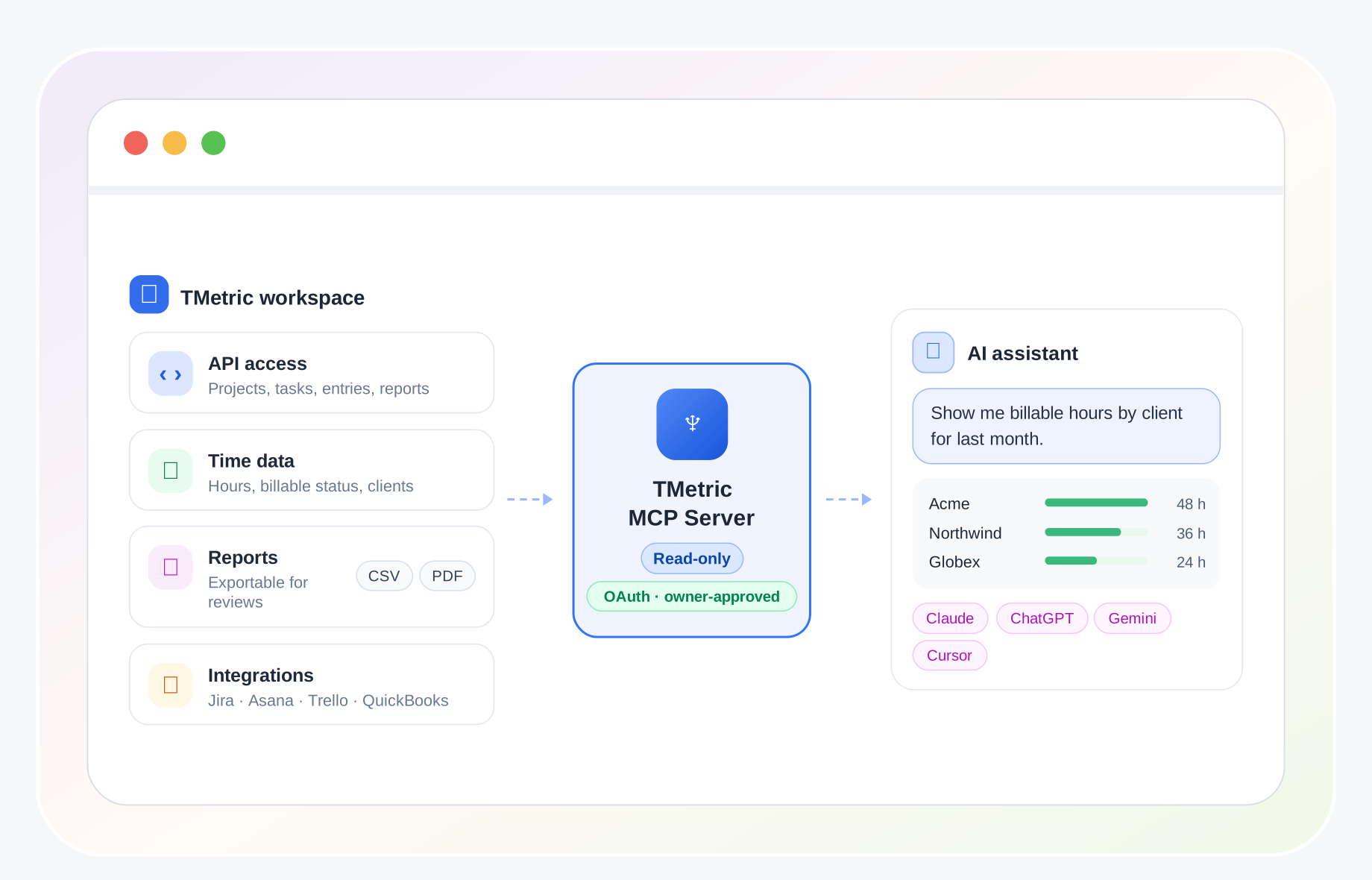
API access: TMetric’s API exposes projects, tasks, time entries, and reports that an MCP server can connect to.
Time data: tracked hours, billable and non-billable time, projects, and clients are available as structured information.
Reports: productivity and project reports can be exported as CSV or PDF for management reviews and payroll.
Integrations: TMetric connects with tools such as Jira, Asana, Trello, and QuickBooks through its integrations, so time tracked on tasks from those tools is already part of your TMetric data.
You don’t need to build anything yourself. The official TMetric MCP Server connects your TMetric workspace to AI assistants such as Claude, ChatGPT, Gemini, and Cursor.
The TMetric MCP Server is read-only. Your assistant can analyze and summarize your time data, but it cannot start timers, create or edit time entries, or change anything in your workspace. Only the workspace owner can set up the connection, authorization runs through OAuth, and the owner can revoke access at any time.
Examples of questions you can ask:
“Show me billable hours by client for last month.”
“Which projects went over their estimated hours?”
“Compare this month to last month by project.”
“What share of our tracked time was non-billable last quarter?”
For recurring reports, billing, and formal client reporting, TMetric Reports remain the main tool. Read more about how the two work together in TMetric Reports vs MCP Server.
Common Pitfalls & How to Avoid Them
Giving the server broad, admin-level access → use scoped, read-only credentials first.
Installing unknown servers without review → check the source, license, and exposed tools.
Connecting too many servers at once → start with a few relevant ones, since a long list of tools can confuse the model and slow responses.
Letting the AI change data without oversight → require approval for write and delete actions.
Treating AI output as always correct → verify important numbers against the source system.
Conclusion
An MCP server is the standardized bridge between AI and the systems where real work happens. By exposing tools, resources, and prompts through the Model Context Protocol, it lets AI assistants and agents discover what is available, take actions, and answer questions with live data, without a custom integration for every pairing. Used with sensible permissions and human oversight, MCP servers make AI more useful and more trustworthy in everyday workflows.
Measure what matters. Use TMetric to track time, projects, and productivity with clear data your whole team can rely on - try it free.