5 Best Employee Monitoring Software [Top Picks for 2026]
From kitchen tables to coworking spaces and cafes, modern teams work everywhere. The smartest monitoring tools don’t watch over shoulders. They reveal how work actually happens and help teams make better decisions without micromanagement.

By Dereck Mushingairi | March 16, 2026
5 Best Employee Monitoring Software Tools for 2026
Choosing the right employee monitoring software depends on your team size, work model, and management goals. We ranked the tools below based on pricing, monitoring depth, reporting capabilities, integrations, privacy controls, and overall fit for specific use cases. The solutions featured here balance visibility, productivity insights, and employee trust.
Quick Picks:
Comparison Table (2026 data)
Verdict: TMetric is the best overall choice for teams that need employee monitoring plus project budgeting and billing. It combines time tracking, activity monitoring, project management, budgeting, payroll, and invoicing features in a single platform, making it especially well-suited for agencies, service businesses, and remote teams that need both productivity visibility and financial oversight.
| Tool | Best for | Price (per user/month) | Free plan limitations | G2 rating | Capterra rating | Agency fit score | SoftDev fit score |
|---|---|---|---|---|---|---|---|
| TMetric - Top Pick | best overall for agencies and remote teams | $7–$9 | 2 users, basic features | 4.6/5 | 4.7/5 | 5/5 | 4.5/5 |
| Hubstaff | best for field teams | $5–$12 | Free plan limited to basic time tracking | 4.4/5 | 4.6/5 | 4/5 | 3.5/5 |
| ActivTrak | best for workforce analytics | $10–$19 | 3 users, limited data retention | 4.3/5 | 4.6/5 | 3.5/5 | 4/5 |
| Time Doctor | best for detailed activity tracking | $6.67–$20 | No permanent free plan (trial only) | 4.4/5 | 4.5/5 | 4.5/5 | 4/5 |
| Apploye | best budget option for small teams | $4.50–$6 | Free plan with limited features | 4.5/5 | 4.7/5 | 3.5/5 | 3.5/5 |
Mini data study: The average price of time trackers in 2026 is $6.20/user/month—but agency-grade tools that bundle invoicing, budgets, and client reports skew 18% higher.
Price is only part of the story. To choose the right platform, it’s important to understand the core capabilities that modern employee monitoring tools should provide.
Must-have Features for Remote Employee Monitoring Tools
The must-have features are time tracking, app and website activity tracking, reporting, payroll-ready exports, integrations, and privacy controls.
- Time tracking
- App and website activity tracking
- Reporting and workforce analytics
- Payroll-ready exports
- Third-party integrations
- Privacy controls and employee permissions
Remote and hybrid work environments require managers to maintain operational transparency without disrupting productivity. Employee monitoring tools help organizations understand how work is distributed, improve remote team accountability, and identify opportunities to optimize workflows across distributed teams.
The most effective solutions combine accurate time tracking with detailed activity monitoring, reporting, and performance insights. Advanced platforms also provide workforce analytics, integrations with project management and payroll systems, customizable reports, and privacy controls that help organizations balance oversight with employee trust.
App and website activity tracking
App and website activity tracking shows which digital tools employees use during work hours and how that activity maps to productive or non-productive time. This feature helps organizations understand how work is performed across remote and hybrid teams by automatically recording the applications and websites employees interact with throughout the day.
For example, managers can see time spent in work-related tools such as Jira, Slack, GitHub, Google Docs, and CRM platforms, as well as activity on websites like YouTube or social media networks. Modern employee monitoring software typically categorizes these tools and websites based on their relevance to work, making it easier to distinguish productive activity from distractions.
Beyond simple usage logs, app and website tracking provides deeper performance insights. Managers can review active time versus idle time, analyze app usage patterns, evaluate category-based productivity trends, and identify workflow bottlenecks that may be slowing projects or reducing team efficiency. These insights support better resource planning, workforce analytics, and remote team accountability without requiring constant supervision.
Work schedules and time controls
Work schedule and time control features help teams define working hours, track attendance, detect idle time, and prevent inaccurate timesheets. These capabilities are especially important for remote and distributed teams, where managers need visibility into work patterns without relying on manual check-ins or spreadsheets.
When evaluating employee monitoring software, look for the following features:
- Shift schedules
- Idle time detection
- Manual time edits
- Overtime visibility
- Break tracking
- Attendance reports
Strong time control tools help organizations maintain accurate records of employee hours while reducing time-tracking errors. Features such as idle time detection can identify periods of inactivity, while attendance reports provide a clear view of punctuality and availability. Manual time edit controls create accountability by tracking adjustments to timesheets, and overtime visibility helps managers monitor workloads before they become a problem. Together, these features improve payroll accuracy, workforce planning, and remote team accountability.
Reporting and productivity analytics
Reporting and productivity analytics show where work time goes across people, projects, apps, and clients. These features transform raw time and activity data into actionable insights that help managers understand team performance, improve operational efficiency, and make better business decisions.
Key metrics to track include:
- Time by project
- Productive vs. unproductive activity
- Idle time
- App and website usage
- Billable vs. non-billable hours
- Workload trends
Advanced reporting tools allow teams to identify productivity patterns, compare project performance, and monitor resource allocation across departments. By analyzing billable and non-billable time, organizations can improve profitability and ensure client work is accurately tracked. Productivity reports also support more accurate project estimates, helping managers plan future work based on historical data.
Beyond efficiency gains, analytics provide valuable workforce insights. Managers can use workload trends to balance assignments, detect potential burnout before it affects performance, and improve resource planning across teams. For service-based businesses, detailed reporting also supports transparent client billing, stronger budget control, and more informed business forecasting.
Data exports and payroll readiness
Payroll-ready exports are essential because they turn tracked work hours into accurate payroll, invoices, and audit-ready reports. While time tracking and employee monitoring provide visibility into daily activity, the real business value comes from being able to convert that data into formats that support finance, operations, and client management workflows.
The best employee monitoring software offers multiple export options, including CSV, PDF, Excel, API access, and direct payroll integrations. These formats make it easy to move time and productivity data between HR, accounting, payroll, and project management systems without manual data entry.
Payroll-ready reporting supports several critical business processes. Teams can use exported timesheets for payroll preparation, ensuring employees are paid accurately for recorded hours. Service-based businesses can generate records for client invoicing and verify billable work. Organizations that rely on freelancers can streamline contractor payments using approved timesheet data. Exportable reports also simplify finance audits by providing documented records of work activity and attendance. In addition, detailed time data helps managers perform project profitability analysis, identify budget overruns, and improve future resource planning and cost forecasting.
Integrations with project management and accounting tools
Integrations matter because they connect monitoring data with the systems teams already use for project delivery, payroll, and billing. Without integrations, managers often spend valuable time manually transferring timesheet data between platforms, increasing the risk of errors and inconsistencies.
When evaluating employee monitoring software, look for integrations across the following categories:
- Project management: Jira, Asana, Trello
- Development: GitHub, GitLab
- Accounting: QuickBooks, Xero
- Communication: Slack, Microsoft Teams
These connections allow employee activity and time-tracking data to flow automatically into existing workflows. For example, time logged against Jira or Asana tasks can be linked to project budgets and client work, while accounting integrations help convert approved hours into invoices or payroll records. Development teams can connect tracked time to GitHub or GitLab projects for better visibility into engineering effort, and communication platform integrations help keep teams aligned without switching between multiple tools.
The result is fewer manual entries, better billing accuracy, cleaner reporting, and less administrative overhead. Organizations also benefit from more reliable project data, improved resource planning, and a single source of truth for productivity, financial, and operational reporting.
Privacy controls and role-based access
Privacy controls let companies collect only the monitoring data they need while limiting access by role, team, or permission level. These features help organizations balance employee privacy with operational transparency while reducing the risk of excessive data collection.
Common privacy controls include:
- Screenshot blurring
- Optional screenshots
- App-category tracking instead of full URLs
- Manager-only access to monitoring data
- Employee access to their own records
- Different settings for contractors, field staff, and senior employees
Role-based permissions ensure that sensitive information is only visible to authorized users. At the same time, customizable monitoring settings allow organizations to apply different levels of oversight based on job responsibilities. This approach helps build trust, support compliance requirements, and maintain visibility into productivity without creating an overly intrusive work environment.
List of Best Employee Monitoring Software Tools for 2026
We selected these tools based on productivity analytics, time tracking accuracy, privacy controls, integrations, pricing, and use-case fit. Each solution was evaluated on its ability to provide workforce visibility, support remote and hybrid teams, simplify reporting, and connect with the business systems companies use every day.
Best for
- TMetric - Best overall for agencies and remote teams
- Hubstaff - Best for field teams and GPS tracking
- ActivTrak - Best for workforce analytics
- Time Doctor - Best for detailed activity tracking
- Apploye - Best budget option for small teams
The tools below represent the strongest options for organizations that need employee monitoring, time tracking, productivity reporting, and operational visibility. While all five solutions offer monitoring capabilities, they differ in reporting depth, privacy features, integrations, and pricing, making each one better suited to specific business needs.
1. TMetric
⭐ 4.6/5 (G2)
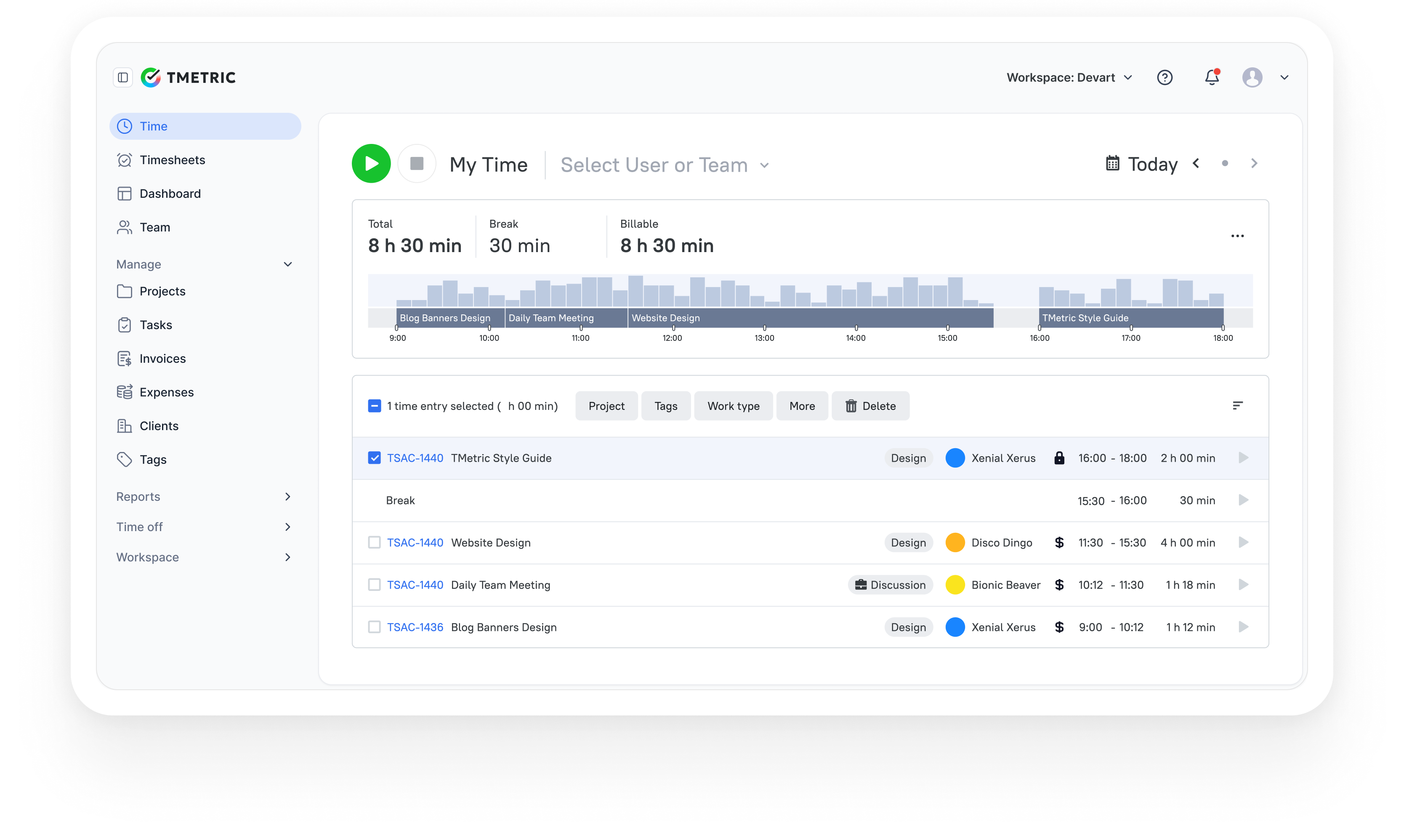
TMetric is a strong choice for teams that want to understand how work time is actually spent. It tracks tasks, application activity, and billable hours while connecting with tools like Jira, Asana, Trello, GitHub, and QuickBooks. The platform runs on web, Windows, macOS, Linux, iOS, and Android.
Why TMetric
TMetric connects employee monitoring with real operational workflows. Time data feeds directly into project budgets, payroll reports, and invoicing, helping teams understand both productivity and project profitability. That combination makes it particularly useful for agencies, consultancies, and remote teams that rely on accurate billable hours.
Key features of TMetric
- App and website activity tracking with productivity metrics.
- Optional screenshot monitoring with configurable capture intervals.
- Idle time detection with customizable settings.
- Productivity dashboards and performance reports.
- Project budgeting and billable rate tracking.
- Payroll-ready reports and invoicing tools.
- Integrations with project management and accounting platforms.
Pros
- Monitoring controls can be adjusted by team or role.
- Includes built-in budgeting and billing capabilities.
- Clean and easy-to-navigate interface.
- Lightweight desktop applications.
- Generous free plan for small teams.
Cons
- Some reports are available only through mobile applications.
- Screenshot monitoring tools do not support annotations.
Pricing
TMetric offers a free plan for up to two users. Paid plans start at $5.83 per user per month, adding project budgeting, advanced reporting, and team management features.
Review
G2: 4.6/5 – "TMetric offers a clean and intuitive interface, making it easy to navigate and use. The interface provides a clear overview of your time entries and allows for quick and efficient time tracking." – View on G2
Capterra: 4.7/5 – "Best time tracking tool we've used. The activity monitoring helps us spot bottlenecks without micromanaging." – View on Capterra
2. Hubstaff
⭐ 4.4/5 (G2)

Hubstaff combines time tracking with location monitoring for teams that work both in the office and in the field. In addition to tracking hours and application activity, it records routes and job-site locations. Hubstaff integrates with tools like Asana, Trello, Jira, QuickBooks, Xero, and Slack and supports web, desktop, and mobile platforms.
Why I picked Hubstaff
Hubstaff earns its place here for teams that need to track work beyond the office. GPS tracking and geofencing make it possible to monitor job-site activity, routes, and hours worked in the field. This makes it a practical choice for companies managing mobile teams alongside traditional desk-based staff.
Key features
- GPS tracking and geofencing.
- Screenshot monitoring.
- App and website activity tracking.
- Time tracking with idle detection.
- Payroll integrations.
- Scheduling and shift management tools.
Pros
- Industry-leading GPS accuracy with efficient battery usage.
- Mobile app provides near feature parity with the desktop version.
- Payroll automation reduces manual payroll processing.
- Includes a built-in shift scheduling module.
- Focus reports highlight productivity trends and work patterns.
Cons
- Pricing increases when GPS and scheduling features are enabled.
- Always-on GPS tracking may feel intrusive for desk-based teams.
- Frequent screenshots may not suit every team culture.
Pricing
Hubstaff offers a limited free plan. Paid plans start at $4 per user per month, with additional features available in higher tiers.
G2: 4.4/5 – "I really like how easy Hubstaff makes it to track time without overcomplicating things. The desktop app runs smoothly in the background and gives me accurate logs of what I worked on. The screenshot feature is helpful for transparency with clients, and the reporting tools give me a clear picture of where my time goes. It’s also great that it integrates with tools I already use, so I don’t need to constantly switch between platforms." – View on G2
Capterra: 4.6/5 – "Hubstaff Tasks has been a great experience so far. It's easy to use, keeps our team organized, and the integration with Hubstaff for time tracking is super convenient." – View on Capterra
3. ActivTrak
⭐ 4.3/5 (G2)
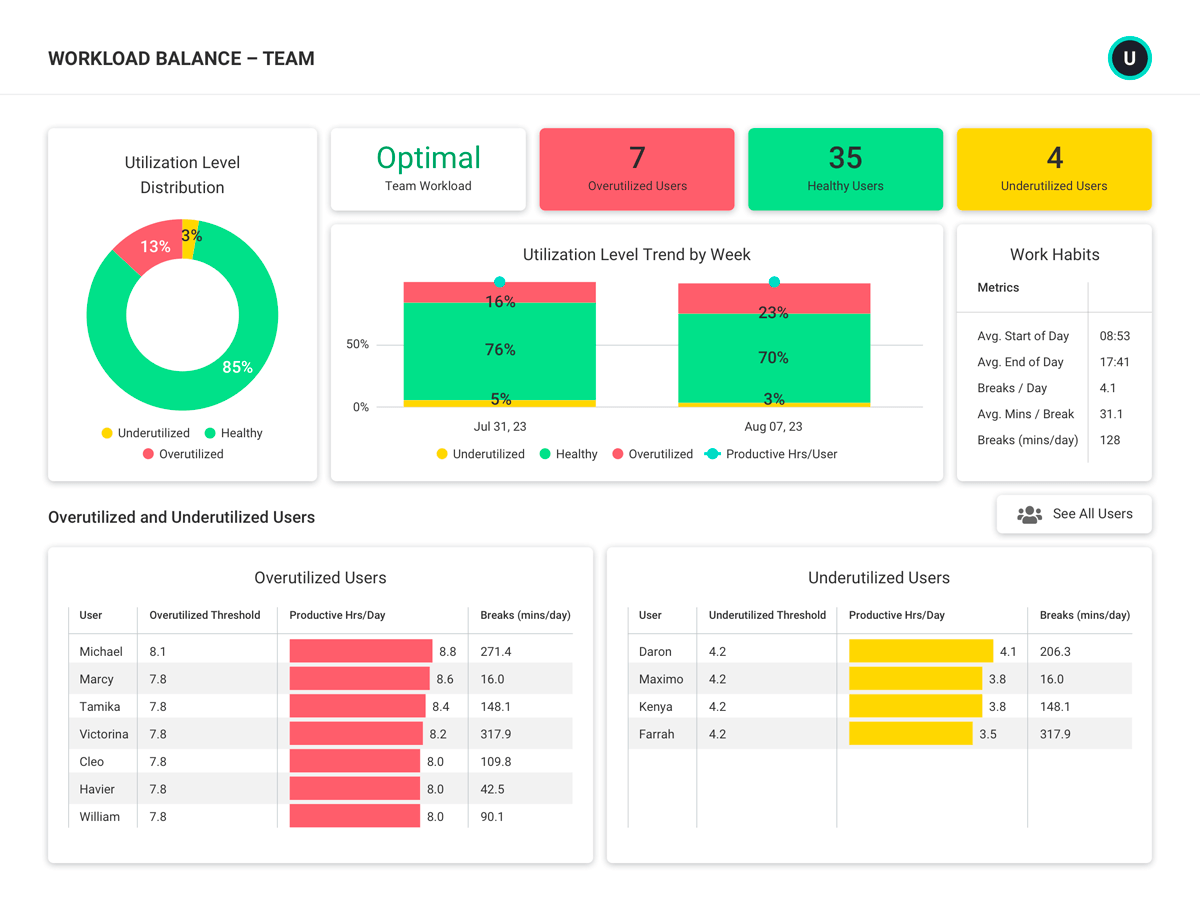
ActivTrak focuses on workforce analytics rather than traditional monitoring. It analyzes application usage and work patterns to show how teams spend time and where productivity shifts occur. The platform integrates with tools like Slack and Microsoft Teams and is available on web, Windows, and macOS.
Why I picked ActivTrak
ActivTrak approaches employee monitoring from an analytics perspective rather than a surveillance one. Instead of focusing on screenshots or individual tracking, it highlights patterns in application usage and team productivity. That makes it a good fit for organizations that want actionable insights without introducing intrusive monitoring.
Key features
- Productivity scoring and benchmarking.
- App and website activity tracking.
- Alerts for unproductive activity patterns.
- Work-life balance insights and analytics.
- Privacy-focused aggregated data analysis.
- Custom productivity labels for activity classification.
Pros
- Privacy-focused approach that helps build employee trust.
- Strong productivity analytics and behavioral insights.
- Customizable reporting dashboards.
- Workload monitoring that can highlight burnout risks.
- Useful free plan for small teams.
Cons
- Limited integrations compared with some competing platforms.
- No mobile monitoring capabilities.
- Does not support screenshot monitoring for teams requiring visual tracking.
Pricing
ActivTrak offers a free plan with limited functionality. Paid plans typically range from $10 to $19 per user per month, depending on the analytics and monitoring features included.
Reviews
G2: 4.3/5 – "ActivTrak has been a game-changer for our team and we use it on daily bases. The level of comprehensive and detailed analytics is outstanding, giving us a clear picture of how work gets done. It's incredibly user-friendly and helps us identify bottlenecks and balance workloads without being invasive. The focus on employee well-being, like burnout detection, is a huge plus. Integration and setup was easy. Highly recommend it for any team, especially remote or hybrid!" – View on G2
Capterra: 4.6/5 – "ActivTrak makes it easy to see how our team is spending their time. It’s helpful for keeping track of productivity, especially since we manage a lot of moving parts, office rentals, conference room bookings, and customer support. The dashboard is clear, and the reports are useful for checking in without micromanaging." – View on Capterra
4. Time Doctor
⭐ 4.4/5 (G2)
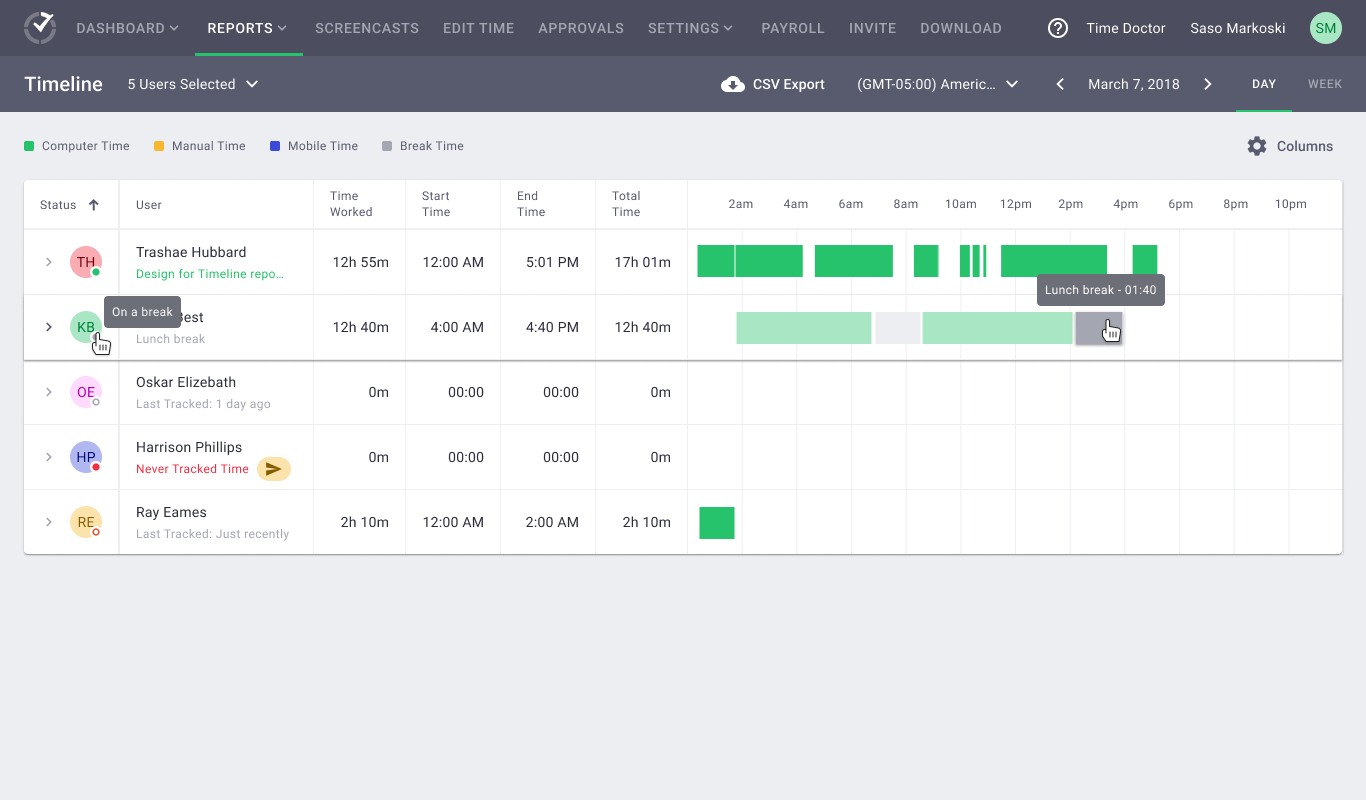
Time Doctor provides detailed tracking of work activity, including time logs, application usage, and website history. Teams often use it when they need clear records of how work hours are spent. It connects with tools such as Asana, Jira, Trello, Slack, GitHub, and QuickBooks and runs on web, desktop, and mobile platforms.
Why I picked Time Doctor
Time Doctor is built for situations where detailed visibility matters. Activity tracking, screenshots, and productivity analytics create a clear record of how work hours are spent. For companies working with freelancers or billing clients by the hour, that level of documentation helps verify work and reduce disputes.
Key features
- Layered activity capture.
- Configurable screenshot monitoring.
- Focus nudges and distraction alerts.
- Productivity analytics and activity timelines.
- Payroll automation tools.
- Client portals for reporting and transparency.
Pros
- Comprehensive monitoring capabilities within one platform.
- Detailed activity records improve transparency for client billing.
- Focus alerts help reduce distractions during work hours.
- Automated payroll workflows simplify compensation management.
- Accurate reporting supports time-sensitive projects.
Cons
- No free plan available for teams that want to test the platform first.
- Continuous monitoring may feel intrusive for some teams.
- Advanced capabilities are limited to higher pricing tiers.
Pricing
Time Doctor plans typically start from $6.67 per user per month, depending on the monitoring and reporting features included.
Review
G2: 4.4/5 – "It has now automated idle time deduction and it also improved on manual tracking reminders. Improved automatic pause during the inactivity of the user." – View on G2
Capterra: 4.5/5 – "Nice experience, good to track time and keep people productivity updated. The information is clear and concise." – View on Capterra
5. Apploye
⭐ 4.5/5 (G2)

Apploye offers a straightforward way for small teams to track work hours and monitor productivity. It records activity, screenshots, and application usage so managers can see how time is spent across projects. The platform works on web, Windows, macOS, Linux, iOS, and Android and connects with several common productivity tools.
Why I picked Apploye
Apploye focuses on delivering the core features most small teams actually need. Time tracking, screenshots, and activity monitoring are included without complicated setup or enterprise pricing. For startups or growing teams that want accountability without investing in advanced analytics tools, it offers a practical entry point.
Key features
- Automatic time tracking with idle detection.
- Screenshot monitoring.
- App and website activity tracking.
- GPS and location tracking.
- Basic invoicing capabilities.
- Team scheduling tools.
Pros
- Generous free plan compared with many competitors.
- Affordable pricing for small teams.
- Simple interface with minimal onboarding.
- Reliable applications across desktop and mobile platforms.
- Responsive customer support.
Cons
- Limited advanced analytics compared with higher-end solutions.
- Smaller integration ecosystem.
- Productivity insights are more basic than enterprise-level tools.
Pricing
Apploye offers a free plan with limited features. Paid plans typically start from $4.50 per user per month, making it one of the more affordable employee monitoring tools available.
Reviews
G2: 4.5/5 – "The most remarkable thing about Apploye is it has too many features with a very minimum monthly subscription fee. Apart from time tracking, it also provides a Task Management feature that helps organizations monitor employees' productivity. I don't need to use any other project management tool like Trello or Asana when Apploye came with all the features in one single step." – View on G2
Capterra: 4.7/5 – "Since it’s so easy to get sidetracked with tasks, I definitely needed something like Apploye to help me keep track of project timings. While I don’t really use the options for employee tracking and monitoring, our team does work remotely across different countries, so the app makes it easier to keep track of the work progress, eliminate time wasted on less important tasks, and be on top of deadlines." – View on Capterra
More Employee Monitoring Solutions
These tools did not make the top five, but they can fit specific monitoring needs. Some focus on scheduling, HR management, or automatic time tracking rather than comprehensive employee monitoring and productivity analytics.
- Monitask - A budget-friendly option that offers basic screenshot capture, activity tracking, and time monitoring. It may be suitable for small businesses and startups that need simple employee monitoring features without the complexity of more advanced workforce analytics platforms.
- Timely - Focuses on AI-powered automatic time tracking that records work activity in the background. It is designed for teams that want to reduce manual time entry and gain a clearer picture of how time is spent across projects and tasks.
- RescueTime - A productivity-focused tool that helps users understand how they spend time across apps and websites. Its reports and focus metrics can help individuals and teams identify distractions, improve work habits, and make more informed productivity decisions.
- Toggl Track - A simple time-tracking platform with team dashboards, project tracking, and reporting capabilities. It works well for organizations that need easy-to-use time tracking and visibility into team workloads without extensive employee monitoring features.
- StaffCop - An enterprise-grade monitoring solution with a strong focus on security, compliance, and employee activity oversight. It is often used by larger organizations that require detailed monitoring controls and audit capabilities.
- BambooHR - An HR platform that includes basic time tracking and attendance functionality alongside employee records and HR management tools. It can be a practical choice for companies looking to centralize workforce administration in one system.
- Workday - An enterprise workforce management platform that includes time tracking, attendance management, and workforce planning modules. It is best suited for large organizations that need time tracking integrated with broader HR and payroll operations.
- Deputy - A workforce scheduling solution that combines employee schedules, attendance tracking, and time tracking for shift-based teams. It is commonly used in industries such as retail, hospitality, healthcare, and other hourly work environments.
- When I Work - A scheduling and attendance platform that provides employee schedules, a time clock, and attendance tracking tools. It helps managers coordinate shifts, monitor attendance, and simplify workforce scheduling for hourly employees.
Trends in Employee Monitoring Software
The main employee monitoring trends in 2026 are privacy-first tracking, workforce analytics, deeper integrations, AI-driven insights, and employee-facing transparency.
As employee monitoring software continues to evolve, organizations are placing greater emphasis on balancing productivity visibility with employee trust. Rather than collecting as much data as possible, many companies are adopting privacy-first tracking approaches that focus on relevant work metrics while limiting unnecessary data collection. Features such as screenshot blurring, configurable monitoring policies, and role-based permissions are becoming standard.
Another major trend is the growth of workforce analytics. Modern platforms increasingly go beyond basic time tracking to provide insights into workload distribution, productivity patterns, capacity planning, and team performance. These analytics help managers make more informed staffing and resource allocation decisions.
Deeper integrations are also becoming a priority. Employee monitoring tools are increasingly connected with project management, accounting, payroll, HR, and communication platforms, allowing organizations to streamline workflows and reduce manual data entry. Integrations with tools such as Jira, Asana, QuickBooks, Slack, and Microsoft Teams help create a more connected operational ecosystem.
At the same time, vendors are investing in AI-driven insights that automatically identify productivity trends, unusual work patterns, project risks, and potential workload imbalances. These capabilities help managers focus on actionable information rather than reviewing raw activity data.
Finally, there is a growing focus on employee-facing transparency. Many platforms now allow employees to view their own tracked time, activity records, productivity reports, and timesheets. This shift supports accountability, improves trust, and helps organizations implement monitoring practices that are more transparent and collaborative rather than purely supervisory.
Shift from Surveillance to Productivity Analytics
Surveillance tracks individual actions; productivity analytics identifies patterns that help teams improve work. This shift is changing how organizations approach employee monitoring, especially in remote and hybrid environments.
Traditional surveillance-focused tools often emphasize individual monitoring methods such as keystroke tracking, constant screenshots, and detailed activity logs. While these features provide visibility into employee activity, they can create concerns about privacy and workplace trust when used excessively.
Modern employee monitoring platforms increasingly focus on productivity analytics, which examine broader work patterns rather than isolated actions. Examples include app usage trends, focus time analysis, workload balance, project time allocation, and team productivity metrics. These insights help managers understand how work flows across teams and identify opportunities to improve processes, collaboration, and resource allocation.
This shift matters because employees are more likely to accept monitoring when it is used to support performance and workload management rather than continuous surveillance. Analytics-based approaches can help organizations improve operational transparency while maintaining employee trust. They also provide managers with data to identify potential burnout, uneven workloads, and workflow bottlenecks. As a result, companies can create healthier work environments, strengthen employee engagement, and support long-term retention while still maintaining visibility into team performance.
Privacy Controls are Becoming a Standard Requirement
Privacy controls are now essential because employee monitoring must balance productivity visibility with employee privacy rights. As organizations adopt remote and hybrid work models, employees increasingly expect transparency about what data is collected, how it is used, and who can access it. In response, modern employee monitoring platforms are adding features such as role-based permissions, screenshot blurring, optional screenshots, and configurable tracking settings.
Benefits for employers:
- Reduce compliance and privacy risks
- Limit access to sensitive monitoring data
- Build clearer, more transparent monitoring policies
- Maintain operational visibility without excessive data collection
- Support trust-based workforce management
Benefits for employees:
- Greater transparency into what information is being tracked
- Better control over personal and sensitive data
- Access to their own time and productivity records
- Reduced concerns about intrusive monitoring practices
- Increased confidence in workplace privacy protections
As a result, privacy controls have become a key evaluation factor when choosing employee monitoring software. Organizations increasingly view them not as optional features, but as essential tools for creating a monitoring strategy that supports accountability, trust, and long-term employee engagement.
Deeper Integrations with Project Management and Business Tools
Integrated monitoring tools are more useful because they connect activity data to project, payroll, and billing workflows. Instead of keeping time tracking, productivity data, project management, and financial records in separate systems, integrations allow information to flow automatically between the tools teams already use.
Modern employee monitoring platforms commonly integrate with project management tools such as Jira, Asana, and Trello; accounting systems such as QuickBooks and Xero; and communication platforms such as Slack and Microsoft Teams. These connections help teams link tracked hours directly to projects, tasks, clients, and payroll processes.
A major benefit of deeper integrations is the reduction of data silos. When information is stored across disconnected systems, managers often struggle to build accurate reports or gain a complete view of team performance. Integrated platforms create a more consistent source of truth by bringing operational, financial, and productivity data together.
Integrations also reduce manual reporting and administrative work. Teams spend less time exporting spreadsheets, reconciling records, and entering the same information multiple times. The result is more accurate reporting, better billing visibility, streamlined payroll preparation, and improved decision-making across projects and departments.
Rise of AI-driven Productivity Insights
AI improves employee monitoring by detecting work patterns, bottlenecks, and productivity shifts faster than manual report review. Rather than requiring managers to analyze large volumes of timesheets, activity logs, and productivity reports, AI-powered tools can highlight trends that may deserve closer attention.
For example, AI can identify changes in workload distribution, unusual fluctuations in project time, recurring periods of low activity, or signs that certain teams may be overloaded. Some platforms also surface productivity trends, focus-time patterns, and resource allocation insights that might otherwise be difficult to spot in standard reports.
Importantly, AI is best used as a decision-support tool, not as a system for automatic employee evaluation. The insights it generates should provide context for managers, helping them ask better questions and make more informed decisions. When combined with human judgment, AI-driven analytics can support resource planning, workload management, and operational improvements while reducing the time spent reviewing data manually.
Increased Focus on Transparency and Employee Visibility
Transparency improves adoption because employees can see what data is collected, how it is scored, and how managers use it. As employee monitoring tools become more common, organizations are recognizing that visibility should work both ways. Many platforms now allow employees to review their own timesheets, activity records, productivity metrics, and attendance data.
This approach helps reduce uncertainty around monitoring practices and encourages open communication about performance expectations. When employees understand what is being tracked and why, they are more likely to view monitoring as a tool for accountability and workflow improvement rather than surveillance. Greater transparency also helps build trust, supports compliance efforts, and creates a more collaborative approach to productivity management.
Monitoring is Expanding Beyond Productivity into Operational Intelligence
Operational intelligence means using monitoring data to improve staffing, project timelines, software usage, and resource planning. Modern employee monitoring platforms are evolving from simple productivity tools into broader business intelligence systems that help organizations make operational decisions based on real work data.
Instead of only measuring employee activity, companies now use monitoring data to pinpoint workflow bottlenecks, quantify project effort, and identify where resources are being underused or stretched too thin. Managers can analyze how teams allocate time across projects, evaluate software adoption, and determine whether workloads align with business priorities.
These insights also help organizations forecast staffing needs, estimate project timelines more accurately, and prioritize resources where they create the most value. For example, businesses can identify recurring delays, uncover inefficient processes, and determine which tools contribute most to productive work.
As a result, employee monitoring is becoming a source of operational intelligence that supports strategic planning, budget management, workforce optimization, and long-term business performance, not just day-to-day productivity tracking.
The Takeaway
TMetric is the best overall choice for teams that need employee monitoring, time tracking, budgeting, invoicing, and reporting in one platform. It combines productivity visibility with project and financial management features, making it particularly well-suited for agencies, service businesses, consultants, and remote teams that need to track both work activity and project profitability.
If you're choosing between the leading employee monitoring tools, consider the following recommendations:
- Choose TMetric for agencies, consultancies, and billable teams that need time tracking, budgeting, invoicing, and reporting in one system.
- Choose Hubstaff for field teams that require GPS tracking, location-based monitoring, and workforce management features.
- Choose ActivTrak for analytics-first monitoring focused on workforce insights, productivity trends, and operational visibility.
- Choose Time Doctor for detailed activity records, including app usage tracking, screenshots, and productivity monitoring.
- Choose Apploye for budget-conscious small teams that need essential employee monitoring and time-tracking features at an affordable price.
The best choice ultimately depends on your team's workflow, reporting requirements, privacy expectations, and budget.