6 Best-Rated Employee Scheduling Software for 2026
Manual scheduling wastes time, drives up labor costs, and creates coverage risks. This guide reviews the top employee scheduling software for 2026, comparing automation, integrations, and pricing so you can find the right tool for your team’s size, structure, and operational demands.

By Dereck Mushingairi | March 03, 2026
Today, planning employee schedules manually can cost you more than just time: it lowers productivity and creates compliance risks. For this reason, many businesses are turning to automated scheduling software. In fact, companies that make the switch save 20–50% on overtime costs, along with improved employee satisfaction, and fewer compliance headaches.
In this guide, we’ll highlight a carefully curated list of top employee scheduling software that can help you achieve these same results.
Compare:
What makes our employee scheduling software reviews reliable?
Our recommendations are based on real operational needs, not vendor claims. Each platform was evaluated for scheduling depth, automation, integrations, scalability, pricing transparency, usability, and overall practicality in day-to-day operations.
We also analyzed market data, user feedback, and independent reviews. Special attention was given to environments where scheduling directly affects performance — hourly teams, distributed workforces, multi-location businesses, and organizations with fluctuating demand.
Each tool was benchmarked against core requirements:
- Creating compliant schedules quickly.
- Managing availability, leave, and shift swaps.
- Integrating attendance with payroll.
- Supporting mobile and deskless teams.
- Scaling from small businesses to large operations.
This approach ensured the shortlist highlights employee management software that genuinely improves workforce coordination, not just those with the longest feature lists.
Employee scheduling software comparison table
This comparison table compares our top recommended tools by primary use case, integration ecosystem, automation capabilities, and pricing approach.
| Tool | Best for | Mobile access | Integrations | Automation depth | Free plan | Pricing model |
| TMetric | Time-driven teams | Yes | Project & payroll tools | High | Yes | Tiered SaaS |
| Deputy | Complex shift operations | Yes | HR, payroll, POS | High | Trial | Per-user |
| When I Work | SMB hourly teams | Yes | Payroll & POS | Medium | No | Per-user |
| Homebase | Single-location SMBs | Yes | Payroll & POS | Medium | Yes | Per-location |
| Connecteam | Deskless teams | Yes | HR & payroll | Medium-High | Yes | Tiered |
| Sling | Retail & hospitality | Yes | POS & payroll | Medium | Yes | Freemium |
With these key factors in mind, let’s take a closer look at each top employee scheduling solution, starting with the best option for time-driven teams.
List of the best employee scheduling software solutions
Here’s a breakdown of the best employee scheduling software. Each solution is evaluated on core capabilities, strengths, pricing, and ideal use cases. TMetric stands out as our top-rated employee scheduling software, thanks to its strong time tracking integration, scalability, and robust reporting features.
TMetric
⭐ 4.6/5 (G2)
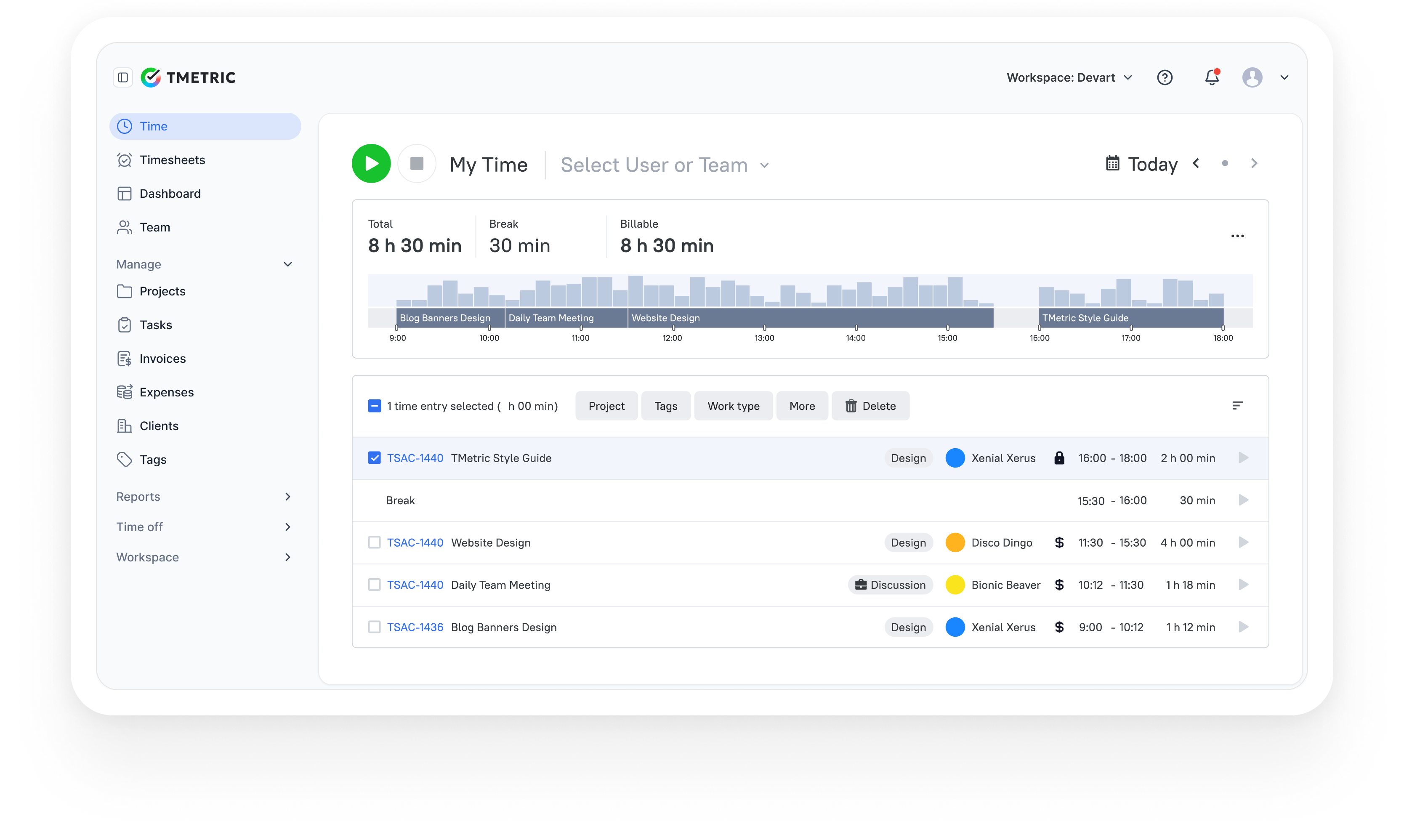
TMetric is a workforce productivity and employee scheduling platform that combines shift planning, time tracking, attendance monitoring, and reporting in one system. By allowing managers to configure work schedules and track actual hours worked, it provides clear visibility into staffing, productivity, and labor costs. This makes it particularly effective for service businesses and distributed teams where accurate scheduling and time control directly impact performance and expenses.
Highlights
| Category | Details |
| Company | Devart |
| Best for | SMBs, agencies, service businesses, distributed teams |
| Scheduling focus | Work hours, attendance, availability, workload visibility |
| Data sources | Time entries, projects, tasks, and employee activity |
| Platforms | Web, Windows, macOS, Linux, iOS, Android |
Key Features
- Configurable work schedules for teams or individual employees.
- Time tracking aligned with predefined work schedules.
- Time and attendance monitoring (clock-in/out, breaks, overtime).
- Management of leave and vacation requests.
- Centralized team dashboard with tasks, status, and activity insights.
- Employee productivity and performance monitoring.
- Detailed timesheets to support accurate payroll processing.
- Comprehensive reporting on worked hours, labor costs, and utilization.
- Integrations with project management platforms.
- Cross-platform applications for office, remote, and mobile teams.
Pros
- Aligns scheduling with real work hours and productivity metrics.
- Offers strong visibility into labor costs and team utilization.
- Consolidates scheduling, time tracking, and reporting in one solution.
- Quick onboarding with minimal training required.
- Scales well from small teams to expanding organizations.
- Includes a free plan option.
Cons
- Not built for advanced retail-style shift optimization.
- Does not include native GPS tracking for field teams.
- Limited advanced demand forecasting functionality.
Pricing
Free plan available for small teams. Paid plans start at approximately $5.83 per user/month (annual billing), with higher tiers offering advanced reporting, permissions, and team management capabilities.
“It’s easy to use and integrates smoothly into our daily routine. We especially appreciate how we can assign time to specific projects and clients, it's super helpful for reporting.” — G2 Reviewer
Deputy
⭐ 4.6/5 (G2)

Deputy is an end-to-end workforce management platform designed for hourly teams and shift-based businesses. It combines employee scheduling, time tracking, compliance management, communication, and payroll support in one system. With AI-powered forecasting and labor optimization tools, it helps organizations maintain the right staffing levels while controlling costs and meeting regulatory requirements, especially across multiple locations.
Highlights
| Category | Details |
| Company | Deputy |
| Best for | Retail, hospitality, healthcare, and multi-location operations |
| Scheduling focus | Shift planning, compliance, demand-based staffing |
| Data sources | Availability, labor rules, sales forecasts, time data |
| Platforms | Web, iOS, Android |
Key Features
- AI-driven scheduling and demand forecasting.
- Automated shift planning based on staff availability and workload demand.
- Time and attendance tracking with digital timesheets.
- Labor cost management and budgeting tools.
- Shift swapping and open shift coordination.
- Leave management and employee availability tracking.
- Compliance controls for breaks, overtime, and labor regulations.
- Team messaging and automated notifications.
- Integrations with payroll, HR, and POS platforms.
Pros
- High level of automation for complex shift-based operations.
- Purpose-built for hourly workforce management.
- Scales efficiently across multiple business locations.
- Built-in compliance support and labor cost oversight.
Cons
- Initial configuration may require time and setup effort.
- Pricing rises as the number of employees increases.
- Feature set may exceed the needs of small teams.
Pricing
Deputy provides tiered per-user pricing starting at approximately $5 per user/month (Lite), $6.50 per user/month (Core), and $9 per user/month (Pro), depending on included features.
Review
“Deputy is a vibrant solution that helps with shift scheduling, which in turn facilitates collaboration and a smoother workflow. The program is intelligent and supports accurate attendance tracking, and this is handled automatically.” — G2 Reviewer
When I Work
⭐ 4.4/5 (G2)
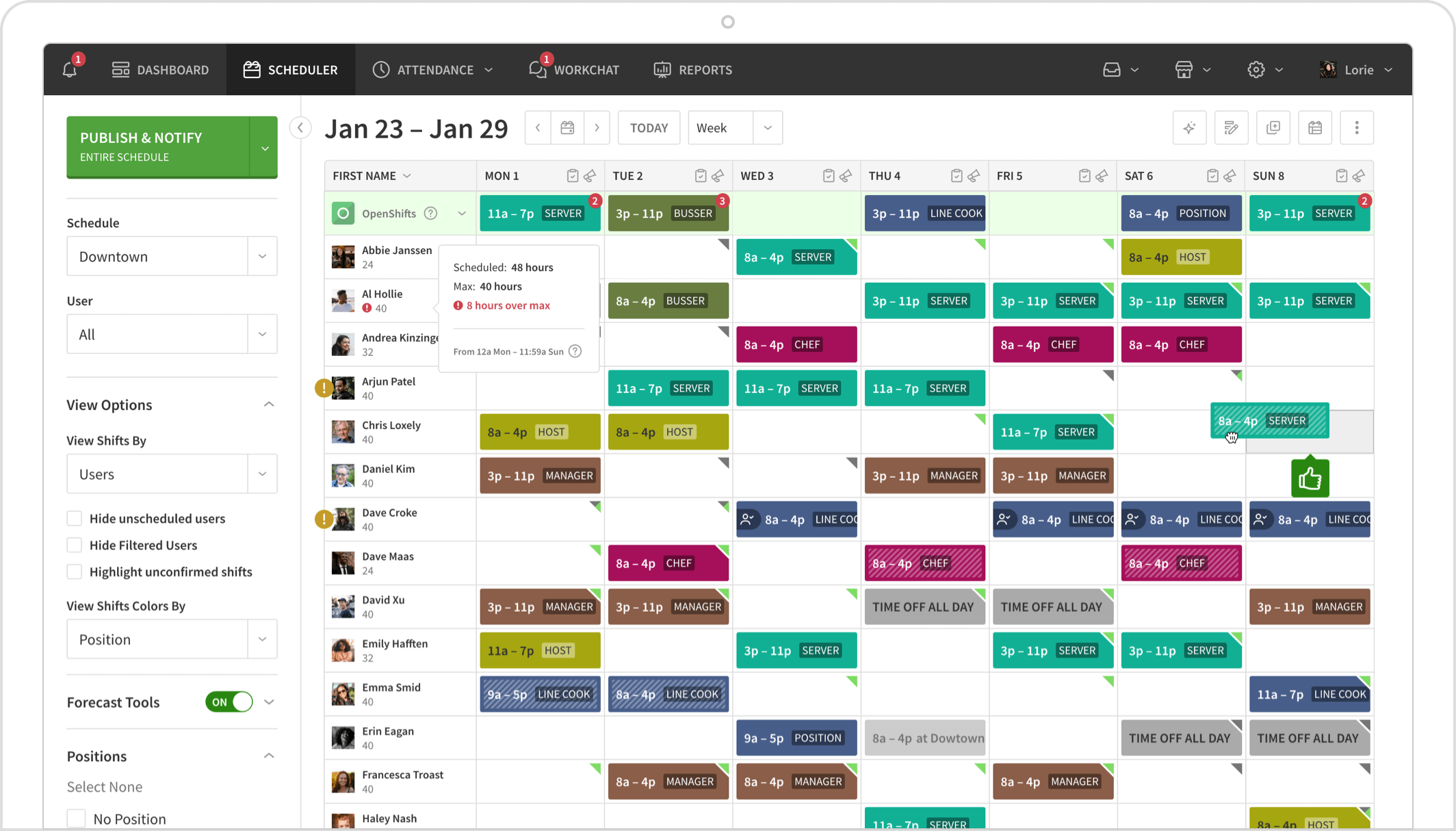
When I Work is a workforce scheduling and time-tracking platform designed specifically for hourly employees and shift-based teams. It combines scheduling, attendance tracking, team messaging, and labor insights in a mobile-first app that managers and staff can use anywhere. Its simplicity and rapid setup make it ideal for businesses moving away from manual planning while still needing real-time visibility and coordination across locations.
Highlights
| Category | Details |
| Company | When I Work |
| Best for | SMBs with hourly or shift-based staff |
| Scheduling focus | Shift planning, availability, communication |
| Data sources | Availability, time entries, shift assignments |
| Platforms | Web, iOS, Android |
Key Features
- Drag-and-drop schedule builder with reusable shift templates.
- Automatic scheduling based on employee availability and preferences.
- Shift publishing with real-time notifications.
- Availability management for team members.
- Shift swapping and open shift coordination.
- Time clock featuring GPS-verified clock-ins and geofencing.
- Time-off request submission and approval workflows.
- Integrated team messaging and announcement tools.
- Attendance tracking with labor analytics.
- Payroll system integrations.
- Support for multi-location workforce management.
Pros
- Simple setup and intuitive interface.
- Strong mobile app experience for managers and staff.
- Cost-effective pricing for smaller teams.
- Built-in communication tools enhance coordination.
- Grows easily from single-site to multi-location operations.
Cons
- Forecasting and analytics are less robust than enterprise-grade platforms.
- Limited customization for complex workforce planning needs.
- Reporting capabilities may not meet large enterprise requirements.
Pricing
Starts at approximately $2.50 per user/month (single location) and $5 per user/month (multi-location), depending on selected features.
Review
“What I like best about When I Work is how user-friendly and efficient it is for managing schedules and communication.” — G2 Reviewer
Homebase
⭐ 4.4/5 (G2)
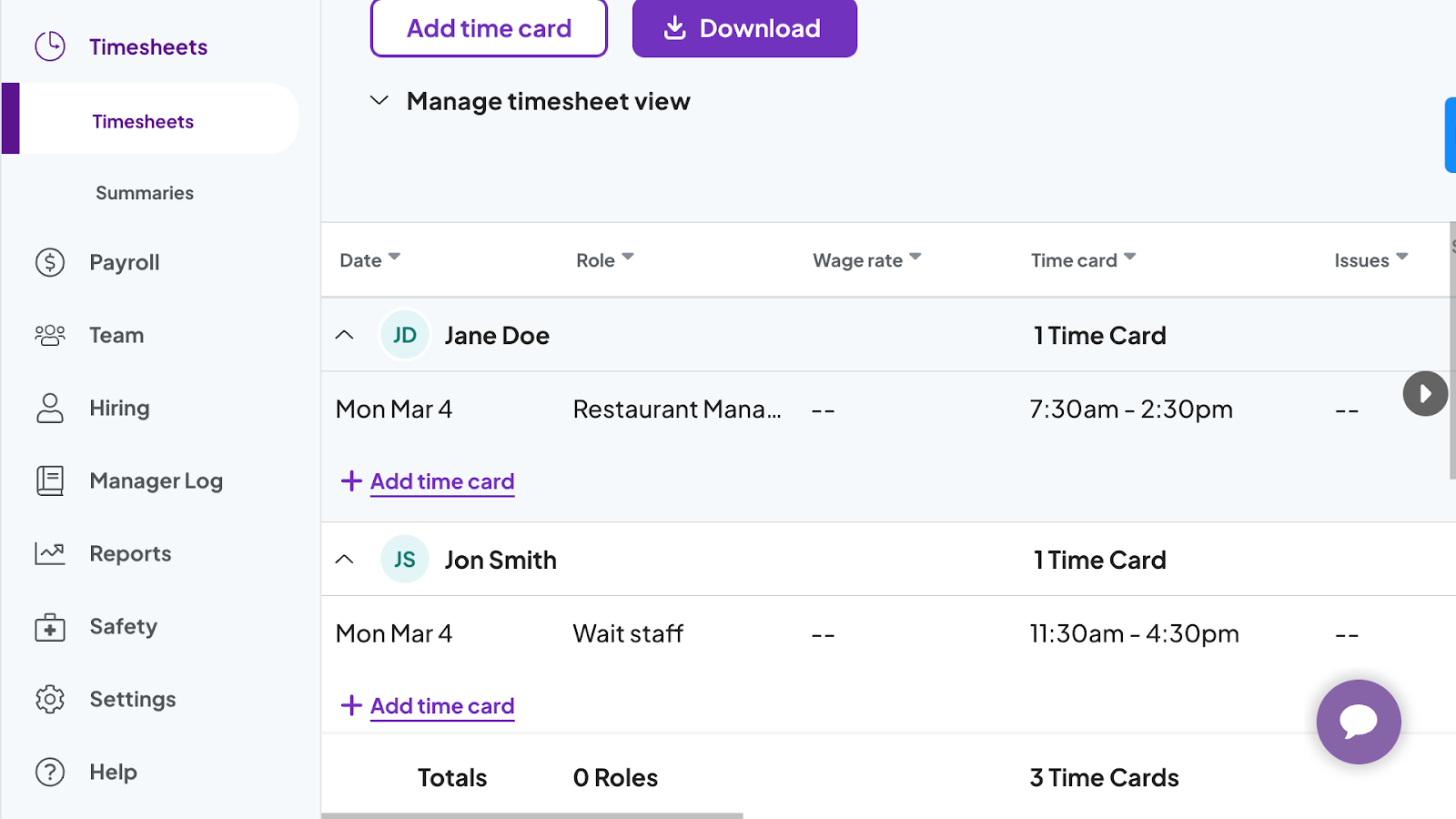
Homebase is an all-in-one workforce management platform built specifically for small businesses with hourly staff. It combines employee scheduling, time tracking, payroll, hiring, HR tools, and team communication in a single app. Its per-location pricing model makes it especially cost-effective for businesses with many part-time employees working at one site, such as restaurants, retail stores, and local service providers.
Highlights
| Category | Details |
| Company | Homebase |
| Best for | Single-location SMBs with hourly staff |
| Scheduling focus | Shift planning, attendance, team coordination |
| Data sources | Availability, roles, labor costs, time entries |
| Platforms | Web, iOS, Android |
Key Features
- Drag-and-drop schedule builder.
- Automated scheduling based on availability, roles, and labor costs.
- Open shift management and shift swapping.
- Time clock with break and overtime monitoring.
- PTO and time-off request handling.
- Built-in team messaging and company announcements.
- Employee hiring and onboarding tools.
- Labor cost visibility and budgeting insights.
- Integrated payroll available as a paid add-on.
- Integrations with POS and other business systems.
- Mobile access for both managers and employees.
Pros
- Generous free plan designed for small teams.
- Clean interface with quick setup.
- Strong internal communication capabilities.
- Cost-effective for companies with many part-time workers.
- Combines scheduling, payroll, and HR tools within one platform.
Cons
- Costs can increase significantly for businesses with multiple locations.
- Payroll functionality requires a paid upgrade.
- Advanced forecasting and analytics are more limited than enterprise-level solutions.
Pricing
Uses per-location pricing. Basic is free (1 location, up to 10 employees), while paid plans start at approximately $24, $56, and $96 per location/month for Essentials, Plus, and All-in-One tiers.
Review
“I really like how customizable it is. I also love that I can copy and paste previous schedules, which helps me work more efficiently.” — G2 Reviewer
Connecteam
⭐ 4.6/5 (G2)

Connecteam is a workforce management platform designed specifically for deskless and field-based employees, including construction crews, security personnel, logistics teams, and maintenance staff. It combines scheduling, time tracking, communication, task management, and HR tools in a mobile-first app built for employees who rarely work at a desk. This makes it particularly valuable for organizations managing distributed teams across job sites or locations.
Highlights
| Category | Details |
| Company | Connecteam |
| Best for | Field teams and deskless workforces |
| Scheduling focus | Shift planning, job-site coordination |
| Data sources | Availability, GPS data, task assignments |
| Platforms | iOS, Android, Web |
Key Features
- Drag-and-drop shift scheduling with reusable templates.
- Employee availability tracking and shift swapping.
- GPS-enabled time clock with geofencing.
- Mobile task management with checklists and workflows.
- Built-in team messaging and announcements.
- Time-off request management.
- Digital forms, onboarding, and training tools.
- HR capabilities for policies, documents, and compliance.
- Real-time updates for distributed teams.
- Multi-location workforce coordination from a single platform.
Pros
- Strong mobile functionality designed for field teams.
- Extensive feature set beyond basic scheduling.
- Reliable GPS-based attendance tracking.
- Well-suited for multi-site organizations.
- Reduces the need for multiple workforce management apps.
Cons
- Feature-rich interface may feel complex initially.
- Pricing increases when advanced modules are added.
- May be more robust than necessary for office-based teams.
Pricing
Starts at approximately $29/month for up to 30 users, with higher tiers around $49 and $99/month. Additional per-user fees apply beyond 30 users, while enterprise plans offer custom pricing.
Review
“Connecteam is really easy to use and makes managing a team much less stressful. I like that scheduling, time tracking, and communication are all in one place, so nothing slips through the cracks.” — G2 Reviewer
Sling
⭐ 4.4/5 (G2)
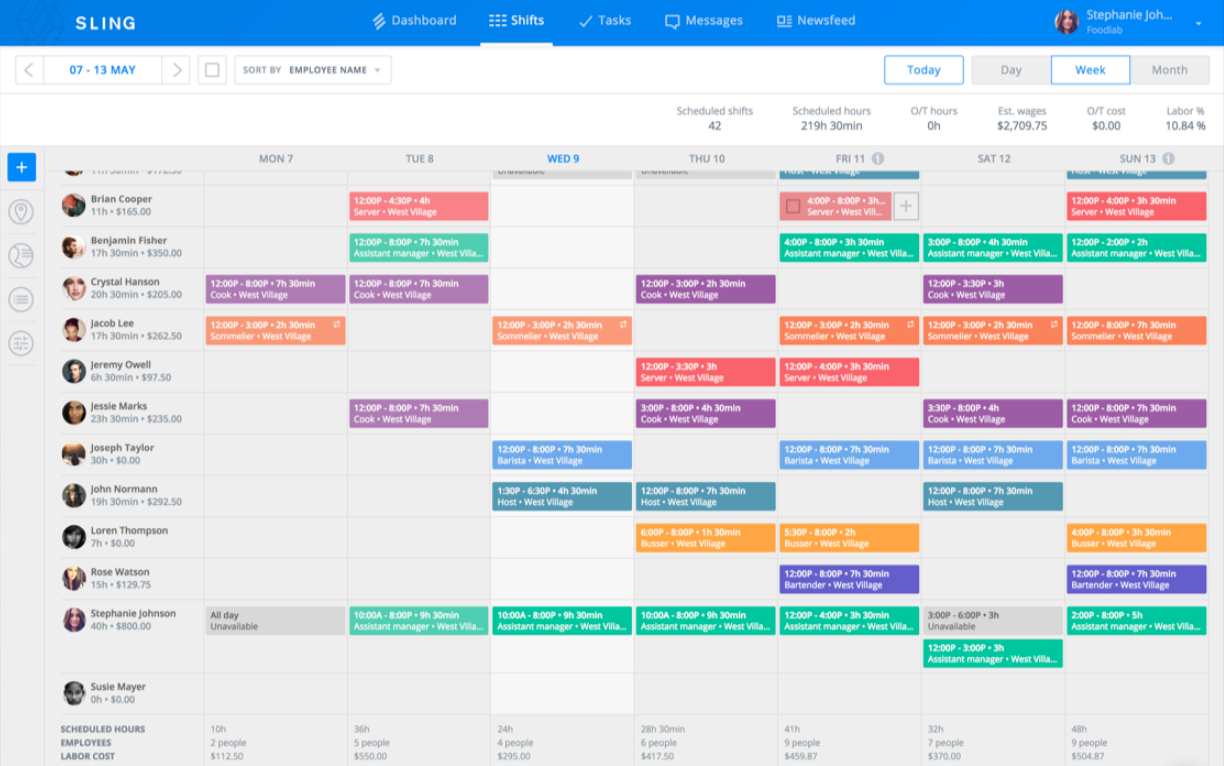
Sling is employee scheduling software built for shift-based businesses such as retail stores, restaurants, hotels, and service operations. It combines scheduling, time tracking, communication, and labor cost management in a single platform, helping managers coordinate hourly staff efficiently while keeping employees informed. Its straightforward interface and low entry cost make it especially appealing to small and mid-sized teams that need practical scheduling tools without enterprise complexity.
Highlights
| Category | Details |
| Company | Toast (Sling) |
| Best for | Retail, hospitality, and shift-based SMBs |
| Scheduling focus | Shift planning and labor cost control |
| Data sources | Availability, time entries, labor data |
| Platforms | Web, iOS, Android |
Key Features
- Drag-and-drop schedule creation with reusable templates.
- Employee availability tracking and shift swapping.
- Open shifts with shift pickup options.
- Time clock with attendance monitoring.
- Labor cost optimization and overtime tracking.
- Management of time-off requests.
- Built-in messaging, announcements, and team newsfeed.
- Task assignment by shift or employee.
- Automated notifications and reminders.
- Support for scheduling across multiple locations.
Pros
- Industry-focused features for retail and hospitality teams.
- Affordable freemium pricing model.
- Strong internal communication tools.
- Quick deployment for small teams.
- Helps monitor and control labor costs.
Cons
- Customization options and integrations are limited.
- Reporting capabilities are less advanced than enterprise solutions.
- Not built for very large or highly complex organizations.
Pricing
Free plan available (up to 30 users). Paid plans start at approximately $1.70 per user/month (Premium) and $3.40 per user/month (Business), depending on the included features.
Review
“I appreciate how easy it is to use; it was extremely helpful for managing my work schedule. I enjoyed the variety of features, and I found myself using it every day.” — G2 Reviewer
Now that you’ve seen the leading options, the next step is understanding how to choose the best software for employee scheduling solution for your specific business needs.
How to choose the best employee scheduling software
The best scheduling software is not the one with the most features, but the one that fits your workforce model, operational complexity, and existing systems. A solution that works for a small retail store may fail in a multi-location operation or a distributed service team.
Core features to evaluate
Focus on capabilities that directly improve scheduling accuracy and labor efficiency:
- Automated schedule generation
- Availability management
- Shift swaps and approval workflows
- Time tracking integration
- Labor cost visibility
- Compliance safeguards
Organizations with hourly staff benefit most from tools that reduce overtime, prevent understaffing, and ensure adequate coverage during peak periods.
Integration requirements
Scheduling rarely operates in isolation. The software should connect smoothly with systems that manage payroll, HR, or operations.
Consider integrations with:
- Payroll systems
- HR platforms
- POS systems
- Project management tools
- Accounting software
Strong integrations reduce manual data entry, minimize errors, and create a consistent flow of workforce data across the business.
Pricing and scalability
Pricing structures vary significantly across providers, and the lowest entry price is not always the most economical long-term option.
Common models include:
- Per-user pricing that scales with workforce size.
- Per-location pricing suited to single-site operations.
- Tiered plans that support gradual growth.
Evaluate total cost as your team expands, not just the starting price.
UX and adoption considerations
Even the most powerful platform will fail if employees avoid using it. Ease of use and accessibility often determine real-world success.
Prioritize:
- Mobile accessibility for frontline workers.
- Clear, intuitive interfaces.
- Minimal training requirements.
- Reliable notifications and updates.
Solutions with strong mobile apps typically achieve faster adoption, especially in shift-based or field environments.
The Takeaway
Employee scheduling software has grown far beyond basic shift planning. Today’s tools help businesses coordinate teams, control labor costs, and keep operations running smoothly by connecting schedules with attendance and payroll data.
No single solution works for everyone. A restaurant, a construction crew, and a distributed office team all face different scheduling challenges and need different levels of control and flexibility.
However, TMetric stands out as a practical, balanced option for organizations that want time tracking software for projects, and scheduling tied directly to real work and costs. By combining planning, time tracking, reporting, and payroll support in one system, it gives managers a clear view of how their teams operate day to day.
Try TMetric to gain full control over scheduling, productivity, and labor costs in one platform.