Best Time Clock Apps for Small Business and Teams
Not all time clock apps actually save time. Some create more work than manual timesheets. This guide breaks down the best time clock apps for small teams and shows how tools like TMetric, Clockify, and Connecteam handle employee tracking, reports, and payroll preparation.

By Dereck Mushingairi | April 14, 2026
Why businesses use time clock apps instead of manual timesheets
Did you know that one out of three employers make mistakes when paying their employees? And keeping track of time by hand can add 1–8% to the total cost of payroll. Time clock apps fix this by automatically keeping track of clock-ins, attendance, and payroll-ready reports.
This guide compares the best time clock apps for small business teams, helping you choose the right time clock app for small business use.
Our top picks:
Time clock apps now substitute paper timesheets and keep track of when workers actually start and finish their work. Using these tools, businesses automatically get accurate records, so they don't have to spend time looking for missing entries or fixing timesheet mistakes.
It seems easy to keep track of time by hand, but it quickly becomes hard when a team grows. People forget to write down their hours. Managers spend time looking for entries that are missing. Someone notices that the numbers don't add up by the time payroll runs.
Time clock apps fix most of that. Instead of filling out sheets at the end of the week, employees clock in and out digitally. The system records when work actually starts and stops, and those entries go straight into centralized timesheets. For managers, that means fewer corrections and clearer payroll records.
Most modern time clock apps for employees also include features like:
- Mobile time clock apps for clock-in and clock-out tracking.
- Automatic timesheet generation.
- Payroll-ready reports.
- Employee attendance monitoring.
- Integrations with project management or accounting tools.
Some tools also help reduce employees clocking in for each other using GPS, geofencing, or device-based clock-ins. Not perfect, but easier than fixing spreadsheets every week.
Why trust our software reviews of time clock apps
Not all time clock software and apps work well once a team starts using them. Some tools look great on paper but end up creating more work for managers or generating reports that aren't very helpful for payroll. The time clock apps in this guide were looked at based on how they perform in real business use, not simply the number of features.
Each tool was reviewed using a few practical things:
- Ease of clock-in and clock-out: Employees should be able to log time quickly without confusing steps or long setup.
- Accurate reporting: Timesheets and reports should actually work for payroll, attendance tracking, and basic workforce insights.
- Mobile accessibility: Many teams work remotely or on job sites, so support for a mobile time clock app matters.
- Team management features: Good time clock apps for employers include approvals, overtime rules, attendance tracking, and basic workforce controls.
- Pricing transparency: Small businesses need software with pricing that's clear and easy to understand as teams grow.
The idea is simple: highlight time clock software and apps that actually help businesses track time and manage teams, not simply tools with long feature lists.
List of the best time clock apps
Below are some of the best time clock apps used by small businesses and growing teams to track employee hours, manage attendance, and prepare payroll.
1. TMetric
⭐ 4.6/5 (G2)

Best for: Small businesses, agencies, consultancies, and teams that need payroll-ready time tracking with project visibility.
Price: Free for up to 2 users; paid plans start at $5.83/user/month (annual billing).
Available on: Web, Windows, macOS, Linux, iOS, Android.
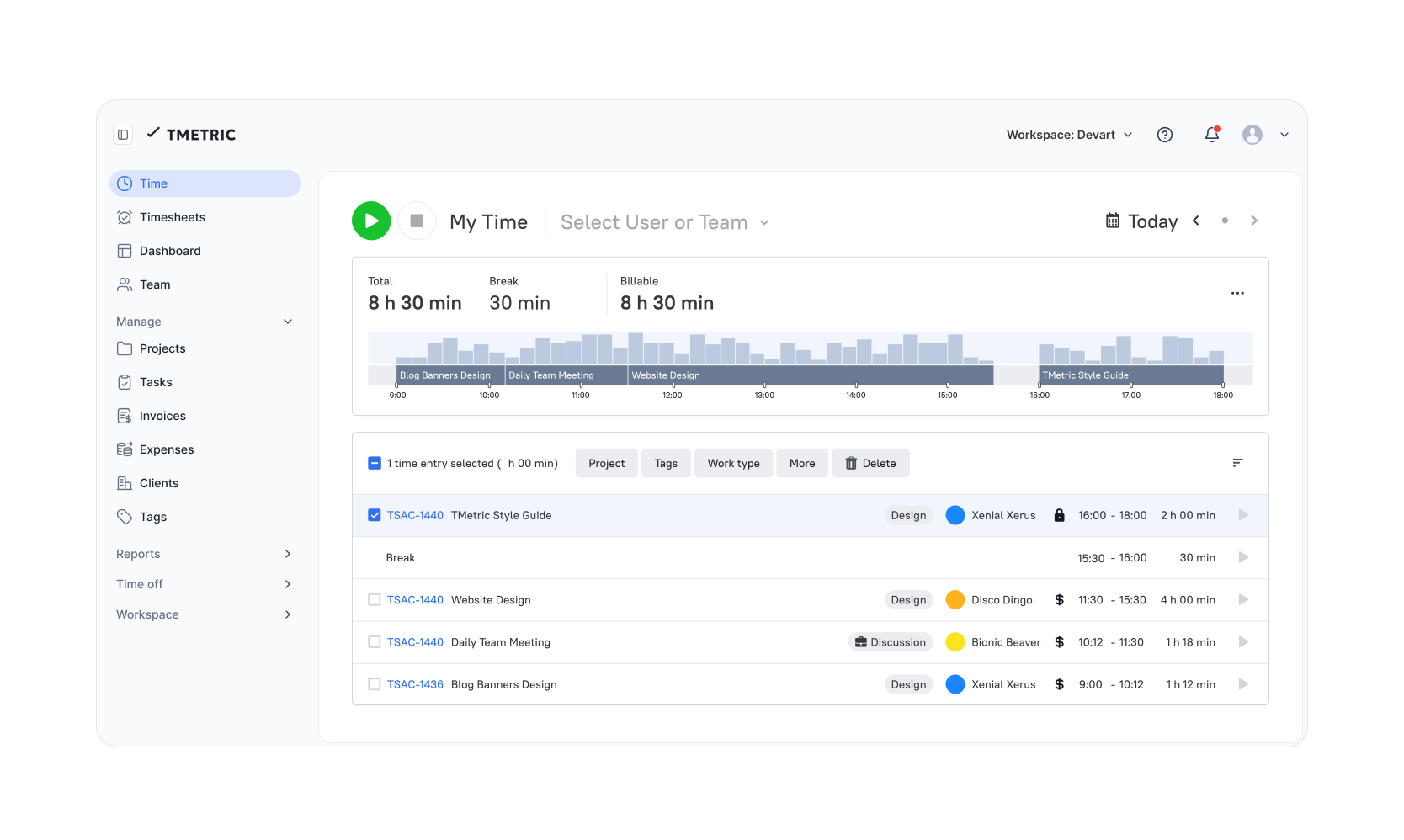
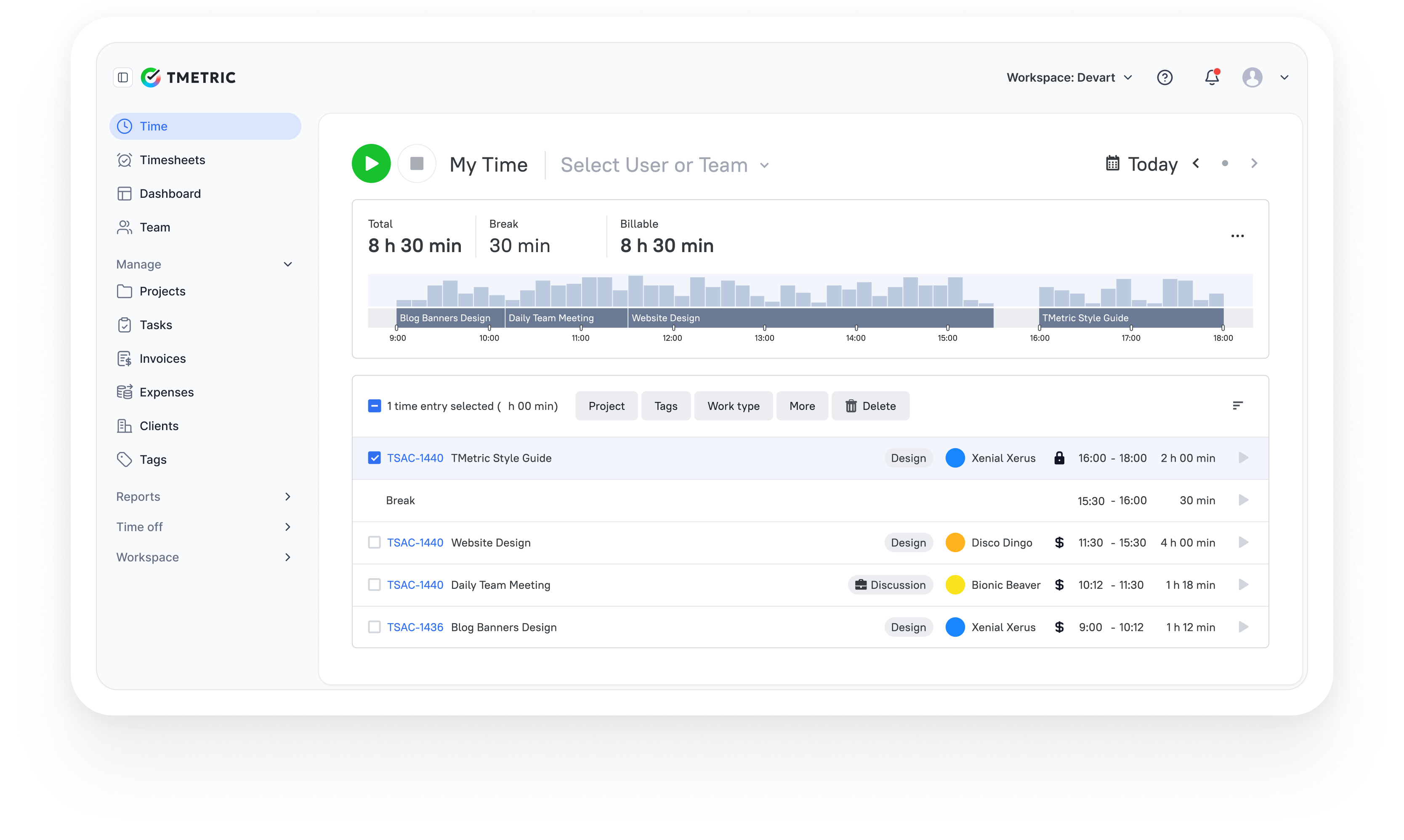
TMetric is a well-known employee time clock app. It helps businesses keep track of work hours, attendance, and make payroll or billing reports. Employees keep track of time by starting and stopping tasks, and the system does the math for them. It also connects daily time tracking to projects, which lets managers see where time goes and use the information for billing or planning workloads.
TMetric is a popular time tracking and employee time clock app that helps businesses record work hours, manage attendance, and create reports for payroll or billing. Employees track time by starting and stopping tasks, and the system calculates total hours automatically. It also links daily time tracking with projects, so managers can see where time goes and use the data for billing or workload planning.
Overview
| Category | Details |
| Company | Devart |
| Reporting focus | Billable hours, project profitability, and team productivity |
| Data sources | Time entries, billable rates, tasks, projects |
| Tracking method | Timer-based tracking and manual time entries |
Key Features
- Track time with a timer or log it manually.
- Track time by project or task.
- Timesheets created automatically, with approvals.
- Set billable rates and create invoices from tracked time.
- Reports showing how time is spent.
- Activity tracking for basic productivity insights.
- Time-off and leave tracking.
- Expenses linked to projects.
- Apps and browser extensions, including time clock apps for iPhone, Android, and desktop.
Pros
- Easy to learn, most teams get started quickly.
- Reports make it easier to see billable hours and project progress.
- Combines time tracking, billing, and productivity data in one place.
- Flexible tracking — start a timer or enter time later.
- Pricing works well for freelancers and smaller teams.
Cons
- Does not include some of the management features you'd see in full HR platforms.
- Screenshot monitoring is available, but not every team is comfortable using that.
Pricing
TMetric is one of the standout free time clock apps for small businesses. It gives growing teams essential features at no cost. Paid plans start with the Professional plan (from about $7 per user per month).
Review
"We like that with a few clicks, my team can log time with TMetric's user-friendly interface, and that reports guarantee billing on the time spent." — G2 Reviewer
2. Connecteam
⭐ 4.6/5 (G2)
Best for: Deskless teams, retail, hospitality, construction, and field service businesses.
Price: Free for up to 10 users; paid plans start at $29/month for up to 30 users.
Available on: Web, iOS, Android, tablet kiosk mode.
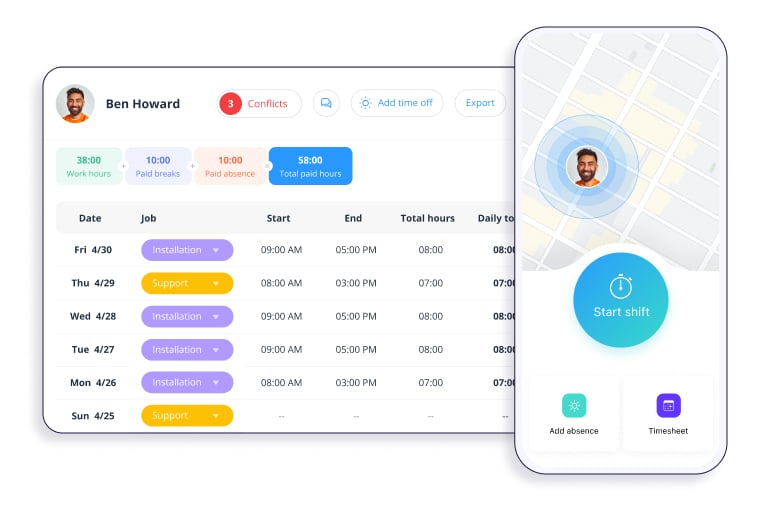
Connecteam is a workforce management platform that includes a mobile time clock app for tracking employee work hours and attendance. Teams can clock in from their phones or a shared kiosk device while managers monitor attendance, approve timesheets, and prepare payroll reports.
Overview
| Category | Details |
| Company | Connecteam |
| Reporting focus | Attendance, payroll hours, overtime, and workforce activity |
| Data sources | Clock-in/out events, schedules, jobs, PTO records |
| Tracking method | Mobile clock-in, GPS tracking, kiosk clock-in, and manual timesheets |
Key Features
- Mobile clock in apps for employees via smartphone.
- GPS location tracking and geofencing for job sites.
- Shared kiosk clock-in using tablets or on-site devices.
- Real-time attendance monitoring and alerts.
- Shift scheduling with planned vs actual hours tracking.
- Automated timesheets with approval workflows.
- Break tracking and overtime rule management.
- PTO and absence tracking.
- Timesheet exports for payroll processing.
Pros
- It's built with mobile teams in mind, so it works well for deskless workers.
- GPS tracking and geofencing help keep clock-ins accurate.
- Combines time tracking, scheduling, and team communication in one place.
- Kiosk clock-ins work well for shared job sites.
- Automated timesheets make payroll a bit easier to prepare.
Cons
- The interface can feel a little busy for very small teams.
- Might feel heavier than simple time tracking apps if you simply need basic clock-ins.
Pricing
Connecteam offers a free plan for up to 10 users. Paid plans start at $29 per month for up to 30 users, with higher tiers adding advanced operations and HR features.
Review
"We needed to have a time clock for multiple employees who work at multiple locations, and we are in California, so there was a compliance piece as well. Connecteam hit all the buttons for us." — G2
3. Timeero
⭐ 4.8/5 (G2)
.webp)
Best for: Field teams, construction crews, delivery teams, and businesses needing GPS time tracking.
Price: Free trial available; paid plans start at $4/user/month.
Available on: Web, iOS, Android.
Timeero is a GPS time tracking and employee time clock app platform designed for businesses with mobile or field-based teams. Employees clock in through a mobile app while the system records timestamps, location data, and job details. This tool is widely regarded as one of the best apps for construction time clock needs.
Overview
| Category | Details |
| Company | Timeero |
| Reporting focus | Work hours, mileage tracking, and field workforce activity |
| Data sources | Clock-in events, GPS location data, mileage logs, job records |
| Tracking method | Mobile clock-in with GPS tracking and geofencing |
Key Features
- Mobile clock-in and clock-out via smartphone app.
- GPS-based employee location tracking.
- Geofencing for job sites and work locations.
- Mileage tracking with route history.
- Digital time cards and automated timesheets.
- Custom fields for job or project data.
- Real-time employee location monitoring.
- Offline time tracking with automatic sync.
- Detailed reports for payroll and workforce analysis.
Pros
- GPS tracking works well for field teams.
- Tracks mileage and routes pretty accurately.
- Mobile-first design, easy to use on the go.
- Helpful when managing remote or mobile workers.
- Makes it easier to see who was where and when.
Cons
- Not as strong on desktop features as office-focused tools.
- Workforce management tools are fairly basic compared to full HR platforms.
Pricing
Timeero offers a 14-day free trial. Paid plans typically start around $5–$8 per user per month, depending on features such as mileage tracking, GPS monitoring, and scheduling.
Review
"Timeero has been incredibly easy to use from day one. The interface is simple and intuitive, making onboarding quick and painless." — G2
4. Clockify
⭐ 4.5/5 (G2)
Best for: Startups, freelancers, and small teams looking for a free time clock app with unlimited users.
Price: Free plan available for unlimited users; paid plans start at $3.99/user/month (annual billing).
Available on: Web, Windows, macOS, Linux, iOS, Android.
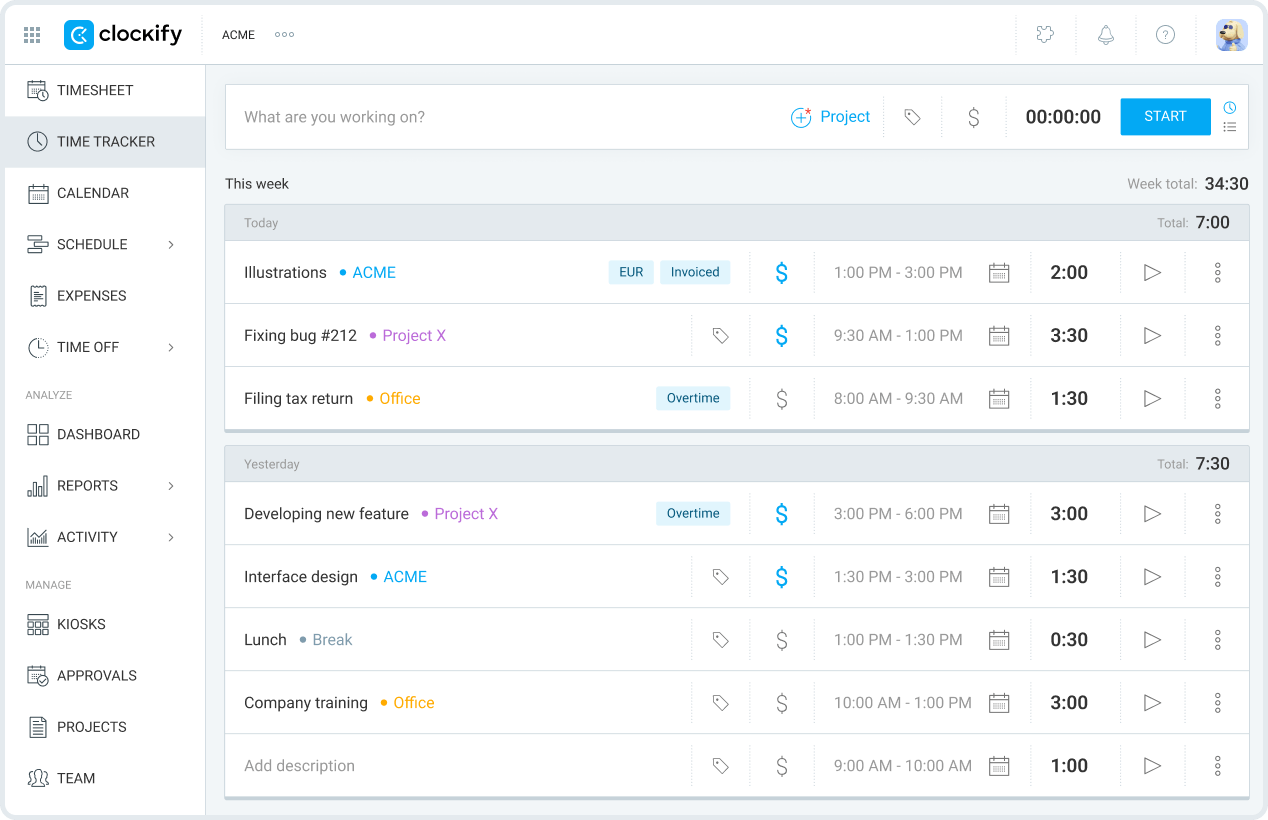
Clockify is a widely used time tracking and timesheet platform that helps teams record work hours across projects and tasks. Its generous free time clock apps tier and cross-platform apps make it a popular choice for growing teams and distributed workforces.
Overview
| Category | Details |
| Company | CAKE.com |
| Reporting focus | Productivity, billable hours, project costs, and team activity |
| Data sources | Time entries, projects, tasks, billable rates |
| Tracking method | Timer tracking, timesheets, calendar logging, kiosk clock-ins |
Key Features
- Real-time timer for tracking work hours.
- Weekly timesheet entry for manual time logging.
- Calendar-based time management.
- Auto tracker for apps and websites used.
- Shared kiosk clock-in for teams.
- Project tracking with budgets and estimates.
- Reports for productivity, time allocation, and costs.
- Scheduling for shifts and assignments.
- Invoicing from billable time entries.
- Expense tracking linked to projects.
Pros
- Free time clock apps plan with unlimited users.
- Simple interface, easy to get started.
- Several ways to track time (timer, timesheet, kiosk).
- Solid reporting and project tracking.
- Works on many devices and platforms.
Cons
- Advanced reporting and management tools require paid plans.
- Interface may feel basic compared to enterprise workforce platforms.
Pricing
Clockify offers a free time clock app plan with unlimited users and projects, which is one of its main advantages. Paid plans start with Basic and Standard tiers, adding features such as time approval, invoicing, and advanced reporting.
Review
"It is the time control and tracking tool that we use in the company, and in my area, I use it to keep track of the activities and times of my team both in the main office and in the remote offices." — G2
5. QuickBooks Time
⭐ 4.5/5 (G2)
Best for: Small businesses already using QuickBooks for payroll and accounting.
Price: Paid plans start at $10/user/month + base fee, depending on the QuickBooks plan.
Available on: Web, iOS, Android, tablet kiosk mode.
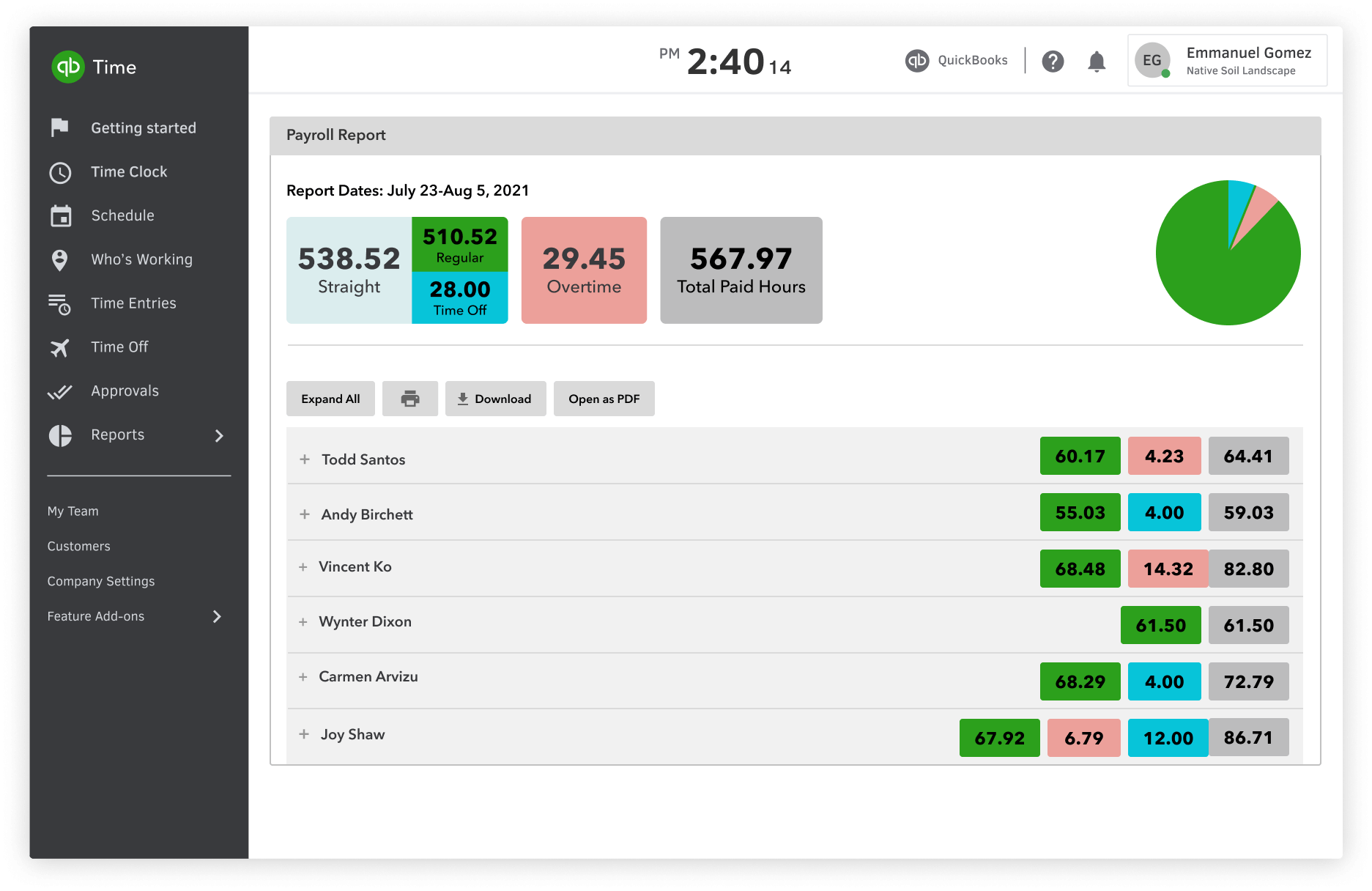
QuickBooks Time is a time tracking app that lets businesses record employee hours, manage timesheets, and keep track of project work from mobile or web. Employees can clock in from their phones or shared kiosks, while managers review schedules and approve timesheets. As one of the best online time clock options, it connects with QuickBooks accounting and payroll to make payroll and job cost tracking easier.
Overview
| Category | Details |
| Company | Intuit |
| Reporting focus | Payroll hours, project tracking, and team activity |
| Data sources | Clock-in events, project hours, timesheets, schedules |
| Tracking method | Mobile clock-in, web dashboard tracking, and kiosk clock-ins |
Key Features
- Mobile clock-in and clock-out for employees.
- Offline time tracking that syncs later.
- Timesheet submission and approvals.
- Project tracking with budgeted vs actual hours.
- Shift scheduling and job assignments.
- Time-off tracking and leave requests.
- Kiosk clock-in using shared tablets or devices.
- Basic activity feed for team updates.
- Payroll-ready timesheet exports.
Pros
- Works smoothly with QuickBooks accounting and payroll.
- Makes payroll prep easier using tracked time.
- Simple mobile clock-in for employees.
- Helpful project and job tracking tools.
- Familiar interface if you already use QuickBooks.
Cons
- Really makes the most sense if you're already using QuickBooks.
- Fewer analytics features than some dedicated workforce tools.
Pricing
QuickBooks time tracking usually comes through QuickBooks Time or Workforce integrations with QuickBooks Online and payroll plans. Pricing varies depending on the QuickBooks plan and the number of users.
Review
"What I like best about QuickBooks Time is how user-friendly it is. It makes tracking hours simple and quick, especially with the mobile app." — G2
Comparison table: Best time clock apps
| Tool | Best for | Mobile app | Reporting | Free plan/trial | Best fit for |
| TMetric | Small business teams, agencies | Yes | Strong | Free plan (up to 2 users) | Payroll-ready time tracking and reporting |
| Connecteam | Deskless and shift teams | Yes | Good | Free plan available | Workforce operations and mobile staff |
| Timeero | Construction and field teams | Yes | Good | Trial available | Location-based workforce tracking |
| Clockify | Budget-conscious teams | Yes | Strong | Free plan available | Basic team time tracking |
| QuickBooks Time | Payroll-connected businesses | Yes | Strong | Trial available | Time tracking integrated with payroll |
How to choose the right time clock app
The best time clock app depends on how your team actually works. Start with how people record time, and what you plan to do with that data afterward.
Choose based on team type
Different teams track time in different ways. Office teams usually stick to timesheets and project reports. Remote teams often rely on browser extensions or integrations with other tools.
Field teams are different. Construction crews or service teams often need time clock apps for construction with mobile clock-ins, GPS checks, and sometimes geofencing.
In most cases, the best clock-in and out app is simply the one that fits how your team already works.
Look for payroll-ready reporting
Time tracking only helps if it works for payroll. A good system should generate simple timesheets showing total hours, overtime, and project time so managers can review them before payroll runs.
Check device compatibility
People need an easy way to clock in. Field workers often use mobile time clock apps, while office teams may rely on desktop tracking or shared tablets. The best time clock apps usually support more than one way to track time.
Compare free and paid plans
Some free time clock apps work fine for small teams, but they usually limit reports, integrations, or the number of users. The best free time clock app options still handle basic clock-in and clock-out well.
As teams grow, paid plans usually add stronger reporting and payroll integrations. Businesses looking for the best clock-in app for small businesses should compare both free and paid options before deciding.
Takeaway: Which time clock app is best?
There's no single best time clock app for small businesses. The right one depends on how your team works and what you need from it.
TMetric works well for teams that want accurate tracking, project visibility, and payroll-ready reports. Connecteam fits deskless teams that rely on scheduling and workforce coordination. Timeero is a strong option for field teams that need GPS tracking, making it one of the best apps for construction time clock use cases. Clockify is one of the best free time clock apps for startups and small teams, while QuickBooks Time works well for businesses already using QuickBooks.
For teams that want a balanced platform, TMetric remains a practical choice as the best employee time clock app for growing businesses.
Try TMetric to track time accurately, monitor productivity, and generate payroll-ready reports.
Create your free account now.
3,000+ companies, teams, and individuals worldwide use TMetric to track time, manage work, and bill with confidence.