Best Time Tracking App for Contractors
Scaling a contractor business without proper time tracking is like building on sand.
It works at the beginning, until more clients, more jobs, and more workers turn your operations into chaos. The teams that grow fast don’t wait for that moment… they fix it early. Read more to avoid the mistakes most teams miss.

By Dereck Mushingairi | April 19, 2026
Contractor businesses often track hours across multiple jobs, clients, and team members, which makes billing and payroll harder to manage accurately. Studies show that about 33% of employers make payroll errors, often caused by manual time tracking and incomplete records.
This guide compares the best time tracking software for contractors in 2026, helping you choose the right tool based on reporting, team oversight, and billing support.
Our top picks
How to choose the best time tracking software for contractors
A simple timer isn't enough for contractor businesses. Teams often work at more than one job site, keep track of hours for different clients, and need accurate time records for payroll and billing. The right tool should help managers keep track of labor costs, check team hours, and make sure that records are accurate for payroll and billing.
When comparing contractor time tracking tools, look for platforms that support:
- Job and client-based tracking, so hours connect to specific projects or work.
- Mobile time capture for contractors working across job sites or remote locations
- Timesheet approvals that let managers review hours before payroll or billing
- Reporting and labor cost visibility across teams, projects, and time periods
- Billing or payroll integrations to simplify invoicing and payment processing
The tools in this guide support different contractor workflows. Some focus on GPS-based tracking for field teams, while others emphasize project reporting, billing workflows, or payroll integration.
Why trust our software reviews
We looked at contractor time tracking tools using the same criteria that managers use to compare software in real life. We looked at each platform to see how easy it was to use, how well it supported contractor-specific workflows, how well it allowed teams to keep an eye on things, and how good the reporting was.
The evaluation looked at the following things:
| Evaluation factor | What we looked for |
| Team adoption | Ease of onboarding, simple time entry, and minimal training requirements |
| Mobile clock-in | Support for mobile apps, field tracking, and real-time time capture |
| Timesheet approvals | Manager reviews workflows before payroll or billing |
| Reporting quality | Visibility into billable hours, project costs, and team productivity |
| Project/job tracking | Ability to track time by job, client, or task |
| Pricing transparency | Clear pricing tiers, free plans, and trial availability |
| Contractor workflow support | Suitability for teams working across multiple projects or locations |
| Verified user feedback | Ratings and reviews from platforms such as G2 |
Timer features alone were not used as the primary ranking criterion. Greater weight was placed on management visibility, reporting accuracy, and practical operational value for contractor teams.
List of the best time tracking software for contractors
Each tool below is reviewed using the same criteria: time capture method, team management features, reporting quality, billing support, and pricing. Some products suit solo contractors better, while others are built for managers overseeing multiple workers, locations, or client projects.
TMetric appears near the top as a reliable option for contractor teams that need accurate tracking, detailed reporting, and billing support alongside team oversight.
1. TMetric
⭐ 4.6/5 (G2)

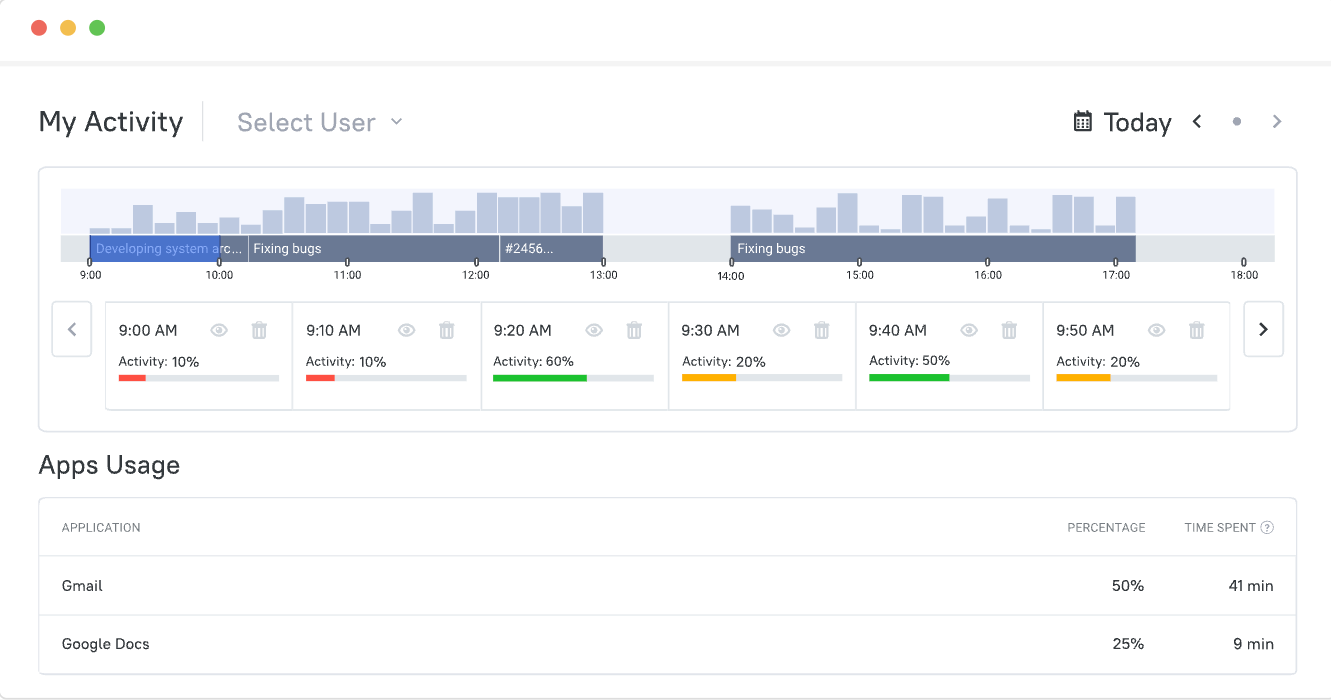
TMetric is a time tracking tool that helps contractors and teams keep track of how many hours they work on different projects, tasks, and clients. It links time tracking with project reporting, billable rates, and invoicing. This lets businesses keep an eye on their team's workload, stay within their project budgets, and make sure their records are correct for billing or payroll preparation. Contractors can log their time in a way that works for them, whether they do it manually or with a timer.
Overview
| Category | Details |
| Time capture methods | Timer tracking and manual time entry |
| Project tracking | Track time by project, task, client, and team member |
| Billing support | Billable rates and invoices generated from tracked time |
| Reporting | Project reports, billable hours, productivity insights |
Key Features
- Timer-based and manual time entry.
- Project and task tracking with time allocation by job or client.
- Automatic timesheet generation with approval workflows.
- Billable rate tracking and invoice creation.
- Reports for projects, billable hours, and productivity.
- Project budgets and cost tracking.
- Time-off tracking and leave management.
- Expense tracking linked to projects.
- Integrations with tools such as Jira, Trello, Asana, Google Calendar, and more.
Pros
- Tracks time by project, task, client, and team member.
- Billable rate tracking with invoice creation from tracked time.
- Timesheet submission and manager approval workflows.
- Reports covering projects, billable hours, productivity, and budgets.
- Free plan available for small teams.
- Cross-platform apps for desktop, mobile, and browser extensions.
Cons
- Limited workforce management tools compared to full HR or scheduling platforms
- Optional activity monitoring may not suit all contractor teams
Pricing
TMetric offers a Free plan for up to two users with unlimited projects and basic reporting. Paid plans start with the Professional plan at around $7 per user per month (annual billing).
Review
"It's easy to use and integrates smoothly into our daily routine. We especially appreciate how we can assign time to specific projects and clients." — G2
2. Clockify
⭐ 4.5/5 (G2)
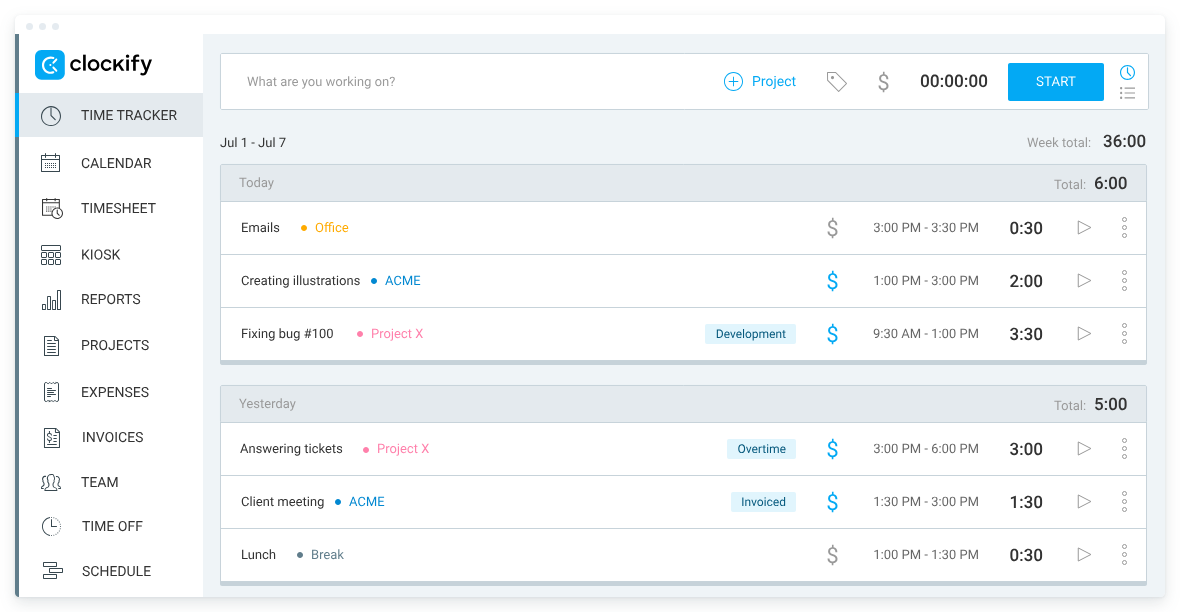
Clockify is a popular time tracking and timesheet tool that lets teams and contractors keep track of the hours they work on different projects, tasks, and clients. Users can keep track of time by using a one-click timer, entering hours by hand, or filling out timesheets.
Clockify is a popular choice for small contractor teams that need a simple way to keep track of billable hours because its free plan lets them have as many users and projects as they want.
Overview
| Category | Details |
| Time capture | Timer tracking, manual time entry, and timesheets |
| Project tracking | Track time by project, task, client, and team member |
| Billing | Billable rates and invoices created from tracked hours |
| Reporting | Summary, weekly, and project-based reports |
Key Features
- One-click timer for real-time time tracking.
- Manual time entry and timesheet logging.
- Project and task tracking organized by client.
- Billable rate management and earnings tracking.
- Detailed time reports with export options (PDF, CSV, Excel).
- Project estimates and budget tracking.
- Optional kiosk mode for shared clock-in devices.
- Integrations with project management tools such as Trello, Asana, and Todoist.
Pros
- Free plan supports unlimited users and projects.
- Multiple time capture options, including timers and timesheets.
- Flexible project tracking organized by clients and tasks.
- Detailed reports that can be exported for billing or analysis.
- Cross-platform apps for desktop, mobile, and browser extensions.
Cons
- Advanced features, such as approvals and invoicing, require paid plans.
- Reporting and analytics are more limited on the free tier.
Pricing
Clockify offers a free plan with unlimited users. Paid plans start at about $5.49 per user/month (Standard), with higher tiers adding approvals, scheduling, and advanced reporting.
Review
"Clockify makes it easy to track work across multiple clients, projects, tasks, and team members." — G2
3. QuickBooks Time
⭐ 4.5/5 (G2)
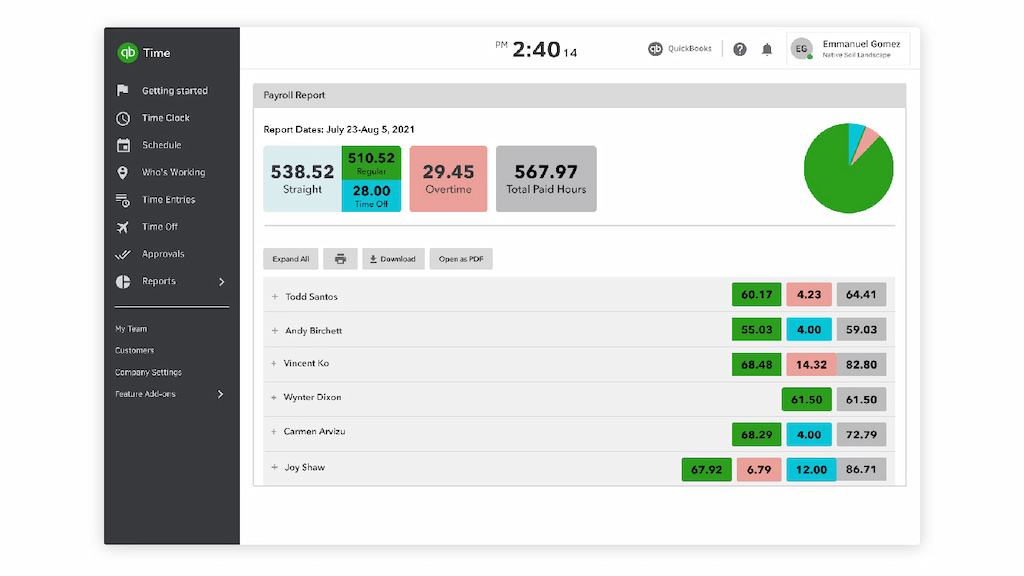
Businesses that hire contractors, employees, or field teams can use QuickBooks Time to keep track of their time. It lets teams keep track of their hours, manage their schedules, approve timesheets, and keep an eye on projects from web or mobile apps. The platform connects directly to QuickBooks for accounting and payroll, which makes it easier for businesses to move tracked hours into payroll processing and invoicing with fewer steps.
Overview
| Category | Details |
| Time capture | Timer tracking, manual time entry, and kiosk clock-in |
| Project tracking | Track hours by job, client, or project |
| Billing | Time data syncs with QuickBooks for payroll and invoicing |
| Reporting | Reports by job, client, date, and team member |
Key Features
- Timer-based time tracking from web and mobile apps
- Manual time entry and timesheet management
- Timesheet submission and manager approvals
- Project tracking with budgeted vs. actual hours
- Job scheduling and shift management
- GPS tracking and geofencing reminders for job sites
- Real-time reports for projects, clients, and labor costs
- Sync with QuickBooks accounting and payroll
Pros
- Direct integration with QuickBooks accounting and payroll
- Mobile app for tracking and approving time on the go
- GPS tracking and geofencing for field teams
- Job scheduling and shift management features
- Real-time reporting across projects and teams
Cons
- Works best when used within the QuickBooks ecosystem
- Pricing is higher than that of many standalone time tracking tools
Pricing
QuickBooks Time starts at about $10/month plus ~$8 per user/month (Time Premium). The Time Elite plan starts around $20/month plus ~$10 per user/month, adding advanced reporting and project tracking.
Review
"What I like best about QuickBooks Time is how user-friendly it is. It makes tracking hours simple and quick, especially with the mobile app." — G2
4. Hubstaff
⭐ 4.4/5 (G2)
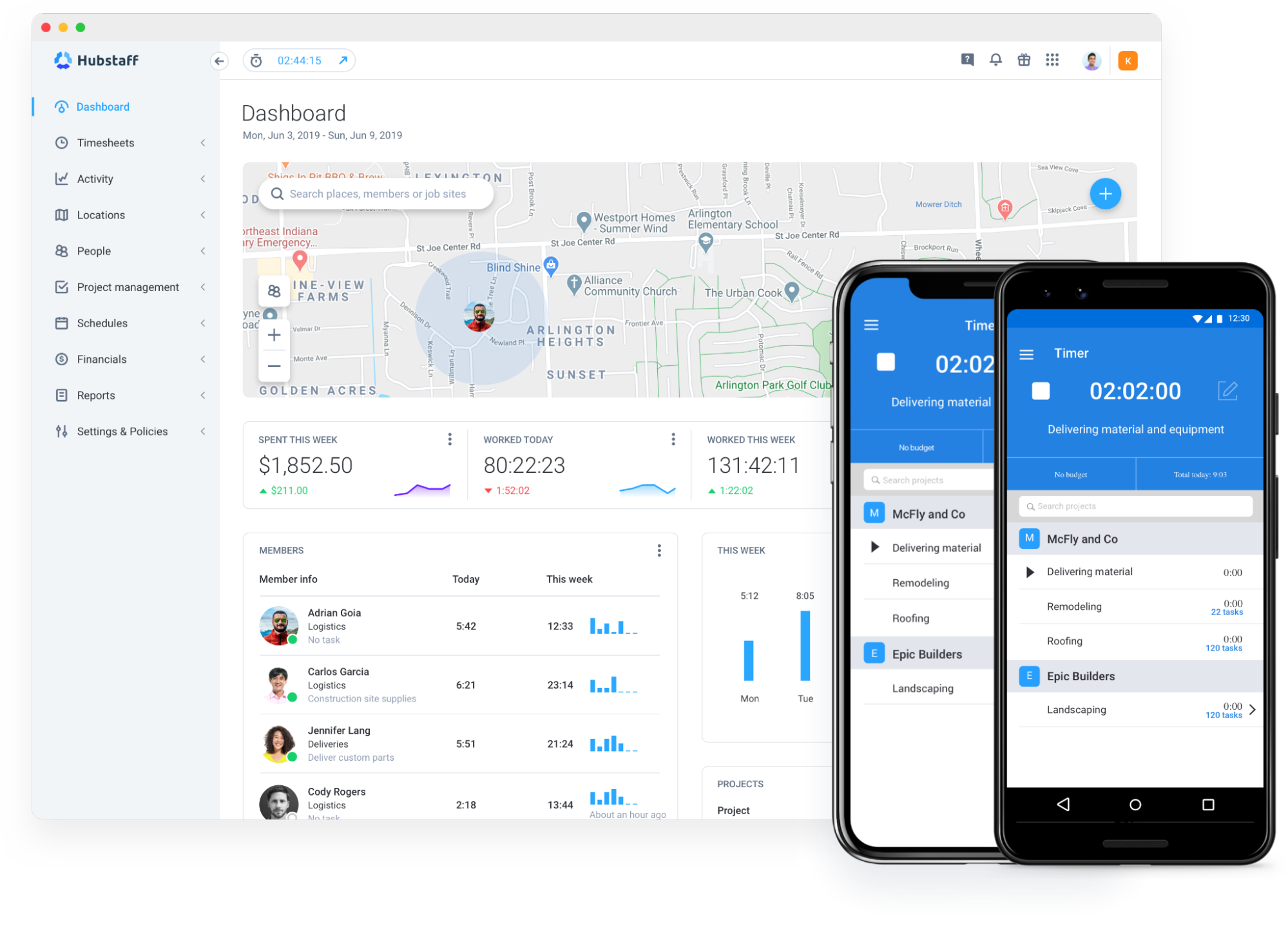
Hubstaff is a platform for managing workers and keeping track of time that is made for teams and contractors who work from different places. It lets businesses keep track of hours worked on different projects, tasks, and clients, and it also gives them information about productivity, keeps an eye on activities, and automates payroll processes. Teams can keep track of their time with timers, desktop apps, mobile devices, or GPS-based tracking when they are out in the field.
Overview
| Category | Details |
| Time capture | Timer tracking, manual entries, and GPS-based tracking |
| Project tracking | Track time by project, task, and client |
| Billing | Billable hour tracking with invoicing and payroll automation |
| Reporting | Productivity metrics, project costs, and team activity reports |
Key Features
- Timer-based time tracking across desktop, web, and mobile apps
- GPS tracking for field teams and mobile workers
- Activity monitoring with productivity metrics
- Automatic timesheets with manager approval workflows
- Project and task tracking with billable hours
- Real-time dashboards and workforce analytics
- Project budget and cost tracking
- Automated payroll and payment integrations
- Integrations with tools such as Jira, Slack, Salesforce, Deel, and PayPal
Pros
- Combines time tracking with productivity monitoring
- GPS tracking available for field and mobile teams
- Real-time productivity insights and activity metrics
- Automated payroll and payment integrations
- Strong reporting for project costs and workforce analytics
Cons
- Monitoring features may feel intrusive for some teams
- More complex than basic time tracking tools
- Higher-tier plans required for advanced monitoring features
Pricing
Hubstaff offers a 14-day free trial. Paid plans start at about $4.99 per user per month (Starter), with higher tiers such as Grow ($7.50) and Team ($10 per user/month) adding advanced features.
Review
"I use Hubstaff for my daily work to track tasks according to the budget, and it has been very helpful for billing clients." — G2
5. Harvest
⭐ 4.3/5 (G2)
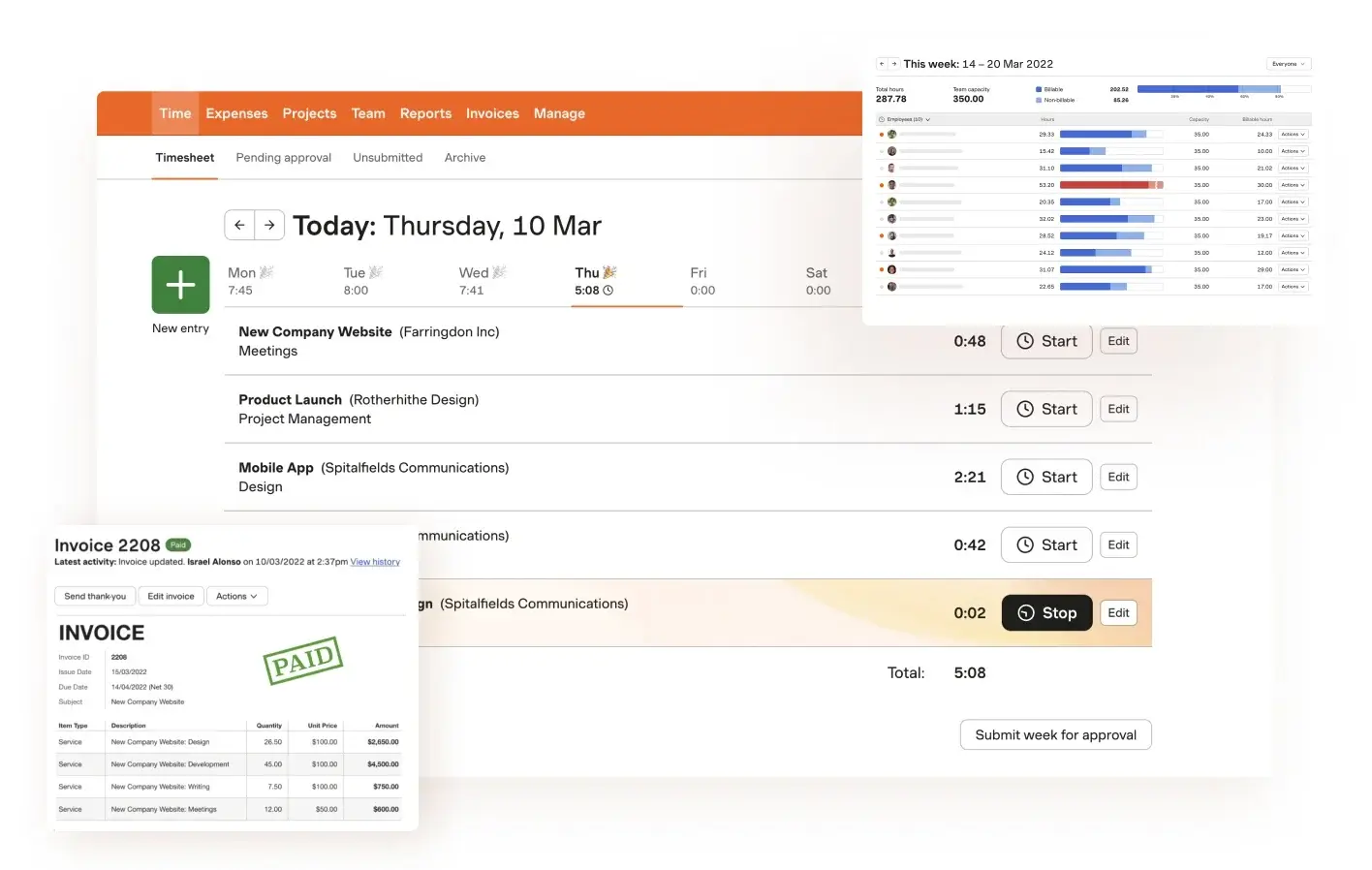
Harvest is a time tracking and billing system for teams that charge clients by the hour. Using a one-click timer or manual entries, contractors can keep track of time spent on projects, tasks, and clients. They can then use that information to make reports and bills. The platform also helps teams keep an eye on project budgets, figure out how much things will cost, and see how billable hours affect profits.
Overview
| Category | Details |
| Time capture | Timer tracking and manual time entry |
| Project tracking | Track time by project, client, and task |
| Billing | Invoice clients directly from tracked billable hours |
| Reporting | Project, team, and billable hour reports |
Key Features
- One-click timer for tracking time across projects and tasks.
- Manual time entry with day, week, and calendar views.
- Project and client tracking with billable rate management.
- Invoicing generated directly from tracked billable hours.
- Project budget tracking and profitability estimates.
- Time reports that can be exported for billing or analysis.
- Expense tracking linked to projects and clients.
- Integrations with tools such as Asana, Trello, Jira, and GitHub.
Pros
- Combines time tracking with invoicing for client billing.
- Clear project budgeting and profitability tracking.
- Simple interface that is easy for contractors to adopt
- Detailed reports for billable hours and project costs
- Integrations with many project management tools
Cons
- Limited workforce monitoring features compared to productivity platforms
- Advanced project management capabilities are minimal
Pricing
Harvest offers a Free plan for one user with up to two projects. Paid plans start at about $9 per user per month, with a 30-day free trial available for team plans.
Review
"Harvest is a useful and versatile work system that facilitates business collaboration and digital support for all your operations and work projects in real time." — G2
Comparison table: best time tracking software for contractors
The following table gives managers a quick reference for comparing contractor time trackers side by side before reading full reviews.
| Tool | Timesheet approvals | Reporting | Billing/invoicing | Free plan/trial | Paid plans | Best fit for |
| TMetric | Yes | Strong: projects, billable hours, productivity | Yes | Free plan (2 users) + trial | From ~$7/user/month | Contractor teams needing tracking, approvals, and billing |
| Clockify | Available on paid plans | Good; stronger on paid tiers | Available on paid plans | Free plan available | Paid from Basic/Standard tiers | Small contractor teams wanting flexible entry and a free tier |
| QuickBooks Time | Yes | Reports by job, client, and team | Syncs with QuickBooks payroll/invoicing | Trial or promotional offers | Base fee + per-user pricing | Contractors managing payroll through QuickBooks |
| Hubstaff | Yes | Strong operational and productivity reporting | Billable tracking + payroll automation | Free trial | Per-seat paid plans | Remote contractor teams needing productivity visibility |
| Harvest | Basic approvals | Good project and billable-time reporting | Yes | Free plan for one user | Paid plans available | Independent contractors and client-service teams |
What managers should look for in a contractor time tracking app
A timer isn't enough for managers. A good contractor time tracking app should let you keep track of hours worked on different jobs, check time before payroll, and show labor costs by team member, project, or client.
Mobile time capture for field and remote contractors
Most contractors don't sit at a desk all day. With mobile apps, workers can clock in on-site, log their time to the right job, and send in entries during the day. This makes it easier for managers to see who is working and where, which cuts down on guesswork.
Timesheet review and approval
Before payroll or billing, approvals are like a checkpoint. Before payments go out, managers can check hours, point out mistakes, and double-check totals. This helps keep mistakes and disagreements from happening.
Project and job-based tracking
Contractor teams should keep track of the hours worked for each job or client, not just the total time worked. Tracking by job helps managers figure out how much each project costs in terms of labor and how much to charge.
Reporting for labor costs and billable hours
Reports make time data useful. Managers can see the total hours worked, billable time, and project costs. This makes it easier to keep track of budgets, paychecks, and client invoices.
The Verdict: Which contractor time tracking tool is right for your team?
The right tool depends on how your team records time and how that data feeds into billing or payroll.
TMetric works well for contractor teams that need project tracking, billing support, and clear reports for payroll. However, for teams looking for a free time tracking app for contractors, Clockify is a good choice. Other tools, such as QuickBooks, Hubstaff, and Harvest, can also be used by those looking for independent contractor time tracking platforms that bill clients from tracked hours.
Start tracking contractor hours with TMetric, a free plan available for small teams.
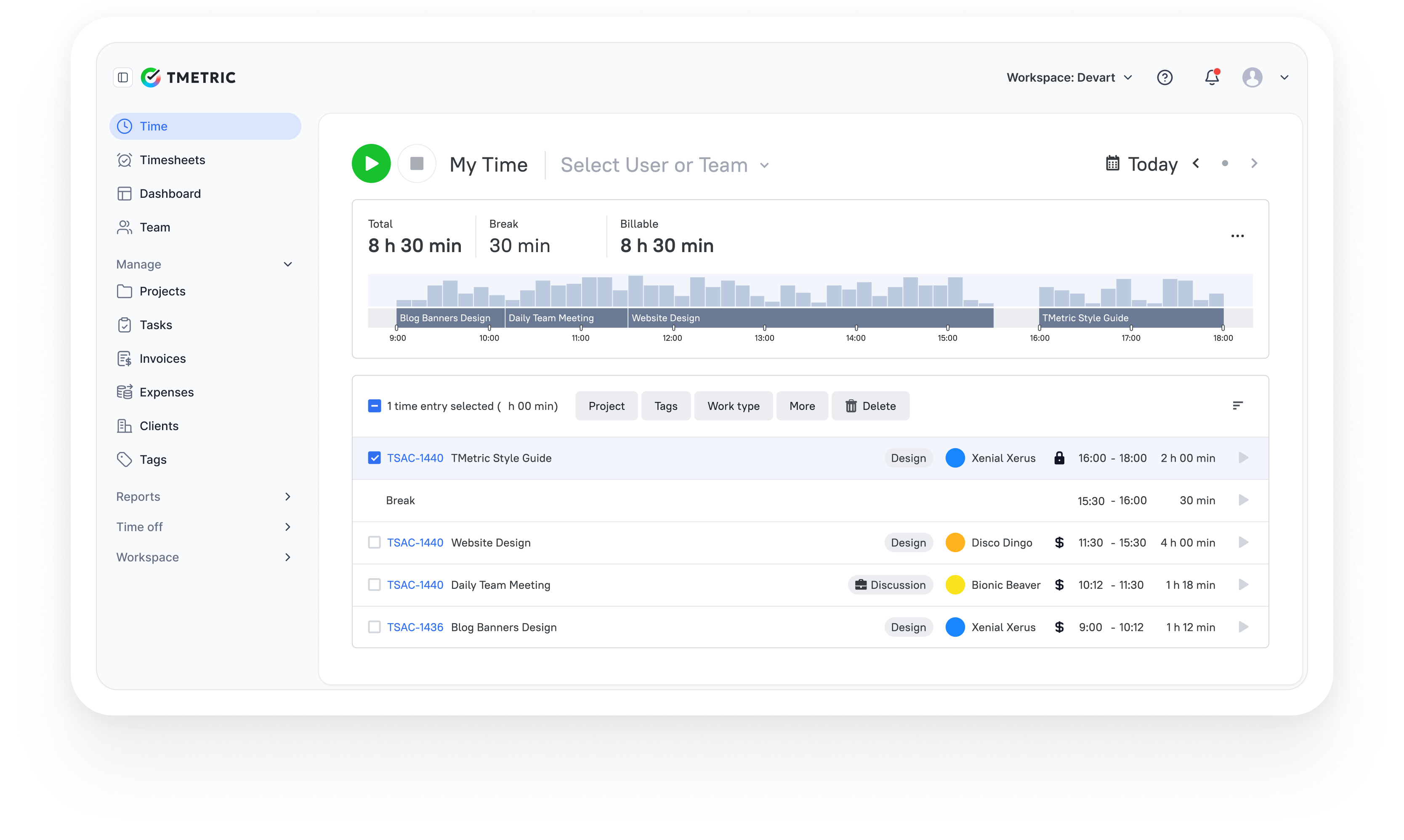
3,000+ companies, teams, and individuals worldwide use TMetric to track time, manage work, and bill with confidence.