







Free Time Card Calculator with Overtime

  • Time tracking
  • Timesheets
  • Reports
  • Payroll
  • Time off
  • Work schedules
Fully functional 14-day trial | No credit card needed

Trusted by over 10 000 companies worldwide

  • Endygo
  • ITsyndicate
  • Pulso
  • 050media
  • JOT Digital
  • Freshlab
  • Mvad
  • Swaven
Weekday Time In Time Out Break Regular Hours (8h/day) Overtime Total Hours
Total 00:00
Monday 00:00 00:00 00:00
Tuesday 00:00 00:00 00:00
Wednesday 00:00 00:00 00:00
Thursday 00:00 00:00 00:00
Friday 00:00 00:00 00:00
Saturday 00:00 00:00 00:00
Sunday 00:00 00:00 00:00

Turn this time card into an approval-ready timesheet in TMetric

What Is a Time Card Calculator?

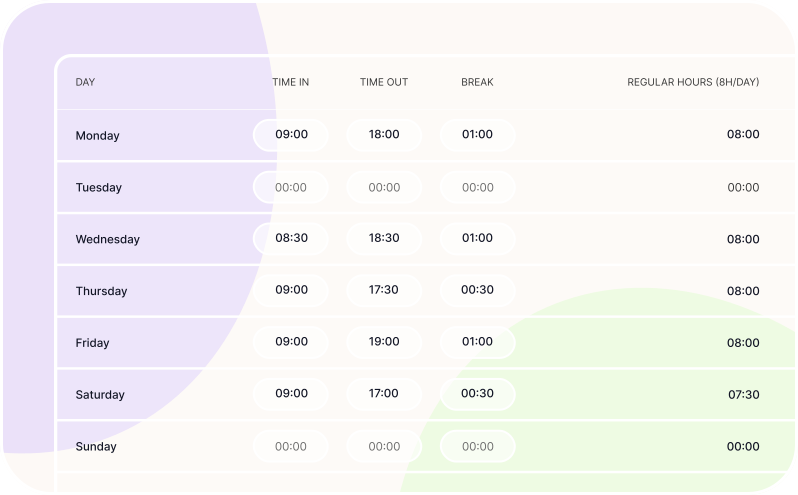
A time card calculator is an online tool that totals your work hours directly from time card entries, no manual math required.

Unlike a spreadsheet, it automatically adds up regular and overtime hours, reducing the risk of calculation errors. If you need recurring timesheets, approvals, and reports in one place, a time tracking app can take the workflow a step further.

What Is a Time Card Calculator?

How to Use This Free Online Time Card Calculator

Follow these simple steps to calculate total work hours, break time, and overtime with ease - no spreadsheets or manual math required.

Step-by-Step Instructions
Step 1

Enter Work Hours

Input the start and end times for each workday into the Time In and Time Out fields accordingly.

Step 2

Add Breaks

Enter any breaks into the appropriate fields if applicable.

Step 3

See Results

View the calculated results of your time card, including total hours and overtime.

Step 4

Start Over

Click the Reset button to clear all fields and restart if needed.

Key Features of Our Time Card Calculator

Explore the powerful features that make our time card calculator simple, flexible, and accurate for any work schedule.

Track work hours with ease using these built-in features

Simple & Intuitive Interface

Ensures quick adoption, smooth onboarding, broad team accessibility, and fewer tracking errors.

Customizable Work Schedules

Allows you to accommodate different working styles and hours, ensuring accurate time tracking and fair labor management.

Break & Overtime Calculation

Automatically calculates break times and overtime hours to ensure accurate payroll and compliance with labor laws.

Multiple Time Format

Enables you to track and view time in various formats, adapting to different preferences and regional standards.

Benefits of a Payroll Time Card Calculator

Discover how a free time card calculator can save you time, reduce errors, and simplify workforce management

Take the guesswork out of tracking work hour

Accurate Time Tracking

Automates the recording of work hours, reducing manual errors and ensuring precise data for payroll and reporting.

Payroll Efficiency

Provides clear and reliable time data that streamlines payroll calculations, making salary processing faster and error-resistant.

Compliance Management

Helps you stay aligned with labor laws and company policies by automating time tracking rules and generating accurate reports.

Reduce Payroll Corrections

Calculates totals directly from clock-in and clock-out entries, so the numbers passed to payroll are consistent and audit-ready.

Minimize Overtime Disputes

Applies your overtime rules automatically and makes hour totals visible to both managers and employees.

Who Needs an Employee Time Card Calculator?

  • Small Business Owners 
& Payroll Admins HR

    Simplify payroll and reduce manual errors.

  • HR & Office Managers

    Streamline attendance tracking and reporting.

  • Hourly Employees

    Accurately log hours and verify earnings.

  • Freelancers & Contractors

    Quickly calculate billable time for invoices.

  • Shift Teams 
(Retail / Support / Field Work)

    Track schedules and total hours with ease.

  • Remote Teams 
& Distributed Workers

    Monitor work across locations and time zones.

Time Card Calculator FAQ

How do I calculate total hours from clock-in/out?

A time card clock calculator subtracts your clock-in time from your clock-out time for each shift, then adds those values across the day or week. Enter your times in the fields above, and the totals update automatically.

Does the calculator subtract lunch breaks automatically?

Yes, our free employee time card calculator includes a break field so lunch or other unpaid time is deducted before the daily total is shown. Just enter the break duration in minutes alongside your shift times.

Can I calculate bi-weekly time cards?

Our customizable time card calculator lets you add rows for as many days as needed, so covering a two-week pay period is straightforward. Simply fill in each day's hours and the running total updates as you go.

How is overtime calculated (8 hours/day vs 40 hours/week)?

The free time card calculator with overtime supports both daily and weekly overtime rules, so you can choose whichever method matches your company policy. Hours beyond the threshold are flagged and totaled separately for easy payroll review.

How do I convert minutes to decimal hours?

Our free calculator for time cards handles the conversion automatically. Just enter clock-in and clock-out times, and it displays totals in decimal format. If you need to do it manually, divide the minutes by 60 and add the result to the whole hours.

Can freelancers use this to calculate billable hours?

Absolutely. The time card calculator for free works just as well for independent contractors tracking billable project hours as it does for salaried employees. Log your start and end times per client or project and get an instant total to invoice against.

When should I switch to a time tracking app?

If you find yourself filling out time cards repeatedly, chasing approvals, or manually compiling reports, a free time card calculator app is a natural next step. A full time tracking solution like TMetric automates timesheets, overtime rules, and reporting in one place.

Time is Money.
Track Yours with TMetric