11 Best Project Cost Management Software (2026)
Nowadays, budget tracking is essential - not optional. Without it, costs creep in unnoticed, projects exceed their limits, and profitability becomes guesswork. Choose a project cost management tool from this guide to keep your budgets under control.

By Dereck Mushingairi | January 11, 2026
In 2026, project budget tracking is no longer a “nice-to-have”—it’s a survival.
The latest survey shows 69 % of digital initiatives still overrun budgets, wiping out margins before the first invoice is even sent.
Teams struggle with:
- Budget overruns caused by scope creep and hidden expenses
- Profitability tracking that lags weeks behind reality
- Real-time reporting gaps that blindside executives at the worst moment
This guide delivers the best project cost management software of 2026—curated, compared, and verified—so you can monitor project costs before they balloon.
(Quick teaser: TMetric earns a hero section for its unique time-plus-budget approach—stay tuned.)
2. What is Project Cost Management Software?
Project costing software is a cost control software suite that lets you plan, track, and optimize every dollar across the project lifecycle.
Core capabilities every business now expects:
| Capability | 2025 Reality Check |
|---|---|
| Budget setting & tracking | Lock scope early and see burn in real time |
| Cost forecasting | Predict overruns 30–60 days ahead with AI models |
| Profitability monitoring | Know margin per client, per phase, per role |
| Alerts & reporting | Push notifications when limits hit Slack, Teams, or email |
3. How to Choose the Right Tool
Use these evaluation criteria before you swipe the company card:
| Evaluation Criterion | Questions to Ask |
|---|---|
| Ease of use | Will non-PM staff log time & expenses daily? |
| Pricing transparency | Are tiers published or hidden behind “contact sales”? |
| Integration with time tracking & billing | Does it sync with TMetric, Harvest, or QuickBooks to eliminate double entry? |
| Scalability | Freelancer today → agency tomorrow? Can the project costing software add seats, projects, and currencies without a re-implementation? |
4. Best Project Management Tools (2025 Edition)
4.1 TMetric – The All-in-One Hero (deep dive)
It is a perfect project management tool that seamlessly combines precise time tracking, real-time team collaboration, and insightful analytics, and helps teams and professionals keep projects on schedule and within budget.
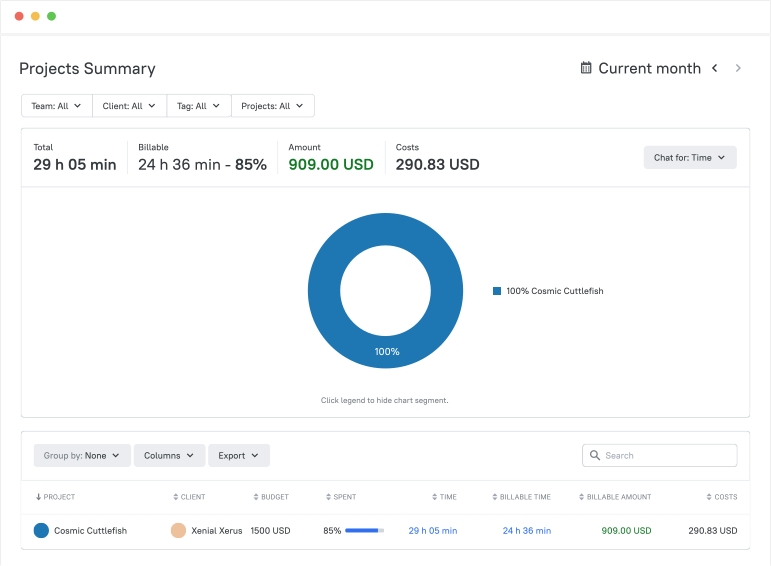
Key Project Management Features
|
Section |
Details |
|---|---|
| Overview | TMetric unites time tracking and project cost tracking software in one lightweight hub. It is purpose-built for agencies, consultancies, and remote teams that need cost control software without enterprise bloat. |
| Key Cost Features | • Budgets: fixed-fee, hourly, or recurring retainers• Billable rates: role-based, client-specific, or flat • Real-time budget alerts: Slack, email, in-app at 75 %, 90 %, 100 % • Invoices: auto-pull billable hours & expenses, send via Stripe or PayPal • Profitability forecasts: live margin per project, client, or team member • Expense tracking: snap receipts, auto-categorize, sync to QuickBooks |
| Pricing | • Free – 2 users, all core features • Professional – $7 user/mo (budget alerts, invoicing) • Business – $9 user/mo (profit forecasts, API, SSO) |
| Ideal For | SMBs, agencies, freelancers who need project budget tracking and profitability insights without hiring a controller |
| TMetric Advantages | • All-in-one: time + project accounting + invoices • Simple UI: 10-minute onboarding, mobile & desktop apps • Affordable: up to 70 % cheaper than enterprise project cost management tools |
Good Fit
Small-to-mid-size businesses, agencies, and freelancers looking for project-cost tracking that comes with integrated time tracking, invoicing, and real-time profitability insights
Pros
- Intuitive, one-click time tracking and 10-minute onboarding
- Robust project budgeting with real-time alerts at 75 %, 90 %, 100 %
- 50+ native integrations (Asana, Trello, JIRA, QuickBooks) and open API
- Affordable pricing—up to 70 % cheaper than enterprise project cost management tools
Cons
- Advanced invoice customization is limited (no logo or color branding)
- Occasional sync delays between desktop and mobile apps
Pricing
Free for up to 2 users; paid plans start at $7 user/mo (Professional) and $9 user/mo (Business) when billed annually.
Ratings
✍️ We like that with a few clicks, my team can log time with TMetric's user-friendly interface, and that reports guarantee billing on the time spent (this also helps us prevent scope creep and set reasonable project budgets).
4.2 Smartsheet
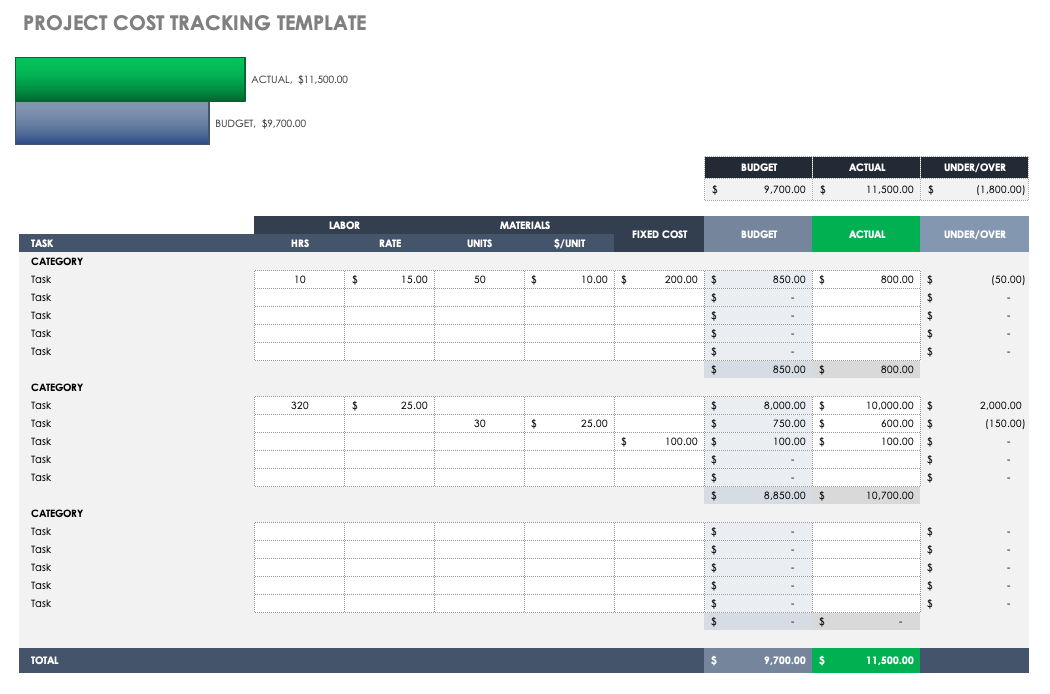
Smartsheet is the go-to choice for large organisations and well-established PMOs juggling cross-department portfolios.
Key Project Management Features
Its standout cost tools include budget templates broken down by phase, department, or expense code, portfolio dashboards that update burn charts in real time, and the kind of financial governance controls auditors love.
Pros
- Users like the ability to lock permissions right down to individual cells
- The freedom to switch between Gantt and grid
- Card views without losing data, and a template gallery of more than three hundred and fifty ready-made sheets that shortens rollout time.
Cons
- On the flip side, newcomers often complain about a steep learning curve, and costs can creep up once you start bolting on premium integrations.
Pricing
- Pro plans start at $7 per user per month (minimum of three seats), Business jumps to $25, and Enterprise is quoted on a case-by-case basis.
Independent reviews back this up: the platform holds a 4.4/5 score on:
🧑💻 I like that we can collaborate with other team members when managing projects. In our organization, we have a host of projects that are running simultaneously. With that said, it is nice that everyone can see all projects (even the ones that they are not assigned) just to be familiar with the progress of a project. Also, assigning team members to tasks has been especially helpful so that we know who's responsible for a certain tasks. Lastly, I like that Smartsheet is intuitive and personalizable. The flexibility and ease of tools that are available allow me to customize each project sheet according to the project's needs.4.3 Wrike
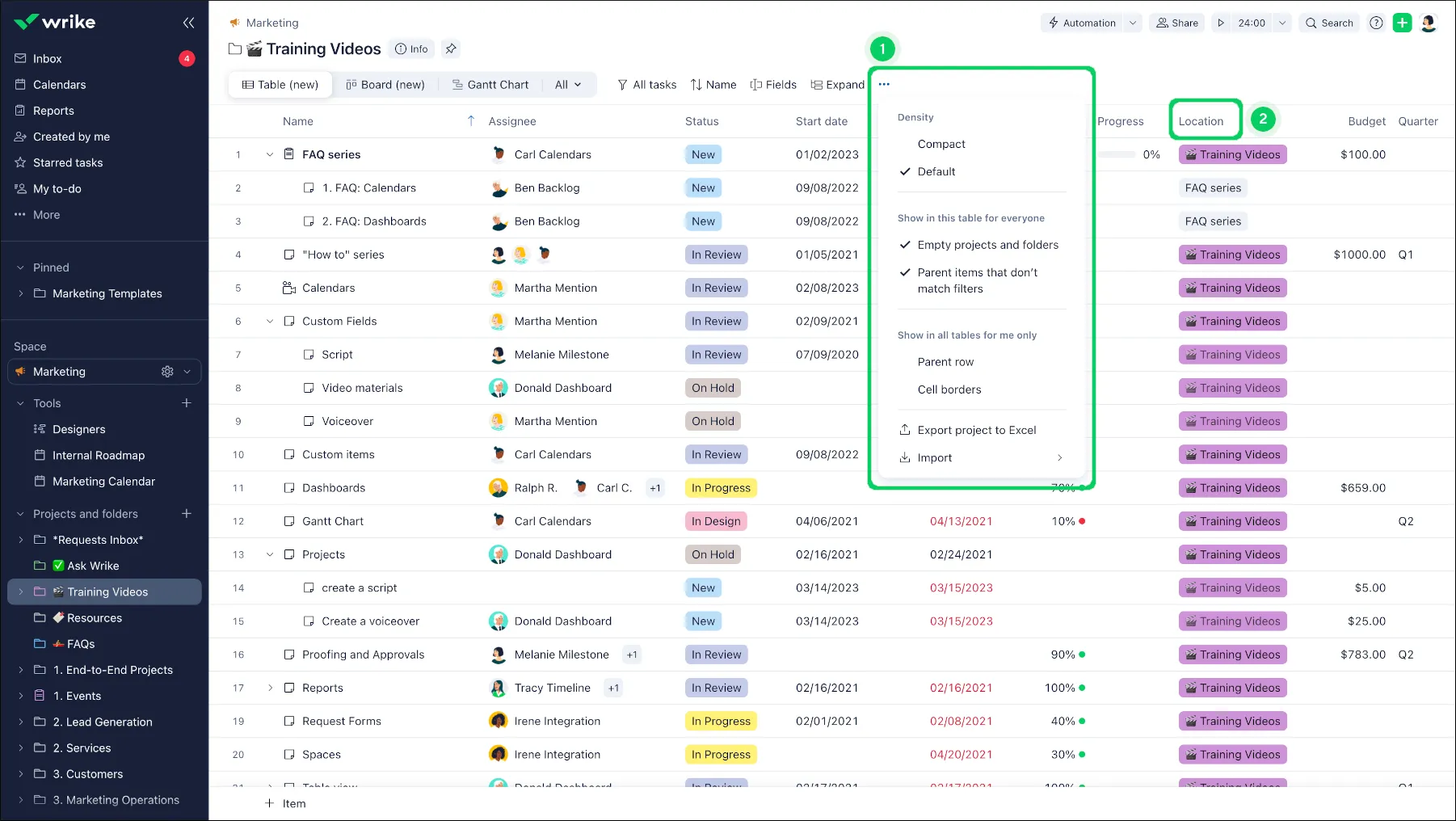
Wrike is a cross-functional work management tool designed to ensure that creative, development, and operations projects stay synchronized within an agency or teams.
Wrike real-time dashboards and deep integrations ensure that everyone, including designers, DevOps, project managers, marketers and salespeople, could see priorities, deadlines and budgets in a single location.
Key Project Management Features
- Live budgeting dashboards with built-in cost-forecasting fields - burn rates and overrun predictions can be viewed right in the workspace.
- 400+ integrations (Slack, Adobe CC, GitHub, Salesforce, etc.) - integrate the tools that your teams already use so that tasks, files, and comments update themselves.
- Dynamic request forms – create creative briefs or bug reports that auto-complete projects, attach owners, and place due dates according to conditional logic.
- Automation that works powerfully - rule-driven triggers, status transitions, and approval workflows reduce repetitive PM administration by up to 70 %.
- Cross-project visibility – Gantt, Kanban, workload, and calendar views let managers spot bottlenecks across creative, dev, and ops work streams.
Pros
- Extensive integration ecosystem keeps every department in one tool. + Custom cost-forecasting fields are rare at this price point.
- Automation engine rivals enterprise-grade competitors.
Cons
- Advanced features, including custom fields, proofing, time-tracking reports) are locked behind the premium tiers.
- Initial setup can feel heavy for very small teams.
Pricing
- Free is limited to 5 users but will be good for light task lists.
- Team is $9.80 user/mo. It offers shareable dashboards and subtasks.
- Business is $24.80 user/mo and provides real-time budgeting and advanced automation.
Ratings
🧑💻 Wrike’s standout feature is its versatile views, resembling a spreadsheet but with the advantage of being online. It simplifies project management and makes progress tracking effortless. A key benefit is the ability to assign tasks to specific users and monitor their status within a single platform. Wrike enhances workflow efficiency while delivering accurate, high-quality data. It’s user-friendly, and the online support team is consistently helpful and reliable.4.4 Kantata (formerly Mavenlink)
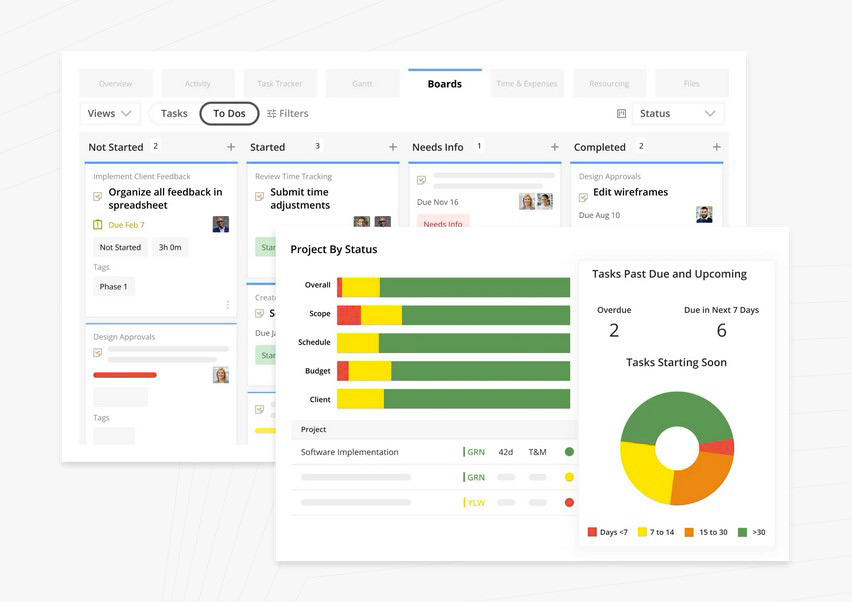
Kantata (formerly Mavenlink) is a purpose-built Professional Services Automation (PSA) suite for consultancies, agencies, and systems integrators that run multi-month, multi-phase engagements.
If your finance, delivery, and resourcing teams argue over margin leakage, Kantata unifies them in one ledger-driven workspace.
It is designed for firms ≥25 billable consultants where project accounting accuracy, not task checklists, drives profitability.
Key Project Management Features
- Role-based profitability analysis – margins are calculated in real time by role rate, loaded cost, and utilization, so PMs see which skill sets erode or enhance margin before the project ends.
- Built-in resource scheduling – drag-and-drop allocations respect skills, availability, and forecast demand; conflicts surface as dollars, not just hours.
- Unified PSA ledger – budgets, actuals, change orders, and revenue recognition live in the same record, eliminating spreadsheet reconciliation.
- Embedded BI – out-of-the-box margin, backlog, and utilization dashboards can be filtered by client, practice, or individual contributor.
- Forecast vs. actual burn alerts – automated notifications trigger when any cost center or role exceeds tolerance thresholds set by finance.
Pros
- Deep PSA DNA: revenue recognition, multicurrency, and resource planning are native
- BI layer is available, which makes you report-ready on day one. + Tight integration with Salesforce, NetSuite, and JIRA for improved sales, - the integrations make finance and delivery data synchronized.
Cons
- Initial configuration takes time because rate cards, cost centers, and security roles must be mapped before first project launch.
- Users will face licensing minimums, which makes it overkill for small teams under ~25 people.
Pricing
- It offers custom enterprise contracts
- Entry point averages ~$19 per user per month. Final quote scales with modules (resource management, BI, integrations) and billable headcount.
Ratings
🧑💻 The best thing about Kantata is that I can see budgets and time entries in real-time. I struggled with our old project management software because it didn't include time tracking. I spent so much time trying to see where we were at on budgets before Kantata. Now, I can know in real-time. Kantata finally gave us the ability to add custom task statuses so that has been a huge help as well.4.5 Scoro
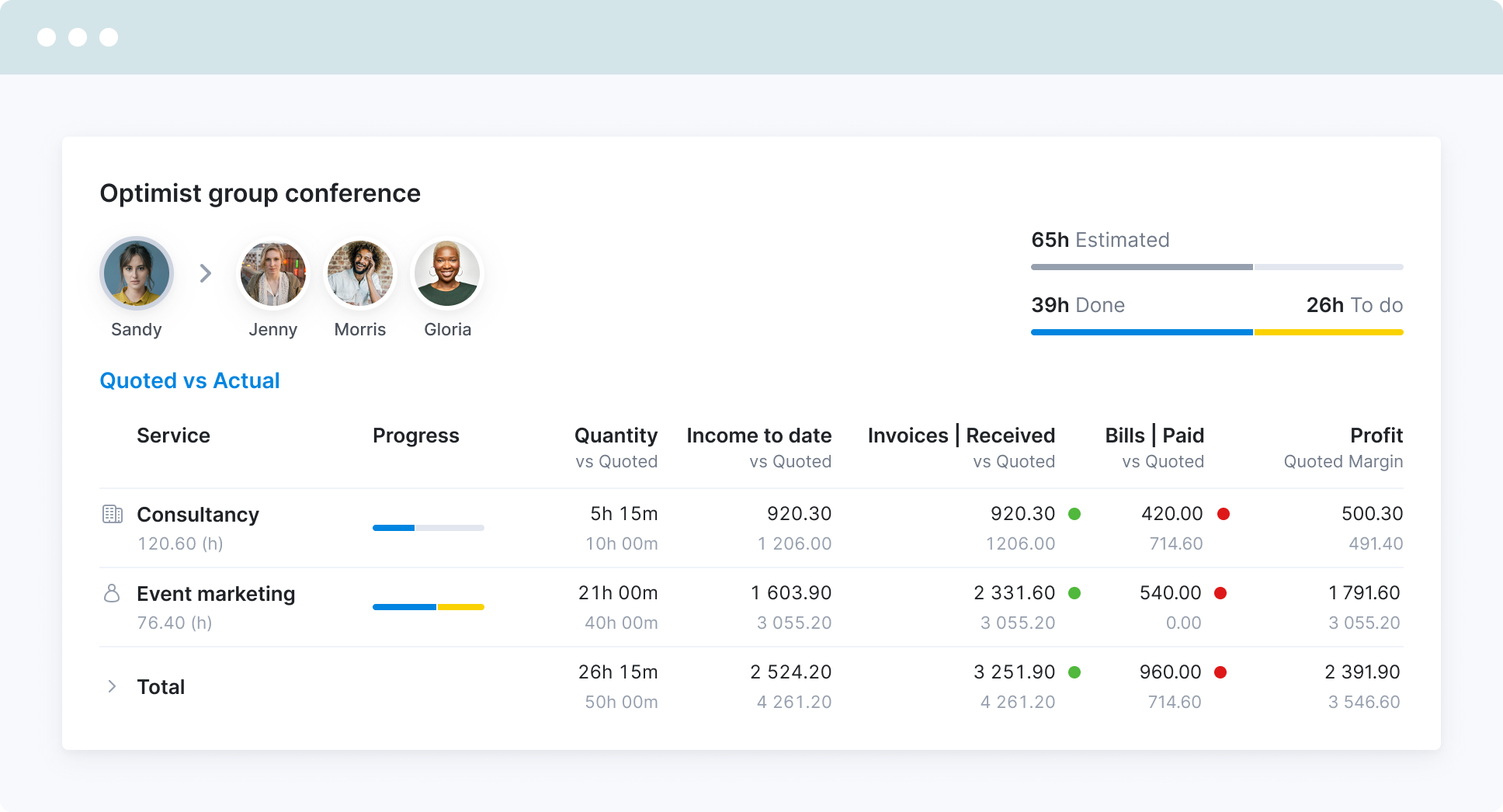
Scoro is an all-in-one business hub built for agencies that refuse to lose money on projects.
If your leadership obsesses over margins, utilization, and cash-flow forecasts — and you’re tired of duct-taping a CRM to a quoting tool to a project board — Scoro pulls the entire workflow from first lead to final invoice into one tightly knit system.
Key Project Management Features
- Burn-up & burn-down charts give real-time visibility into scope creep and delivery velocity so you can re-price or re-negotiate before it’s too late.
- End-to-end pipeline: qualified lead → quote → project → time-tracking → invoicing lives in a single record; no double entry, no tab-hopping.
- Role-based dashboards surface KPIs like “profit per hour,” “overdue deliverables,” and “unbilled WIP” the second you open your laptop.
- Drag-and-drop Gantt planner that ties directly to resource calendars, instantly flagging overloaded team members and slipped deadlines.
- Native CRM & quoting: turn an approved estimate into a live project with one click, budgets and task lists pre-populated.
Pros
- CRM, quoting, and projects in one place eliminates the usual patchwork of tools.
- Dashboards are eye-candy for finance-minded PMs—clear, fast, exportable.
- Average payback period reported at 6 months due to tighter scope control.
Cons
- UI packs a lot of widgets; first-time users may feel overwhelmed.
- Expect 1–2 weeks of setup and data migration before teams feel at home.
Pricing
- Core: $19.90 user/mo
- Growth: $32.90 user/mo with access adds advanced Gantt, retainer management, and deeper financial reporting.
Ratings
🧑💻 All the information pertaining to sales pipeline, project delivery and invoicing is in one place, as a business owner it is invaluable. Previously, all our KPIs were focused on completing administrative activities, such as the completeness of spreadsheet data entries. Now, our focus has shifted towards project execution and achieving outcomes. I should also mention the incredibly helpful team there - don't skimp on the implementation support, use them to get it set up right for you and you will be able to hit the ground running with it. It is intuitive to use, and something we have incorporated into our daily meetings.4.6 Teamwork
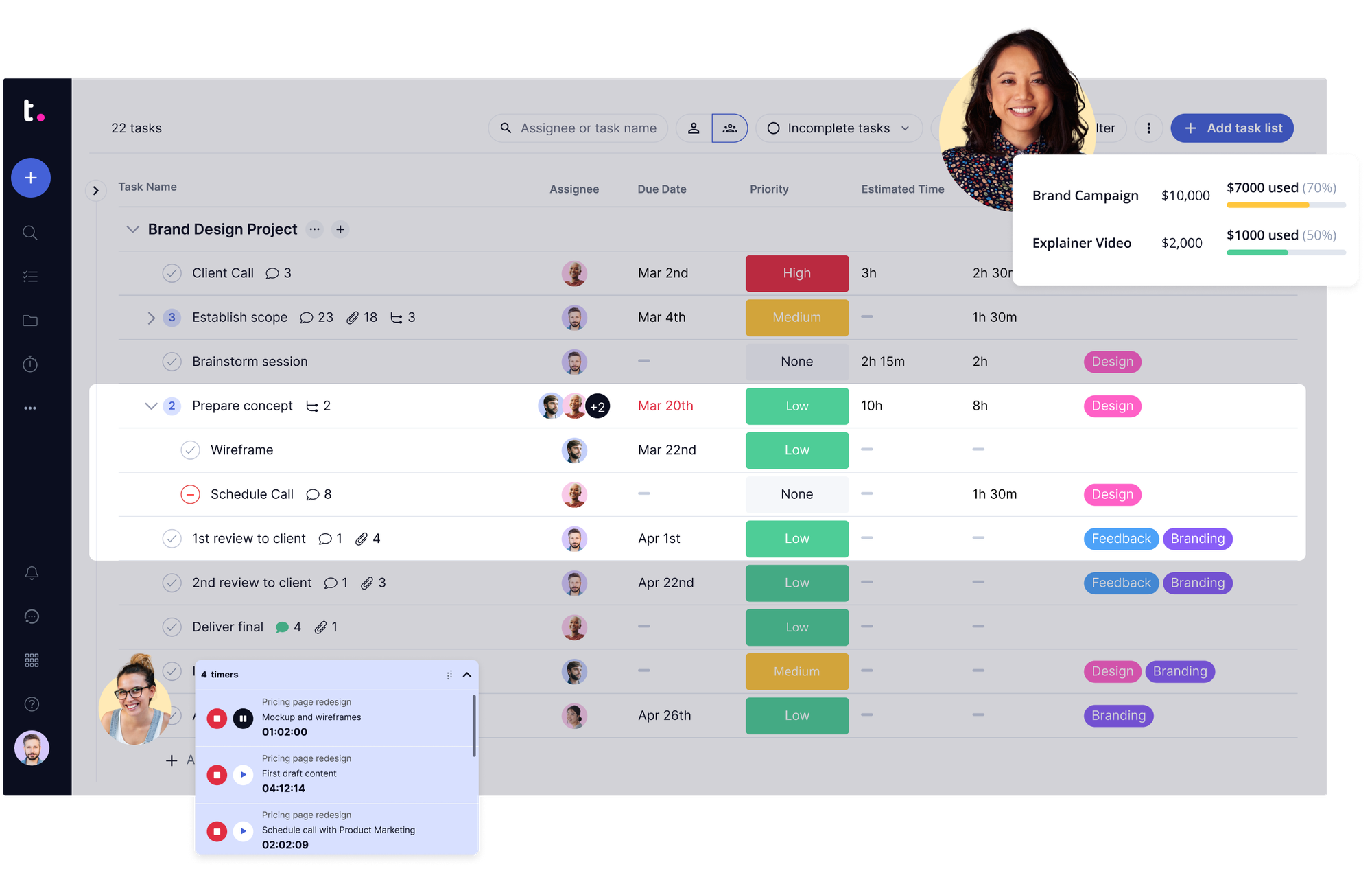
Teamwork is a project-management platform purpose-built for client-services teams and small agencies that run several retainer contracts at once.
If your day-to-day involves juggling overlapping client deadlines, fixed-fee milestones, and the occasional scope-creep conversation, Teamwork keeps everything—tasks, time, budgets, and client approvals—in one tidy hub.
Key Project Management Features
- Budget vs. actual reports by milestone – see exactly how each deliverable is tracking against the quoted cost, the moment anyone logs time or expenses.
- An integrated client portal is important for stakeholders because it allows them to see progress, leave feedback, and sign off on proofs without extra logins or emails.
- Simple onboarding wizard – import a retainer template, invite the client, and start logging hours in under ten minutes.
- Task lists, Gantt, Kanban, and calendar views – pick the lens that best shows your team (and your client) what’s next.
- Built-in timer + manual time entries – every billable minute flows straight into the milestone budget report.
Pros
- Client portal keeps approvals and feedback out of your inbox.
- Super-quick setup enables you to reduce configurations and start delivering work instead.
- Clean, milestone-level budget tracking helps you spot margin erosion before it’s too late.
Cons
- Advanced resource-scheduling tools (skills matching, heat-maps, capacity leveling) are limited; larger shops may outgrow it.
- Gantt dependencies and custom fields are lighter than what enterprise tools offer.
Pricing
- Free for 2 active projects - it is good for testing or ultra-small gigs.
- Deliver costs $9.99 per user/mo and unlocks unlimited projects, client portal, and basic budget reports.
Ratings
🧑💻 In my experience, Teamwork.com is a powerful project management tool that truly shines with its all-in-one approach to client work. I find it incredibly useful for consolidating time tracking, billing, and resource management into one platform, which helps me streamline my workflow. The platform's flexibility and customization features, from different project views to customizable templates, let me tailor it to my specific needs, making it an essential part of my process for improving collaboration and client transparency.4.7 Harvest
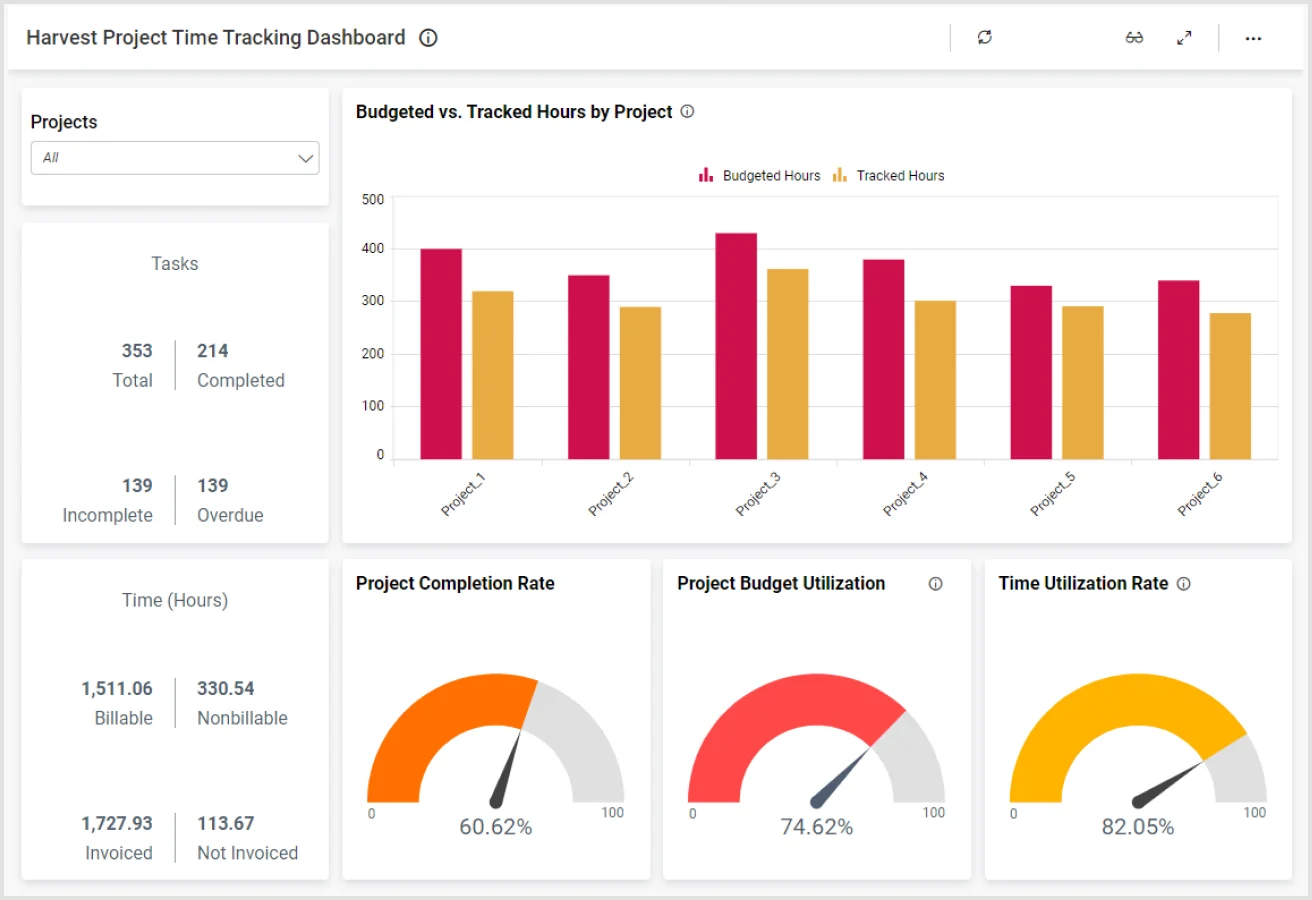
If you’re a freelancer juggling three client sites or a five-person studio with one eye on the clock and the other on the bank balance, Harvest keeps it simple.
There’s no enterprise bloat—just start a timer, log the work, and watch the budget bar shrink in real time.
Key Project Management Features
- Time-based budgets you set per project; Slack pings you when you hit 75 % and again at 90 %.
- One-click timer on web, desktop, or phone; pause for coffee, resume when you’re back.
- Visual budget burn so you know if that “quick revision” is about to eat the margin.
- Lightweight team view—see who’s tracking what today without opening another tab.
- Invoices pull straight from the timesheet; no retyping hours into a Word doc.
Pros
- Zero learning curve—open it and you’re billing in minutes.
- Mobile app is rock-solid; start/stop timers from a coffee shop or a job site.
- Friendly pricing for soloists and small crews.
Cons
- No forecasting or “what-if” cost models—great for watching today, not predicting next quarter.
- If you need resource leveling or Gantt charts, look elsewhere.
Pricing
- Free: 1 seat, 2 projects—perfect for a lone freelancer testing the waters.
- Pro: $11 per user per month, unlimited projects and team members.
Ratings
🧑💻 Harvest saves our time, where employees can seamlessly log using their phones The tool integrates with other expense management services We seamlessly invoice our expenses and make a robust routine check We consistently breakdown our expenses using Harvest and all inefficiencies are recorded.4.8 Procore
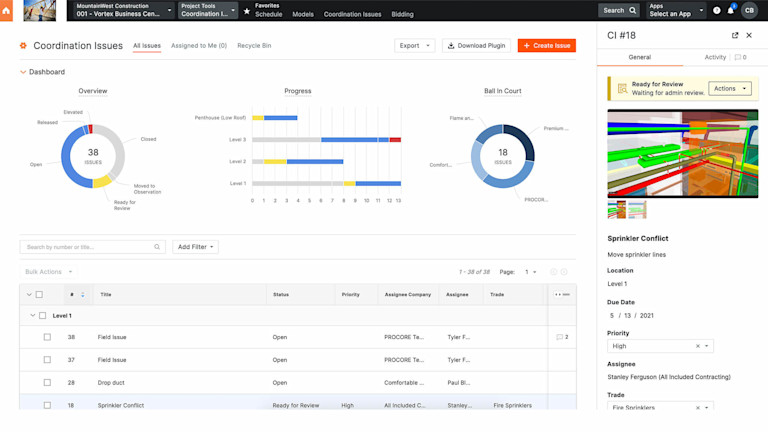
Procore is the job-site command center for construction and engineering firms that live or die by change orders.
If your PMs spend mornings on scaffolding and afternoons juggling RFIs, submittals, and revised drawings, Procore keeps every blueprint, budget line, and safety form in one cloud locker that still works when Wi-Fi doesn’t.
Key Project-Management Features
- Construction-centric budgets tagged with CSI MasterFormat codes, so cost overruns tie directly to the exact spec section.
- Change-order workflow that starts with a mobile photo from the field and ends with owner approval—time-stamped, version-controlled, and linked to the original contract.
- Real-time daily logs that capture weather, manpower, and safety notes; they auto-roll into progress billing so nothing is double-entered.
- RFIs and submittals live next to drawings; when a spec changes, every affected subcontractor sees the redline instantly.
- Compliance dashboards flag missing insurance certificates, permit expirations, or OSHA training lapses before the inspector shows up.
Pros
- Built for boots on the ground—works offline, loves tablets with dusty screens.
- Compliance templates and audit trails already match DOT, OSHA, and most owner requirements.
- One click turns a change-order mark-up into an updated schedule and revised budget.
Cons
- Feature depth makes it feel like a bulldozer when all you needed was a shovel; pure design or software teams will drown in unused modules.
- Pricing is custom and starts around $400 per month; small GCs may flinch.
Pricing
- Custom quote, but ballpark starts at roughly $400/month for a mid-size general contractor; exact figure depends on modules (Project Management, Financials, Quality & Safety) and user count.
Ratings
🧑💻 We've had a very positive experience with Procore. The support can be reached almost immediately using the chat and they know their stuff. The training videos are comprehensive and set up our new employees for success when using Procore.4.9 Deltek Vantagepoint
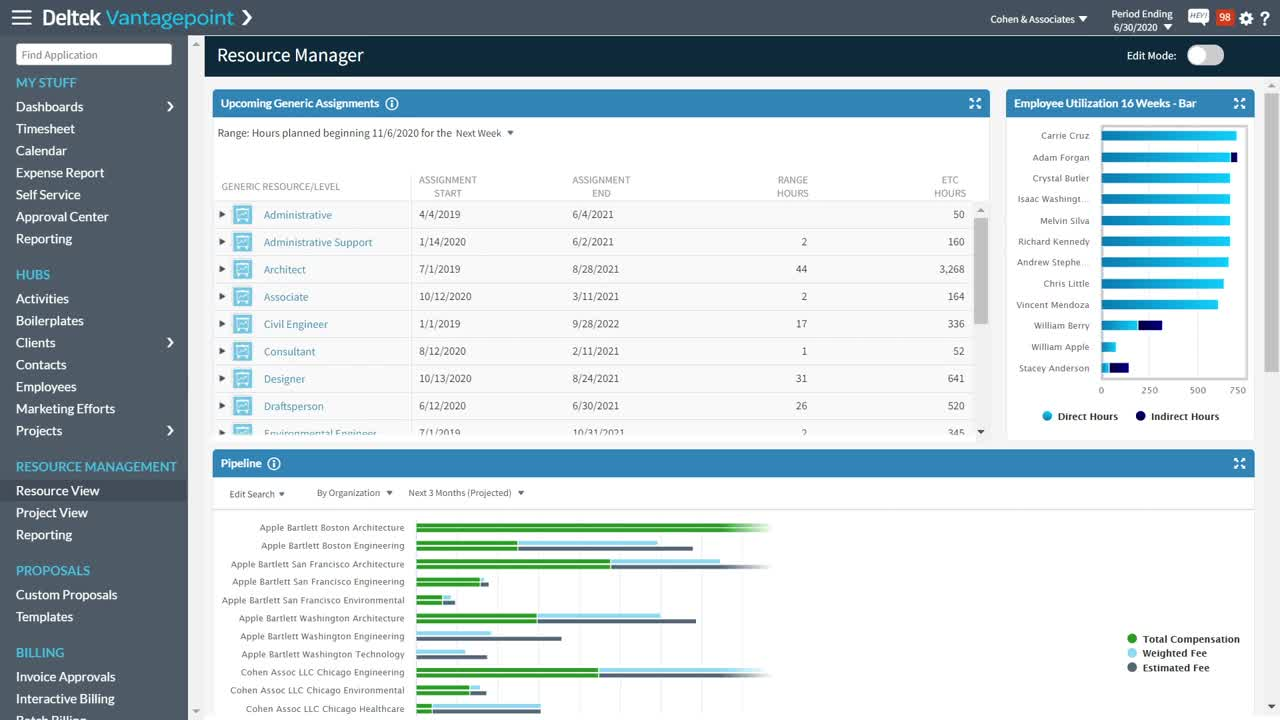
Deltek Vantagepoint is a purpose-built ERP for large professional-services firms—think architecture, engineering, construction (AEC), government contractors, and global consultancies.
If your organization runs multi-year, multi-country projects that must meet DCAA, CAS, or IFRS standards, Vantagepoint is designed to keep every dollar, hour, and deliverable compliant without spreadsheets.
Key Project Management Features
- Multicurrency project accounting with automated revenue recognition—track budgets, bill rates, and margins across USD, EUR, GBP, etc., while ASC 606 / IFRS 15 schedules post themselves.
- Real-time earned-value dashboards—see CPI, SPI, and forecast-at-completion at the project or portfolio level.
- Built-in resource planning—match staff by role, rate, and certification to future demand; gaps and overloads surface weeks in advance.
- Compliance engine—built-in DCAA timesheet rules, indirect-cost pools, and provisional-vs-actual rate tables reduce audit prep from days to hours.
- Advanced BI & reporting—drag-and-drop cubes connect live project data to Power BI or Tableau for exec-level margin analysis.
Pros
- Deep compliance controls out of the box; auditors rarely ask for supplemental files.
- Handles global, multi-currency, multi-company operations without bolt-ons.
- BI layer lets finance and PM teams slice data the same way, ending version-control wars.
Cons
- Requires a dedicated admin team; expect at least one full-time system owner.– Deployment is measured in months, not weeks; the change-management budget is as large as the license fee.
- UI feels “enterprise” to field staff who just want a simple timesheet.
Pricing
- Enterprise custom contracts; typical annual TCO lands north of $40 per user per month once you layer in hosting, add-ons, and support. Discounts appear when user counts cross the 500-seat mark.
Ratings
🧑💻 It is my one-stop-shop for pretty much all project data for marketing. It's well organized throughout the various tabs and hubs, and contains a good portion of what I need. Although I'm not involved with its customization, I do understand it to be customizeable, though I can't speak to how easy it is to do so.4.10 ClickUp
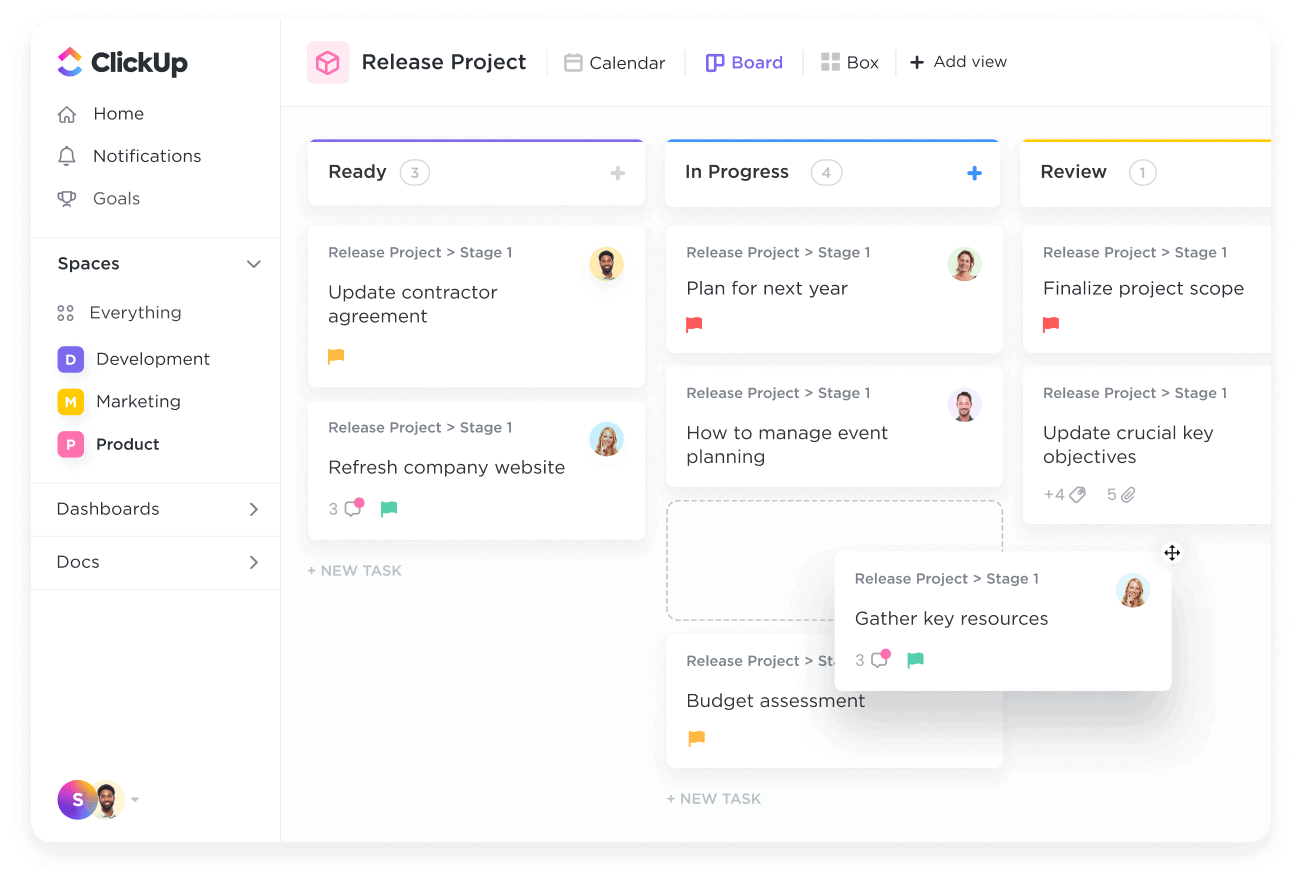
ClickUp is the Swiss-army workspace for hybrid teams that refuse to jump between five different apps.
If your crew mixes remote writers, in-house designers, finance, and the occasional external contractor, ClickUp bundles tasks, docs, goals, chat, and budgets under one roof.
Think of it as the place where a sprint story, a content brief, and the monthly burn report all live in the same tab.
Key Project-Management Features
- Budgeting templates with custom fields for expense tracking – set up a board once, drop in forecasts vs. actuals, and let the roll-ups do the math.
- Everything-is-a-task philosophy: turn a Google Doc comment, a Slack thread, or a whiteboard sketch into a trackable card without leaving the app.
- Hierarchical views: List → Board → Gantt → Calendar → Mind Map, so the same data looks right for both dev and execs.
- Goal-linking: tie individual tasks directly to quarterly OKRs; the progress bar updates in real time as hours and dollars move.
- Automations & “slash commands” that close subtasks, update budgets, and ping reviewers the moment a deliverable hits “ready for QA.”
Pros
- Ridiculously customizable—rename statuses, build custom dashboards, color-code anything.
- Free tier is actually usable (100 MB storage, unlimited tasks, unlimited members).
- Native docs & whiteboards mean you can spec a feature, budget it, and assign it without opening another tool.
Cons
- Menu overload: first-time users can drown in toggles and options.
- Performance dips once your workspace grows past ~10 k items; expect lag on older laptops.
Pricing
- Free – 100 MB storage, unlimited members & tasks.
- Unlimited – $7 user/mo – adds guests, advanced reporting, integrations.
- Business – $12 user/mo – unlocks advanced automations, custom permissions, and the full budgeting suite.
Ratings
🧑💻 It's been super helpful so far. I've worked with many other PM platforms and Clickup brings everything together for free. I regret not finding it sooner. The only reason I am giving it 4 starts is because the only thing missing for me is better calendar integration. I hope that this bring their attention to it and ClickUp realizes how crucial great two-way integration is in the world of technology. I honestly would pay good money for it.4.11 Productive.io
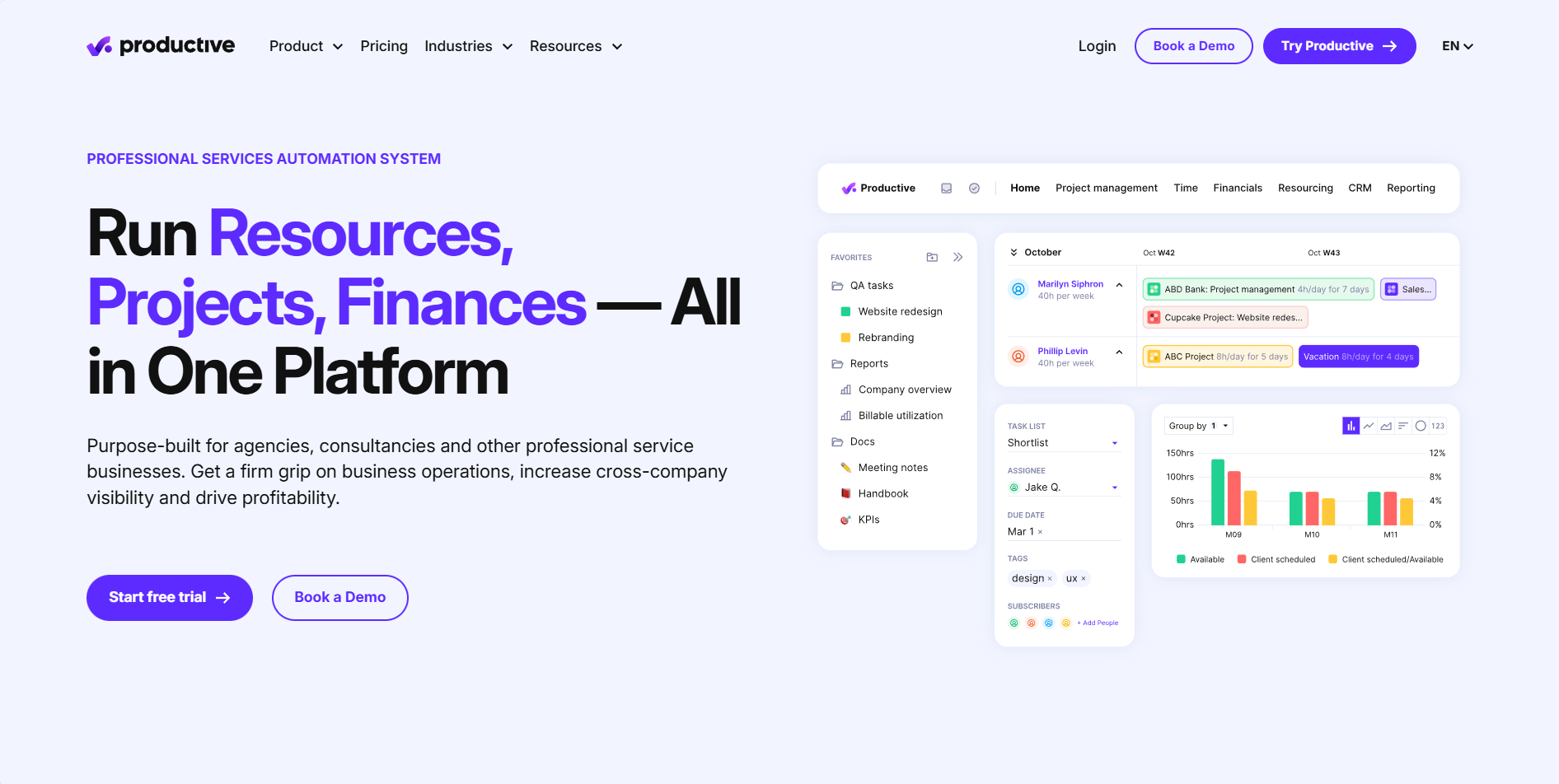
Productive.io is a powerful all-in-one project cost management and agency operations platform built for professional services teams that need real-time visibility into budgets, utilization, and profitability.
It connects the full workflow — from sales pipeline and project planning to time tracking, invoicing, and financial reporting — into a single system, making it ideal for agencies and consultancies that want to prevent budget overruns before they happen.
Key Project Management Features
- Real-time project budgets & cost tracking – track planned vs actual costs by phase, service, or role with live margin insights.
- Integrated time tracking & expense management – every logged hour and expense feeds directly into budget burn and profitability reports.
- Resource planning & utilization forecasting – schedule teams, balance workloads, and predict revenue capacity in advance.
- Recurring budgets & rate cards – manage retainers, role-based pricing, and long-term client engagements easily.
- Advanced reporting dashboards – pivot reports, group by project/client, and convert currencies for financial clarity.
- Excellent real-time visibility into project profitability and cost burnStrong resource planning and forecasting tools for growing teams
- Unified workflow from project planning to financial reporting
- Modern, clean UI compared to traditional PSA platforms
- More setup required than simple time-tracking tools
- Higher price point than lightweight project management software
- Advanced features may feel overwhelming for very small teams
Pricing
- Essential – $10 per user/month (billed yearly)
Includes budgeting, resource planning, project & task management, time tracking, expenses, reporting, docs, API access, and basic custom fields. - Professional – $25 per user/month (billed yearly)
Adds recurring budgets, advanced reports, invoicing & HRIS integrations, approvals, rate cards, advanced task management, and more customization. - Ultimate – Custom pricing
Unlocks revenue forecasting, scenario planning, multi-subsidiary support, advanced financial controls, SSO/2FA, webhooks, and deep integrations.
Ratings
🧑💻 The most helpful thing for us as an agency is the full visibility Productive gives us across the business. From the initial quote and budget, through the entire project lifecycle and into invoicing, the tight integration of data makes errors far less likely. Being able to see resourcing and utilization in real time — and pull reports on just about anything — all from one dashboard is incredibly useful.
5. Comparison Table: Top Project Cost Management Tools
| Tool | Best for | Core Cost Features | Starting Price | Free Tier | G2 Rating | 3-word Summary |
|---|---|---|---|---|---|---|
| TMetric | SMBs, agencies, freelancers | Budgets, role-rates, live margin alerts, auto-invoices | $7 /user/mo | 2 users, unlimited features | 4.6 /5 | Simple, cheap, unified |
| Smartsheet | Large orgs / PMOs | Phase budgets, portfolio burn charts, cell-level permissions | $7 /user/mo (min 3) | 30-day trial | 4.4 /5 | Enterprise grid power |
| Wrike | Cross-functional teams | Live cost dashboards, 400+ integrations, automation | $9.80 /user/mo | 5 users, lite | 4.2 /5 | Creative ops hub |
| Kantata (Mavenlink) | 25+ consultant firms | Role-based margins, PSA ledger, resourcing & rev-rec | ~$19 /user/mo | None | 4.2 /5 | Deep PSA finance |
| Scoro | Margin-obsessed agencies | End-to-end pipeline, burn charts, KPI dashboards | $19.90 /user/mo | 14-day trial | 4.5 /5 | All-in-one margin |
| Teamwork | Client-service teams | Milestone budgets, client portal, retainer templates | $9.99 /user/mo | 2 projects | 4.4 /5 | Client-centric clarity |
| Harvest | Freelancers & small studios | Time budgets, Slack alerts, instant invoices | $11 /user/mo | 1 seat, 2 projects | 4.3 /5 | Zero-learning timer |
| Procore | Construction / GCs | CSI cost codes, change-order workflow, offline daily logs | ~$400 /mo (custom) | Demo only | 4.6 /5 | Job-site command |
| Deltek Vantagepoint | Global AEC / GovCon | Multi-currency rev-rec, DCAA compliance, earned-value | $40+ /user/mo (TCO) | Demo only | 4.1 /5 | Compliance ERP beast |
| ClickUp | Hybrid / mixed teams | Budget templates, OKR roll-ups, everything-is-a-task | $7 /user/mo | Unlimited tasks & members | 4.7 /5 | Swiss-army workspace |
| Productive.io | Agencies & professional services teams | Real-time budgeting & cost tracking, expense tracking, employee cost rates | $12/month (min 3) | Free 14-day trial | 4.6 /5 | Budget-aware agency tool |
Why TMetric Stands Out
While enterprise cost control software can cost thousands and take months to deploy, TMetric delivers project budget tracking, profitability forecasts, and invoices in a single, lightweight interface—at a price even bootstrapped agencies can swallow.
Start your free TMetric trial →
Conclusion
The best project cost management software of 2025 may not only be the most well-featured, but it will also save money and increase profitability on every deliverable.
👉 Start tracking and managing your project costs with TMetric today.