11 Best Trello Time Tracking Software [Compared]
Discover the 11 best Trello time tracking software tools that help agencies prevent lost billable hours, improve project profitability, and track time directly inside their existing Trello workflow.

By Dereck Mushingairi | March 21, 2026
Reality: Trello is the leader in creating visual task flow, but it won’t log a single minute.
You quoted a website redesign at $12,000 (40 hours × $300/hour).
Your team logged 52 hours. But you only billed the client for 37 hours because:
- 8 hours weren't tracked (designers forgot to start the timer)
- 5 hours were "admin work" nobody assigned to the project
- 2 hours disappeared in "quick fixes" that never made it to Trello
Result: You delivered $15,600 worth of work, billed $11,100, and paid your team for 52 hours. That's $4,500 in leaked profit—on one project.
Multiply this across 8 active projects, and you're losing $36,000/month without knowing it.
The pattern agencies tell us:
→ "We think we're profitable, but the numbers don't match reality"
→ "Clients question our invoices because we can't show detailed breakdowns"
→ "We quote new projects by guessing, then eat the overruns"
→ "We don't know which clients are actually profitable until tax season"
The fix isn't "track time better." It's embedding a zero-friction timer into your existing Trello workflow so every billable minute hits the invoice automatically—before your team even thinks about it.
Our Top Picks
Pick a tracker that snaps into Trello like it was always there. These five plug-ins add start-stop timers directly to your cards, push every minute back to Trello, and keep your flow untouched.
- TMetric - Best for agencies, software teams, and small to mid-sized businesses tracking billable hours in Trello
- Toggl Track - Simple time tracking with Trello integration for small teams
- Clockify - For Trello time tracking on the budget
- Harvest - For combining Trello time tracking with professional invoicing
- TimeCamp - For automatic tracking in Trello
Data Study: The average cost is $6.20/user/month, but many tools offer significant discounts for annual billing. But agency-grade tools with robust reporting and budget tracking skew higher at $8-12/user/month.
Comparison Table
| Tool | Key Feature | Price (Monthly) | Free Plan Limitations | G2 Rating | Capterra Rating | Agency Fit Score | SoftDev Fit Score |
|---|---|---|---|---|---|---|---|
| TMetric | Native Trello integration, impeccable task tracking and project management | $7/user/month | Free for limited number of seats | 4.6/5 | 4.5/5 | 5/5 | 5/5 |
| Toggl Track | Simple one-click timer with intuitive interface | $9/user/month | Basic reports, limited number of users | 4.6/5 | 4.7/5 | 4/5 | 4/5 |
| Clockify | Kiosk Mode for tracking | $4.99/user/month | Basic tracking | 4.5/5 | 4.7/5 | 3.5/5 | 4/5 |
| Harvest | Expense tracking | $10.80/user/month | 1 user, 2 projects | 4.3/5 | 4.5/5 | 4.5/5 | 3.5/5 |
| TimeCamp | AI-powered time tracking | $3.99/user/month | Basic tracking | 4.7/5 | 4.7/5 | 4/5 | 4.5/5 |
1. TMetric - Best for Agencies & Dev Teams
Price: Free plan available; paid plans from $7/user/month (Pro) to $9/user/month (Business)
Available on: Web, iOS, Android, macOS, Windows, Linux
Why I Picked TMetric
TMetric stands out as the best Trello time tracking software for agencies and software teams because of its seamless one-click time tracking directly from Trello cards.
The browser extension automatically syncs Trello card titles, lists, and board names to time entries, eliminating manual data entry and ensuring accurate project tracking.
What makes TMetric exceptional for agencies is its built-in billable hours designation and client assignment capabilities within Trello.
You can track time in Trello and immediately mark it as billable to specific clients, making it effortless to bill clients from Trello time data.
The reporting tool links Trello workflows straight to billing and productivity data, giving agency owners a transparent view of project profitability and pinpointing opportunities to boost team efficiency.
Key Features
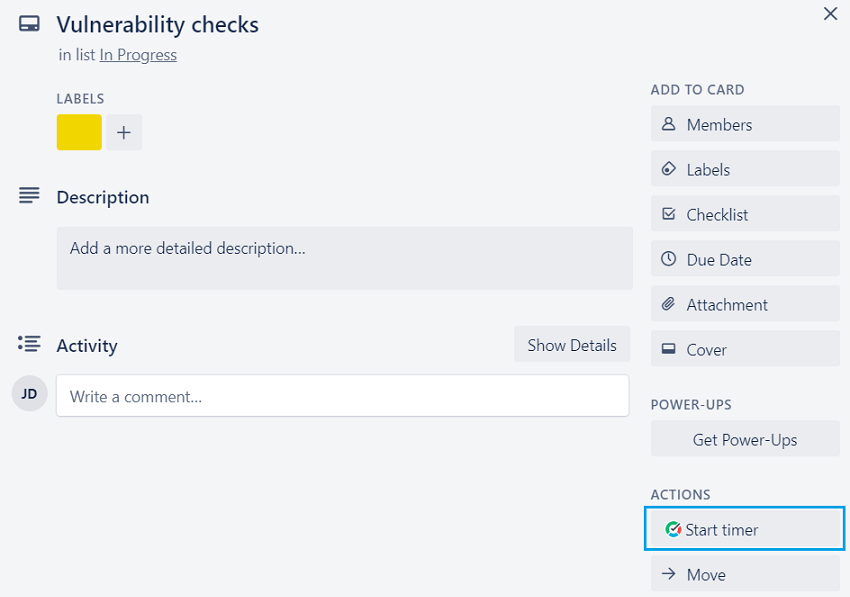
- One-click time tracking means you can track time directly from Trello cards via a browser extension
A Chrome add-on adds a green “Start Timer” button to every Trello card. You can punch in without leaving the board. The timer appears instantly in the card badge, giving visual confirmation that tracking is live.
- Automatic sync of Trello card titles, lists, and board names to time entries
When you start the timer, the extension grabs the card’s title, its current list, and the parent board and writes them into the time entry’s description. If you move the card later, the entry updates itself so your reports always reflect the latest Trello structure.
- Billable hours designation and client assignment from within Trello
Inside the same card, you can toggle a “Billable” switch and pick a client from a drop-down populated by your account.
These choices are stored with the time entry, so invoices can be generated without any extra bookkeeping.
- Reporting that connects Trello workflows to billing and productivity metrics
The web dashboard turns Trello activities into charts showing hours per board, list velocity, and billable ratio. You can put filters on such categories as clients, labels, or date ranges to see exact value of each workflow stage.
- Automatic timer switching when moving between Trello cards
If you open a different card while a timer is running, the extension asks whether you want to stop the old timer and start a new one in a single click. This prevents overlapping entries and keeps every minute attributed to the correct task.
- Manual time entry option for offline work
When you’re away from Wi-Fi, you can add time blocks later through a pop-up that asks for duration, card URL, and optional notes. The entry is back-dated and synced the next time Chrome goes online.
- Export time reports in multiple formats (PDF, CSV, Excel)
From the dashboard, you can download a polished PDF invoice, a CSV for QuickBooks, or an Excel workbook with pivot-ready sheets. Each format preserves Trello metadata as card links and list names and contributes to seamless hand-off to accounting.
- Chrome extension with offline functionality
The extension caches project and client data locally, so the timer, manual entry form, and last 30 days of logs still work when you’re on a plane. Once connectivity returns, all offline records merge automatically with the cloud.
👉 Learn how to connect TMetric and Trello
Integrations
TMetric offers more than 50+ integrations . You can work in your favorite project management and invoicing tools in addition to working in Trello. In particular, it connects with Jira, Asana, Notion, GitHub, GitLab, QuickBooks, Xero, and FreshBooks.
This makes it easy to track time in Trello while maintaining connections to your broader tech stack for invoicing, accounting, and development workflows.
Pros
✅ It integrates effortlessly with Trello without breaking your team’s flow
✅ Agency-ready: powerful billable-hour tracking and built-in client management
✅ Export-ready reports in any format your invoicing needs
✅ Budget-friendly, with a rich free tier that scales with small teams
✅ Runs everywhere—Windows, Mac, mobile, and even native Linux
Cons
❌ Mobile apps lack some advanced features available on desktops
Ratings
G2: 4.6/5 (100+ reviews)
Capterra: 4.5/5 (250++ reviews)
User Comments
After testing quite a few time tracking tools, I landed on TMetric because it struck the best balance between functionality, reliability, and support. It’s feature-rich without being overwhelming, secure, and priced fairly compared to others I tried. I don’t use all the collaboration options (since I mainly work solo), but I can see how great they’d be for teams. Overall, TMetric has made managing my time and projects far easier, and I wouldn’t switch to anything else at this point. – Capterra User Review
View TMetric on G2 | View TMetric on Capterra
Agency Fit Score: 5/5
SoftDev Fit Score: 5/5
Price to Value: 5/5
🔖 If your team wants plain-spoken time tracking without enterprise bloat, TMetric is the Goldilocks choice.
2. Toggl Track - Best Simple Time Tracking for Small Teams
Price: Free plan available; Track Starter at $9/user/month
Available on: Web, iOS, Android, macOS, Windows, Linux, Chrome extension
Why I Picked Toggl Track
Toggl Track offers a good Trello time tracker for teams that value ease-of-use above all else.
It skips the client-centric tools found in TMetric, but it provides friction-free tracking that customers can start using in their daily workflows.
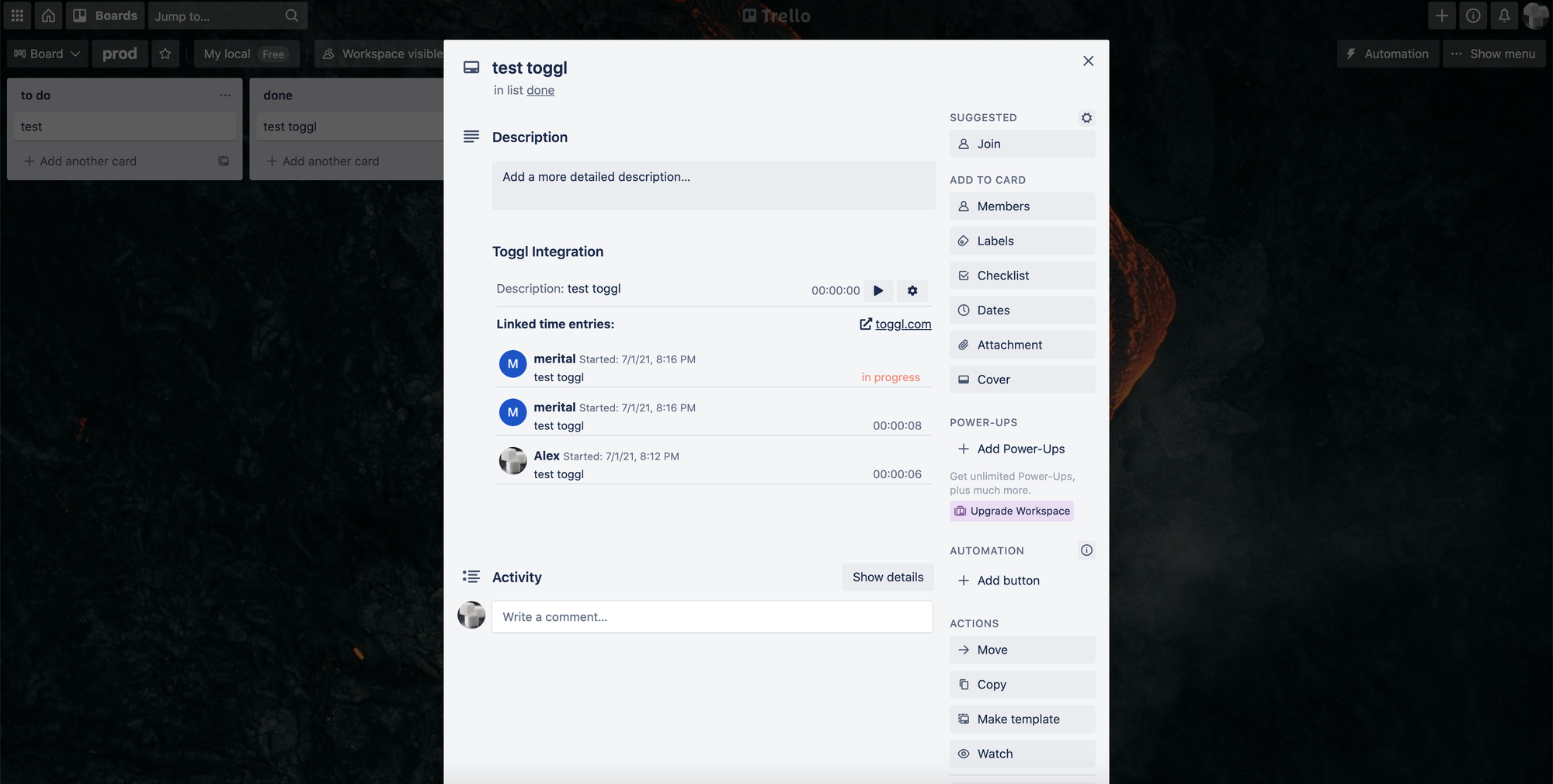
Its Trello Power-Up slips a discreet timer button onto Trello cards, and auto-fills time entries with card data.
And because every second is synced across web, desktop, and mobile, you can stop a timer on your phone during your commute and restart it from your laptop at the office without losing a beat.
Key Features
- Initiate timers on Trello cards effortlessly through one-click functionality.
- Options for review and modification of time entries via an intuitive timesheet interface.
- Time tracking around projects corresponding to Trello boards.
- Visual reports with exportable charts and data.
- Built-in Pomodoro timer to remove distractions.
- Auto-detects idle time when you step away.
- The calendar view to visualize the entirety of logged time entries.
Integrations
Toggl Track integrates with Trello, Asana, Monday.com, Slack, Google Calendar, and various invoicing platforms.
The integration ecosystem is strong, though it focuses more on the connection of time data to other tools rather than pulling detailed task information from them.
Pros
✅ Intuitive design that’s instantly easy to use
✅ Live dashboards that update as events happen
✅ Works everywhere—web, iOS, Android, Windows, macOS
✅ Keeps working even without an internet connection
✅ 24/7 award-winning support team
Cons
❌ More expensive than competitors once you need advanced features
❌ Limited client management compared to agency-focused tools
❌ Reporting capabilities are basic on lower-tier plans
Ratings
G2: 4.6/5 (1,500+ reviews)
Capterra: 4.7/5 (2500+ reviews)
User Comments
"Toggl Track helps small businesses track time across projects and roles with minimal setup. It’s most used by creative, IT, and administrative teams. Users value its reporting tools and cross-device access. While billing customization is limited, recent updates like workload reports and project manager access improve oversight and resource planning."
View Toggl Track on G2 | View Toggl Track on Capterra
Agency Fit Score: 4/5
SoftDev Fit Score: 4/5
Price to Value: 3.5/5
3. Clockify - Best Free Trello Time Tracking
Price: Free for unlimited users; Basic at $3.99/user/month
Available on: Web, iOS, Android, macOS, Windows, Linux, Chrome extension
Why I Picked Clockify
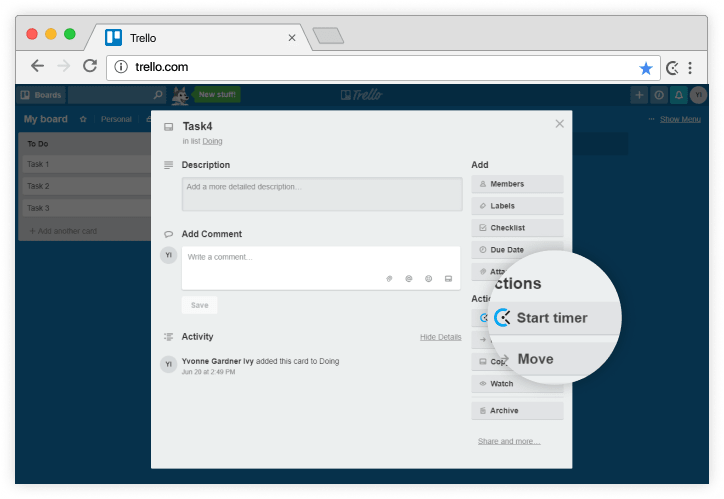
With Clockify, users get the Trello Power-Up, a simple stopwatch, manual entry, and basic reports—enough for straightforward time-and-task tracking.
Advanced invoicing or custom analytics will cost extra, but if you just need to know who worked on what card and for how long, the no-charge plan covers the essentials.
Key Features
- Free plan supports an unlimited number of users
- Browser extension adds a timer button to Trello cards
- There are no caps on entries
- You can filter reports by project and user
- Weekly timesheet view to check logged hours
- Kiosk mode is good for shared devices
- Set project estimates to see how actual hours compare
Integrations
Aside from Trello, Clockify integrates with Jira, Asana, GitHub, Slack, and QuickBooks.
The integration approach is consistent across platforms, making it easy to sync Trello with time tracker data and push information to productivity and project management tools.
Pros
✅ Unlimited, restriction-free plan
✅ Paid tiers unlock a suite of advanced tools
✅ Clean, intuitive interface for effortless navigation
✅ Robust reporting and analytics
✅ Weekly emailed summaries of your tracked time
Cons
❌ Invoicing, custom fields and other advanced options are pay-walled
❌ UI isn’t as refined as some premium rivals
❌ Free-plan support is minimal
❌ Occasional sync lag with Trello reported.
Ratings
G2: 4.5/5 (150+ reviews)
Capterra: 4.8/5 (9000+ reviews)
User Comments
"I have been using Clokify paid version since 2year and application is very easy to use. I haven't found any major bug excluding couple of UI issues."
View Clockify on G2 | View Clockify on Capterra
Agency Fit Score: 3.5/5
SoftDev Fit Score: 4/5
Price to Value: 5/5
4. Harvest - Best for Invoicing Integration
Price: Free for 1 user, 2 projects; Pro at $10.80/user/month
Available on: Web, iOS, Android, macOS, Chrome extension
Why I Picked Harvest
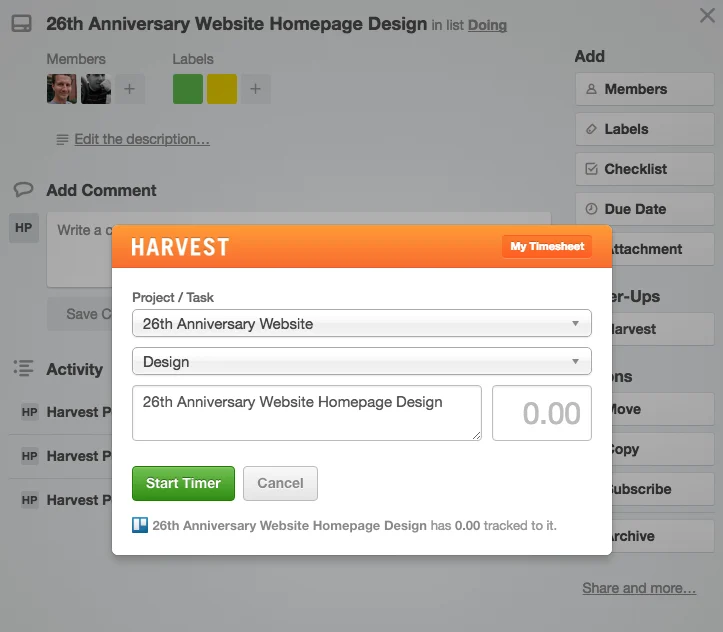
Harvest positions itself as a Trello time tracker that includes invoicing rather than treating billing as an afterthought. Track time on individual cards, mark the entries as billable, and push the same data straight to an invoice without leaving the workflow.
A Chrome extension plants a timer on every card and copies the task title and description into the time entry. Expenses can be attached the same way. When the work is done, the logged hours, notes, and any expenses appear in Harvest ready to be dropped into a draft invoice—no export step, no second tool.
Key Features
- Polished invoices straight from your timesheets
- Log expenses next to hours so nothing slips through the billing cracks
- Color-coded bars and instant alerts keep you in the green.
- Profit, productivity, and utilization in one-click reports.
- See who’s free, who’s maxed out, and who’s heading for burnout before it happens.
- Compare original estimates to actual hours to fix the next bid
- Lock timesheets until they’re reviewed and approved
- Live view of every hour and penny on their dime.
Integrations
Harvest connects with popular tools, including Trello, Asana, Basecamp, QuickBooks, Xero, Stripe, and PayPal.
The integrations help create a complete financial workflow with time tracking and help export accurate time reports to accounting systems.
Pros
✅ Invoicing features with professional templates
✅ Expense tracking
✅ Comprehensive project billing
✅ Strong reports
✅ Profitability insights
✅ Mobile app with offline tracking
Cons
❌ Expensive compared to tracking-only tools
❌ Free plan limited to solo users
❌ Some users report that Trello integration could be tighter
❌ Project setup can be complex for simple use cases
Ratings
G2: 4.3/5 (800+ reviews)
Capterra: 4.6/5 (600+ reviews)
User Comments
Harvest is a very intuitive and easy-to-use application for my team. The best part is that a user can make modifications to go back in time if he or she misses recording time. We have been using Harvest App for the last 6 years and my team loves it.
View Harvest on G2 | View Harvest on Capterra
Agency Fit Score: 4.5/5
SoftDev Fit Score: 3.5/5
Price to Value: 4/5
5. TimeCamp - Best Automatic Time Tracking
Price: Free plan available; Basic at $2.99/user/month
Available on: Web, iOS, Android, macOS, Windows, Linux, Chrome extension
Why I Picked TimeCamp
TimeCamp timer works unseen, sensing when Trello is active and attributing time to the card on-screen.
Later, you can audit the captured entries, approving or tweaking them in your timesheet.
For teams that wrestle with getting people to fill out timesheets, this hands-off approach boosts accuracy and compliance overnight.
Key Features
- Track time automatically from apps and websites
- Start/stop timers on demand for full flexibility
- Auto-link work time to the Trello card you have open
- Optional activity monitor; pause or disable anytime
- Log clock-ins/outs and total work hours
- Visual productivity reports and trends
- Set billable rates, generate invoices in a click
- Submit and approve timesheets without leaving the app
- Watch project budgets update live as work is logged
Integrations
TimeCamp offers Trello, Asana, Jira, GitHub, GitLab, Slack, QuickBooks, and Xero integrations.
The power-up works smoothly with the automatic tracking engine. It ensures time is correctly attributed, even when you're not actively using the timer button.
Pros
✅ Automatic tracking removes the risk of forgotten time entries
✅ The pricing for automatic features seems affordable
✅ Users get productivity insights
✅ It monitors computer activities at work
✅ Attendance tracking options are handy
Cons
❌ Automatic tracking may feel intrusive to some team members
❌ Setup and configuration can be complex initially
❌ Activity monitoring features require clear team communication
❌ Interface feels dated in comparison with newer competitors
Ratings
G2: 4.7/5 (300+ reviews)
Capterra: 4.7/5 (550+ reviews)
User Comments
As an office manager, it's very easy to teach our employees how to use TimeCamp and it's also very easy to export the timesheets into an Excel file. Overall a very easy and flexible tool to work with.
View TimeCamp on G2 | View TimeCamp on Capterra
Agency Fit Score: 4/5
SoftDev Fit Score: 4.5/5
Price to Value: 5/5
Other Trello Time Tracking Options
- Planyway
Planyway overlays a visual timeline and budget bar onto every Trello card so the team sees remaining hours, cost and scope in one glance without opening extra tabs.
When the burn-rate curve threatens the original estimate, Planyway auto-posts a red-flag comment to the card and pings the PM so scope or pricing can be re-negotiated before the overrun is locked in.
- Hubstaff
Hubstaff records active minutes, keystrokes, and screenshot cadence from inside Trello to turn card assignments into measurable productivity scores.
Managers receive daily email summaries that flag idle time and rank each contributor’s output without leaving the board view.
- TrackingTime
TrackingTime drops a colorful timer button onto every Trello card and then paints the collected hours into drag-and-drop calendars and pie charts.
These visuals make it obvious which tasks are ballooning so teams can reallocate effort before deadlines slip.
- Paymo
Paymo converts Trello cards into full project objects that carry their own time entries, Gantt charts, and client invoices under one roof.
When a card moves to “Done,” Paymo auto-generates a billable hours report that can be approved and sent without retyping anything.
- RescueTime
RescueTime silently logs which websites and apps are used while a Trello card is active, then assigns a productivity pulse score to each board.
Weekly digests compare that score against the card’s original estimate, nudging users to block distractions if the gap grows too wide.
- Zoho Projects
Zoho Projects pulls Trello cards into its enterprise-grade workspace, where they inherit resource calendars, SLA timers, and inter-department dependencies.
Because the data lives on the same Zoho backbone, CIOs can blend Trello activity with CRM, finance, and support metrics for company-wide roll-ups.
Red Flags: When Time Tracking Makes Things Worse
Not every agency needs every feature. But some gaps will actively hurt you.
Red Flag #1: No client-level reporting
Problem: You can see project profitability, but not client profitability
Why it matters:
- Client A gives you 5 small projects/year (high overhead, low margin).
- Client B gives you 2 large projects/year (low overhead, high margin). If you can't see this, you'll focus on the wrong clients.
Who has it: TMetric, Harvest
Who doesn't: Clockify, TimeCamp, Toggl
Red Flag #2: No budget alerts
Problem: You only see overruns in hindsight
Why it matters: By the time you realize you're at 120% of quoted hours, it's too late to renegotiate scope. Client expects delivery. You eat the loss.
Who has it: TMetric, Harvest, Planyway
Who doesn't: Toggl, Clockify, TimeCamp
Red Flag #3: Can't export detailed client reports
Problem: Client questions invoice, you have no proof of work
Why it matters: Without timestamped task logs, you're arguing about memory vs. memory. You lose credibility and often lose money.
Who has it: TMetric, Harvest
Who doesn't: TimeCamp (activity logs are intrusive, not client-friendly)
Red Flag #4: No historical project data
Problem: Every new estimate is a guess
Why it matters: You can't improve estimation accuracy without comparing quoted hours vs. actual hours on past similar projects.
Who has it: TMetric, Harvest (basic)
Who doesn't: Clockify, Toggl, TimeCamp
Summary
After stress-testing 11 Trello-integrated time trackers, we found the “best” tool is the one that maps to your workflow, not the one with the longest feature list.
TMetric is the best overall: One-click Trello import, granular billing rates, and agency-friendly pricing.
TMetric is the only tracker that natively maps Trello cards to billable rates, then pushes one-click invoices without leaving the board. It wins because the two-minute setup gives you error-free client billing and sprint-cost visibility that finance and engineering actually trust.
Bottom line: a timer button inside Trello is table stakes. What actually moves the needle is zero-friction data capture, real-time project sync, and reports that tie hours to revenue, sprint velocity, or client margins.
Pick the tool that delivers those three things for your use case, and you’ll turn Trello into a profit-and-productivity dashboard instead of a digital corkboard.
How We Selected
- Integration quality – one-time auth, bidirectional card/project sync, and no missing time entries.
- Ease of use – new user onboarded in <5 min, mobile parity, no Chrome-tab gymnastics.
- Feature depth – auto vs. manual tracking, budget burn, profitability by card, invoicing, API.
- Pricing & scale – free-plan limits, per-seat cost ramps, and enterprise tier gatekeepers.
- Real-world proof – median ratings ≥4.4 on G2/Capterra, support response <24 h, 99.9 % uptime, and verified stories from remote, agency, and product teams.
We weighed those five vectors equally, then pressure-tested each contender with live Trello boards, real client projects, and actual invoices. The five tools above were the top survivors.
Related Resources: