20 Best Notion Integrations for Workflow & Productivity

Discover how Notion integrations can improve your workflow. Explore the best tools and automation options to optimize your productivity.

By Alla Chernets | February 11, 2026

dfsdfsdsfsdf
Your Notion workspace requires an advanced level of development with best Notion integrations

Key Features

  • Company social feed 1
  • Company social feed 2
  • Company social feed 3
  • Company social feed 4

Pros

  • Company social feed 1
  • Company social feed 2
  • Company social feed 3
  • Company social feed 4

Cons

  • Company social feed 1
  • Company social feed 2
  • Company social feed 3
  • Company social feed 4

Key Features

  • Company social feed 1
  • Company social feed 2
  • Company social feed 1
  • Company social feed 2

Pros

  • Company social feed 1
  • Company social feed 2

Cons

  • Company social feed 1
  • Company social feed 2

Pricing

Free-for-life

Available

Premium plans

Start at $29/month for 30 users.

Pricing

Free-for-life plan available · Premium plans start at $29/month for 30 users.

What Is Notion

Users gain an efficient workplace through Notion that combines project organization and note management while providing team and individual customization features in one centralized environment.

Notion enables users to develop knowledge bases and wikis, which enhances both teamwork effectiveness and productivity.

The strength of deploying Notion results from:

  • its adaptable databases and notes
  • its smooth connectivity with additional workflow applications.

Core Features of TMetric
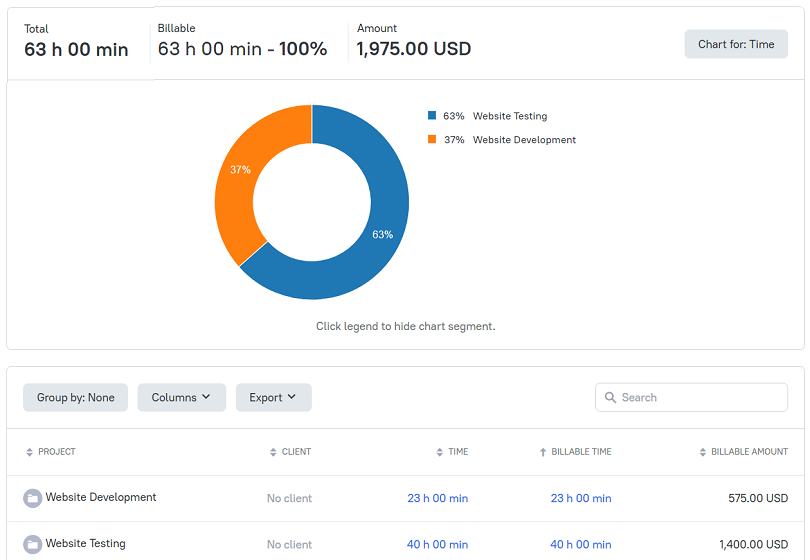
fdsfdsfdsfsdfsdf

  1. The time tracking tool enables users to track their project work hours and task durations.
  2. The system produces complete reports that include time utilization information.
  3. It can generate invoices through tracked time data.
  4. The software offers a comprehensive module for tracking time off.

The Notion Integrations List

Tool Connect with Notion
TMetric Time tracking tool that allows you to track work hours on tasks, generate reports, and manage invoices directly within the Notion app.
Zapier No-code automation platform with bi-directional syncing capabilities, supporting database syncing, task creation, document generation, and content publishing workflows.
Canva Users can embed Canva designs into their Notion pages through the integration which simplifies design asset and project concept organization.
Google Calendar Allows embedding calendar views in Notion, creating events from database items, syncing deadlines, and integrating meeting notes.
Trello Enables two-way syncing between Trello boards and Notion databases, mirroring cards as pages, primarily through third-party tools like Zapier.

Frequently Asked Questions

Which plan should I choose?

Choose a plan based on your team's size and needs. The Professional plan is for individuals or small teams requiring basic time tracking, task management, and reporting. The Business plan is designed for larger teams with advanced reporting, workforce management, admin controls, integrations, and invoicing.

Is there a free trial, and what happens when it ends?

Choose a plan based on your team's size and needs. The Professional plan is for individuals or small teams requiring basic time tracking, task management, and reporting. The Business plan is designed for larger teams with advanced reporting, workforce management, admin controls, integrations, and invoicing.

How do I pay for a plan?

Choose a plan based on your team's size and needs. The Professional plan is for individuals or small teams requiring basic time tracking, task management, and reporting. The Business plan is designed for larger teams with advanced reporting, workforce management, admin controls, integrations, and invoicing.

What if I have multiple workspaces?

Choose a plan based on your team's size and needs. The Professional plan is for individuals or small teams requiring basic time tracking, task management, and reporting. The Business plan is designed for larger teams with advanced reporting, workforce management, admin controls, integrations, and invoicing.

I've bought a subscription, why wasn't my workspace upgraded?

Choose a plan based on your team's size and needs. The Professional plan is for individuals or small teams requiring basic time tracking, task management, and reporting. The Business plan is designed for larger teams with advanced reporting, workforce management, admin controls, integrations, and invoicing.

Do I have to pay for myself even if I only monitor my employees?

Choose a plan based on your team's size and needs. The Professional plan is for individuals or small teams requiring basic time tracking, task management, and reporting. The Business plan is designed for larger teams with advanced reporting, workforce management, admin controls, integrations, and invoicing.

Can I change my plan later?

Choose a plan based on your team's size and needs. The Professional plan is for individuals or small teams requiring basic time tracking, task management, and reporting. The Business plan is designed for larger teams with advanced reporting, workforce management, admin controls, integrations, and invoicing.

What if my team size changes?

Choose a plan based on your team's size and needs. The Professional plan is for individuals or small teams requiring basic time tracking, task management, and reporting. The Business plan is designed for larger teams with advanced reporting, workforce management, admin controls, integrations, and invoicing.

Is there a money-back guarantee?

Choose a plan based on your team's size and needs. The Professional plan is for individuals or small teams requiring basic time tracking, task management, and reporting. The Business plan is designed for larger teams with advanced reporting, workforce management, admin controls, integrations, and invoicing.

Can I get help with onboarding or setup?

Choose a plan based on your team's size and needs. The Professional plan is for individuals or small teams requiring basic time tracking, task management, and reporting. The Business plan is designed for larger teams with advanced reporting, workforce management, admin controls, integrations, and invoicing.

What support options are available?

Choose a plan based on your team's size and needs. The Professional plan is for individuals or small teams requiring basic time tracking, task management, and reporting. The Business plan is designed for larger teams with advanced reporting, workforce management, admin controls, integrations, and invoicing.