5 Best Billing Software for IT Services in 2026 [Compared]
Simplify invoicing and payments with the best billing software for IT services in 2026. See how the top 5 platforms compare in features and performance, and choose the one that best fits your company’s needs.

By Dereck Mushingairi | April 10, 2026
Every IT team has invisible work, the kind that never makes it into a timesheet but always shows up in client expectations. The quick Slack fix, the emergency patch, the micro-consulting call — individually small, collectively enormous. Repeated across development, support, and DevOps, these moments quietly drain billable time and project margin.
Layer in the financial complexity:agenvy
- engineers with different billable rates,
- hybrid billing models (hourly + retainers + SLAs),
- a mix of billable and internal engineering work
In the end, you get a billing environment that demands accurate attribution, real-time tracking, and full financial visibility.
Modern billing platforms finally solve this. They capture work where it happens, separate billable from non-billable activity, and translate engineering output into clean, defensible invoices.
This guide breaks down the 11 best billing software tools for IT services in 2026, chosen for developer alignment, billing accuracy, and financial transparency.
TL;DR
| Core Category | Feature | TMetric | Harvest | FreshBooks | Accelo | Toggl Track |
|---|---|---|---|---|---|---|
| Billing Capabilities | Billable rates (role/project/service) | ✓ | ✓ | ✓ | ✓ | ✓ |
| Invoice generation from tracked work | ✓ | ✓ | ✓ | ✓ | ✓ | |
| Retainer billing | — | — | — | ✓ | — | |
| SLA-based billing | — | — | — | ✓ | — | |
| Automated billing cycles | ✓ | ✓ | ✓ | ✓ | — | |
| Expense → invoice workflow | ✓ | ✓ | ✓ | ✓ | — | |
| Developer Workflow Fit | Time tracking inside dev tools (Jira/GitHub/GitLab/ADO) | ✓ | ✓ | — | ✓ | ✓ |
| Issue/ticket-level tracking | ✓ | ✓ | — | ✓ | ✓ | |
| Timer start from tasks/issues | ✓ | — | — | ✓ | ✓ | |
| Project Financials | Time- or cost-based project budgets | ✓ | ✓ | ✓ | ✓ | ✓ |
| Budget alerts | ✓ | ✓ | — | ✓ | — | |
| Profitability reporting | ✓ | ✓ | ✓ | ✓ | ✓ | |
| Labor cost tracking | ✓ | — | ✓ | ✓ | — | |
| Governance & Controls | Timesheet approvals | ✓ | ✓ | — | ✓ | — |
| Audit logs | — | — | — | ✓ | — | |
| Multi-team reporting | ✓ | ✓ | — | ✓ | — | |
| Client Visibility | Client portals / shared views | ✓ | — | ✓ | ✓ | — |
| Detailed work breakdown | ✓ | ✓ | ✓ | ✓ | — | |
| Overall Fit | Best for | Dev teams & IT consultancies | IT consulting teams | Solo IT contractors | MSPs & enterprise IT | Small dev teams |
Key Features to Look For in IT Billing Software
Choosing billing software for IT services means focusing on features that support the realities of engineering work — mixed billing models, technical workflows, and tight project margins.
Flexible rate management
IT teams rarely bill at a single rate. You need software that adapts to different pricing structures without manual adjustments.
Common rate models IT teams use:
- Role-based rates (e.g., junior dev vs. architect)
- Project-specific rates
- Blended/tiered rates for mixed services
Note: Over 60% of IT consultancies use multi-level rate cards.
Clear separation of billable vs. internal time
Engineering work mixes client tasks with internal efforts like planning or R&D. The software should keep these categories distinct to avoid billing errors and protect margins.
| Time Type | Revenue Impact | Margin Impact |
|---|---|---|
| Billable | Direct income | Improves margin |
| Internal | No income | Reduces margin if excessive |
Accurate activity-to-time link
Time entries must mirror actual technical work. Tools should let engineers track directly from tasks, issues, pull requests, or commits.
This helps teams:
- Reduce missing hours
- Produce defendable invoices
- Maintain accurate project costing
Strong integrations with IT systems
To keep data accurate, billing software needs to plug into the systems engineers already use — Jira, GitHub/GitLab, Azure DevOps, QuickBooks, and Slack.
Well-integrated tools reduce manual entry and keep engineering, PM, and finance aligned.
Budget visibility & alerts
PMs need clarity on burn rate and remaining budget in real time — not at month-end.
Look for:
- Budget-to-actual tracking
- Alerts at key thresholds (75%, 90%)
- Projected overrun indicators
Note: Teams using proactive budget alerts report significantly fewer overruns.
Automated invoicing
Invoices should build themselves from tracked work with minimal cleanup. This speeds up billing cycles and ensures accuracy.
Scalability & controls
As IT teams grow, approvals, audit logs, and role-based permissions become essential. Reliable governance helps prevent errors and supports multi-team reporting without adding friction.
What we considered in choosing these 11 top billing tools
Here’s the criteria we used to cut through the crowded billing software market and highlight the tools that actually work for IT services teams.
| Step | What we did | What we learned (general trends) |
|---|---|---|
| 1. Industry & user feedback analysis | Reviewed insights from G2, Capterra, Reddit developer groups, MSP forums, and IT leadership communities. | Most IT teams struggle with scattered time tracking, inconsistent billing data, and tools that don’t match real engineering workflows. |
| 2. IT workflow testing | Simulated ticket-based work, dev-tool integrations, rate structures, and budget alerts across realistic scenarios. | Tools that sync with tickets, commits, and PRs lead to far more accurate billing and fewer lost hours. |
| 3. Pricing, scaling & margin impact | Compared costs across dev teams, MSPs, consultancies, and multi-team engineering setups. | As teams grow, pricing pressure increases, and tools without automation become costly or inefficient. |
| 4. Integration depth & ecosystem fit | Evaluated support for Jira, GitHub, GitLab, Azure DevOps, Notion, QuickBooks, and other IT systems. | Strong integrations reduce admin work and improve billing accuracy; weak integrations push teams back to spreadsheets. |
11 Best billing software for IT services in 2026
Let’s explore the billing tools that have proven they can handle real IT workflows and deliver the accuracy, visibility, and client-ready invoices teams need.
1. TMetric
🌟 4.6/5
Best for: IT consultancies and dev teams
Price: Free; paid plans from $7–$9/user/month
Available on: Web, iOS, Android, macOS, Windows, Linux, browser extension
What makes TMetric stand out
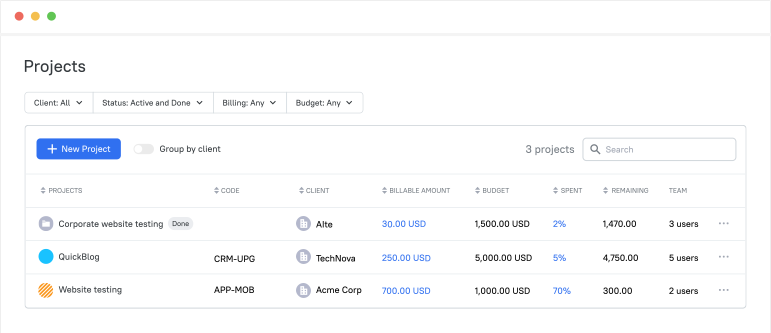
Backed by 3,000+ companies worldwide, a fully functional 14-day trial (no credit card needed), and 4.6-star ratings on Capterra, GetApp, and G2, TMetric delivers clarity without friction—an effortless time tracker built for any team size. TMetric stands out because it keeps time tracking, billing, and team management effortless—even for distributed teams working across multiple tools. Developers can start timers directly inside Jira, GitHub, GitLab, Azure DevOps, Asana, Notion, QuickBooks, and 50+ other services, capturing hours accurately without breaking their workflow.
With real-time insights, productivity tracking, and clean reporting, teams get a clear view of progress, budgets, and billable work. For IT and service teams, this simplicity makes billing predictable and eliminates manual admin. Turning tracked work into invoices or payroll takes just a few clicks, while attendance, time off, and timesheets stay synced in one system.
Key TMetric features
Task-level tracking for technical work
Organize time across projects, client engagements, engineering tasks, and support work to keep everything clearly attributed.
Time tracking inside popular tools
Use the browser extension to start and stop timers from Jira, GitHub, GitLab, Azure DevOps, and other integrated platforms.
Connect hours to actual work
Link time to tasks, PRs, issues, or activities so clients get a clear picture of what was done.
Flexible billing rates
Set different billable rates based on project, work type, or service category. You can also designate work as non-billable when needed.
Clear billable vs non-billable separation
Keep internal meetings, training, planning sessions, and admin work separate from client-facing hours for cleaner billing.
Project budgets in time or money
Monitor project progress with simple budget tools.
- Choose between a time-based or cost-based budget.
- Track usage as the project evolves.
- Catch potential overruns early.
- Maintain a clear view of financial performance.
Fast and accurate invoicing for IT services
Build invoices directly from tracked work and export them instantly.
- Generate invoices using real project data.
- Export to PDF or Excel for easy sharing.
- Review billable time before sending.
- Reduce manual cleanup at month-end.
TMetric pricing overview (monthly vs annual)
| Plan | Monthly (billed monthly) | Monthly (billed annually) | Key features included |
|---|---|---|---|
| Free | $0 | $0 | Basic time tracking, unlimited projects & clients, reports |
| Professional | $7 | $5.83 | Billable rates, invoicing, budgets, integrations, reports |
| Business | $9 | $7.50 | Time Off, Team Timesheets, monitoring, and advanced integrations |
| Custom | Custom quote | Custom quote | For teams needing custom terms, support, or deployment options |
What TMetric users are saying
“I'm tracking both billable and non-billable time for my business, giving me a better view of where my time is going and what I'm doing with it, thus allowing me to better optimize my time investment.” — Verified Capterra review
Why it’s #1
- Fits naturally into developer workflows: The browser extension lets teams track time inside the tools they already use, improving adoption and accuracy.
- Makes project finances easy to understand: Budgets, billable rates, and reports come together to show which projects are on track and profitable.
- Simple for teams to roll out: Setup is quick, the interface is intuitive, and both engineering and billing teams get the clarity they need without extra admin work.

2. Harvest
🌟 4.3/5
Best for: All-in-one time tracking + billing for IT consulting teams
Price: ~\$11/user/month (Pro plan)
Available on: Web, iOS, Android, desktop apps, browser extensions
What makes Harvest stand out
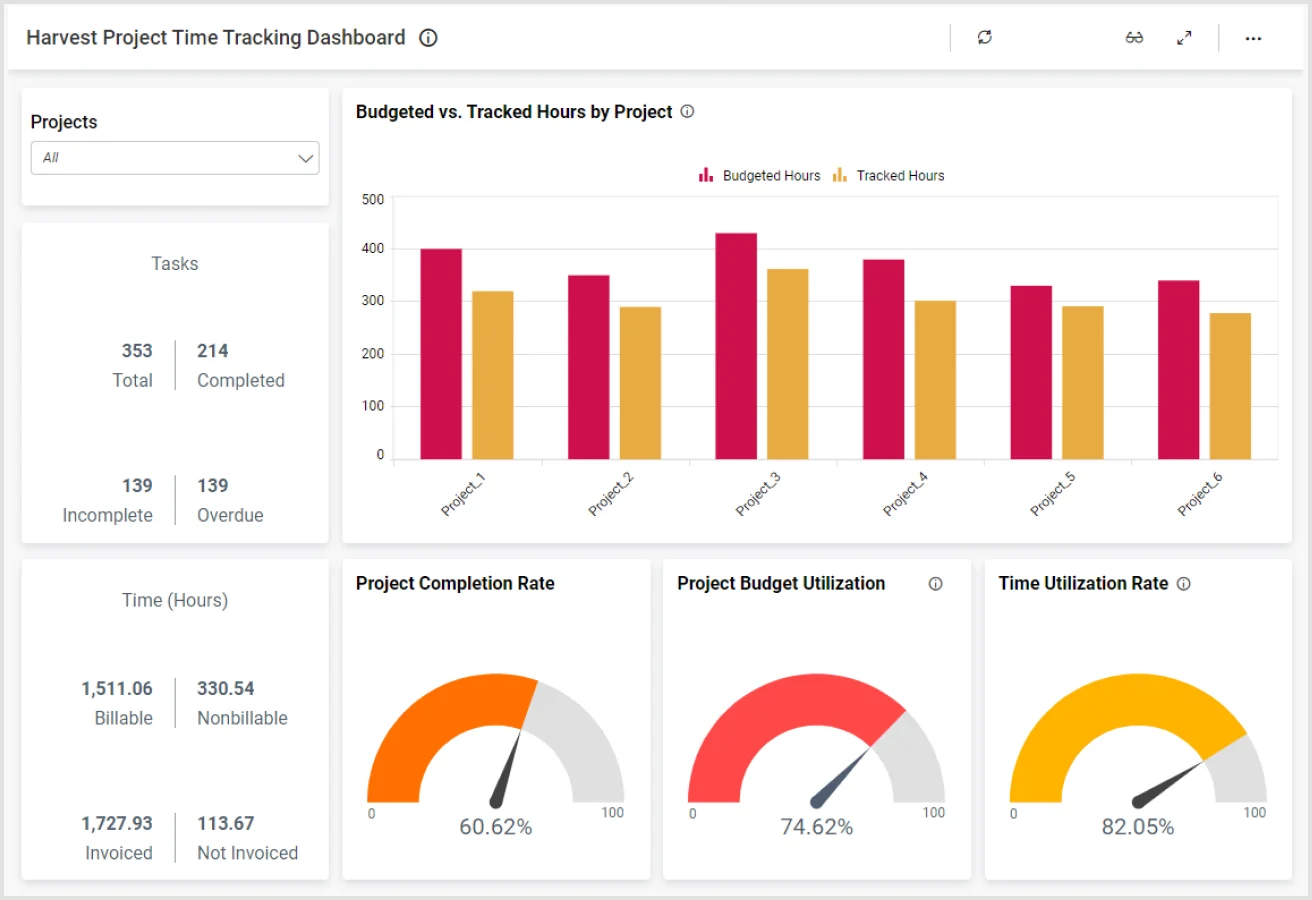
Harvest is a solid choice for IT consulting teams that want simple yet reliable time tracking paired with straightforward billing. Developers can log hours from web, mobile, or via browser extensions, and PMs can see project budgets and hours at a glance. With built-in invoicing, expense tracking, and integrations with tools like Jira and GitHub, it’s practical for smaller IT teams that want clarity without complexity.
Key Harvest features
- Time tracking by project and role
- Budget tracking for hours and cost
- Clean invoicing and payment options
- Expense recording for billable costs
- Integrations with Jira, GitHub, Trello, and more
Reviews
“Harvest is a comprehensive system that offers advanced and innovative resources for recording and monitoring your work projects, allowing you to manage your time across your organization's operations and work projects.” — G2 reviewer
3. FreshBooks
🌟 4.5/5
Best for: Freelance IT consultants & independent developers
Price: Plans start in the low \$20s/month
Available on: Web, iOS, Android
What makes FreshBooks stand out
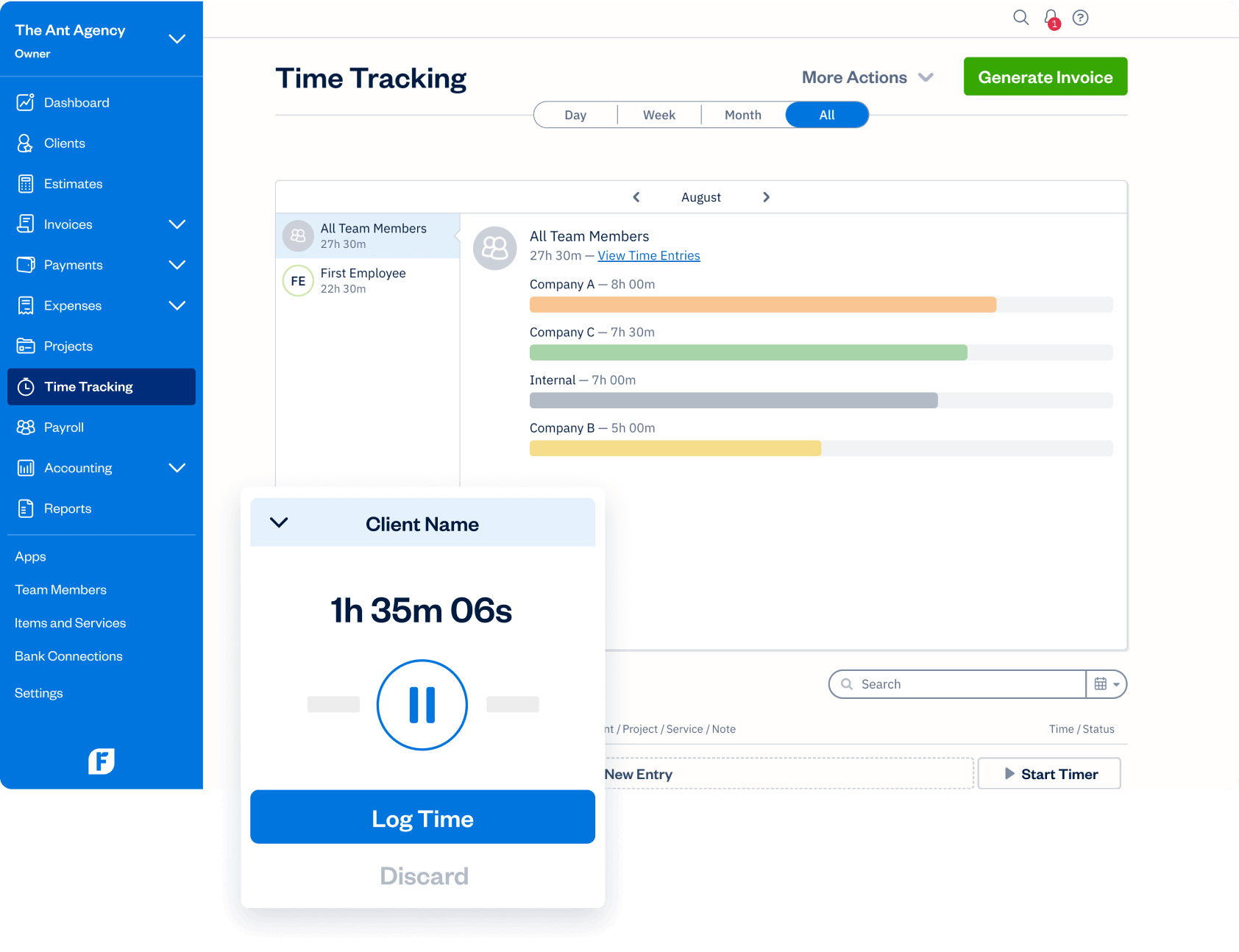
FreshBooks is ideal for solo IT consultants and independent developers who want fast, professional billing without heavy setup. Its time tracking feeds directly into invoices, recurring invoices are easy to set up, and clients can pay online quickly. While it isn’t tailored to developer workflows, its strong invoicing, expense management, and client payment portal make billing painless and predictable for freelancers juggling multiple engagements.
Key FreshBooks features
- Simple time tracking attached to clients and projects.
- Automated recurring invoices.
- Expense management and reporting.
- Professional proposals and estimates.
- Client payment portal with online payment options.
Reviews
“Fresh books allow me to keep track of multiple clients with multiple projects each in a clean and organized manner. It's easy to create and send invoices for each project. The timekeeping function is so helpful because it keeps track of my time spent on each project and then enters the billable time directly on an invoice. I don't have to do any calculating.” — G2 reviewer
4. Accelo
🌟 4.4/5

Best for: IT implementation firms & technical project organizations.
Price: Typically ~\$30–\$40/user/month, depending on modules.
Available on: Web, mobile.
What makes Accelo stand out
Accelo is a broader work management and billing system that’s particularly useful when IT billing spans projects, tickets, milestones, and retainers. Time logged on issues and work items flows into automated billing workflows, and retainer cycles and service commitments stay organized without manual spreadsheets. Its integrations help teams centralize project, client, and financial data, giving MSPs and IT consultancies better end-to-end clarity from time entry to invoices.
Key Accelo features
- Billing across tickets, projects, and milestones.
- Retainer automation and recurring revenue tracking.
- SLA and commitment tracking.
- Resource planning and utilization insights.
- Integrations with productivity and CRM tools.
Reviews
“A few things I like best about Accelo are: 1) the ability to see and respond to all team members’ email correspondence with clients and vendors, 2) the ability of the engagement templates to be heavily customized, and 3) the ability to create customized shared lists.” — G2 reviewer
5. Toggl Track
🌟 4.6/5
Best for: Small IT teams needing simple time tracking + light billing
Price: Free for up to 5 users; paid plans from \$9/user/month
Available on: Web, iOS, Android, desktop apps, browser extensions
What makes Toggl Track stand out
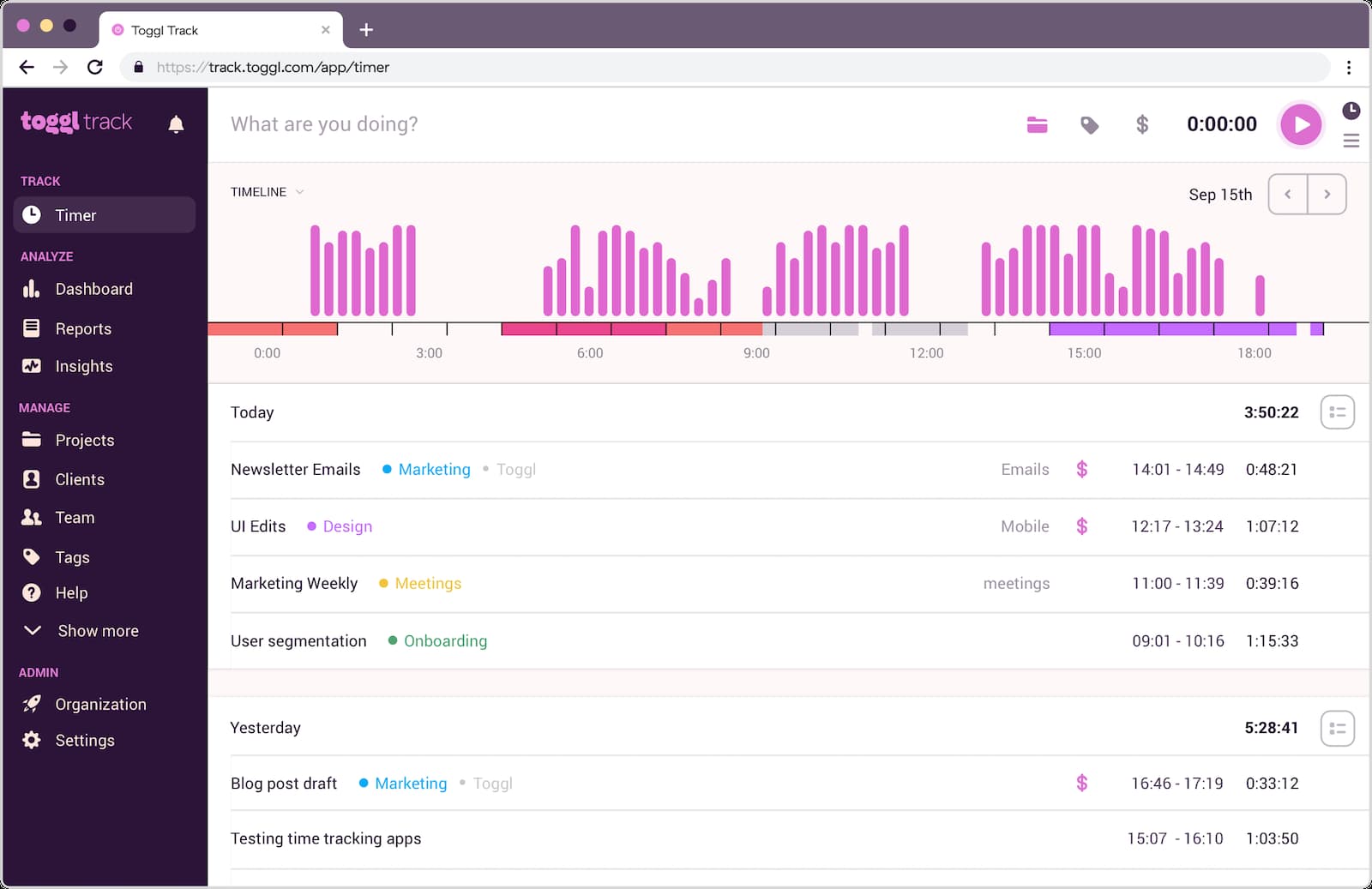
Toggl Track is perfect for teams that want effortless time tracking with light billing support. Developers can start timers from browser extensions or apps and tag their work for clear reporting. While it doesn’t provide deep automated billing workflows, it lets teams export structured reports and apply billable rates, making it easy to build invoices using integrated exports or connected tools. Its simplicity and speed make it a favorite among small dev and consulting teams.
Key Toggl Track features
- Fast, flexible time capture.
- Project and task tagging for clarity.
- Developer-friendly extensions.
- Billable rate tracking.
- Exportable reports for billing and analysis.
Reviews
“I love how clean and simple Toggl is, I can literally just hit start, get to work, and stop easily, no confusing UI or extra clicks.” — G2 reviewer
Quick Comparison
| Tool | Lowest paid plan (per user/month) | Free plan limitations | Ratings (G2 / Capterra) | Agency fit score | SoftDev fit score |
|---|---|---|---|---|---|
| TMetric | ~\$7–\$9 | Free for up to 2 users with core tracking | ~4.6 / ~4.5 | 4.8 / 5 | 4.9 / 5 |
| Harvest | ~\$11 | No permanent free plan | ~4.3 / ~4.6 | 4.2 / 5 | 4.3 / 5 |
| FreshBooks | Low-\$20s | No free plan | ~4.5 / ~4.5 | 4.0 / 5 | 3.8 / 5 |
| Accelo | ~\$30–\$40 | No free plan | ~4.4 / ~4.5 | 4.5 / 5 | 4.6 / 5 |
| Toggl Track | ~\$9 | Free for up to 5 users | ~4.6 / ~4.6 | 4.1 / 5 | 4.0 / 5 |
Other billing software for IT options
If none of the main tools fit your exact workflow, these platforms are also strong contenders, each with a clear advantage depending on your IT setup:
- Replicon – Enterprise-grade time tracking with compliance and approvals, ideal for large IT departments with strict audit requirements.
- ClickTime – Combines resource planning with time tracking, helping IT teams manage workload capacity and billing.
- Avaza – Project management + billing in one place, good for mid-size IT agencies that want scheduling and invoicing together.
- WorkflowMax – Job management with integrated billing, suitable for IT implementation teams handling multiple client jobs at once.
- Mavenlink – A delivery platform built for professional services, strong for IT firms wanting advanced financial management.
- Paymo – Task and project management with time tracking for smaller technical teams needing an all-in-one workflow.
- TimeCamp – Automatic time tracking with simple billing features, helpful for teams wanting minimal setup and quick reporting.
Which billing software should you pick?
If you want billing that aligns with real technical activity — tickets, commits, PRs, support tasks — TMetric is the strongest overall fit. It matches developer workflows naturally and adapts to common IT and billing models without forcing teams to change how they work.
- Prefer a straightforward consulting workflow? → Harvest
- Solo IT consultant or freelancer? → FreshBooks
- Need automation across projects, tickets & retainers? → Accelo
- Small team wanting fast setup and light billing? → Toggl Track
How much does billing software for IT services cost in 2026?
Most billing platforms for IT services fall into familiar pricing ranges:
- Core billing + time tracking tools: \$7–\$15/user/month. This includes TMetric, Harvest, Toggl Track, and similar platforms designed for everyday technical teams.
- Developer-focused platforms: \$9–\$18/user/month. Tools with deeper integration into dev workflows or advanced reporting typically fall here.
- PSA systems (Accelo, Mavenlink): \$30–\$40/user/month. These serve IT consultancies, MSPs, and implementation firms that need automated billing across tickets, projects, and retainers.
- MSP-specific billing suites: \$50+/user/month. Pricing increases for platforms offering automation around SLAs, ticketing, usage data, and device-based billing.
In short, IT billing tools follow predictable pricing tiers, from lightweight trackers to full PSA platforms. The right choice depends on how your team works: simple time capture, developer-aligned billing, or automated workflows across projects and tickets. Once the tool reflects how your engineers actually work, the cost becomes small compared to the hours and clarity you regain.
The Takeaway
Accurate billing is one of the most decisive factors in running a healthy IT services business. Among all the options, TMetric stands out because it aligns with how engineering teams actually work, capturing time at the task level, syncing with dev tools, and giving teams a clear view of budgets and billable activity. Harvest, FreshBooks, Accelo, and Toggl Track each serve important roles across different consulting and MSP scenarios, but when billing needs to mirror real technical output, TMetric remains the most reliable fit.