Best Automated Billing Software for Growing Businesses in 2026
The gap between growth and stagnation often comes down to one thing: how well you track and bill your time. But most time trackers force a trade-off. You either get simplicity without insight, or power with complexity. The solutions in this guide are designed to eliminate that compromise, giving you seamless tracking, strong reporting, and precise, audit-ready billing without the friction.

By Dereck Mushingairi | February 27, 2026
As businesses expand and global companies rapidly adopt subscription and recurring revenue models, automated billing software has become a linchpin for success. These tools simplify complex payments, guaranteeing precise invoicing and faster collections, which is why their market is growing at an unprecedented 14.3% annual growth rate.
But how do you narrow down the best fit for your business in the crowded market? This guide breaks down the top tools of 2026 that match your business needs.
Compare:
Who is automated billing software suitable for
Automated time and billing software is suitable for organizations that bill clients repeatedly, charge by time or usage, or manage multiple revenue streams. It serves far more than accounting teams: it supports operations, delivery, and revenue management across the business.
| Role/Business Type | Why automated billing fits | Typical use cases | Business value |
|---|---|---|---|
| Managers and Team Leads | Provides visibility into billable activity, approvals, and revenue trends | Monitoring billable hours, approving invoices, and forecasting revenue | Better financial control and reduced administrative workload |
| Software Developers and Technical Teams | Aligns billing with real development work through integrations and APIs | Billing by sprint, feature delivery, or usage | Accurate client billing tied to actual effort |
| Marketing and Creative Teams | Supports retainers and mixed pricing models | Monthly retainers, campaign billing, and hourly work | Predictable recurring revenue |
| Designers and Freelancers | Simplifies invoicing linked to time or deliverables | Hourly projects, fixed-price work | Faster invoicing and fewer disputes |
| Accountants and Finance Specialists | Improves accuracy and reconciliation | Invoice review, reporting, compliance checks | Cleaner financial records and audit readiness |
| Consultants and Professional Services | Handles multi-client and recurring billing structures | Advisory retainers, long-term engagements | Scalable billing processes and transparent reporting |
Now that we’ve clarified who benefits, you’re probably wondering how we picked the best tools. Let’s walk through the criteria we used to choose them.
How we selected the best automated billing software
The software for automated billing and payments in this guide were selected based on their ability to automate real billing operations, support diverse revenue models, and scale with growing businesses. Rather than ranking tools by popularity, we focused on solutions that deliver measurable operational value.
We evaluated each product using the following criteria:
- Automation depth: The extent to which the platform can generate invoices, apply pricing rules, process payments, send reminders, and reconcile transactions without manual intervention
- Billing flexibility: Support for multiple pricing models, including time-based billing, recurring subscriptions, usage-based charges, and industry-specific workflows
- Integrations and APIs: Compatibility with accounting systems, payment gateways, CRM platforms, project management tools, and developer ecosystems
- Payment handling: Ability to process online payments, track outstanding balances, manage failed transactions, and support global payment methods
- Scalability: Suitability for both small teams and larger organizations as billing volume and complexity increase
- Usability and setup: Ease of implementation, configuration, and day-to-day operation without extensive technical resources
- Pricing transparency: Clear, predictable pricing structures that remain sustainable as usage grows
- User feedback and market adoption: Consistent ratings, real-world usage across industries, and evidence of reliability in production environments
Only tools that performed strongly across these dimensions were included. The result is a shortlist of automated billing software solutions that can support real revenue operations in 2026 — not just basic invoicing tasks.
List of the best automated billing software solutions
The following tools represent the best automated billing software available in 2026, selected for their ability to handle real-world billing complexity at scale. Among these, TMetric stands out as a particularly strong option, offering a balanced mix of features for time tracking, invoicing, and integrations. However, all tools on this list bring unique strengths to different business needs.
1. TMetric
🌟 4.7/5
Best for: Service teams, consultants, agencies, and freelancers billing by time or project.
Price: Free for up to 2 users; paid plans start at $5.83 per user/month (annual billing).
Available on: Web, Windows, macOS, Linux, iOS, Android.
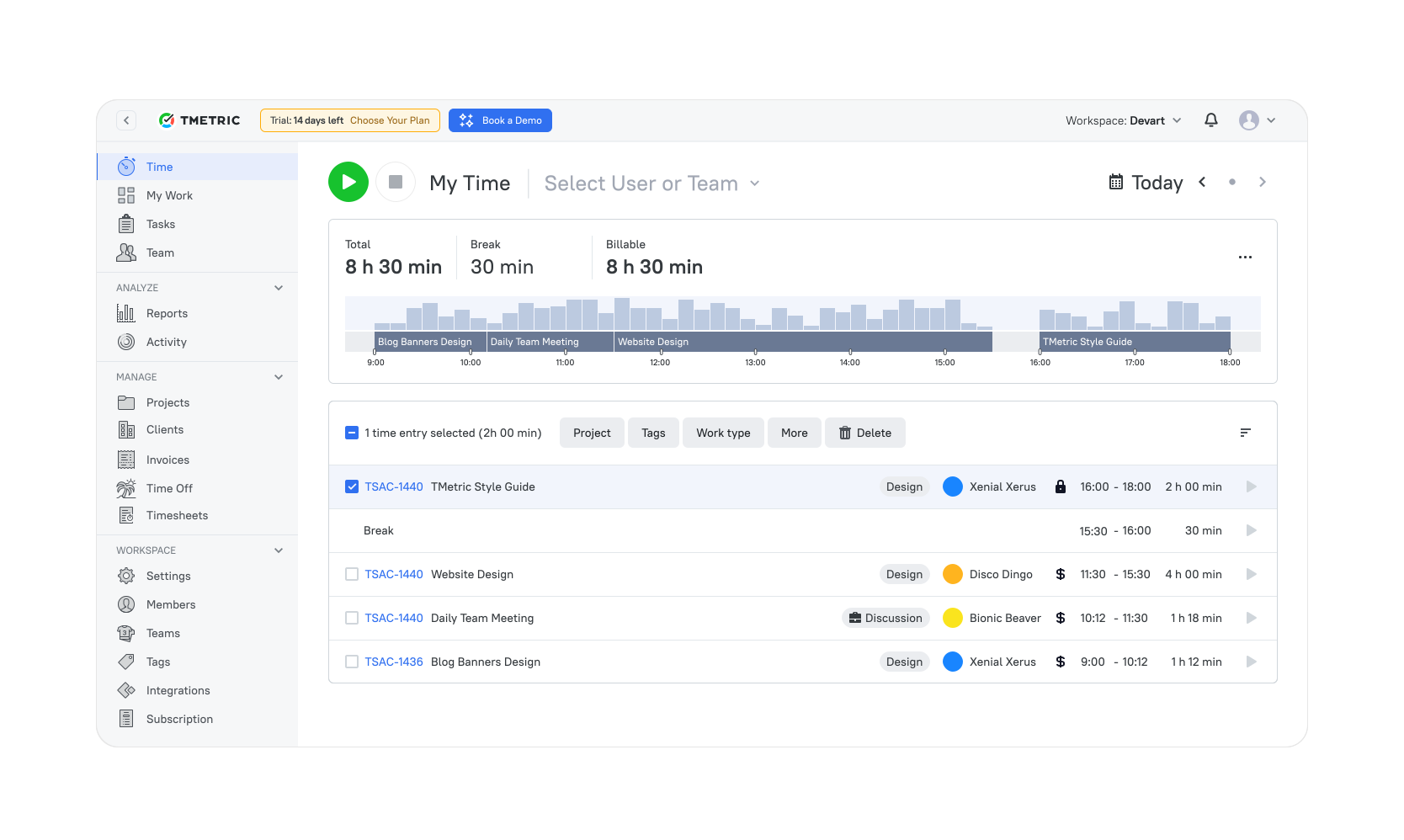
TMetric is automated billing software purpose-built for service businesses where time is the primary revenue driver. By linking time tracking directly to invoicing, it generates bills from actual work performed, eliminating manual calculations, reducing disputes, and improving revenue accuracy.
Teams log billable hours, apply custom rates, and produce invoices automatically, while recurring billing supports retainers and long-term engagements. Built-in payment tracking provides clear visibility into outstanding balances and cash flow.
Moreover, the platform integrates with project management and accounting systems, allowing billing data to move seamlessly from work execution to financial reporting. For organizations that bill for expertise rather than product consumption, TMetric billing automation software delivers a tightly aligned, end-to-end billing workflow.
Tool snapshot
| Category | Details |
|---|---|
| Company | Devart |
| Best for | Service teams, consultants, agencies, and freelancers billing by time or project |
| Primary billing model | Time-based and project-based billing |
| Key strength | Direct conversion of tracked work into invoices |
| Compatibility | Web, Windows, macOS, Linux, iOS, Android |
| Integrations | Jira, QuickBooks, Asana, Trello, GitHub, and other project/accounting tools |
| Deployment | Cloud-based (SaaS) |
| Team support | Individuals to multi-user teams |
| Free plan | Yes — up to 2 users |
| Payment handling | Invoice tracking (payments recorded externally) |
| API availability | Yes |
| Typical users | Consultants, legal teams, software developers, marketing agencies |
Key features
- Automated invoice creation from tracked hours.
- Recurring billing for retainers and ongoing projects.
- Custom billable rates and project budgets.
- Expense tracking and allocation.
- Payment tracking and balance monitoring.
- Reporting dashboards for billable performance.
Pros
- Strong automation for time-based billing workflows.
- Invoices are directly tied to tracked work, reducing disputes.
- Solid integrations with project and accounting systems.
- Suitable for both freelancers and multi-user teams.
Cons
- Not designed for usage-based or consumption billing.
- Requires consistent time tracking to maximize accuracy.
Pricing
Free-for-life
Available
Premium plans
Start at $7 per seat/month
What users say
“We like that with a few clicks, my team can log time with TMetric's user-friendly interface, and that reports guarantee billing on the time spent (this also helps us prevent scope creep and set reasonable project budgets).” — G2 reviewer
Why TMetric is #1
- Legal precision: Matter tracking, rounding, and detailed narratives
- Financial clarity: Rates, budgets, expenses, profitability
- Trusted: Used by 10,000+ organizations worldwide

2. FreshBooks
⭐ 4.5/5 (G2)
Best for: Freelancers and small businesses needing simple recurring billing with built-in accounting.
Price: No permanent free plan (trial available); paid plans start at approximately $2.10 per month (introductory pricing may apply).
Available on: Web, iOS, Android.
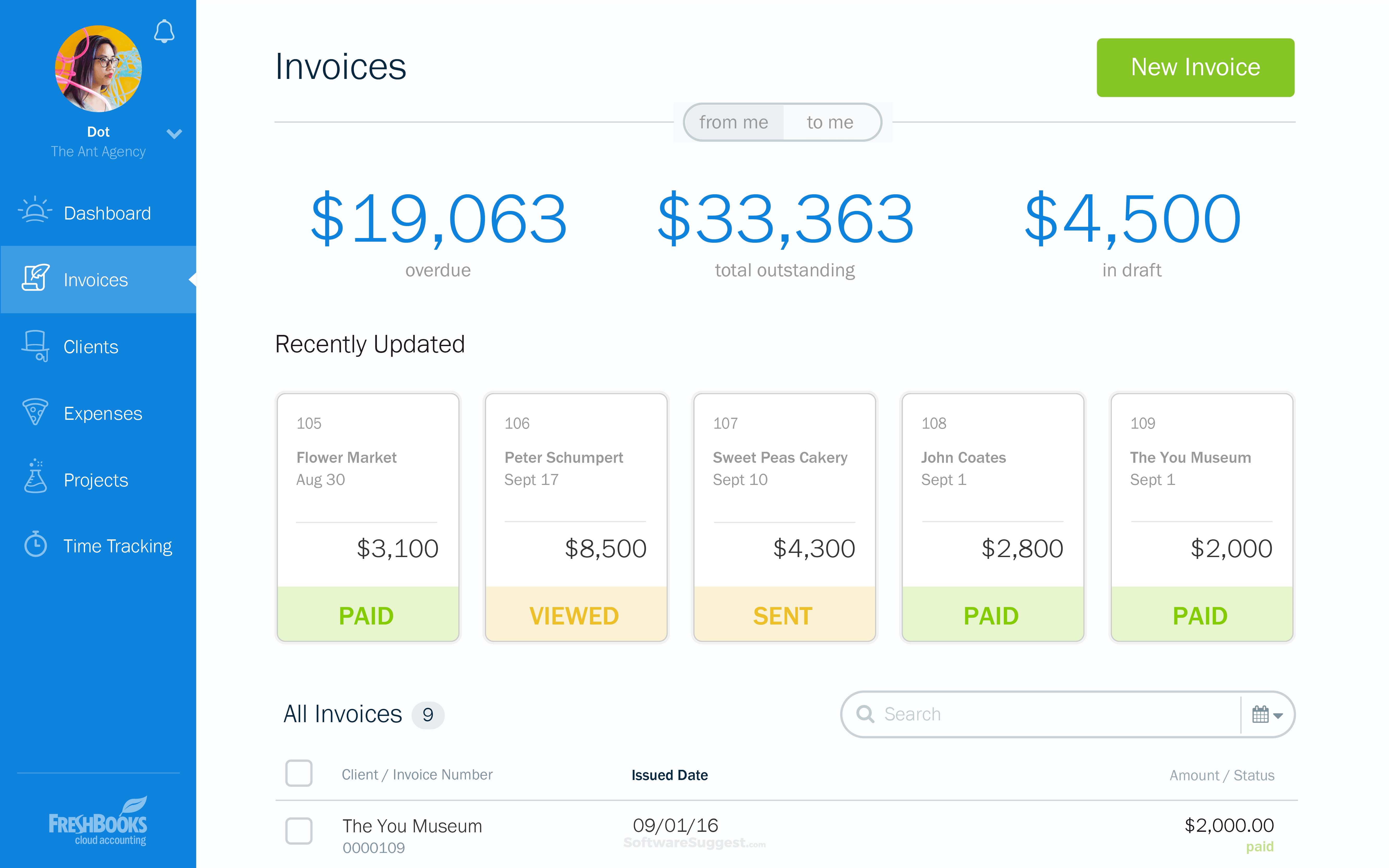
FreshBooks is automated recurring billing software designed primarily for freelancers and small businesses that need simple invoicing combined with light accounting. It automates invoice creation, tax calculations, payment reminders, and online payments, reducing the administrative burden on small teams.
In addition, it enables businesses to set up recurring billing, allowing them to charge clients automatically for retainers or subscriptions. Moreover, the built-in expense tracking and financial reports give business owners a clear view of their profitability.
Tool snapshot
| Category | Details |
|---|---|
| Company | FreshBooks |
| Best for | Freelancers and small businesses that need simple recurring billing and invoicing |
| Primary billing model | Recurring and fixed-price invoicing |
| Key strength | Ease of use with built-in accounting features |
| Compatibility | Web, iOS, Android |
| Integrations | Payment gateways, accounting tools, CRM, and project apps |
| Deployment | Cloud-based (SaaS) |
| Team support | Individuals to small teams |
| Free plan | No permanent free plan (trial available) |
| Payment handling | Built-in online payments and reminders |
| API availability | Yes |
| Typical users | Freelancers, consultants, small agencies, service businessesKey features |
- Automated invoice creation and reminders.
- Recurring billing schedules.
- Built-in payment processing.
- Expense tracking and categorization.
- Financial reporting and dashboards.
- Multi-user access with role permissions.
Pros
- Comprehensive financial management in one platform.
- Scales well as businesses grow.
- Strong reporting and analytics.
- Extensive integrations and ecosystem.
Cons
- More complex than lightweight invoicing tools.
- Higher pricing tiers for advanced features.
Pricing
Pricing
No free plan (trial available), with paid plans starting at about $2.10 per month for the Simple Start plan (introductory discounts may apply).
User reviews
“FreshBooks is extremely easy to use, even for someone without an accounting background. The interface is clean, intuitive, and saves me time when creating invoices, tracking expenses, or managing projects.” — G2 reviewer
3. QuickBooks Online
⭐ 4.0/5 (G2)
Best for: Growing businesses that want integrated accounting and automated billing in one system.
Price: No free plan (trial available); paid plans start at approximately $2.10 per month (introductory pricing may apply).
Available on: Web, iOS, Android.
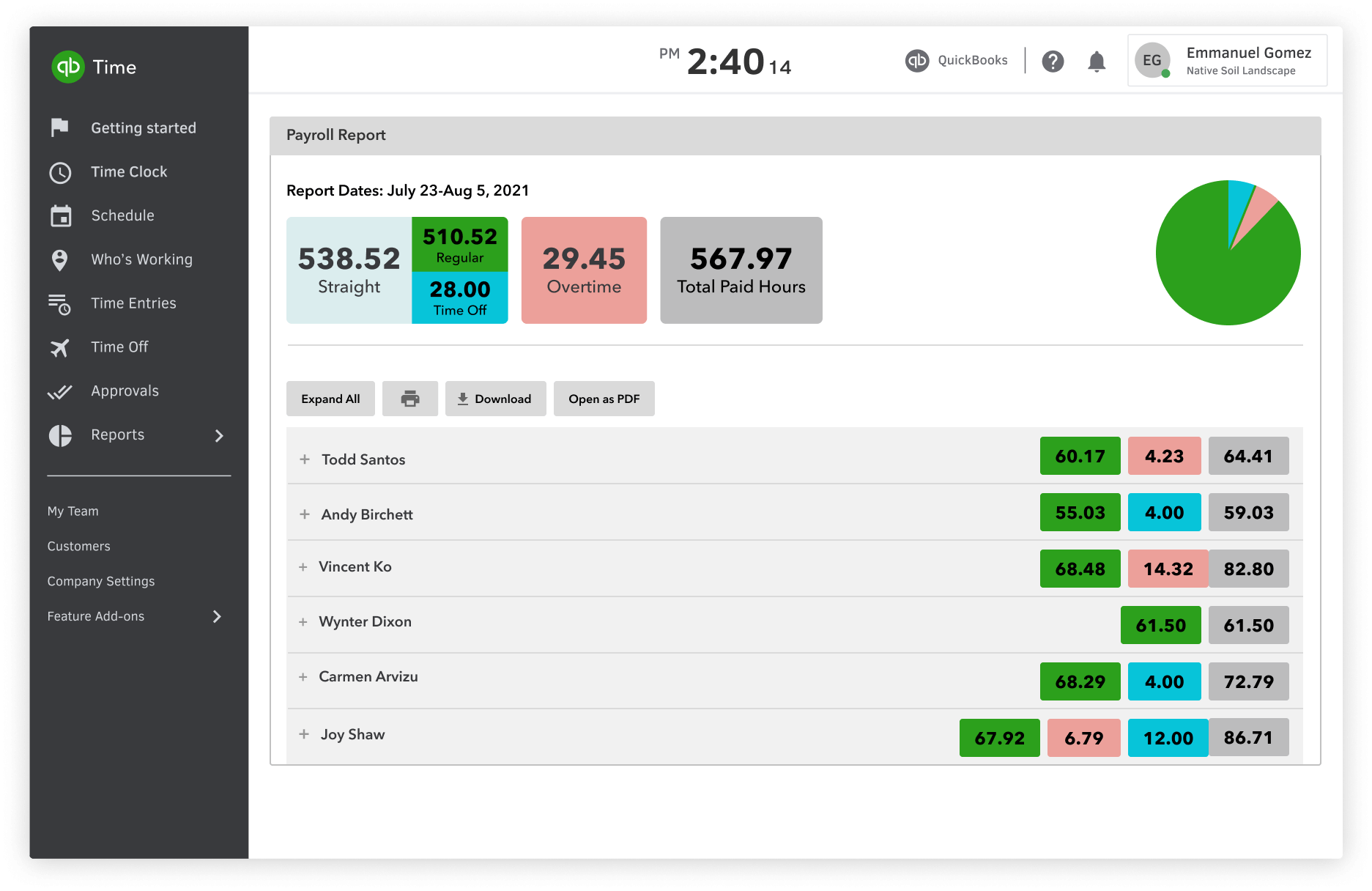
QuickBooks Online combines full accounting functionality with an automated billing system in a single platform. Instead of managing invoicing and finances separately, businesses can handle billing, payments, expenses, and reporting within one system.
It automates invoice creation, recurring billing, online payment processing, and transaction reconciliation. Because billing data flows directly into bookkeeping, financial records stay accurate without manual entry. This integration provides strong control over cash flow and profitability.
As a result, QuickBooks Online is particularly well-suited to growing businesses that want billing embedded within a complete accounting solution rather than a standalone invoicing tool.
Tool snapshot
| Category | Details |
|---|---|
| Company | Intuit |
| Best for | Growing businesses that need integrated accounting and billing |
| Primary billing model | Recurring and project-based invoicing |
| Key strength | Seamless integration between billing and accounting |
| Compatibility | Web, iOS, Android |
| Integrations | Hundreds of business apps, payment gateways, and CRM tools |
| Deployment | Cloud-based (SaaS) |
| Team support | Small teams to large organizations |
| Free plan | No (trial available) |
| Payment handling | Built-in online payments and reconciliation |
| API availability | Yes |
| Typical users | Small to mid-sized businesses, finance teams, and accountants |
Key features
- Automated invoice creation and reminders.
- Recurring billing schedules.
- Built-in payment processing.
- Expense tracking and categorization.
- Financial reporting and dashboards.
- Multi-user access with role permissions.
Pros
- Comprehensive financial management in one platform.
- Scales well as businesses grow.
- Strong reporting and analytics.
- Extensive integrations and ecosystem.
Cons
- More complex than lightweight invoicing tools.
- Higher pricing tiers for advanced features.
Pricing
Pricing
No free plan (trial available), with paid plans starting at about $2.10 per month for the Simple Start plan (introductory discounts may apply).
User reviews
“It allows you to do both bookkeeping, including AP/AR and payroll, all in one place, but also integrates with other software and automates the process of bringing in and categorizing sales for e-commerce platforms.” — G2 reviewer
4. Tebra (formerly Kareo + PatientPop)
⭐ 4.1/5 (G2)
Best for: Small to mid-sized healthcare practices managing insurance claims and patient billing.
Price: No free plan; pricing typically starts at $150+ per provider per month and scales by practice size.
Available on: Web-based (cloud platform).
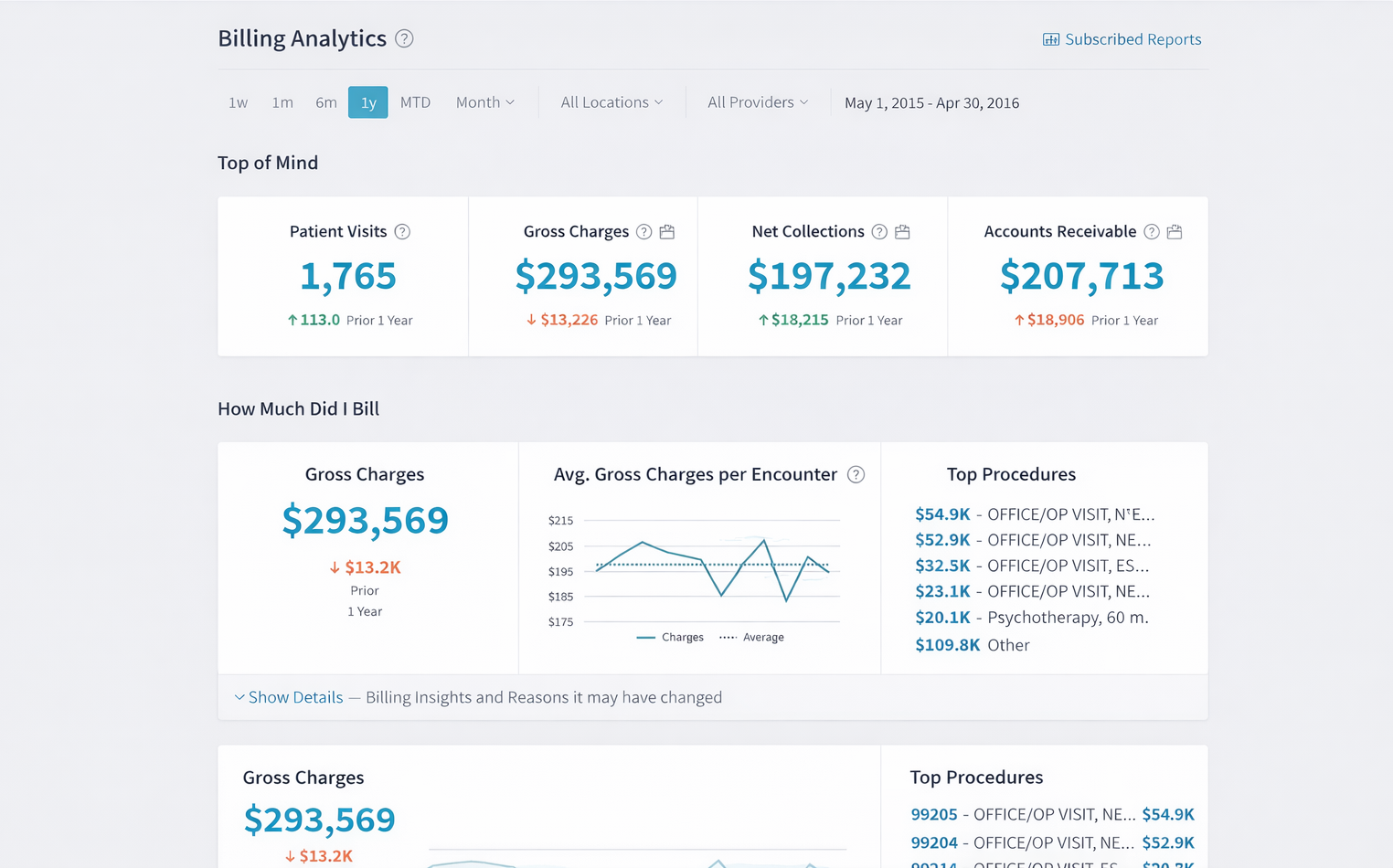
Tebra (formerly Kareo + PatientPop) is automated medical billing software designed specifically for healthcare practices that must manage insurance claims, patient billing, and regulatory compliance. Unlike general invoicing tools, it handles the complex workflows required for medical reimbursement.
The platform automates claim creation, submission, payment posting, and follow-ups, while supporting medical coding and reimbursement tracking. By reducing manual processing and errors, Tebra helps practices accelerate payments and maintain compliance with healthcare regulations.
Because billing is tightly integrated with clinical workflows and insurance systems, Tebra is particularly effective for small to mid-sized medical practices seeking to streamline revenue cycle management rather than basic invoicing.
Tool snapshot
| Category | Details |
|---|---|
| Company | Tebra (Kareo) |
| Best for | Small to mid-sized healthcare practices |
| Primary billing model | Insurance claims and patient billing |
| Key strength | End-to-end medical revenue cycle automation |
| Compatibility | Web-based (cloud) |
| Integrations | Electronic Health Record (EHR) systems and practice management tools |
| Deployment | Cloud-based (SaaS) |
| Team support | Medical practices and billing departments |
| Free plan | No |
| Payment handling | Insurance reimbursements and patient payments |
| API availability | Limited / healthcare-specific |
| Typical users | Physicians, clinics, and medical billing specialists |
Key features
- Insurance claim creation and submission.
- Patient billing automation.
- Payment posting and tracking.
- Medical coding support.
- Reimbursement tracking.
- Compliance reporting.
Pros
- Purpose-built for healthcare billing workflows.
- Automated insurance claim processing.
- Strong compliance support.
- Detailed reporting tools.
Cons
- Limited applicability outside the medical sector.
- Implementation can be complex.
Pricing
Pricing
No free plan, with pricing typically starting around $150+ per provider per month and scaling based on practice size and services.
User reviews
“Tebra (formerly Kareo + PatientPop) has transformed our practice management with its seamless integration of EHR, billing, and patient engagement tools.” — G2 reviewer
5. TruckLogics
⭐ 4.6/5 (G2)

Best for: Trucking companies, fleets, and owner-operators needing freight- and route-based billing.
Price: No free plan; paid plans start at $35.96 per month (billed annually) for small operators.
Available on: Web-based platform.
TruckLogics is automated trucking invoice and billing software built specifically for logistics companies and independent owner-operators. It translates operational data (such as loads, routes, mileage, and fuel costs) into invoices automatically, eliminating manual paperwork.
Transportation businesses often rely on complex pricing structures tied to distance, freight type, or contractual agreements. TruckLogics simplifies this process by linking dispatch, expense tracking, and billing into a single workflow, reducing errors and administrative effort.
Also, because it is tailored to trucking operations rather than general business use, this automated billing trucking software is particularly effective for fleets and operators who need payments aligned with real transport activity instead of standard service invoicing.
Tool snapshot
| Category | Details |
|---|---|
| Company | TruckLogics |
| Best for | Trucking companies, fleets, and owner-operators |
| Primary billing model | Freight- and route-based invoicing |
| Key strength | Direct conversion of operational data into invoices |
| Compatibility | Web-based platform |
| Integrations | Accounting tools and logistics systems |
| Deployment | Cloud-based (SaaS) |
| Team support | Individual operators to fleet teams |
| Free plan | No |
| Payment handling | Invoice generation and tracking |
| API availability | Limited / logistics-focused |
| Typical users | Owner-operators, small fleets, logistics companies |
Key features
- Load tracking and dispatch management.
- Automated freight invoicing.
- Expense tracking (fuel, maintenance, tolls).
- Route and mileage tracking.
- Financial reporting.
Pros
- Purpose-built for trucking workflows.
- Automated freight-based billing.
- Integrated expense tracking.
- Route and load management features.
Cons
- Narrow industry focus.
- Limited general accounting capabilities.
Pricing
Pricing
No free plan, with paid plans starting at $35.96 per month (billed annually) for owner-operators with 1–2 trucks (pricing increases with fleet size).
User reviews
“The best thing about TruckLogics is the features. It covers everything you need when you operate a trucking company. From load information, to tracking, to drivers' app, to mileage, to expenses, and I could go on and on.” — G2 reviewer
6. Wave
⭐ 4.3/5 (G2)
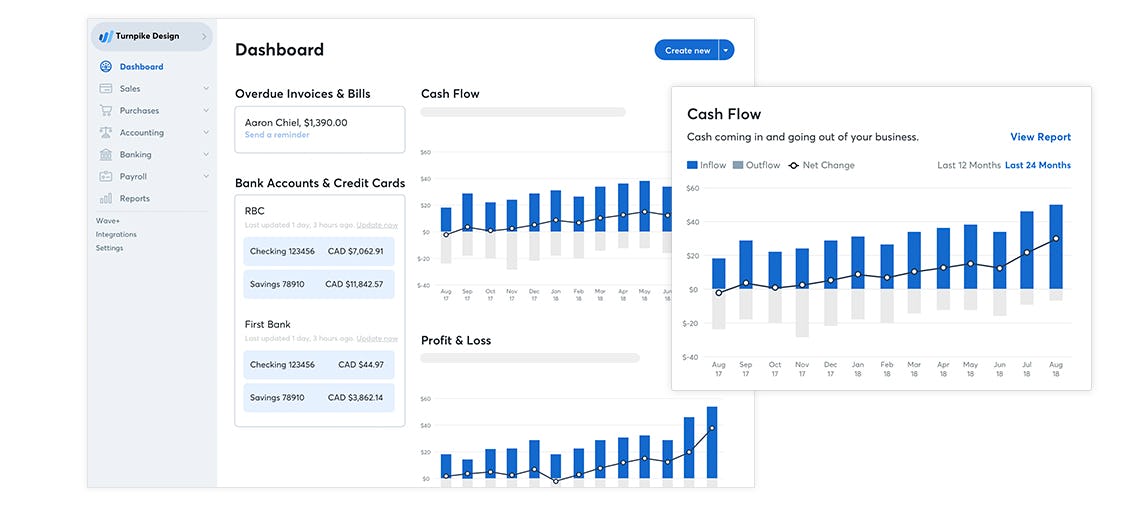
Wave is automated billing software for freelancers and very small businesses that need simple invoicing without monthly software costs. It focuses on essential billing tasks (creating invoices, accepting payments, tracking expenses, and monitoring cash flow) within one lightweight platform.
It allows users to generate professional invoices quickly, send automated reminders, and accept online payments by card or bank transfer. Because billing data connects directly to basic accounting features, users can track income and expenses without separate bookkeeping tools.
Tool snapshot
| Category | Details |
|---|---|
| Company | Wave Financial |
| Best for | Freelancers, solo entrepreneurs, and micro-businesses |
| Primary billing model | Basic invoicing and recurring billing |
| Key strength | Free core accounting and billing features |
| Compatibility | Web, iOS, Android |
| Integrations | Payment services, banking connections, Zapier-supported apps |
| Deployment | Cloud-based (SaaS) |
| Team support | Individuals to small teams |
| Free plan | Yes — fully functional Starter plan |
| Payment handling | Built-in online payments with transaction fees |
| API availability | Limited |
| Typical users | Freelancers, consultants, contractors, startups |
Key features
- Automated invoice creation and delivery.
- Recurring billing capability.
- Expense tracking and receipt management.
- Online payment acceptance.
- Basic financial reports and dashboards.
Pros
- Genuinely free core billing and accounting tools.
- Very easy setup and beginner-friendly interface.
- Integrated payments and expense tracking.
- Suitable for solo operators and micro-businesses.
Cons
- Limited customization and scalability.
- Fewer advanced features than paid competitors.
Pricing
Pricing
Free core invoicing and accounting plan, with paid plans starting at $190 per year (about $15.83 per month, billed annually) for advanced features.
User reviews
“It's the best option for small businesses, freelancers who want their accounting every month, and it's easy to navigate. I have a good experience with it.” — G2 reviewer
Now that we’ve covered all the top automated billing software platforms, let’s put them side by side so you can easily compare their strengths and fits.
Automated billing software comparison table (2026)
The following table compares the leading automated billing system software across key decision criteria, including automation style, payment capabilities, integrations, and pricing approach.
| Tool | Best for | Billing automation | Recurring billing | Payments | Integrations | Pricing model |
|---|---|---|---|---|---|---|
| TMetric | Service teams, consultants, agencies | Time-based invoicing from tracked work | Yes | Invoice tracking | Project & accounting tools | Subscription (per user) |
| FreshBooks | Freelancers & small businesses | Automated invoicing workflows | Yes | Online payments | Accounting & payment tools | Subscription (tiered) |
| QuickBooks Online | Growing businesses | Accounting-integrated billing | Yes | Built-in payments | Extensive business ecosystem | Subscription (tiered) |
| Kareo Billing | Medical practices | Claims & patient billing automation | Limited | Insurance & patient payments | EHR & medical systems | Per provider |
| TruckLogics | Trucking & logistics firms | Freight- and route-based billing | Yes | Invoice processing | Logistics & accounting tools | Subscription (fleet-based) |
| Wave | Freelancers & micro-businesses | Basic automated invoicing | Limited | Online payments | Banking & accounting connections | Free + transaction fees |
Comparing features is one thing, but choosing the right fit for your business takes some thought. Let’s break down how you can confidently select the best option.
How to choose the best automated billing software
Choosing the right automated billing software starts with understanding how your business actually earns revenue. Here’s what to consider first:
- Revenue model: If you bill by hours or projects, look for strong time-tracking integration. Subscription businesses need reliable recurring billing management, while usage-based companies require metered billing tied directly to system data.
- Integrations: Billing doesn’t happen in isolation. Your software should connect smoothly with accounting tools, payment gateways, CRM systems, and project platforms so information flows automatically instead of being entered twice.
- Business size: Solo operators usually benefit from simple automated billing software for small business use. As teams grow, you’ll likely need approval workflows, advanced reporting, and controls to manage multiple clients or departments.
- Industry requirements: Some sectors have non-negotiable needs. Healthcare organizations must handle insurance claims and compliance rules, while logistics companies often need billing linked to routes, loads, or fuel costs.
- Pricing scalability: What looks affordable today may become expensive as volume increases. Entry-level tools can start under $20 per month, but specialized platforms may cost hundreds per provider or department at scale.
Quick decision guide
- Freelancers – Simple invoicing platforms.
- Agencies & service teams – Time-based billing tools.
- SaaS companies – Subscription or usage billing systems.
- Healthcare providers – Medical billing platforms.
- Logistics companies – Freight-specific billing solutions.
https://blog.tmetric.com/flexible-billing-with-enhanced-invoices/
The Takeaway
So, what’s the best solution for you? It ultimately comes down to how you charge your clients and where your business is headed next. If you run subscriptions or operate in regulated industries, you’ll need a system that supports recurring plans or compliance workflows. Larger companies often require deeper integrations, approval processes, and detailed reporting. Service-based teams, on the other hand, benefit from platforms like TMetric that convert tracked work directly into invoice-ready data.
The key is this: manual billing no longer scales. The right automated platform makes revenue predictable and repeatable, ensuring that every hour worked, product delivered, or subscription renewed translates cleanly into recognized income.
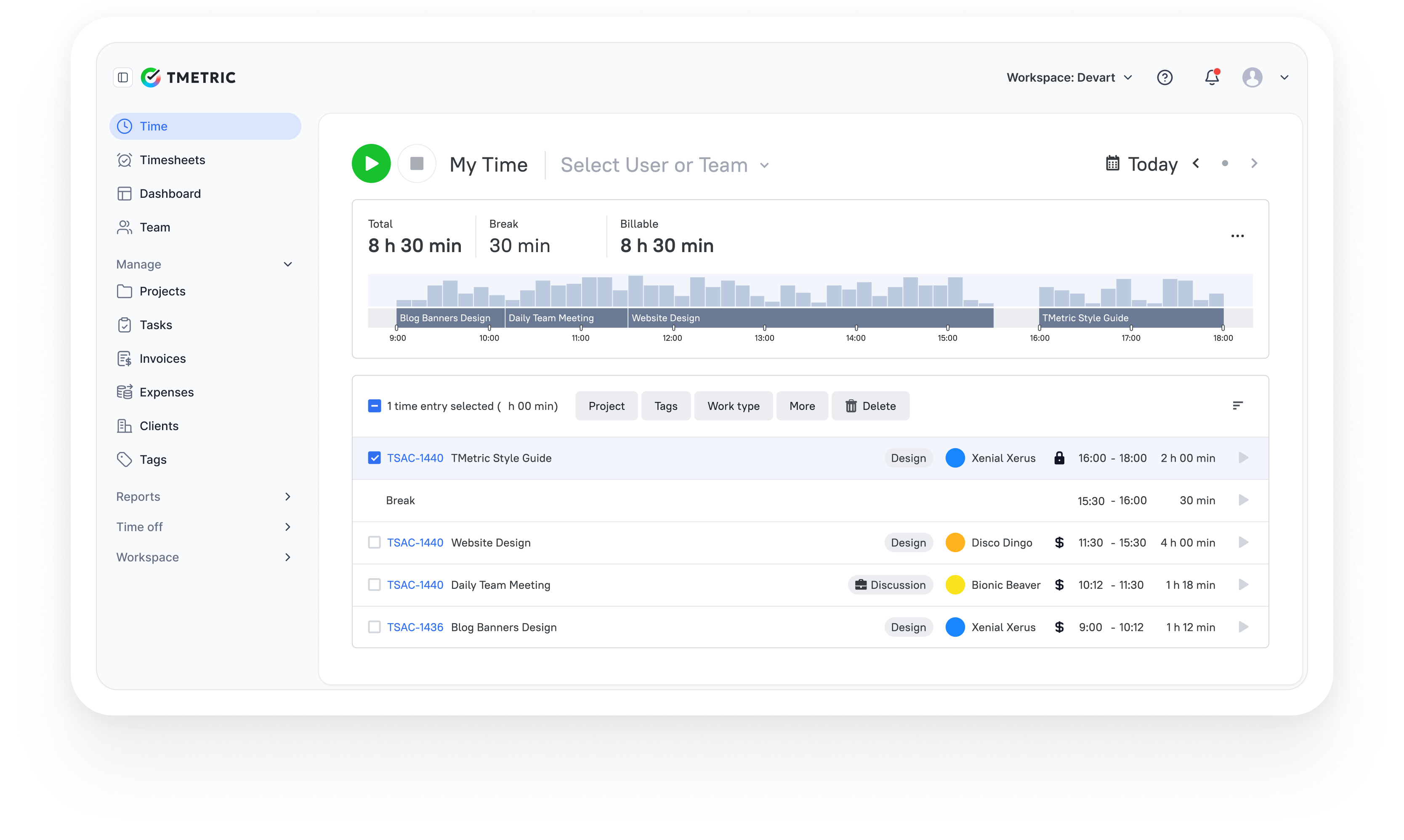
10,000+ companies, teams, and individuals worldwide use TMetric to track time, manage work, and bill with confidence.