7 Best Financial Reporting Tools for 2026
Traditional reporting workflows were built for smaller, slower businesses. Today, they create bottlenecks. Fragmented systems limit visibility, delay answers, and increase compliance exposure. These modern financial reporting software eliminate those gaps with automation, integrated data, and dashboards that reflect reality in real time.

By Dereck Mushingairi | February 28, 2026
For many companies, traditional financial reporting built on spreadsheets and disconnected systems no longer works. It limits visibility, slows decisions, and raises compliance risk when leaders need clear answers fast. That’s why organizations are shifting to automated financial reporting software — a trend reflected in the financial reporting software market projected to grow at a 12.92% CAGR from 2023 to 2033.
This guide explores the best financial reporting software that you can rely on today.
Our top picks
Why trust our financial reporting software reviews
Our evaluation is based on real reporting workflows rather than vendor claims. Each tool was assessed using consistent criteria to ensure fair, practical comparisons.
| Evaluation area | What we assessed |
| Reporting capabilities | Range and depth of financial statements, dashboards, and customization |
| Automation maturity | Ability to reduce manual work and accelerate reporting cycles |
| Integration scope | Connectivity with accounting, ERP, payroll, and operational systems |
| Usability | Ease of use for finance teams and non-finance stakeholders |
| Pricing transparency | Clarity of pricing models and overall value |
| Customer feedback | Verified user reviews and market adoption |
Tools were also evaluated across organizations of different sizes, from small teams producing core financial reports to enterprises managing multi-entity consolidation and regulatory requirements. This ensured the recommendations remain practical, whether the goal is operational visibility or board-level reporting.
To help you quickly compare these solutions, the following table summarizes how each platform differs in deployment model, automation capabilities, target users, and integration scope.
Financial reporting software comparison table
Here’s a quick glimpse of key differences in deployment, automation, target users, and integrations to help you narrow your shortlist.
| Tool | Best for | Deployment | Organization size | Automation depth | Integration scope | Pricing tier |
| TMetric Financial Reporting | Service teams, agencies | Cloud | Small–Mid | Operational reporting automation | Project & billing tools | Low–Mid |
| Workday Adaptive Planning | Enterprise planning | Cloud | Enterprise | Advanced modeling & consolidation | ERP & HR systems | High |
| NetSuite ERP | ERP-centric reporting | Cloud | Mid–Enterprise | Built-in enterprise automation | Full ERP ecosystem | High |
| QuickBooks Online | SMB accounting reports | Cloud | Small–Mid | Standard report automation | Accounting ecosystem | Low–Mid |
| Xero | Cloud accounting visibility | Cloud | Small–Mid | Automated financial reports | Apps marketplace | Low–Mid |
| Zoho Books | Mobile-friendly SMB reporting | Cloud | Small–Mid | Template-based automation | Zoho ecosystem | Low |
| FloQast | Close management reporting | Cloud | Mid–Enterprise | Workflow automation | ERP integrations | High |
Below is a closer look at each of the top software for financial reporting, highlighting their strengths, core capabilities, pricing approach, and the type of organization it serves best.
7 Best financial reporting tools in 2026
Here’s a breakdown of the top financial reporting tools in 2026. Each platform stands out for a different strength: operational visibility, enterprise consolidation, SMB accounting automation, or compliance-ready reporting.
TMetric ranks first for its versatility, combining financial insight and a powerful time tracker app that links work activity directly to costs and profitability.
1. TMetric
🌟 4.7/5
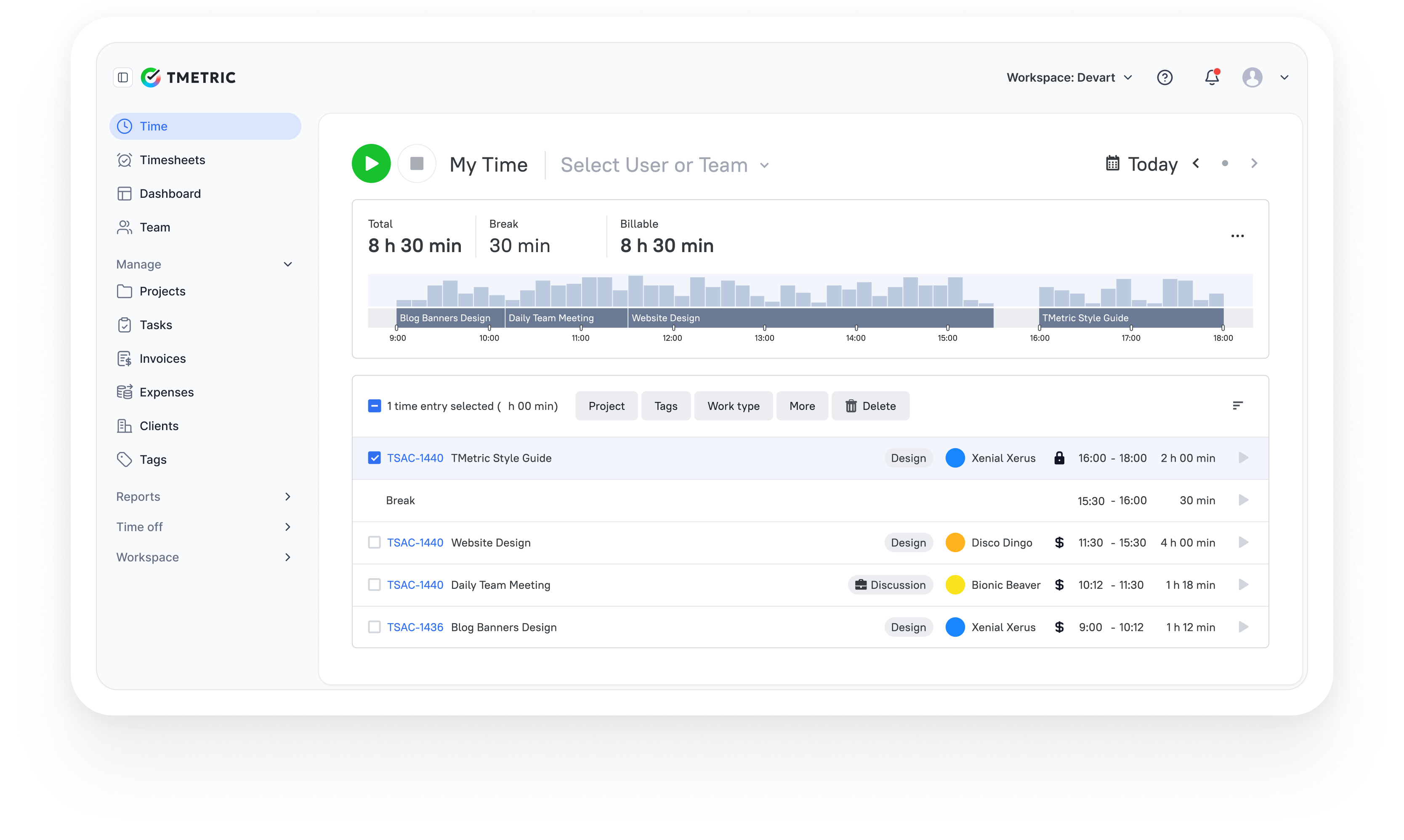
TMetric is a time tracking and work management platform that helps businesses track expenses, billing, and work activity to generate actionable financial insight. It focuses on operational data rather than accounting records, showing how hours worked, budgets, and billing rates translate into project costs, billable revenue, and profitability. This makes it especially useful for service-based organizations where labor and utilization drive financial performance.
Overview
| Category | Details |
| Company | Devart |
| Best for | Agencies, consultancies, software teams, service businesses |
| Reporting focus | Project profitability, cost control, and utilization |
| Data sources | Time entries, billable rates, expenses, budgets |
| Platforms | Web, Windows, macOS, Linux, iOS, Android |
Key Features
- Automated project and profitability reports.
- Time and expense tracking for cost visibility.
- Real-time insights from billable rates and work hours.
- Customizable reports with filters and exports.
- Expense categorization and tagging.
- Budget tracking with actual vs planned comparison.
- Client-level revenue and project performance reporting.
- Mobile access for tracking and reporting on the go.
- Team utilization and workload analytics.
Pros
- Clear visibility into labor-driven financial performance.
- Quick setup with minimal training required.
- Affordable pricing for SMBs and growing teams.
- Combines time tracking, budgeting, and reporting in one platform.
- Real-time insights without spreadsheet consolidation.
Cons
- Not a full accounting or ERP system.
- Limited statutory financial reporting capabilities.
- Forecasting features are basic compared to FP&A platforms.
Pricing
Free-for-life
Available
Premium plans
Start at $7 per seat/month
Review
“We like that with a few clicks, my team can log time with TMetric's user-friendly interface, and that reports guarantee billing on the time spent (this also helps us prevent scope creep and set reasonable project budgets).” — G2 Reviewer
2. Workday Adaptive Planning
⭐ 4.3 (G2)
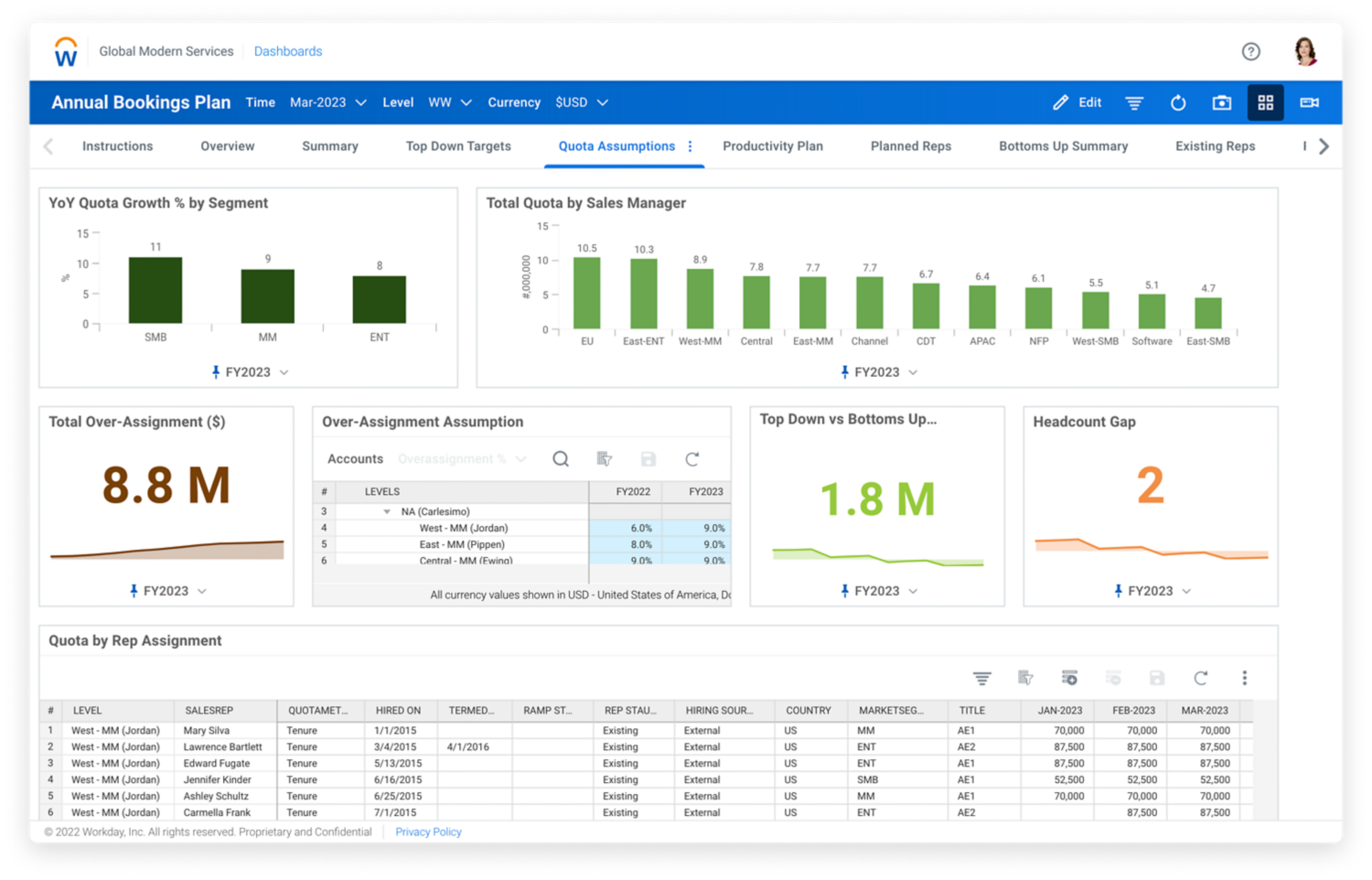
Workday Adaptive Planning is a cloud-based enterprise performance management (EPM) platform for budgeting, forecasting, financial consolidation, and management reporting. It connects financial, workforce, and operational plans in a single system, enabling organizations to model scenarios, analyze performance, and produce executive-level reports using real-time data. The platform is widely used by mid-to-large enterprises that require coordinated planning across departments and entities.
Overview
| Category | Details |
| Company | Workday |
| Best for | Enterprise FP&A, budgeting, forecasting |
| Deployment | Cloud |
| Reporting focus | Planning, consolidation, performance reporting |
| Integrations | ERP, HR systems, CRM, data warehouses |
Key Features
- Budgeting and rolling forecasts.
- Driver-based planning models.
- Multi-entity financial consolidation.
- Scenario modeling and what-if analysis.
- Management and board-level reporting.
- Workforce and operational planning integration.
- Dashboards and visual analytics.
- Version control and audit trails.
- Collaborative planning workflows.
Pros
- Strong capabilities for complex financial planning.
- Supports large, multi-entity organizations.
- Aligns financial and operational planning.
- Scalable for global enterprises.
Cons
- High cost compared to SMB solutions.
- Implementation typically requires specialists.
- Can be complex for new users.
Pricing
Custom enterprise pricing based on organization size, modules, and deployment scope.
Review
“What I like best about Workday Adaptive Planning is its ability to bring structure, flexibility, and transparency to financial planning and forecasting.” — G2 Reviewer
Visit Workday Adaptive Planning Site
3. Oracle NetSuite
⭐ 4.3/5 (G2)

Oracle NetSuite is a cloud-based ERP platform that combines accounting, financial management, and reporting in a single system. It allows organizations to manage transactions, consolidate financial data across subsidiaries, and generate real-time reports without relying on separate tools. NetSuite is widely used by growing and global companies that need unified financial visibility, regulatory compliance, and tight integration between finance and operations.
Overview
| Category | Details |
| Company | Oracle |
| Best for | Mid-to-large enterprises, multi-entity organizations |
| Deployment | Cloud ERP |
| Reporting focus | Financial management, consolidation, performance reporting |
| Integrations | Native ERP modules, third-party integrations, APIs |
Key Features
- Real-time financial dashboards and analytics.
- Multi-entity and multi-currency consolidation.
- Revenue recognition management (ASC 606 / IFRS 15 support).
- Automated financial close and reporting workflows.
- Compliance and audit trail capabilities.
- Custom report builder and saved searches.
- Accounts payable and receivable management.
- Budgeting and forecasting tools.
- Integration across finance, inventory, CRM, and operations.
Pros
- Unified platform for finance and operational data.
- Strong support for global accounting and compliance.
- Real-time visibility into business performance.
- Scalable as organizations grow and expand.
Cons
- High licensing and implementation costs.
- Complex configuration and deployment.
- Often requires experienced administrators or partners.
Pricing
Custom pricing based on modules, users, organization size, and implementation requirements.
Review
“Oracle Netwuite has a very good reporting capabilities. we can generate & automate the reports without the dependency on IT teams and its very easy to implement.” — G2 reviewer
4. QuickBooks Online
⭐ 4.0/5 (G2)

QuickBooks Online is a cloud-based accounting platform designed for small and mid-sized businesses. It centralizes bookkeeping, invoicing, expense tracking, payroll, and financial reporting in one system, enabling companies to manage daily finances and generate real-time financial statements without manual spreadsheets. The platform is widely used by SMBs seeking structured financial management and visibility into cash flow and profitability.
Overview
| Category | Details |
| Company | Intuit |
| Best for | Small to mid-sized businesses |
| Deployment | Cloud accounting software |
| Reporting focus | Core financial statements & cash-flow visibility |
| Integrations | Large third-party app ecosystem |
Key Features
- Profit and loss, balance sheet, and cash-flow reports.
- Automated bank feeds and transaction categorization.
- Invoicing, payments, and accounts receivable tracking.
- Expense management with receipt capture.
- Accounts payable tracking and bill management.
- Sales tax calculation and reporting.
- Budgeting and project profitability tools (higher tiers).
- Multi-currency support (plan dependent).
- Mobile apps for financial management on the go.
Pros
- Easy to use for non-accountants.
- Comprehensive core accounting capabilities.
- Extensive integration marketplace.
- Real-time visibility into financial performance.
Cons
- Advanced analytics are limited compared to enterprise platforms.
- Costs increase with premium plans and add-ons.
- Less suitable for complex multi-entity organizations.
Pricing
Subscription plans typically range from about $38 to $275 per month, depending on features, users, and region. Introductory discounts may temporarily reduce these prices.
Review
“It allows you to do both bookkeeping including AP/AR and payroll all in one place but also integrates with other software and automates the process of bringing in and categorizing sales for e-commerce platforms.” — G2 Reviewer
5. Xero
⭐ 4.4/5 (G2)
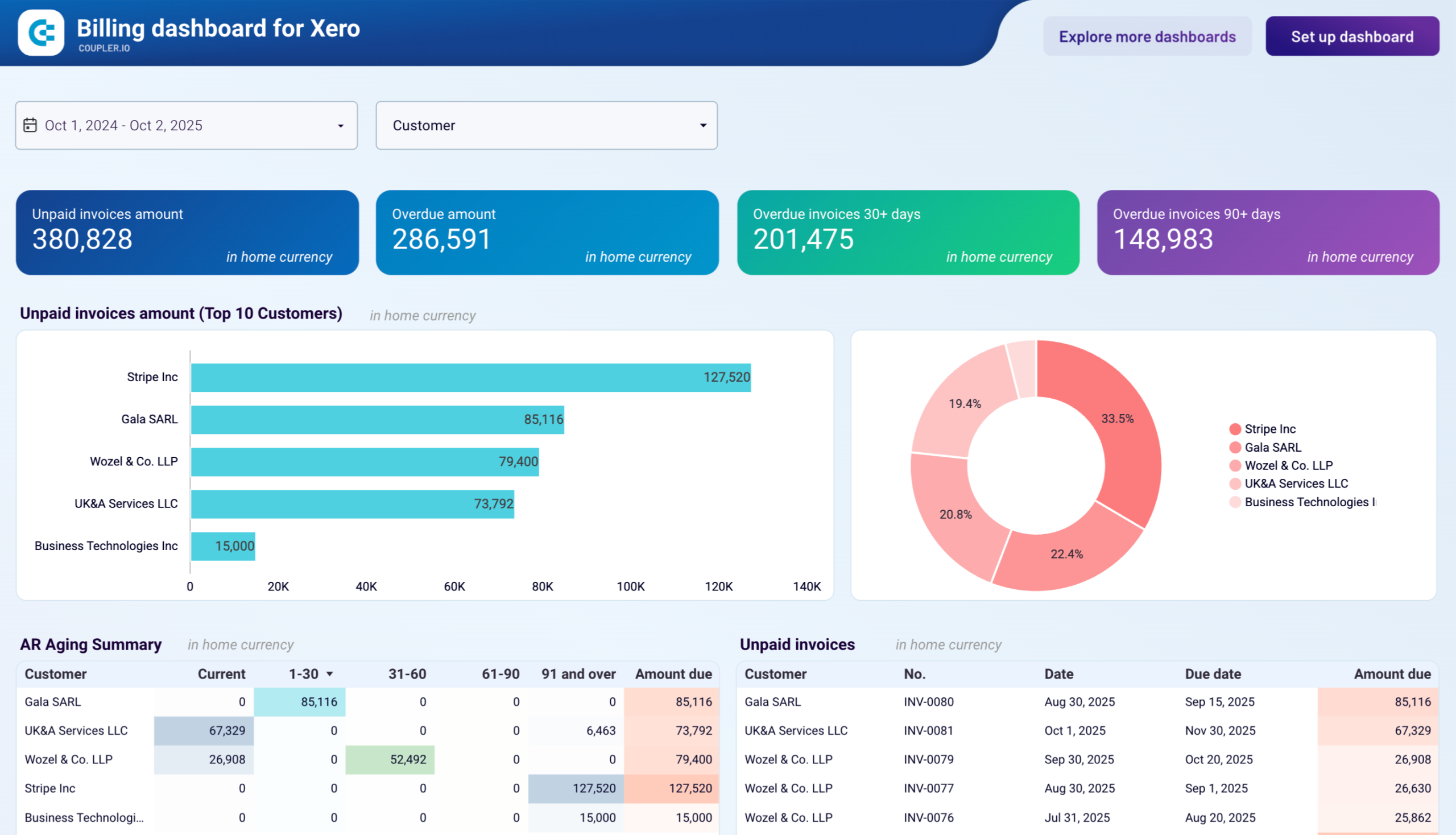
Xero is a cloud-based accounting platform designed for small and growing businesses. It automates bookkeeping tasks such as bank reconciliation, invoicing, and expense tracking while providing real-time financial reports and dashboards. Known for its strong bank connectivity and extensive app ecosystem, Xero helps organizations maintain accurate financial records and monitor performance without manual spreadsheets.
Overview
| Category | Details |
| Company | Xero Ltd. |
| Best for | Small and growing businesses |
| Deployment | Cloud accounting software |
| Reporting focus | Core financial statements & cash-flow visibility |
| Integrations | 1,000+ third-party apps |
Key Features
- Automated bank feeds and reconciliation.
- Profit and loss, balance sheet, and financial reports.
- Invoicing and accounts receivable management.
- Expense tracking and receipt capture.
- Multi-currency accounting (higher-tier plans).
- Cash flow insights and short-term forecasting.
- Inventory tracking (select plans).
- Financial dashboards and analytics.
- Mobile apps for managing finances on the go.
Pros
- Clean, intuitive interface.
- Strong automation for bookkeeping tasks.
- Large integration marketplace.
- Scales well for growing SMBs.
Cons
- Payroll features are limited or region-specific.
- Advanced reporting often requires integrations.
- Costs increase with higher-tier plans.
Pricing
Subscription plans typically start around $25 per month for entry-level tiers, with higher pricing for advanced features and multi-currency support.
Review
I use Xero to maintain the accounting for several small businesses, primarily for journal entries, bank reconciliations, and running system reports. I like how it organizes accounting data in an easy-to-understand way. — G2 Reviewer
6. Zoho Books
⭐ 4.4/5 (G2)
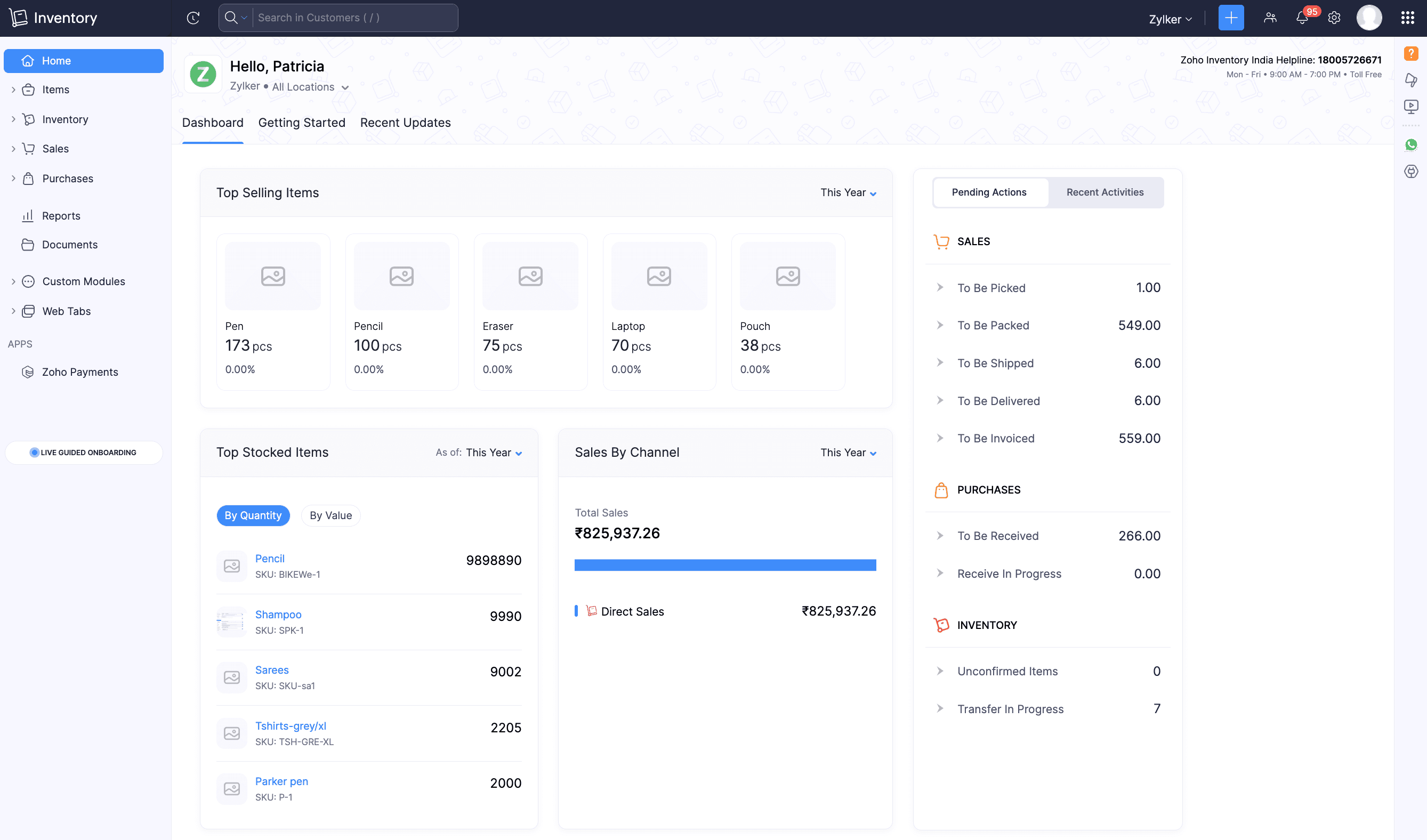
Zoho Books is a cloud-based accounting platform designed for small businesses and startups. It automates key financial tasks such as invoicing, expense tracking, tax management, and reporting while providing real-time visibility into financial performance. The software is especially attractive to organizations using other Zoho applications, as it integrates seamlessly with the broader Zoho business suite.
Overview
| Category | Details |
| Company | Zoho |
| Best for | Small businesses, startups, and Zoho ecosystem users |
| Deployment | Cloud accounting software |
| Reporting focus | Accounting, compliance, and financial reporting |
| Integrations | Zoho apps ecosystem + third-party integrations |
Key Features
- Profit and loss, balance sheet, and cash-flow reports.
- Invoicing and accounts receivable management.
- Expense tracking with receipt capture.
- Tax calculation and compliance reporting.
- Workflow automation for routine accounting tasks.
- Multi-currency support (plan dependent).
- Client portal for invoice review and payments.
- Inventory tracking (higher tiers).
- Mobile apps for managing finances on the go.
Pros
- Affordable pricing compared to many competitors.
- Strong mobile experience and usability.
- Built-in automation reduces manual work.
- Smooth integration with Zoho CRM, Projects, and other apps.
Cons
- Smaller third-party ecosystem than QuickBooks or Xero.
- Limited advanced capabilities for large enterprises.
- Custom reporting depth is moderate.
Pricing
Free plan available for eligible businesses. Paid plans typically start around $15 per month (US) and can exceed $200 per month depending on features, users, and region.
Review
“I use Zoho Books for all types of accounting work, including managing invoices, calculating expenses or taxes, and generating reports. I appreciate that it has improved compliance, especially for tax or GST, and offers transparent, real-time reports that make things super easy.” — G2 Reviewer
7. FloQast
⭐ 4.6/5 (G2)
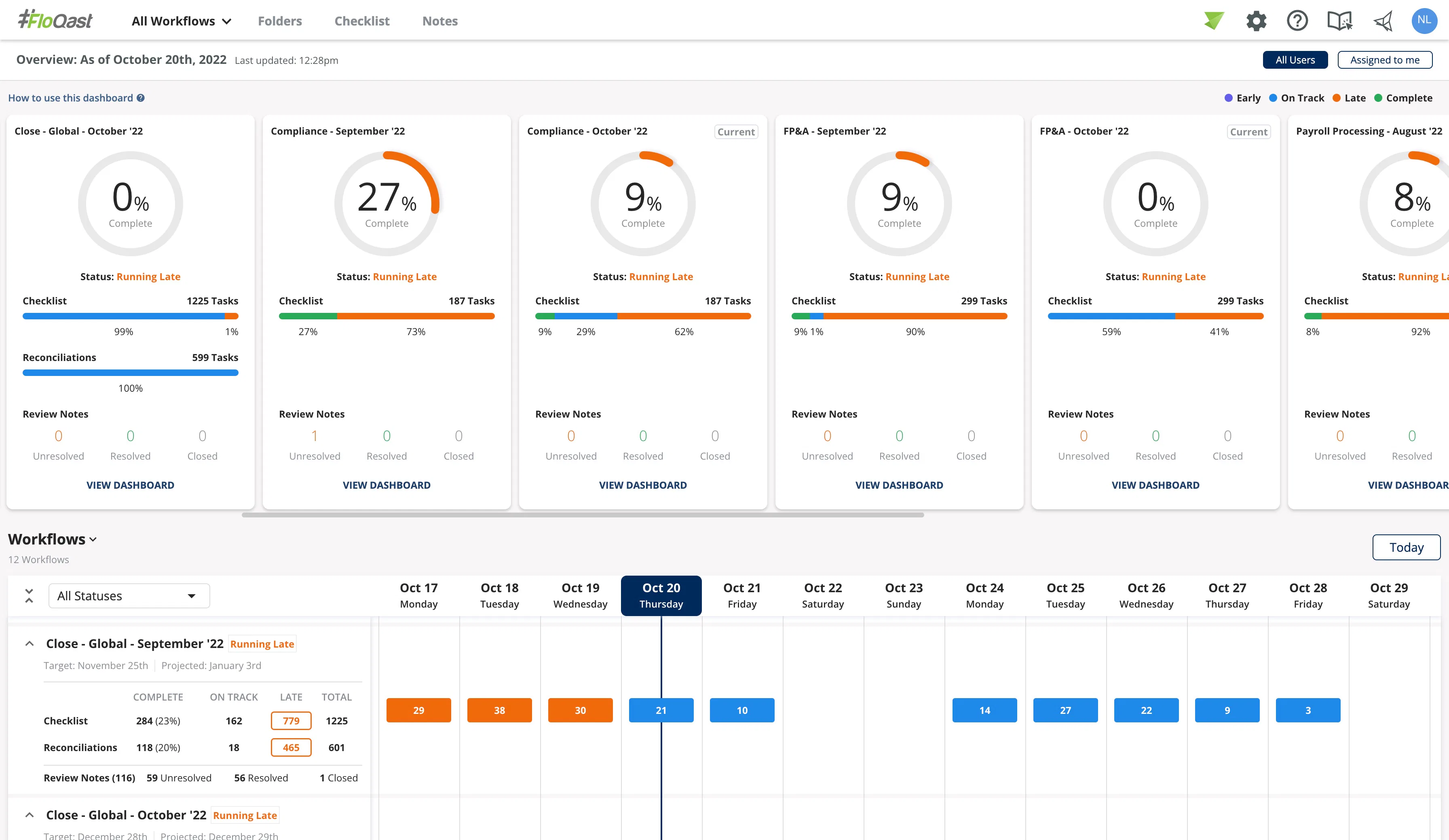
FloQast is a cloud-based accounting workflow platform focused on financial close management. It helps accounting teams streamline month-end and year-end close processes by organizing reconciliations, tracking tasks, centralizing documentation, and maintaining audit readiness. Rather than replacing ERP or accounting systems, FloQast integrates with them to improve efficiency, visibility, and control across the close cycle.
Overview
| Category | Details |
| Company | FloQast |
| Best for | Accounting teams managing financial close cycles |
| Deployment | Cloud |
| Reporting focus | Close management, reconciliation, and compliance |
| Integrations | ERP and accounting systems |
Key Features
- Automated reconciliation management linked to ERP data.
- Close checklists with task assignments and deadlines.
- Real-time close status dashboards and progress tracking.
- Centralized documentation and workpaper storage.
- Audit trails and compliance controls.
- Workflow approvals and sign-offs.
- Automated reminders and notifications.
- Variance (flux) analysis capabilities.
- Integration with ERP and accounting systems.
FloQast centralizes close activities and improves visibility, helping teams complete period-end processes faster and more accurately.
Pros
- Reduces time and effort required for the month-end close.
- Improves audit readiness and documentation quality.
- Enhances visibility into task status and bottlenecks.
- Strengthens coordination across accounting teams.
Organizations report faster close cycles and reduced audit preparation time after implementation.
Cons
- Focused specifically on close management rather than full finance operations.
- Requires an existing ERP or accounting system.
- May be costly for smaller organizations.
Pricing
Custom pricing based on organization size, users, and deployment scope (not publicly listed).
Review
What I like best about FloQast is how it centralizes and automates the month-end close process. The checklists, task tracking, and automated reconciliations make it easy to see exactly where we are in the close at any time. — G2 Reviewer
Having explored the top financial reporting software, the key question becomes which platform aligns most closely with your reporting requirements, operational scale, and growth plans.
How to choose the best financial reporting tools
Selecting top-rated software for financial reporting means matching the tool’s capabilities to your organization’s complexity, data landscape, and decision-making needs. The right choice should reduce manual work, improve accuracy, and scale as reporting requirements evolve.
Reporting depth and automation
Basic tools generate standard financial statements, while advanced platforms support consolidation, forecasting, scenario modeling, and performance analytics. Automation is critical for reducing manual effort and minimizing errors, especially in multi-entity environments.
Modern solutions can also deliver real-time dashboards and automated summaries, helping finance teams interpret results faster and respond to changes sooner.
Integration and data connectivity
Accurate reporting depends on consistent, up-to-date data. Prioritize tools that integrate with accounting systems, ERP platforms, payroll, CRM, and operational software to eliminate manual data transfers.
Native integrations and open APIs ensure information flows across departments, producing a single source of truth for financial analysis.
Scalability and deployment model
Cloud platforms provide flexibility, remote access, and automatic updates, making them suitable for most organizations. However, companies with strict regulatory or security requirements may need hybrid or specialized deployments.
A scalable solution should support growth in users, business entities, currencies, and reporting complexity without requiring system replacement.
Usability and collaboration
Financial reporting tools must serve more than accounting teams. Executives, project managers, and department leaders rely on dashboards and reports to guide decisions.
Look for intuitive interfaces, role-based permissions, and collaboration features that enable stakeholders across the organization to access insights without specialized training.
The Takeaway
Financial reporting tools now span a wide range of capabilities, from basic accounting reports to enterprise planning and consolidation platforms. The best choice depends on how complex your operations are, how many systems you need to connect, and how quickly stakeholders require reliable insight.
For service-driven organizations in particular, tools like TMetric can provide meaningful visibility into costs and performance by linking financial outcomes directly to time and work.
However, ultimately, the best software for financial reporting must fit your current needs while supporting future growth. That means delivering clear, dependable insight without adding unnecessary complexity.