Best Marketing Project Management Software for Teams in 2026
Discover the best marketing project management software for teams in 2026. This guide compares top tools that streamline campaign planning, improve collaboration, and give you real-time visibility into tasks, timelines, and budgets - so your team can execute faster and deliver better results.

By Dereck Mushingairi | April 10, 2026
If you’ve been in marketing long enough, you know execution is where things break. Not because strategy is weak, but because campaigns overlap, dependencies pile up, and priorities change mid-flight. To keep output predictable, teams need systems that make ownership clear and progress visible. That’s where marketing project management software plays a critical role.
In 2026, the strongest platforms go beyond task tracking. They support campaign-level planning, cross-functional collaboration, asset workflows, and real-time visibility into dependencies. When the tooling is right, teams spend less time managing work and more time delivering outcomes. Execution becomes structured, scalable, and repeatable.
This guide breaks down the best marketing project management software teams use to regain control. These tools bring structure to planning and visibility to execution while campaigns are still in motion.
How we selected the marketing project management tools
To find tools that truly solve these issues, we went beyond features and focused on real-world fit. We reviewed G2 and Capterra feedback from marketing teams to spot consistent strengths and deal-breakers. We also tested how each tool handles real campaign workflows, compared pricing and scalability to see the impact on margins, and checked how well each platform integrates with the tools marketing teams already use.
Understanding the pricing landscape
We looked at the market pricing for 2026 to understand what sets basic tools apart from agency-grade solutions. Most standalone time tracking tools cluster in the $7–$8 per user per month range, while agency-focused platforms that include budgeting, billable rates, and invoicing typically range from $8 to $15 per user per month, depending on the plan.
That premium reflects real operational value, as agencies are investing in tools that tie time, money, and client billing into a single system.
TMetric, for example, sits at the lower end of this agency-grade range while still offering integrated budgeting and invoicing, which contributes to its strong adoption among marketing teams managing billable client work.
Our top tools at a glance
We chose the following tools not only for their user feedback and pricing, but because they actually fit how marketing teams operate: bringing coordination, accountability, and speed to multiple campaigns at once.
- TMetric – Time tracking and budgeting software built for agencies managing billable client campaigns.
- Monday.com – Visual project management that organizes workflows and coordinates team collaboration.
- Asana – Work management centered on timelines, dependencies, and editorial planning.
- Wrike – Advanced reporting and resource management for complex marketing operations.
- ClickUp – All-in-one workspace combining tasks, documentation, automation, and reporting.
Each tool supports a different way of working, but all of them help marketing teams run campaigns with more structure, visibility, and control.
TL;DR
|
Tool |
Price (starting) |
G2 Rating |
Capterra Rating |
Pros |
Cons |
|
TMetric |
Free; $7–$9/user/month |
4.6/5 |
4.6/5 |
Strong billable time tracking, campaign budgets, invoicing, and clear reporting for agencies |
Limited native task planning compared to full PM tools |
|
ClickUp |
$7–$10/user/month |
4.7/5 |
4.6/5 |
All-in-one workspace, flexible workflows, built-in time tracking |
Can feel complex; requires setup discipline |
|
Monday.com |
~$10–$12/user/month |
4.7/5 |
4.6/5 |
Visual workflows, strong collaboration, and easy adoption |
Advanced features are locked behind higher tiers |
|
Asana |
$10.99/user/month |
4.4/5 |
4.5/5 |
Excellent timelines, dependencies, and editorial workflows |
Time tracking requires integrations |
|
Wrike |
~$9.80–$10/user/month |
4.2/5 |
4.4/5 |
Advanced reporting, resource management, and proofing tools |
Steeper learning curve; heavier interface |
5 Best marketing project management software for teams
Here’s a closer look at how each of these marketing project management tools supports real team workflows.
1. TMetric
🌟 4.6/5

Best for: Marketing agencies & creative teams.
Price: Free; paid plans from about $7–$9 per user/month.
Available on: Web, iOS, Android, macOS, Windows, Linux, browser extensions.
What makes TMetric stand out
TMetric stands out as a marketing-focused execution layer for agencies that need tighter control over campaign time, budgets, and billable work. Thousands of teams use it to understand where marketing hours actually go (across channels, clients, and campaigns) without adding friction to creative workflows.
It’s easy to roll out, works alongside tools like Asana, Trello, and Notion, and gives agency owners visibility into utilization, profitability, and workload without forcing marketers into heavy project admin. For agencies managing multiple campaigns at once, TMetric quietly keeps delivery and finances aligned.
Key TMetric capabilities
- Campaign-level time tracking for marketing teams
TMetric lets marketers track time by campaign and client, with tags and project structures commonly used to represent channels such as SEO, paid ads, content, or design. This structure makes it easy to see how much effort goes into SEO, paid ads, content, or design, and keeps campaign reporting clean and defensible. - Campaign budgets in money or time
Marketing leads can set campaign budgets based on total hours or total cost, then monitor spend as work progresses, before overruns happen.
- Set time-based or cost-based campaign budgets.
- Assign billing logic per campaign or client.
- Track budget usage in real time.
- Spot overspend early with clear visual indicators.
- Billable vs. non-billable hours for agency work
TMetric allows teams to separate billable client work from internal marketing, strategy, or revisions. This keeps invoicing accurate while still capturing the full effort behind campaigns. - Expense tracking for marketing spend
Track campaign-related expenses (such as ad spend, creative assets, or tools) directly inside each project. Reports show how time and expenses combine to affect overall campaign profitability. - Fast, accurate invoicing for client campaigns
Invoices are generated directly from tracked campaign data, reducing disputes and manual cleanup at month-end.
- Generate client invoices from real campaign data.
- Export invoices to Excel for quick sharing.
- Review billable time before sending.
- Eliminate manual calculations and billing errors.
TMetric pricing overview (monthly vs. annual)
|
Plan |
Monthly cost (billed monthly) |
Monthly cost (billed annually) |
Key features included |
|
Free |
$0 |
$0 |
Basic time tracking, unlimited campaigns & clients, reports, web/mobile/desktop apps, browser extensions |
|
Professional |
$7 per user/month |
$5.83 per user/month |
Billable rates, campaign budgets & alerts, expenses, invoicing, task management, calendar sync, My Timesheets, client/project/team import |
|
Business |
$9 per user/month |
$7.50 per user/month |
All Professional features plus Time Off, Team Timesheets, app & site monitoring, screenshots, activity tracking, real-time notifications, QuickBooks sync, advanced integrations (Asana, Jira, ClickUp) |
|
Enterprise |
Custom pricing |
Custom pricing |
All Business features plus custom integrations, priority support, secure deployment, and volume discounts |
What TMetric users are saying
“We like that with a few clicks, my team can log time with TMetric's user-friendly interface, and that reports guarantee billing on the time spent (this also helps us prevent scope creep and set reasonable project budgets).” — Marketing Manager
Why it’s #1
- Built for campaign execution: Campaign-level tracking, workload visibility, and clear reporting make marketing delivery easier to manage.
- Full agency financial clarity: Time, budgets, expenses, and invoicing connect into one consistent picture of profitability.
- Proven at scale: Used by 3,000+ businesses worldwide and recognized by platforms like GoodFirms, Crozdesk, SelectHub, and SoftwareSuggest for usability and performance.

2. Monday.com
🌟 4.7/5
Best for: Marketing teams that rely on visual workflows and cross-team collaboration.
Price: Paid plans from around $10–$12 per user/month.
Available on: Web, desktop apps, mobile apps.
How Monday.com earns its place
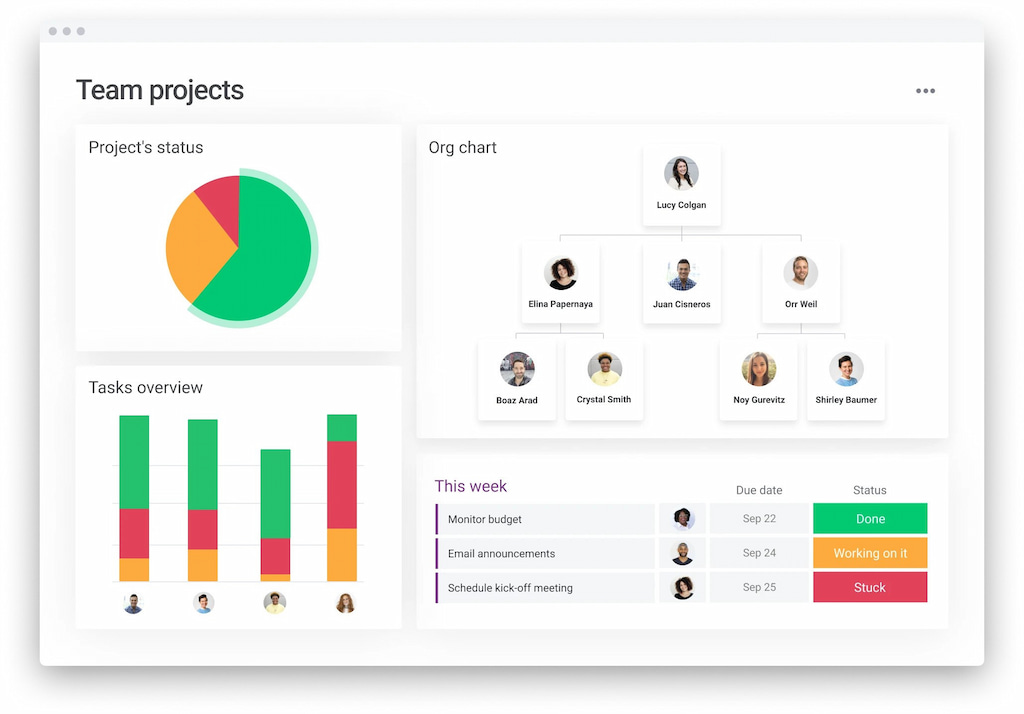
Monday.com excels at turning marketing workflows into clear, visual systems that teams can understand at a glance. Campaigns, tasks, and responsibilities are organized into boards that make ownership and progress obvious, even for non-technical stakeholders. For marketing teams coordinating designers, copywriters, media buyers, and managers, Monday.com reduces confusion by making dependencies, timelines, and approvals visible in real time.
Key features
- Visual boards with status columns tailored to marketing workflows.
- Timeline and calendar views for campaign planning and deadlines.
- Workflow automation for approvals, notifications, and status changes.
- Dashboards for tracking campaign progress and team workload.
- Integrations with marketing and collaboration tools like Slack and Google Workspace.
Reviews
“I like the easy use function. I taught myself how to use this program by utilizing the YouTube videos available from monday.com staff members. I enjoy the ability to auto-save, to do reports, and to move a project through a process from start to finish.” — G2 reviewer
3. Asana
🌟 4.4/5
Best for: Content calendars and structured editorial workflows.
Price: Paid plans from around $10.99 per user/month.
Available on: Web, desktop apps, mobile apps.
How Asana earns its place
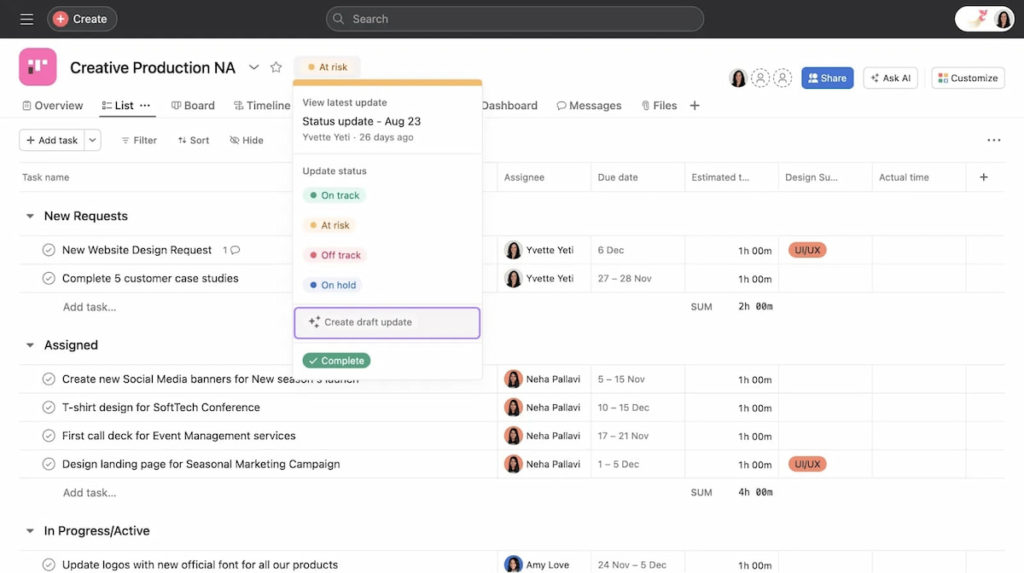
Asana is well-suited for marketing teams that need a strong structure around content production and campaign execution. Its timeline-based planning helps teams map out work weeks or months in advance while keeping dependencies clear. Asana emphasizes clarity around responsibilities, ensuring that every task has an owner, a deadline, and a clear place in the broader campaign plan.
Key features
- Timeline view to visualize campaign schedules and dependencies.
- Task dependencies to manage sequencing and avoid bottlenecks.
- Custom fields to tag campaigns, channels, or priorities.
- Automation rules to streamline recurring marketing processes.
- Reporting tools that highlight progress and missed deadlines.
Reviews
“What I like best about Asana is how it keeps all my tasks and projects organized in one place. I appreciate the clarity it provides on deadlines, priorities, and responsibilities, which helps me stay on track and manage my workload efficiently.” — G2 reviewer
4. Wrike
🌟 4.2/5
Best for: Marketing teams that need advanced reporting and resource management.
Price: Paid plans from around $9.80–$10 per user/month.
Available on: Web, desktop apps, mobile apps.
How Wrike earns its place
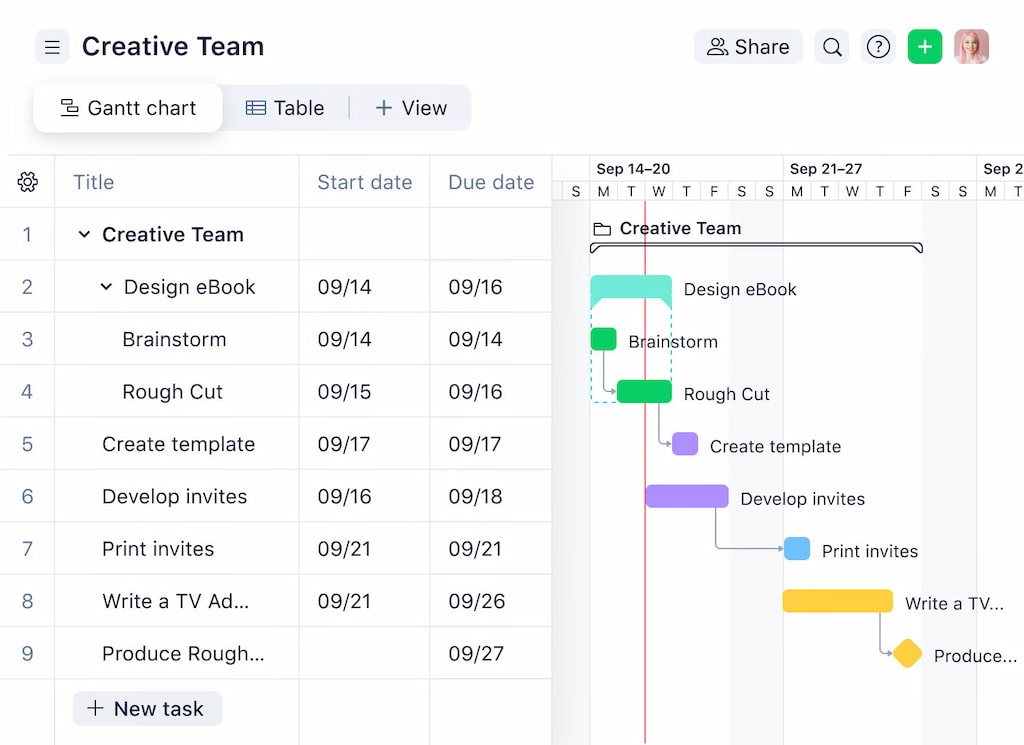
Wrike is designed for marketing teams that operate at scale and need deeper insight into performance, workload, and delivery risk. It combines traditional project management with strong analytics and resource planning features. For teams handling multiple campaigns with shared resources, Wrike helps balance workloads while maintaining visibility into timelines, approvals, and campaign health.
Key features
- Gantt charts for managing campaign timelines and dependencies.
- Workload views to monitor team capacity and allocation.
- Custom dashboards for performance and delivery tracking.
- Proofing and approval tools for creative assets.
- Advanced reporting for leadership and operations teams.
Reviews
“Wrike centralizes client work, approvals, and task ownership so our 5-person team isn’t chasing threads across email and chat. Dashboards and workload views give me a real-time picture of project health.” — G2 reviewer
5. ClickUp
🌟 4.7/5
Best for: Marketing teams that want planning, execution, and reporting in one system.
Price: Paid plans from around $7–$10 per user/month.
Available on: Web, desktop apps, mobile apps, browser extension.
How ClickUp earns its place
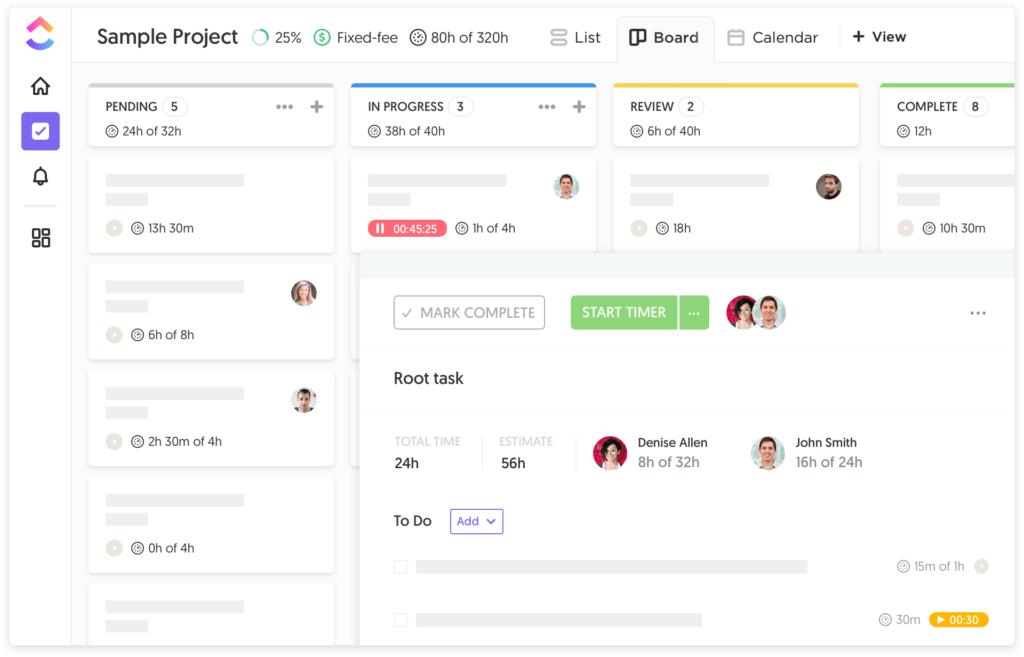
ClickUp positions itself as an all-in-one workspace for marketing teams that want to centralize campaign planning, task execution, documentation, and reporting. Instead of stitching together separate tools, teams can manage content calendars, campaign timelines, creative tasks, and internal documentation in one place. Built-in automation and customization make it adaptable to different marketing workflows, from content production to multi-channel campaign execution.
Key features
- Task and subtask management with multiple views (List, Board, Calendar, Timeline).
- Native time tracking on tasks to capture effort across campaigns.
- Custom fields to track campaign status, channels, budgets, or priorities.
- Dashboards that surface campaign progress, workload, and delivery risks.
- Automation rules to reduce manual updates and handoffs.
Reviews
“One of its biggest strengths is its flexibility—everything from task views to dashboards can be customized to match our working style. This level of adaptability has helped us streamline coordination, reduce miscommunication, and ensure that important work doesn’t fall through the cracks.” — G2 reviewer
Additional marketing project management options
Beyond the main five, the following platforms also stand out as viable options, depending on how your marketing team plans and executes work.
- GoodDay: A structured marketing workflow platform with strong collaboration features, well suited for teams managing content pipelines, approvals, and cross-functional coordination.
- Teamwork: A client-focused project management tool designed for agencies that need clear task ownership, client visibility, and structured delivery across retainers and projects.
- Smartsheet: A spreadsheet-style planning platform built for large teams that prefer grid-based control over timelines, dependencies, and campaign tracking at scale.
- Trello: A lightweight, Kanban-based tool ideal for simple task planning, small campaigns, or teams that want minimal setup and visual clarity.
- Hive: A marketing-focused collaboration platform with built-in proofing and approvals, often used by teams managing creative reviews and fast feedback cycles.
Which marketing project management tool should you choose?
For teams that want clear visibility into campaign progress, ownership, and execution (without juggling multiple disconnected tools) TMetric stands out as a strong choice for agencies in 2026, particularly those managing billable client campaigns and budgets. Its combination of time tracking, budgeting, and reporting makes it especially effective for managing billable client work while keeping campaigns under control.
If you’re weighing options based on how your team actually works, this quick breakdown helps narrow it down:
- Need effortless time tracking with clear insights into where work actually goes? → TMetric
- Want visual workflows and cross-team coordination? →. Monday
- Focused on editorial calendars and structured planning? → Asana
- Managing complex campaigns with reporting and resource needs? → Wrike
- Want an all-in-one workspace with maximum flexibility? → ClickUp
The Takeaway
From TMetric’s control over billable work and campaign budgets to the broader planning and collaboration strengths of Monday.com, Asana, Wrike, and ClickUp, each tool serves a different operational style. Teams that value structure, visibility, and accountability tend to benefit most from systems that connect planning with execution instead of treating them separately.
Ultimately, the best marketing project management software is the one teams actually use every day. A tool that feels intuitive, supports real workflows, and keeps work visible as it happens will always outperform a more complex system that never fully sticks. When that alignment is right, campaigns move faster, teams stay focused, and leaders regain confidence in execution.