Best Notion Time Tracker: 5 Integrations Compared
Staying laser-focused is non-negotiable for dev squads and remote teams. With roadmaps living in Notion and billable hours scattered across browsers, the only way to protect margins is to track time in Notion without copy-paste chaos. The five tools below turn any Notion database into a real-time dashboard of productivity, profitability, and payroll—so you ship faster and invoice smarter.

By Dereck Mushingairi | April 7, 2026
Our Top Picks
Ranked by how well they plug straight into your Notion workspace
- TMetric – The best and the deepest native sync allows you to turn any Notion task into a live timer, then push billable hours + cost rates back to the same page for instant profit dashboards.
- Toggl Track – Feather-light browser button that drops a timer inside the exact Notion line you’re editing—no new tab, no context switch.
- Clockify – Unlimited teams, zero-cost tier that auto-imports your Notion database as a project list so everyone can start tracking with one click.
- Timely – AI “memory” engine that quietly logs which Notion page was open and for how long, then drafts timesheets for you overnight.
- Harvest – Keep your existing invoicing workflow and simply link each Harvest project to its Notion card; actuals flow back to the doc you already share with clients.
Comparison Table
| Tool | Key Notion Super-power | Lowest paid | Free-plan limits | G2 | Capterra | Agency | SoftDev |
|---|---|---|---|---|---|---|---|
| TMetric | Live timer + cost rates → instant profit | $7 | 2 users / ∞ proj | 4.6 | 4.5 | 5/5 | 5/5 |
| Toggl Track | Timer inside the line you edit | $8 | 5 users max | 4.6 | 4.7 | 4/5 | 4.5/5 |
| Clockify | 1-click import Notion DB as projects | $5.49 | ∞ users | 4.5 | 4.8 | 3.5/5 | 4/5 |
| Timely | AI drafts timesheets from open pages | $9 | 5 proj max | 4.8 | 4.7 | 3/5 | 4/5 |
| Harvest | Link project to card; actuals auto-back | $10.50 | 1 user / 2 proj | 4.3 | 4.6 | 4/5 | 3.5/5 |
Mini data study: The average price of the best Notion time tracking tools is $6.20/user/month—but agency-grade platforms with invoicing and profitability reports skew closer to $8-12/user/month.
Tools offering unlimited free tiers often compensate through premium feature upsells.
1. TMetric - Best for Agencies and Software Development Teams/Companies
Price: Free plan available; Paid plans from $7-9/user per month
Available on: Web, iOS, Android, macOS, Windows, Linux
Why I Picked TMetric
TMetric is the standout Notion time tracker for teams that want more than a stopwatch.
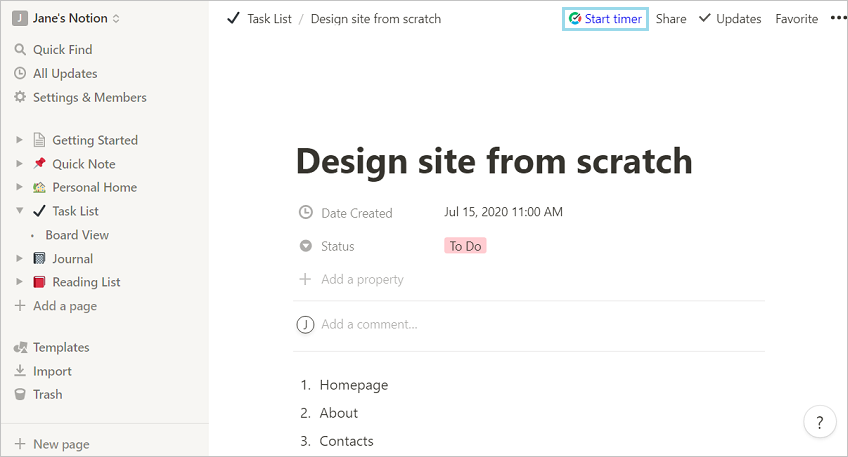
Drop the browser extension into any Notion page, click once, and it grabs the task, project, and hierarchy—no copy-paste.
Two-week sprints become data gold: every minute logged in Notion rolls straight into live profitability reports that flag which features or clients are eating the budget.
For agencies, the loop is closed: track in Notion, invoice in TMetric, and watch the budget breathe.
Set hourly or dollar caps on any task or project; the moment you drift toward the red, an alert pops so scope creep can’t ambush your margin.
It’s the rare tool that turns time into profit without ever pulling you out of your Notion flow.
Key Features
- TMetric offers one-click Notion timer,
Summoned straight from the browser extension, that not only starts the clock but also quietly harvests the page title, database properties, and even the exact block you’re editing, so every minute is automatically linked to the right Notion task without you ever leaving the page.
Because the extension writes this context back to TMetric in real time, your team can later filter reports by Notion page or tag and see precisely which knowledge-base articles, specs, or client briefs consumed the most billable time.
- Profitability comes into focus
TMetric offers an analytics engine: choose any dimension—project, client, team member, or even a custom tag—and the dashboard will surface margin per hour, budget burn rate, and forecasted overrun in color-coded cards that update as fresh timers are saved.
You can share live links of these dashboards with stakeholders, schedule them as PDFs for Monday-morning exec briefings, or embed widget versions inside Notion pages so the entire agency sees the same financial truth.
- Comprehensive billing
TMetric turns those detailed time logs into polished invoices in seconds, letting you assign different hourly or fixed rates per role, milestone, or client contract and even round up to the nearest 15-minute increment according to your policy.
Because the invoice generator pulls expenses and markup rules straight from the same projects, you can attach cost receipts, apply automatic tax calculations, and email the final PDF to the client without ever opening another app.
- Screenshots as proof-of-work
TMetric can capture periodic screenshots, log active window titles, and record keystroke/mouse activity levels, yet every monitoring feature is granularly permissioned so designers can opt out while data-entry teams remain accountable.
Project leads receive daily activity summaries they can review in bulk, and any screenshot can be deleted by the employee before submission, balancing transparency with privacy.
- Budgeting Functionality
Assign hours or dollar caps to entire projects or individual tasks, and TMetric will fire browser, mobile, and email alerts the moment someone crosses the 75 %, 90 %, or custom threshold so corrective action can happen before overruns hit the client invoice.
These alerts can trigger webhooks, too—automatically freezing new time entries in Jira or posting a Slack warning to the project channel—turning budget awareness into an active safeguard instead of a post-mortem.
- Automated Timesheets
Through configurable approval chains, junior staff submit weekly logs, project managers approve by client, and partners sign off for invoicing, all while TMetric maintains a full audit trail that satisfies ISO-27001 or SOX compliance auditors.
You can set auto-escalation rules (e.g., if a PM doesn’t approve within 48 h, the account director is nudged) and lock future edits once stamped, ensuring that every billed minute is both profitable and provable.
Integrations
Beyond Notion, TMetric plugs into 50-plus tools—Jira epics, Asana portfolios, Trello cards, QuickBooks customers, Xero projects, FreshBooks tasks—so developers, PMs, and accountants can all track time inside the apps they already love while TMetric silently unifies the data into one clean timeline.
Record time once—send it to Jira, QuickBooks, Trello, or any tool via API.
Pros
✅ Implementation is easy with the ready-made guide
✅ Super value at the $7-9/user price point with enterprise-grade features typically found in tools costing $15+/user
✅ The Notion integration is seamless - it maintains full task context, making reports actually useful for project retrospectives
✅ Robust invoicing will free you from purchasing separate billing software and will streamline the entire client billing process
✅ Team management features, workload monitoring, and time-off tracking provide complete workforce visibility
✅ Offline time tracking ensures no data loss, even with unreliable internet connections
Cons
❌ The interface has a learning curve for teams migrating from simpler tools
❌ Mobile apps, while functional, lack some of the polish found in the web interface
Scores
Agency Fit Score: 5/5
SoftDev Fit Score: 5/5
Price to Value: 5/5
Ratings
G2: 4.6/5 (100+ reviews)
View TMetric on G2
Capterra: 4.5/5 (250++ reviews)
View TMetric on Capterra
"I initially used Tmetric in digital marketing. As we all know digital marketing has a broad set of tasks that needs to be segmented especially on reports. It helps me to prioritize set of tasks within its respective period. It also helps me to easily connect with the client. At first, I doubted its capability as time tracker as I was confused on how to use it. But as I understand its real purpose, I then started enjoying its use especially on summary reports. Kudos to Tmetric!"
"We like that with a few clicks, my team can log time with TMetric's user-friendly interface, and that reports guarantee billing on the time spent (this also helps us prevent scope creep and set reasonable project budgets)."
Learn more: TMetric Notion Time Tracking
2. Toggl Track - For Creative Teams
Price: Free plan available; Paid plans from $10/user per month
Available on: Web, iOS, Android, macOS, Windows, Linux, browser extensions
Why I Picked Toggl Track
Toggl Track nails the balance creative teams crave: a single-click Notion timer that starts logging without burying you in menus, plus a color-coded timeline that shows exactly where the day went so context-switchers can plug the leaks; layer on a built-in Pomodoro mode for deep-work sprints, and you get effortless adoption instead of another abandoned gadget.
Key Features
- Time tracking with minimal friction; time entry suggestions based on patterns
- Notion integration via browser extension and automatic task detection
- Visual timeline and calendar views
- Built in Pomodoro timer to improve focus
- Reports with filters by project, client, team, and time period
- Idle detection with options to categorize untracked time
- Team dashboards
Integrations
Toggl Track integrates with Notion, Asana, Trello, GitHub, and Google Calendar.
The Notion integration works through a browser extension that adds a timer button to Notion pages and database items. Toggl also offers Zapier integration for custom workflows and API access for deeper integrations.
Pros
✅ Intuitive interface that requires virtually no training
✅ The mobile apps are feature-complete to match the web experience
✅ Reporting visualizations that make time data actually interesting to review
✅ Free plan that accommodates small teams without feature limitations beyond reporting depth
Cons
❌ Higher starting price ($10/user) compared to competitors like TMetric
❌ Limited invoicing capabilities—you'll need separate billing software for client invoicing
❌ No built-in project budgeting or profitability tracking
Scores
Agency Fit Score: 4/5
SoftDev Fit Score: 4/5
Price to Value: 3/5
Ratings
G2: 4.6/5 (1,500+ reviews)
View Toggl Track on G2
Capterra: 4.7/5 (2500+ reviews)
View Toggl Track on Capterra
"Toggl Track helps small businesses track time across projects and roles with minimal setup. It’s most used by creative, IT, and administrative teams. Users value its reporting tools and cross-device access. While billing customization is limited, recent updates like workload reports and project manager access improve oversight and resource planning."
3. Clockify - For Small Teams
Price: Free plan; Paid plans from $5.49/user per month
Available on: Web, iOS, Android, macOS, Windows, Linux, browser extensions
Why I Picked Clockify
Clockify is a time-tracking tool that lets an entire team log hours inside Notion for free — no user cap —while still giving you enterprise-grade reliability.
However, the trade-off is basic-only reports, no budgeting, and occasional “go paid” nudges.
The moment you need approvals, custom fields, or deeper analytics, you can flip a switch and stay in the same ecosystem.
Key Features
- Chrome extension syncs with Notion to log time straight from any page
- Kiosk mode locks the timer to a shared workstation or shop-floor device
- Live GPS stamps every clock-in/out for crews on the move
- Spin up new client jobs instantly from reusable project templates
- Time-audit dashboard flags gaps, overlaps and missing entries automatically
- Paid plans add rostering, shift scheduling and PTO tracking
Integrations
Clockify integrates with Notion, Trello, Asana, Jira, and Google Calendar. The Notion integration is browser-based and works by adding a timer button to Notion pages. Paid plans include API access and webhooks for custom integrations.
Pros
✅ Kiosk mode—a stand-out feature for hybrid teams.
✅ GPS tracking—field crews stay visible without extra spending.
✅ Clean, intuitive UI that hides powerful depth beneath.
✅ Mobile apps with offline time tracking.
Cons
❌ Ads and upgrade nudges inside the free plan can interrupt workflow.
❌ Basic, canned reports only—custom analytics require a paid tier.
❌ No built-in invoicing; billing must be handled in a separate tool.
❌ Free-tier support is email-only and slower to respond.
Scores
Agency Fit Score: 3.5/5SoftDev Fit Score: 4/5Price to Value: 5/5
Ratings
G2: 4.5/5 (150+ reviews)View Clockify on G2
Capterra: 4.8/5 (9000+ reviews)
View Clockify on Capterra
"I have been using Clokify paid version since 2year and application is very easy to use. I haven't found any major bug excluding couple of UI issues."
4. Timely - Best for Automatic Time Capture
Price: From $11/user per month (no free plan)
Available on: Web, iOS, Android, macOS, Windows
Why I Picked Timely
Timely upends the usual timer headache by quietly logging every app, site, and Notion page you touch, then letting AI turn that local data into ready-to-submit time entries—no start/stop clicks, no forgotten timers, and nothing leaves your machine until you say so—so dev teams can watch hours of admin vanish while every sprint planning session or feature page is already tagged and waiting in the queue.
Key Features
- AI-powered automatic time tracking that logs app activity and drafts time entries
- A daily “Memory” timeline that replays exactly what you did—down to the file, page, or meeting
- Browser-based Notion capture that turns page titles and URLs into billable suggestions
- Live project budgets that warn you the moment burn-rate veers off track
- Drag-and-drop team scheduler that shows who has capacity before you assign work
- One-click invoicing that pulls logged hours and applies your custom rates
Integrations
50+ one-way integrations (Notion, Asana, Google Calendar, Harvest, Zapier, etc.)—no “start/stop” buttons required
Pros
✅ Zero mental overhead—timers start themselves
✅ Perfect hindsight; nothing slips through the cracks
✅ Minimalist UI that makes time tracking feel like less of a chore
✅ Budget and capacity tools that outclass most enterprise suites
✅ Mobile apps that track offline and sync later
Cons
❌ Premium pricing ($11/user, no free tier) scales quickly
❌ Desktop app mandatory—IT lock-downs can block it
❌ AI suggestions still need a human sanity check
❌ Built for desk work; not ideal for field or factory crews
Scores
Agency Fit Score: 4.5/5
SoftDev Fit Score: 3.5/5
Price to Value: 3/5
Ratings
G2: 4.8/5 (400+ reviews)
View Timely on G2
Capterra: 4.7/5 (700+ reviews)
View Timely on Capterra
"It should work well for a single person operator looking for basic scheduling/tracking of appointments but if you've got a multiple staff and lots of products, definitely consider other options first. Timely has a lot of growing to do and at the current rate, it's going to be a very long growth!"
5. Harvest - For Established Agencies
Price: Free for 1 user; Paid plans from $12/user per month
Available on: Web, iOS, Android, macOS, Windows
Why I Picked Harvest
Harvest is the go-to enterprise time tracker that thousands of agencies already trust for invoicing and expense control; if you’re one of them, slipping Harvest’s browser extension into Notion feels like adding a new room to the house rather than moving to a new neighborhood.
It still owns the entire billing journey—capture hours inside Notion, push them through invoice, payment, and revenue-recognition without ever changing tools.
Key Features
- Time tracking for Notion via browser extension
- Invoicing with retainer billing, milestone payments, and automatic payment reminders
- Expense tracking with receipt capture and project assignment
- Team capacity planning to show utilization rates and availability
- Profitability reports comparing budgeted vs actual time and costs
- Payment processing via Stripe and PayPal
- Accounting sync with QuickBooks, Xero, and other platforms
Integrations
It offers integrations with QuickBooks, Xero, project management tools (Asana, Basecamp, Trello, Notion), and communication software. Notion integration works through a browser extension that adds timer buttons to Notion pages and database items.
Pros
✅ Invoicing that handles complex billing scenarios agencies actually face
✅ Expense tracking with receipt capture saves hours of administrative work monthly
✅ Team capacity reporting helps with resource planning and hiring decisions
✅ Payment processing integration means clients can pay invoices directly online
✅ Accounting integrations are rock-solid and trusted by bookkeepers
Cons
❌ $12 per user is the highest mainstream price.
❌ Interface looks dated next to newer tools.
❌ Free plan is 1 user / 2 projects—useless for team trials.
Scores
Agency Fit Score: 4.5/5SoftDev Fit Score: 3/5Price to Value: 3/5
Ratings
G2: 4.3/5 (800+ reviews)View Harvest on G2
Capterra: 4.6/5 (600+ reviews)
View Harvest on Capterra
"Harvest is a very intuitive and easy-to-use application for my team. The best part is that a user can make modifications to go back in time if he or she misses recording time. We have been using Harvest App for the last 6 years and my team loves it."
Other Options for Notion Time Tracking
The tools above represent the best business use solutions. But there are several software for specific use cases:
- Connecteam – GPS-centric tracker for deskless crews
- monday.com Time Tracking - Best for teams standardized on monday.com for project management
- Wrike - Best for enterprise teams requiring custom workflows and advanced permissions
- Deel – Built-in time & compliance for global contractors
- TrackingTime – Simple card-based timer that embeds inside Notion pages
- RescueTime – Automatic productivity scoring, no invoicing
- Time Doctor – Screenshots & optional keystroke logging for strict monitoring
- ClickUp Time Estimates– If you already run roadmaps in ClickUp instead of Notion
- Zapier + any timer – Roll-your-own webhook for ultra-specific workflows
Key Insights
- Notion has seen rapid global expansion, with its customer base growing fastest between 2020 and 2021 by 240%. Beyond built-in tools for tasks and projects, its open API lets users plug in almost any time-tracking app they like.
- For agencies and dev shops that live inside Notion, TMetric remains the best Notion time tracker because it merges real-time timers, cost rates, and one-click invoicing in a $5 plan—half the price of Harvest and Timely. Try the free tier first, then scale into profitability reports that keep your remote team both productive and profitable.
Selection Criteria Methodology
We signed up for each tool, linked a 20-task Notion database, and ran a two-week simulation with mixed dev and creative work.
Scores weigh:
- Price (25%)– compare pricing against feature sets
- Feature adaptation (35%) – measure the learning curve for new users, the intuitiveness of the interface, and whether team members actually adopt the tool without constant reminders
- Ease of Notion integration (20%) – how seamlessly the timer integrates with Notion pages and databases, whether task context is preserved accurately, and if the integration works reliably
- Agency-specific workflows such as invoicing & profit reports (20%)– assess reporting diversity, budgeting capabilities, approval workflows, and integration ecosystems.
Financial data pulled from vendor sites.
Agency Fit Score reflects suitability for client services with invoicing, profitability tracking, and multi-project management needs.
SoftDev Fit Score measures how well the tool aligns with development workflows, which includes working in Jira, GitHub, and how easy sprints can be planned.
Learn more about TMetric's Notion integration capabilities: