7 Best Team Management Software for 2026
More than half of remote-capable employees now work hybrid, making visibility a strategic priority for leadership. This guide compares the platforms that deliver real operational control, enabling organizations to coordinate people, projects, and performance across locations with precision.

By Dereck Mushingairi | March 04, 2026
Top 7 Team Management Software for 2026
Hybrid work now defines nearly half of remote-capable teams, with 80% working at least part-time outside offices. This evolution has expanded flexibility but also amplified challenges in coordination, communication, and workload balance. To stay effective, teams need tools that restore visibility and accountability.
This guide compares the top team management software of 2026, offering clear insights to help you pick the best fit for your team’s needs.
Compare:
Key factors to consider when choosing the best tools
Selecting team management software is not about finding a single “perfect” platform — it’s about choosing tools that match how your team actually operates. Many organizations combine multiple solutions, such as using Microsoft Teams for communication, TMetric for workload visibility, and a project tool for planning. The right choice depends on workflow complexity, collaboration style, reporting needs, and integration compatibility.
Use the criteria below to evaluate which software team management tools, or combination of tools, will deliver the most value for your team.
| Factor | What to look for | Why it matters | Tools that excel |
| Task & Project Management | Task hierarchy, dependencies, timelines, Kanban boards | Ensures work is structured, trackable, and aligned with deadlines | Asana, ClickUp, monday.com, Trello |
| Productivity & Time Tracking | Time logs, workload monitoring, billable tracking, dashboards | Provides visibility into effort, capacity, and performance | TMetric, ClickUp |
| Communication & Collaboration | Messaging, file sharing, real-time discussions, channels | Reduces email overload and speeds decision-making | Microsoft Teams |
| Reporting & Analytics | Progress reports, utilization metrics, and custom dashboards | Enables data-driven decisions and accountability | TMetric, monday.com, Smartsheet |
| Integration Ecosystem | Compatibility with CRM, accounting, dev tools, and calendars | Prevents tool fragmentation and duplicate work | ClickUp, Microsoft Teams |
| Scalability | Ability to support growing teams and complex workflows | Avoids costly migrations as the organization expands | monday.com, Smartsheet, Teams |
| Ease of Use & Adoption | Intuitive interface, onboarding support | Drives user adoption and reduces training time | Trello, Asana |
| Pricing & ROI | Transparent pricing, free tiers, enterprise options | Ensures long-term affordability and value | TMetric, Trello, ClickUp |
Evaluating software through these factors helps you assemble a toolkit that supports coordination, accountability, and sustainable growth, not just short-term convenience.
Why trust our software reviews
The tools in this review were selected using a structured evaluation framework based on real team workflows, not popularity or vendor claims. Each platform was assessed for usability, task management capability, collaboration features, reporting strength, integrations, scalability, pricing transparency, and effectiveness in hybrid or remote environments.
Because modern teams manage work, communication, and performance across multiple locations, the shortlist includes tools representing different coordination models: productivity visibility, project planning, communication hubs, and enterprise execution platforms.
This balanced approach helps you compare solutions based on operational fit and long-term value, so you can choose software that supports how your team actually works — not just what ranks highest on marketing lists.
Team management software comparison table
The table below highlights key distinctions across task depth, collaboration capabilities, analytics, platform availability, and pricing models. Use it to narrow your shortlist before exploring detailed reviews.
| Tool | Best fit use case | Task management depth | Collaboration features | Reporting & analytics | Platform availability |
| TMetric | Productivity visibility & workload tracking | Moderate — task-linked tracking | Integrations with PM tools | Advanced time & productivity reports | Web, Desktop, Mobile |
| ClickUp | All-in-one project management | Advanced | Built-in chat, docs, comments | Custom dashboards | Web, Mobile |
| Asana | Structured project planning | Advanced | Comments, timelines, goals | Progress & workload tracking | Web, Mobile |
| monday.com | Workflow orchestration | Advanced | Automation, dashboards | Advanced analytics | Web, Mobile |
| Trello | Lightweight visual task boards | Moderate | Board-based collaboration | Basic reporting | Web, Mobile |
| Microsoft Teams | Microsoft 365 coordination hub | Moderate | Chat, meetings, file sharing | Limited built-in reporting | Web, Desktop, Mobile |
| Smartsheet | Enterprise project execution | Advanced | Shared sheets & workflows | Advanced reporting & dashboards | Web, Mobile |
To understand how these differences translate into real-world performance, explore the detailed breakdown of each platform below.
List of the best team management software solutions
Here are the best software for team project management for 2026. Each tool is built for specific needs, from structured project planning to workload visibility and cross-team collaboration.
Scan the list to find options that match your team’s size, working style, and reporting requirements, then review the details to identify the best fit.
1. TMetric
⭐ 4.6/5 (G2)
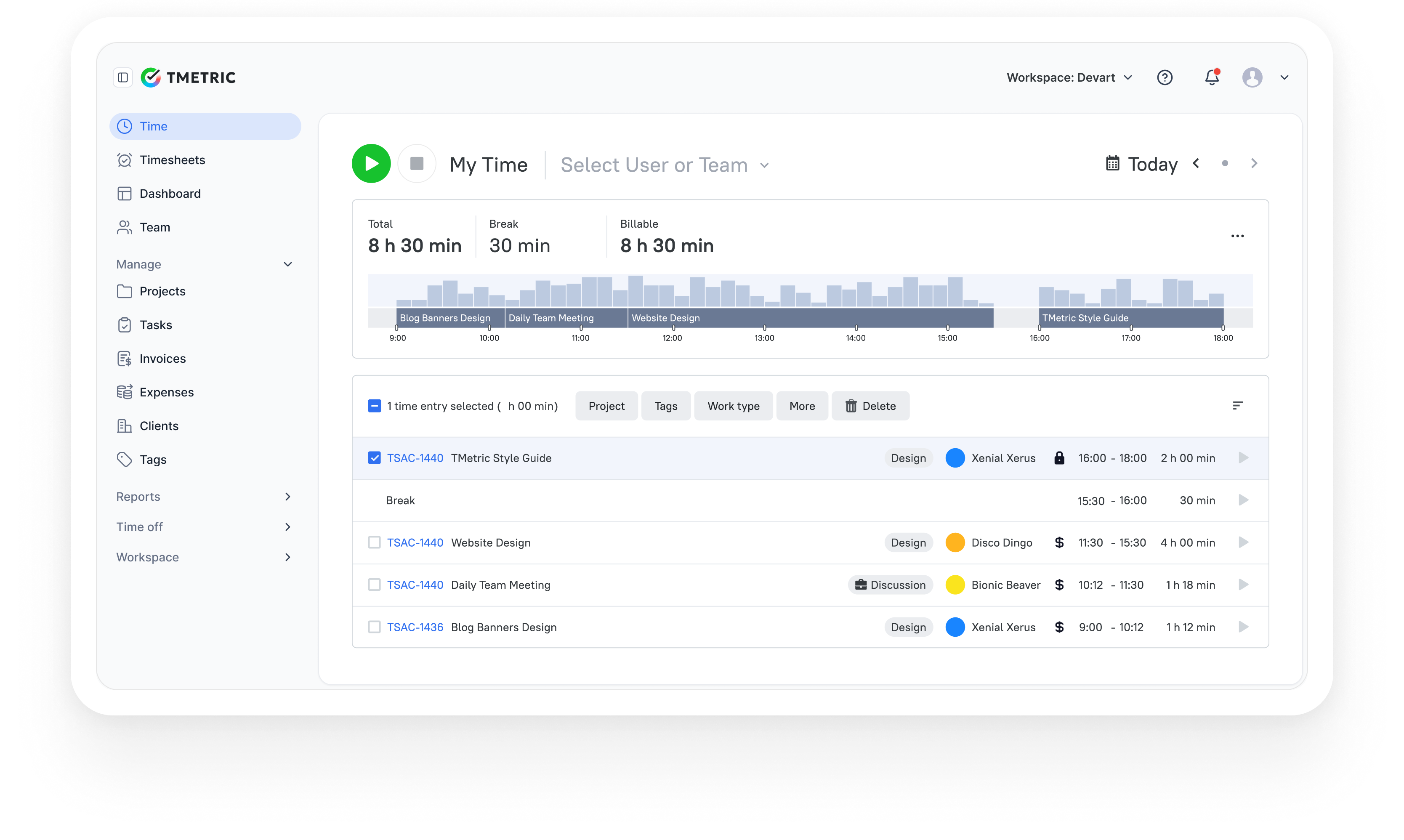
TMetric is a workforce productivity and team time tracking software for projects that combines work schedule management, attendance monitoring, activity tracking, and reporting in one system. By enabling managers to define work hours and track actual time spent on tasks and projects, it provides clear visibility into productivity, workload distribution, and labor costs. This makes it especially valuable for agencies, service businesses, and distributed teams where accurate time data directly affects billing, performance, and operational efficiency.
Highlights
| Category | Details |
| Company | Devart |
| Best for | SMBs, agencies, service businesses, distributed and remote teams |
| Management focus | Time tracking, attendance, workload visibility, productivity monitoring |
| Data sources | Time entries, projects, tasks, activity data, cost rates |
| Platforms | Web, Windows, macOS, Linux, iOS, Android, browser extensions |
Key Features
- Automatic and manual time tracking for tasks and projects.
- Configurable work schedules for teams or individual users.
- Time and attendance monitoring (clock-in/out, breaks, overtime).
- Activity tracking with real-time insights into work patterns.
- Team performance dashboards with workload visibility.
- Detailed timesheets to support payroll and billing accuracy.
- PTO and time-off management with calendar-based views.
- Flexible billable rates and invoicing capabilities.
- Comprehensive reporting on hours worked, costs, and utilization.
- Integrations with major project management and business platforms.
- Cross-platform applications for office, remote, and mobile work.
Pros
- Links time tracking directly with productivity and cost insights.
- Strong visibility into team workload and utilization.
- Supports billing workflows, payroll preparation, and performance analysis.
- Can replace several separate tools such as trackers, attendance systems, and reporting solutions.
- Simple onboarding with minimal training required.
- Free plan available for small teams.
Cons
- Not designed for advanced retail-style shift optimization.
- Does not include built-in GPS tracking for field workforce management.
- Advanced forecasting and demand planning features are limited.
Pricing
Free-for-life
Available
Premium plans
Start at $7 per seat/month
Review
“We like that with a few clicks, my team can log time with TMetric's user-friendly interface, and that reports guarantee billing on the time spent (this also helps us prevent scope creep and set reasonable project budgets).” — G2 Reviewer
2. ClickUp
⭐ 4.7/5 (G2)
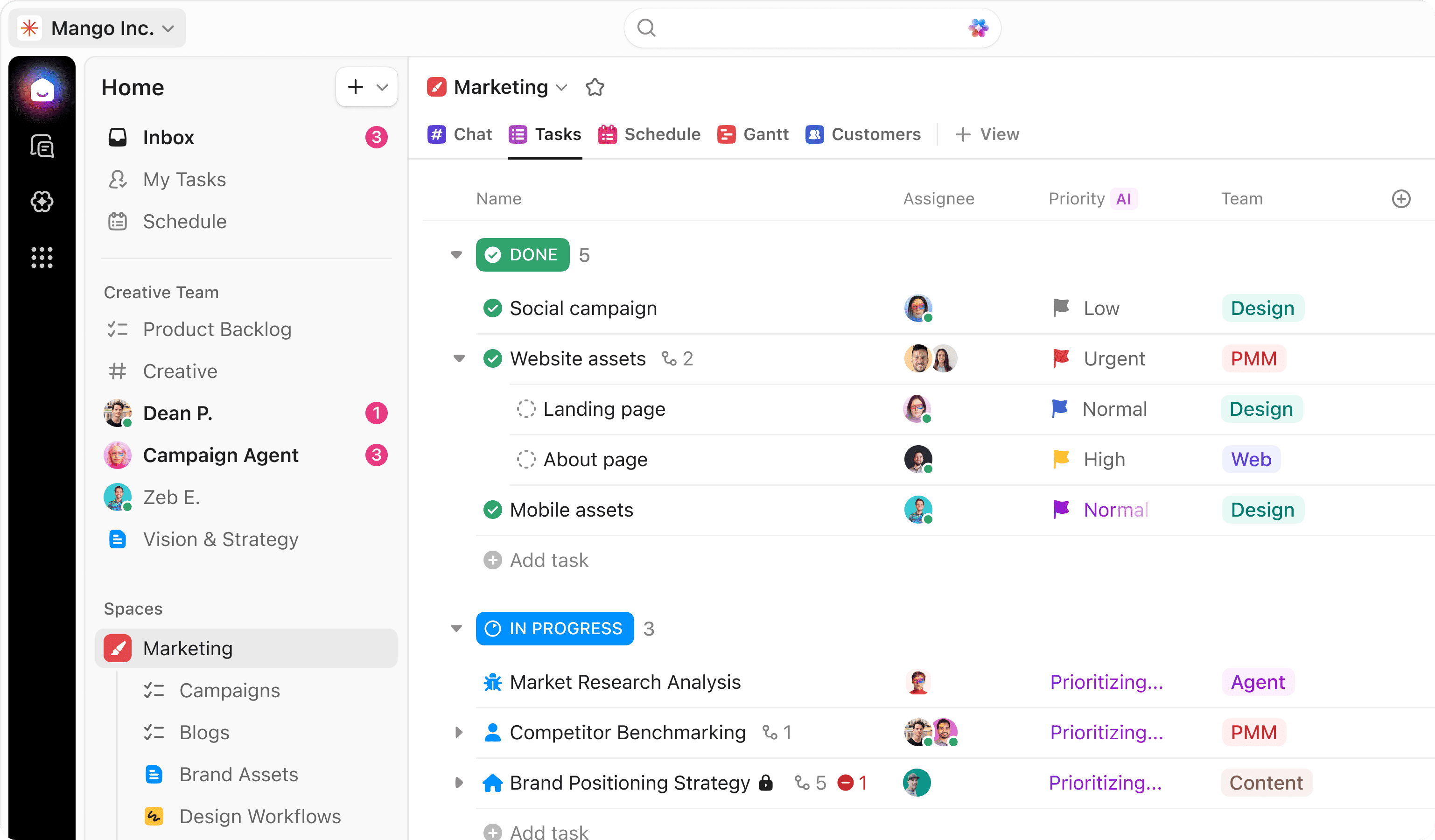
ClickUp is an all-in-one work management platform designed to centralize tasks, documents, communication, and reporting in a single workspace. It supports highly customizable workflows, allowing teams to model complex processes using hierarchical structures, multiple project views, and automation. This flexibility makes it suitable for organizations seeking to replace multiple productivity tools with one unified system.
Highlights
| Category | Details |
| Company | ClickUp |
| Best for | SMBs, enterprises, product teams, remote organizations |
| Management focus | Project planning, task management, collaboration, automation |
| Core structure | Spaces → Folders → Lists → Tasks hierarchy |
| Platforms | Web, Windows, macOS, Linux, iOS, Android |
Key Features
- Hierarchical task organization with dependencies and priority settings.
- Multiple project views including List, Board, Gantt, Calendar, and Timeline.
- Built-in documents, whiteboards, and collaborative editing tools.
- Integrated chat and comment threads for team communication.
- Workflow automation builder with customizable triggers and actions.
- Goals and OKR tracking capabilities.
- Time tracking and workload management tools.
- Custom dashboards and reporting features.
- Extensive integrations with business and development platforms.
- Role-based permissions and enterprise-grade security controls.
Pros
- Combines project management, documentation, and collaboration in one platform.
- Highly customizable for various industries and workflows.
- Suitable for both small teams and large enterprise environments.
- Reduces reliance on multiple standalone tools.
- Generous free plan available.
Cons
- Steeper learning curve due to the breadth of features.
- Interface may feel complex for new users.
- Requires configuration to unlock its full potential.
Pricing
Free-for-life
Available
Premium plans
Start at $7 per seat/month
Review
“What I like best about ClickUp is that it brings everything into one place. Tasks, timelines, notes, and updates all live in the same system, which reduces back and forth between tools.” — G2 Reviewer
3. Asana
⭐ 4.5/5 (G2)
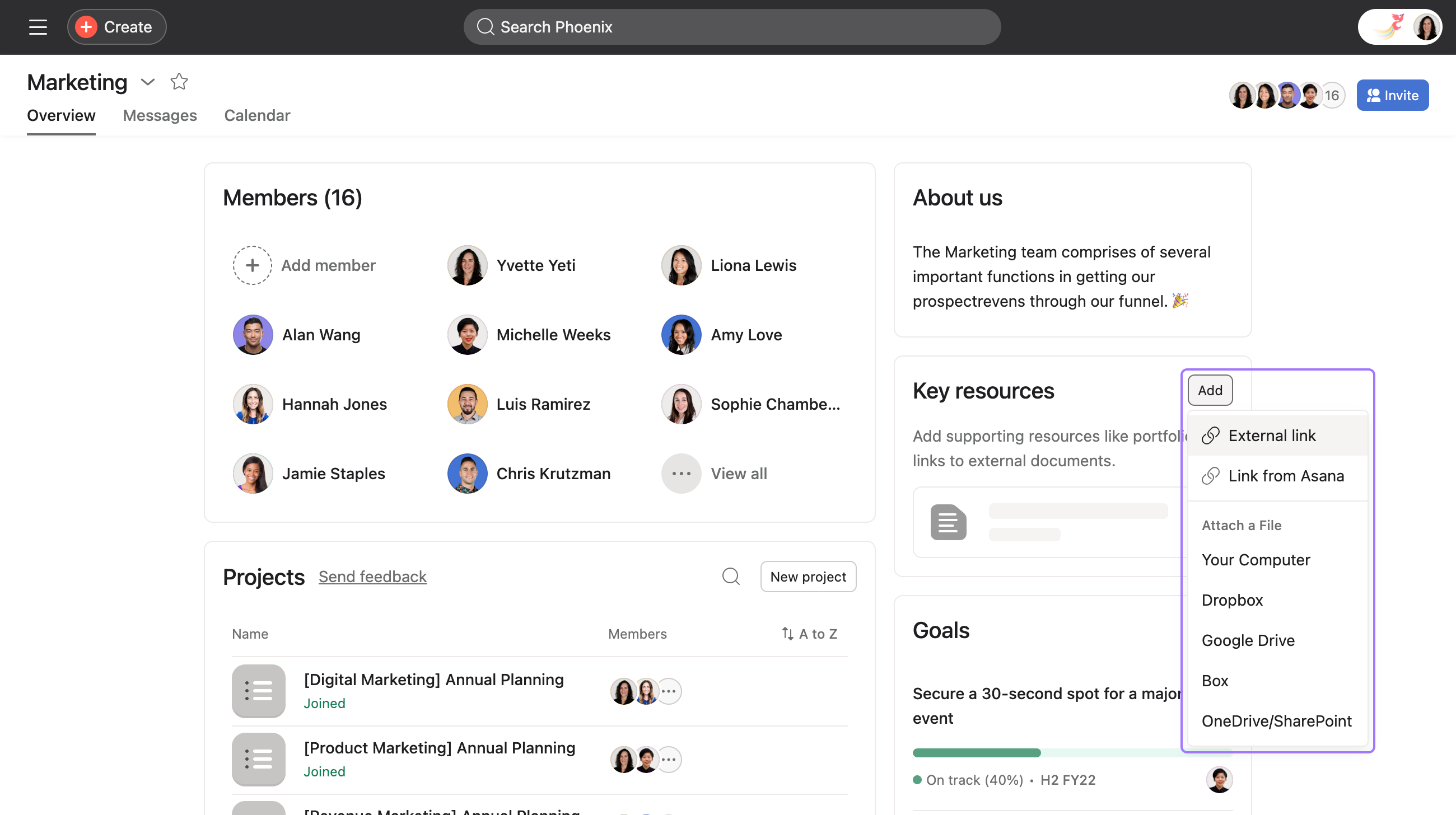
Asana is a project and work management platform designed to help teams plan, organize, and track complex initiatives from start to finish. It excels at structuring work into tasks, timelines, dependencies, and milestones, making it well suited for organizations managing cross-functional projects. Its intuitive interface supports both agile execution and long-term strategic planning, which is why it is widely used by marketing, product, and operations teams.
Highlights
| Category | Details |
| Company | Asana, Inc. |
| Best for | Marketing, product, operations, cross-functional teams |
| Management focus | Project planning, task coordination, goal tracking |
| Core capabilities | Timelines, dependencies, portfolios, workload management |
| Platforms | Web, Windows, macOS, iOS, Android |
Key Features
- Task and subtask management with priorities and due dates.
- Timeline planning (Gantt-style) with task dependencies.
- Milestone tracking for key deliverables.
- Multiple project views including List, Board, Calendar, and Timeline.
- Portfolio management across multiple projects.
- Workload view to support capacity planning.
- Goals and OKR alignment tools.
- Automation rules for repetitive workflow processes.
- Reporting dashboards and project progress tracking.
- Integrations with major productivity and development platforms.
Pros
- Well suited for managing complex, multi-team projects.
- Clean and intuitive interface with a relatively low learning curve.
- Strong timeline and dependency management capabilities.
- Provides effective portfolio-level visibility for leadership.
- Large ecosystem of integrations.
Cons
- Limited built-in communication features compared to chat-focused platforms.
- Advanced capabilities require paid plans.
- Costs can increase for larger teams.
Pricing
Free-for-life
Available
Premium plans
Start at $7 per seat/month
Review
“Asana help in project tracking and ease the team collaboration. It is very easy to use and can be implemented easily. The customer support is super responsive.” — G2 Reviewer
4. Monday.com
⭐ 4.7/5 (G2)
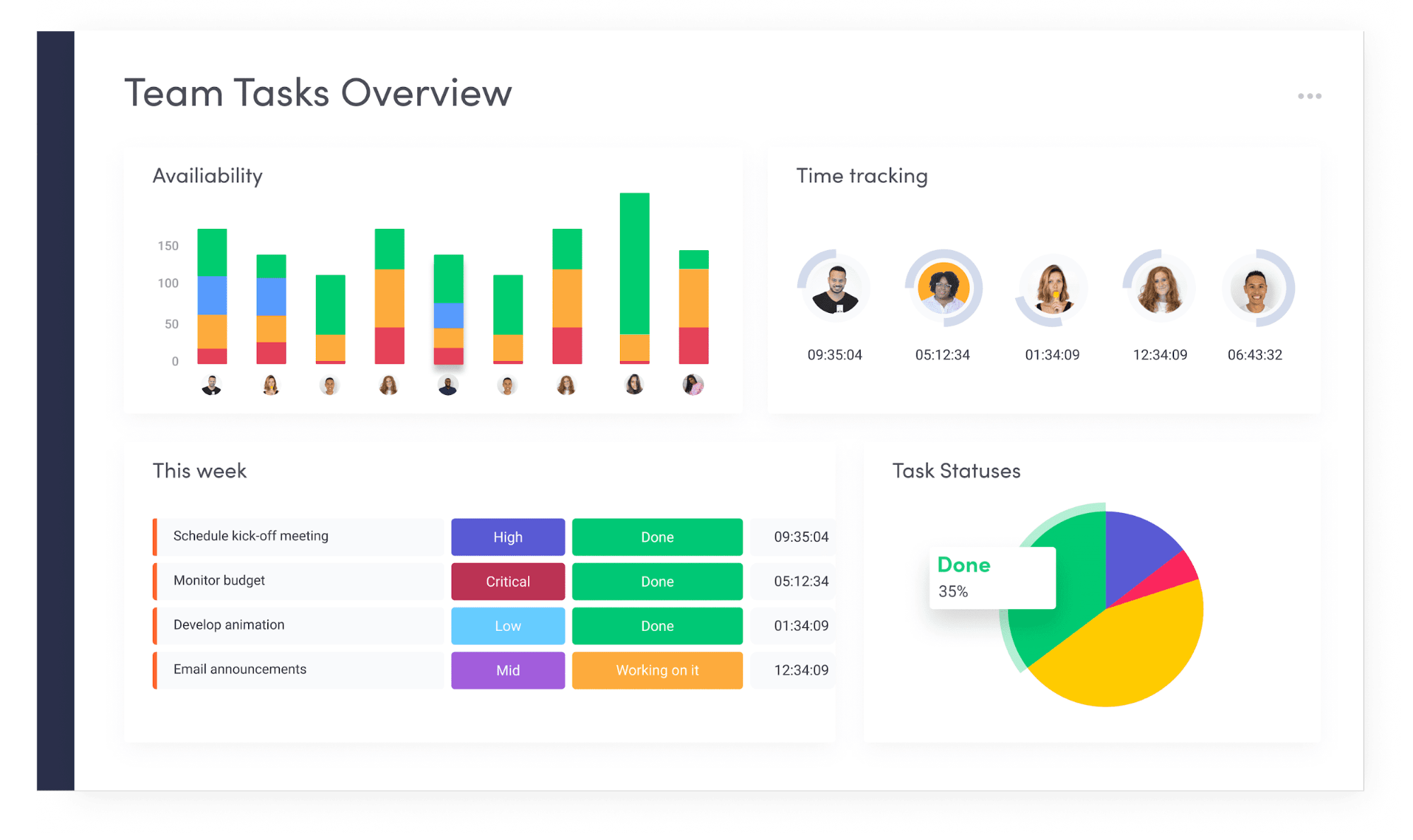
monday.com is a work management platform built around a flexible “Work OS” model that allows teams to design custom workflows using visual boards, automations, and dashboards. Its low-code environment enables non-technical users to structure processes, track work, and coordinate projects without relying on IT support. This makes it particularly effective for organizations managing cross-functional initiatives or complex operational workflows.
Highlights
| Category | Details |
| Company | monday.com Ltd. |
| Best for | SMBs, enterprises, cross-department teams, operations |
| Management focus | Workflow orchestration, project coordination, process automation |
| Core structure | Boards with customizable columns, automations, dashboards |
| Platforms | Web, Windows, macOS, iOS, Android |
Key Features
- Visual boards for managing projects, tasks, and business processes.
- Customizable columns to track status, timelines, owners, and data.
- Automation rules to streamline repetitive workflows.
- Multiple project views including Table, Board, Timeline, Calendar, and Gantt.
- Cross-project dashboards with real-time analytics.
- Workload and resource management tools.
- Collaboration features such as updates, comments, and file sharing.
- Extensive integrations with business and productivity applications.
- Role-based permissions and enterprise-grade security controls.
- Scalable architecture designed for growing organizations.
Pros
- Highly flexible platform adaptable to various business workflows.
- Powerful automation and reporting capabilities.
- Visual interface that remains accessible for non-technical users.
- Effective for coordinating work across teams and departments.
- Scales from small teams to enterprise-level deployments.
Cons
- Pricing can rise quickly as team size increases.
- Advanced capabilities are limited to higher-tier plans.
- Initial setup may require time to configure optimal workflows.
Pricing
Free-for-life
Available
Premium plans
Start at $7 per seat/month
Review
“I really appreciate the platform’s regular updates; they make it incredibly easy to visualize the entire process from start to finish. It offers a wide range of comprehensive features and provides a very clear, high-level overview” — G2 Reviewer
5. Trello
⭐ 4.4/5 (G2)
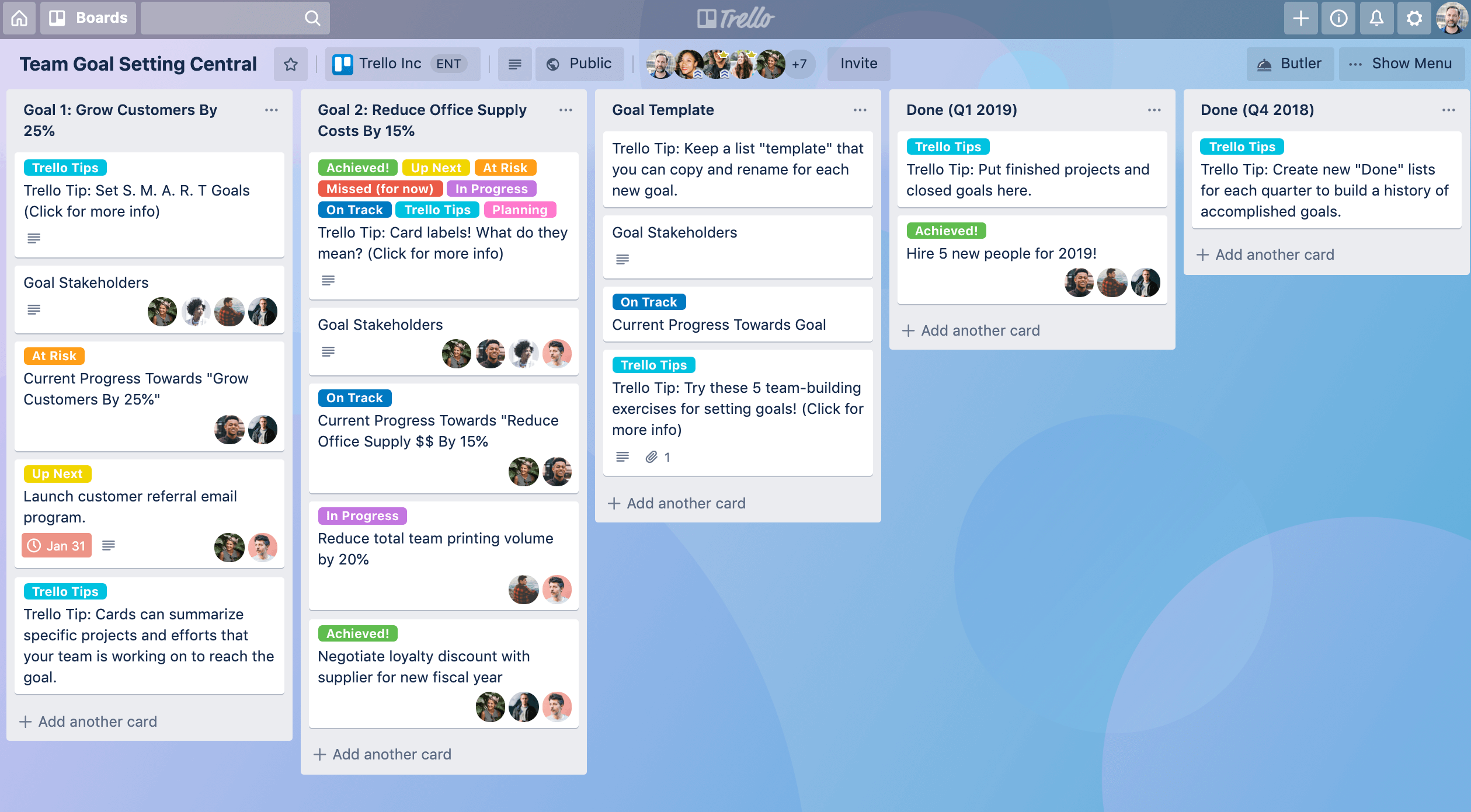
Trello is a Kanban-based task management tool designed for visual organization of work. Projects are structured as boards containing lists and cards that move through stages, providing an intuitive view of progress without complex setup. This simplicity makes Trello especially effective for small teams, startups, and lightweight workflows where ease of use matters more than advanced planning features.
Highlights
| Category | Details |
| Company | Atlassian |
| Best for | Small teams, startups, simple projects, personal productivity |
| Management focus | Visual task tracking, lightweight collaboration |
| Core structure | Boards → Lists → Cards (Kanban model) |
| Platforms | Web, Windows, macOS, iOS, Android |
Key Features
- Drag-and-drop Kanban boards for visual workflow management.
- Cards with checklists, attachments, due dates, and assigned members.
- Basic workflow automation using Butler rules.
- Collaboration through comments, mentions, and file sharing.
- Power-Ups (integrations) to expand platform functionality.
- Additional views such as Calendar, Timeline, and Dashboard on higher plans.
- Mobile applications for managing tasks and projects on the go.
- Activity logs for tracking board and task updates.
Pros
- Very easy to learn and adopt.
- Well suited for simple workflows and task tracking.
- Generous free plan for individuals and small teams.
- Visual interface offers quick status visibility.
- Flexible enough for both personal and professional projects.
Cons
- Limited built-in reporting and analytics.
- Lacks advanced resource and workload management.
- More complex projects may require integrations or upgrades.
- Less suitable for large-scale enterprise coordination.
Pricing
Free-for-life
Available
Premium plans
Start at $7 per seat/month
Review
“Trello is just enormously customizable and friendly - you can use visuals, colors, checklists, columns, filters, and SO much more to organize both your work and personal lives.” — G2 Reviewer
6. Microsoft Teams
⭐ 4.4/5 (G2)
Description
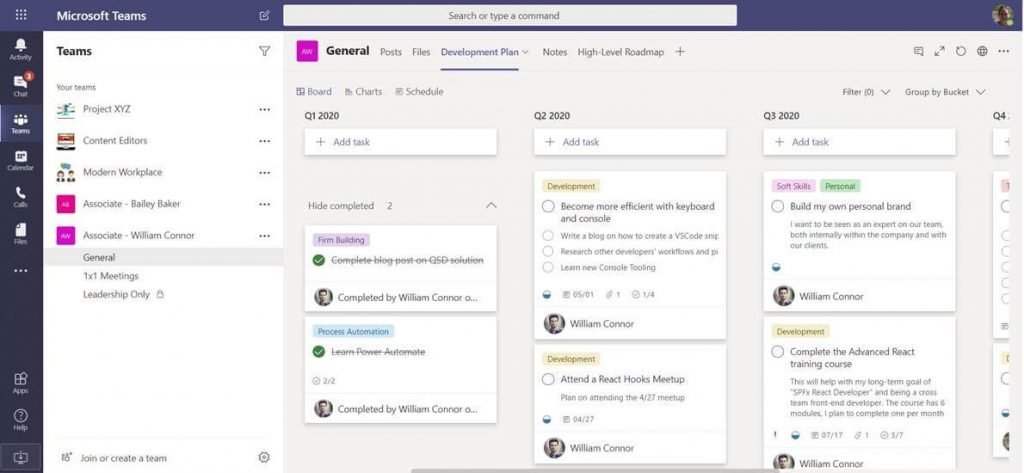
Microsoft Teams is a collaboration platform that combines chat, video meetings, file sharing, and workspace coordination within the Microsoft 365 ecosystem. By integrating tightly with tools such as Outlook, SharePoint, OneDrive, and Office apps, it enables teams to communicate and manage work without leaving their existing productivity environment. This makes it a natural choice for organizations already standardized on Microsoft technologies, particularly enterprises and large distributed teams.
Highlights
| Category | Details |
| Company | Microsoft |
| Best for | Enterprises, Microsoft 365 users, distributed organizations |
| Management focus | Communication, meetings, collaboration, document coordination |
| Core capabilities | Chat channels, video conferencing, file sharing, app integrations |
| Platforms | Web, Windows, macOS, Linux, iOS, Android |
Key Features
- Persistent team chat with channels and threaded conversations.
- High-quality video meetings, webinars, and screen sharing.
- Deep integration with Microsoft 365 applications such as Word, Excel, PowerPoint, and Outlook.
- File storage and collaboration through SharePoint and OneDrive.
- Integrated calendar and scheduling capabilities.
- Extensible app ecosystem for additional functionality.
- Advanced security, compliance, and administrative controls.
- Real-time document co-authoring.
- Support for large meetings and enterprise-scale deployments.
Pros
- Seamless integration with the Microsoft 365 productivity suite.
- Strong communication and video meeting capabilities.
- Well suited for large organizations and distributed teams.
- Enterprise-grade security and compliance features.
- Reduces the need for separate conferencing and collaboration tools.
Cons
- Limited native project and task management functionality.
- Interface may feel complex for new users.
- Full value typically requires a Microsoft 365 subscription.
- Reporting capabilities are less extensive than dedicated project management platforms.
Pricing
Free-for-life
Available
Premium plans
Start at $7 per seat/month
Review
“What I like best about Microsoft Teams is its all-in-one collaboration platform. It combines chat, video meetings, file sharing, and task coordination in one place, making teamwork more organized and efficient.” — G2 Reviewer
7. Smartsheet
⭐ 4.4/5 (G2)
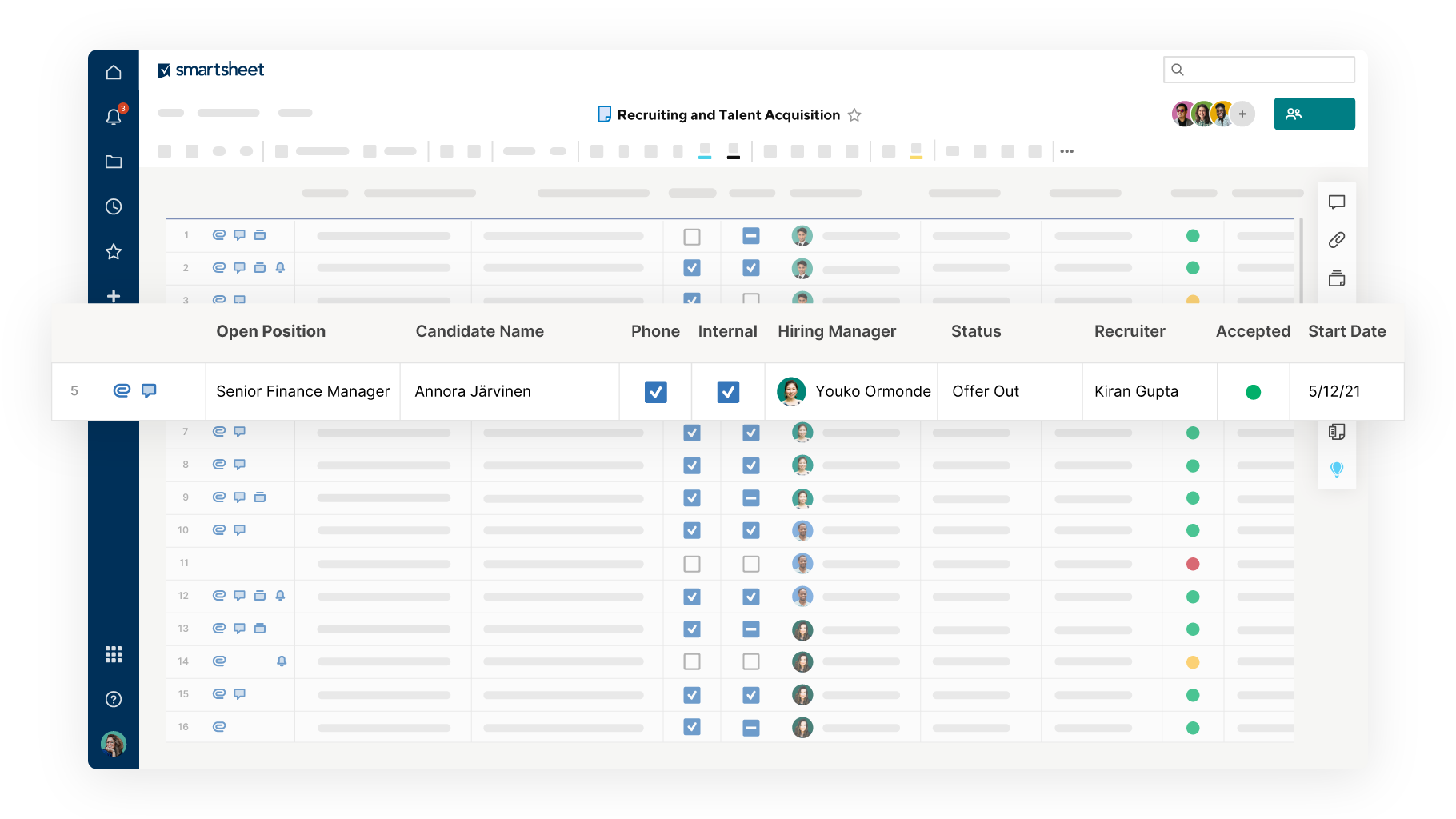
Smartsheet is a work management platform built around a spreadsheet-style interface enhanced with project planning, automation, and reporting capabilities. It combines the familiarity of grid-based data entry with tools such as timelines, workflows, and dashboards, making it well-suited for organizations that require structured execution and detailed oversight.
This approach is particularly effective for managing large programs, operational initiatives, and cross-functional projects where tracking dependencies, budgets, and progress is critical.
Highlights
| Category | Details |
| Company | Smartsheet Inc. |
| Best for | Enterprises, program managers, operations teams |
| Management focus | Structured planning, program execution, reporting |
| Core structure | Spreadsheet-style sheets with automation and dashboards |
| Platforms | Web, Windows, macOS, iOS, Android |
Key Features
- Grid-based project tracking similar to spreadsheets.
- Gantt charts and timeline planning with task dependencies.
- Workflow automation for approvals and status updates.
- Resource management and capacity planning tools.
- Cross-project dashboards with real-time metrics.
- Collaboration tools including comments and file attachments.
- Forms for collecting requests and structured data.
- Reporting capabilities across multiple sheets and projects.
- Integrations with enterprise software and cloud platforms.
- Security, governance, and administrative controls.
Pros
- Spreadsheet-style interface that feels familiar to many users.
- Strong capabilities for managing structured and complex projects.
- Advanced reporting and analytics tools.
- Well suited for large organizations and regulated environments.
- Scales effectively across departments and programs.
Cons
- Less intuitive for teams unfamiliar with spreadsheet-style workflows.
- Can feel rigid compared to more visual project management tools.
- Pricing is higher than many lightweight alternatives.
- Initial setup may require planning to optimize workflows.
Pricing
Free-for-life
Available
Premium plans
Start at $7 per seat/month
Review
“SmartSheet makes it easy to create checklists and send them off to people to share. It also allows you to set up tasks and easily create Gantt charts.” — G2 Reviewer
How to choose the best team management software
Choosing the right team time management software depends on how your team actually works, not on popularity or feature volume. The criteria below help translate the earlier comparisons into practical decision factors you can apply to your organization.
Define team workflow complexity
Large programs with dependencies, approvals, and cross-team coordination require advanced planning tools with timelines, automation, and reporting. Smaller teams handling straightforward tasks may work more efficiently with lightweight boards or communication-centric tools. Hybrid environments often need additional visibility features to track progress without in-person oversight.
Evaluate core functional features
Focus on capabilities that directly influence execution: task management, workload visibility, reporting, automation, and collaboration. Platforms that combine multiple functions can reduce tool fragmentation, improve data consistency, and simplify daily workflows.
Remote vs office collaboration needs
Distributed teams rely on digital coordination to replace hallway conversations and ad-hoc updates. Real-time messaging, asynchronous collaboration, file sharing, and mobile access are essential for maintaining alignment across locations and time zones.
Integration ecosystem
Most organizations already use CRM systems, accounting tools, development platforms, or cloud storage services. Ensure the software integrates with these systems to avoid duplicate work, manual data transfer, and operational silos.
Budget vs ROI considerations
Cost should be evaluated against productivity gains, not price alone. Free plans may suit small teams, but larger organizations need scalable pricing, governance controls, and measurable efficiency improvements to justify long-term adoption.
The Takeaway
Team management software has evolved from simple task trackers into comprehensive operational platforms supporting hybrid, remote, and distributed work. The best choice depends on how your team coordinates tasks, communicates, and measures success — not on which tool is most popular.
Organizations prioritizing clarity, accountability, and measurable productivity should start with solutions that provide strong visibility into workload and performance. Platforms emphasizing communication or structured planning may be more appropriate for other operational styles.
For teams seeking immediate improvements in productivity, transparency, and coordination, exploring TMetric is a logical first step.