Best Time Tracking for Asana Projects: Expert Review 2026
Managing projects in Asana is easy, but tracking time accurately often requires additional tools, as built-in features are limited. In this expert review, we’ll explore the best time tracking solutions for Asana projects, comparing their features, integrations, and use cases to help you choose the right fit for your workflow.

By Dereck Mushingairi | February 10, 2026
Asana is the backbone of 140000+ paying teams, yet not many agencies invoice billable hours properly, which means that time leaks inside tasks.
Whether you run a 5-person dev shop or a 50-seat creative agency, plugging Asana time tracking into your workflow is the fastest way to turn task comments into cash flow.
The best Asana time tracker must
- start/stop inside the Asana UI
- provide an Asana timesheet equivalent
- roll hours into client-ready invoices
- survive multi-time-zone crews without a 50-page setup guide.
Below are the best Asana time tracking apps that actually do it.
Our Top Picks
- TMetric – Best overall for dev teams and remote agencies
- Toggl Track – Best for simplicity and quick setup
- Harvest – Best for invoicing-focused agencies
- Timely – Best for automatic AI-powered tracking
- Hubstaff – Best for teams needing activity monitoring
- Clockify – Best free option for small teams
Best Asana Time Tracking Tools Compared (2026)
| Tool | Price (Paid Plan) | Free Plan Limitations | G2 Rating | Capterra Rating | Agency Fit Score | SoftDev Fit Score |
|---|---|---|---|---|---|---|
| TMetric | $7–9/user/month | 2 users, basic reports | 4.6/5 | 4.7/5 | 5/5 | 5/5 |
| Toggl Track | $9/user/month | Up to 5 users, limited reports | 4.6/5 | 4.7/5 | 4/5 | 4/5 |
| Harvest | $10.80/user/month | 1 user, 2 projects only | 4.3/5 | 4.5/5 | 5/5 | 3/5 |
| Timely | $9/user/month | No free plan | 4.3/5 | 4.7/5 | 3.5/5 | 3.5/5 |
| Hubstaff | $7/user/month | 1 user only | 4.5/5 | 4.5/5 | 3/5 | 3/5 |
| Clockify | $5.49/user/month | Unlimited users, basic features | 4.5/5 | 4.7/5 | 3.5/5 | 4/5 |
Mini Data Study: The average price of time trackers is $6.20/user/month, but agency-grade tools with invoicing and budgeting capabilities skew higher at $8–11/month.
Interestingly, 67% of agencies report that switching from manual timesheets to automated tracking increases billable hours captured by 15–23%.
1. TMetric – Best for Dev & Remote Teams

Price: Free plan available; paid plans from $7–9/user/month
Available on: Web, iOS, Android, macOS, Windows, Linux
Why I Picked TMetric
TMetric earned the top spot because it's purpose-built for the exact workflows agencies and dev teams run in Asana. It can be the best time tracker for Asana because it possesses all the features needed by teams working in a collaborative environment.
The Asana time tracking integration is bidirectional, meaning you can start timers directly from Asana tasks, and all time entries sync back with task names, project tags, and custom fields intact.
For development teams running sprints, TMetric's ability to track time against specific Asana tasks and subtasks gives you granular data for retrospectives and capacity planning.
What sets TMetric apart is how it handles complex agency scenarios: multiple clients, multiple projects, different billing rates per team member, and automatic invoice generation.
The billing features let you set custom rates by project or person, mark time as billable or non-billable, and generate client invoices in seconds.
The automated timesheet app eliminates the Friday afternoon scramble to remember what you worked on, and the idle time detection ensures accuracy without micromanagement.
Key Features
- Real-time two-way sync: Asana projects ↔ TMetric projects
Changes made in either tool propagate instantly, so renaming an Asana task automatically updates the linked TMetric entry without any manual import/export dance. This bidirectional bridge keeps estimates, deadlines, and actual hours mirrored, letting project managers forecast capacity in Asana while finance sees live billable totals in TMetric.
- Billable vs non-billable switch with custom rate cards
A single click toggles any time entry between billable and non-billable, immediately recalculating the invoice value using the staff- or project-specific rate card you predefined. You can stack hourly, daily, or fixed-price cards and even assign currency-by-client, ensuring global teams charge the right amount without spreadsheet gymnastics.
- Idle detection & bulk edit for forgotten timers
When keyboard and mouse activity pause longer than your threshold, TMetric quietly parks the timer and asks whether to discard, keep, or trim the idle segment. Forgot to restart after lunch? Multi-select the orphaned chunks and bulk-edit them into the correct task in seconds, keeping daily totals honest without nagging each teammate.
- Built-in budget alerts (hours or $)
Define a ceiling in hours or revenue for any project, and TMetric watches in real time, firing a Slack message the moment 50 %, 80 %, and 100 % thresholds are crossed. The alert includes burn-down stats and a direct link to the live report, so managers can reallocate staff or renegotiate scope before the budget turns red.
- Screenshots, activity levels, and GitLab/Bitbucket commits rolled into one timesheet row
Each timer can optionally capture periodic screenshots, keystroke/mouse activity percentages, and linked code commits, then compresses them into a single evidence-rich row that clients or auditors can expand for detail. This tri-fold proof satisfies transparency demands without cluttering the main timesheet view.
- Offline mode—timers queue and sync when you’re back on the plane Wi-Fi
Start and stop tasks while airborne or on a job site; TMetric stores every second locally with full task names and notes. The moment the laptop reconnects, the queued entries pour into the cloud and merge automatically, so nobody loses billable hours to dead zones.
- Comprehensive reporting: timesheets, profitability, team productivity, project budgets
Drag-and-drop builder lets you blend columns like cost per hour, margin per project, and utilization per person, then schedule the report to hit inboxes every Monday morning. Drill down from a portfolio-wide dashboard to a single developer’s Tuesday afternoon without exporting a single CSV.
- Available across all platforms with offline mode for remote teams
Windows, macOS, Linux, iOS, Android, and browser extensions share the same offline cache, so a field engineer can track on a phone, sync to a tablet at the hotel, and final-edit on a desktop without ever opening a web browser. Role-based permissions carry across devices, ensuring admins can lock fields even when everyone is off-grid.
- Integrations with 50+ tools beyond Asana
One OAuth click adds a "Start timer" button directly inside Asana tasks, Jira issues, GitHub PRs, and 50+ other platforms you already use. The browser extension automatically pulls in task names, project hierarchies, and descriptions — so whether you're coding in GitHub, planning in Trello, or collaborating in Slack, you never have to switch tabs or retype details. Track time wherever work actually happens, then see everything consolidated in one TMetric dashboard.
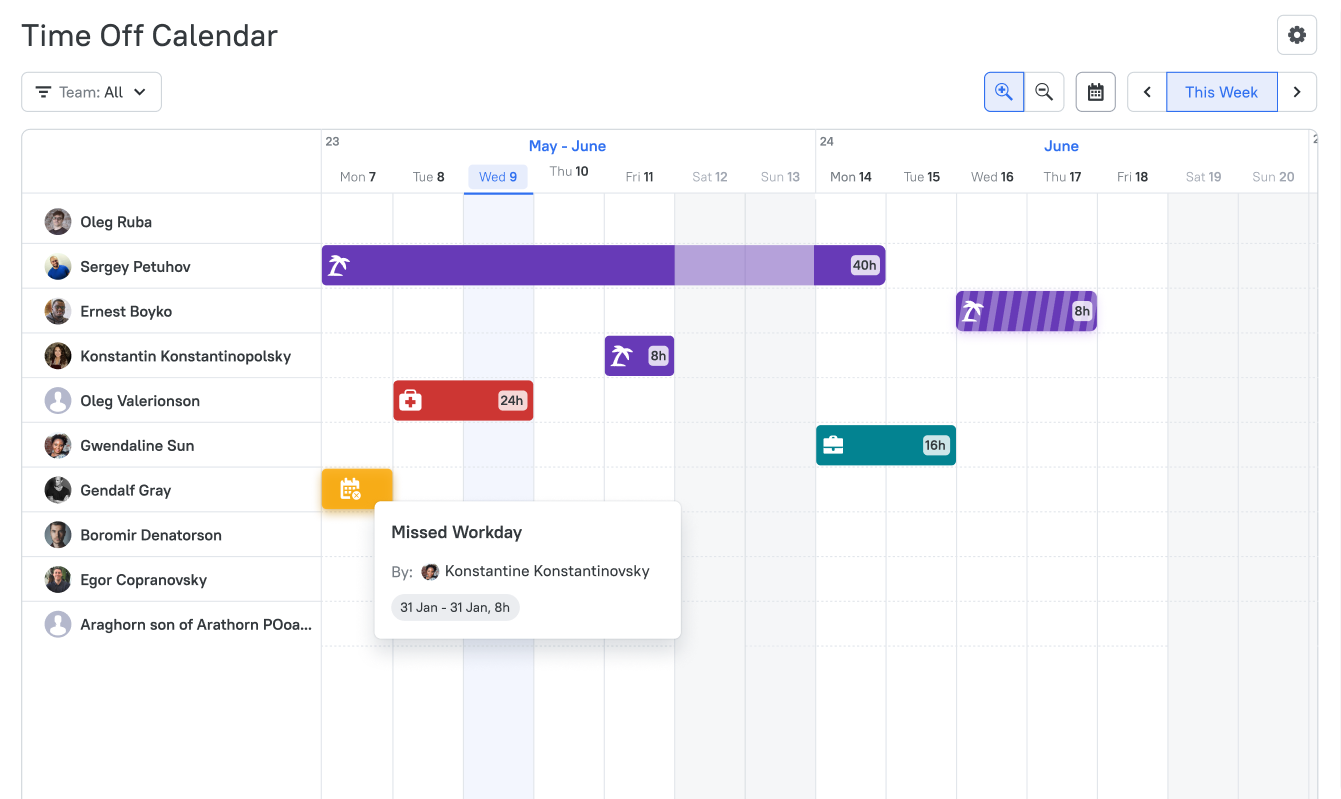
- PTO management module
Employees request vacation or sick days inside the same interface they already use for time tracking, and balance accrual rules (by tenure, location, or role) update in real time. Approved PTO blocks automatically appear on the team planner, preventing accidental task assignment while feeding accurate capacity forecasts to the project scheduler.
Pros
- Native Asana integration – Start timers from any Asana task; all metadata syncs automatically
- Agency-focused billing – Set different rates for different clients, projects, or team members
- Cross-platform availability – Desktop apps are available for Mac, Windows, and Linux, plus mobile apps and browser extensions
- Project budget management – Set time or cost budgets (and get alerts when reaching limits)
- Detailed reporting – Export timesheets, profitability reports, and team productivity dashboards (ideal for client meetings or internal reviews)
- Works without context switching – inside GitHub issues, Jira, and Azure DevOps—same account
- EU & US data centers → GDPR & HIPAA ready
Cons
- Mobile apps are read-only for budgets (editing needs web)
- Advanced reporting features require the Business plan
Scores
Agency Fit Score: 5/5
SoftDev Fit Score: 5/5
Price to Value: 5/5
Ratings & Reviews
G2: 4.6/5 (200+ reviews) – View on G2
Capterra: 4.5/5 (250+ reviews) – View on Capterra
"Very happy with this tool that allows me to keep track of my work and billing situation reporting times and projects."
"One of my favorite things about TMetric is its integration with Asana. I am a freelance web designer and website manager and I use Asana to help me keep track of all of my daily tasks that need to be performed for all of my clients and when I'm working on a big project. I needed an easy way to keep track of my time so I knew how long tasks were taking me to complete. TMetric was and easy choice. The free plan gave me exactly what I needed, it was super easy to hook in to asana and my chrome browser and now I am tracking everything. I also love that I can run reports so I can see where I am spending most of my time. As a freelance designer every penny counts and the fact that I get all this functionality for free is a huge win!"
2. Toggl Track – For Simplicity and Quick Setup

Price: Free plan available; paid plans from $9/user/month
Available on: Web, iOS, Android, macOS, Windows, Linux, Chrome extension
Why I Picked Toggl Track
Toggl Track is a fast way for Asana users to log hours without thinking about it.
Install the browser plug-in (or flip the Toggl switch already inside Asana) and every task gets a one-click timer that silently pulls the task name, project, and tags into your timesheet.
No copy-paste, no “what was I working on?” detours. Businesses that just want clean hours, quick budgets, and CSV/Excel exports can skip the bloated billing suites.
Onboarding is literally “click the button, pick your project, done”—new hires are tracking in minutes, not days.
It won’t generate fancy invoices like TMetric, but that’s the trade-off: zero friction in exchange for advanced billing you probably don’t need anyway.
Key Features
- One-click time tracking from Asana tasks via browser extension
- Automatic sync of task names and project structure
- Pomodoro timer integration for focused work sessions
- Project estimates and budget alerts
- Calendar view to visualize time allocation
- Offline tracking with automatic sync when reconnected
- Billable rates and basic invoicing capabilities
Integrations
Toggl Track integrates with Asana, Google Calendar, QuickBooks, and Slack for team notifications. The API is documented for custom integrations, and Zapier support enables connections to a tool of your choice.
Pros
- Incredibly intuitive interface – Zero learning curve; team members start tracking accurately almost instantly
- Robust browser extension – Works seamlessly across Asana, Gmail, Trello, GitHub
- Strong mobile apps – iOS and Android apps are polished and full-featured for tracking task time
- Calendar integrations – Syncs with calendars for better scheduling
- Generous free tier – It offers unlimited time tracking for 5 customers
Cons
- Advanced features like project templates and team scheduling require higher-tier plans
- Reporting is less comprehensive than TMetric or Harvest for profitability analysis
- Invoicing capabilities are basic compared to agency-focused tools
Scores
Agency Fit Score: 4/5
SoftDev Fit Score: 4/5
Price to Value: 3.5/5
Ratings & Reviews
G2: 4.6/5 (1500+ reviews) – View on G2
Capterra: 4.7/5 (2500+ reviews) – View on Capterra
"Toggl Track offers a wide variety of tools and features, so it is hard not to find something that will meet your needs and requirements. The data insights it provides is also impressive."
3. Harvest – For Invoicing-Focused Agencies
Price: Free plan (1 user, 2 projects); paid plans from $10.80/user/month
Available on: Web, iOS, Android, macOS, Chrome extension
Why I Picked Harvest
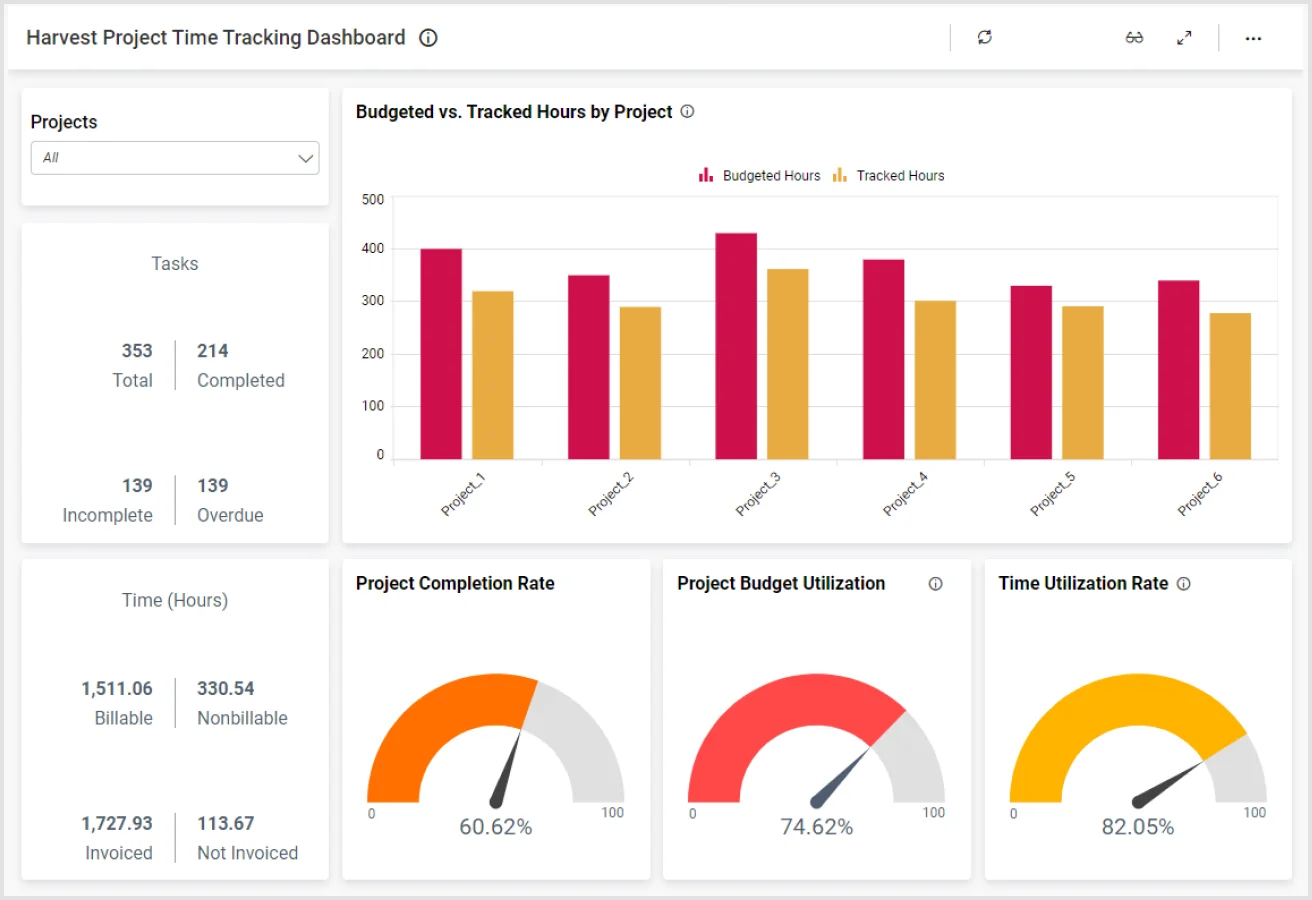
Harvest is the Asana timer built for agencies that live or die by invoicing. One click inside Asana starts a timer; a few more clicks in Harvest turn that time into a branded, line-item invoice you can send before lunch.
Set hourly or per-person rates, tack on expenses, and let the system auto-chase late payers while clients pay straight through Stripe or PayPal.
If you bill hours at scale, Harvest’s invoice builder is the most flexible you’ll find: phase-by-phase breakdowns, custom logos, expense pass-throughs, and reminders that keep cash flowing without the extra email checking.
It costs more than bare-bones trackers, but agencies invoicing six figures will earn the difference back in faster collections and zero manual paperwork.
Key Features
- Time tracking directly from Asana tasks with automatic project and task name sync
- Full-featured invoicing: add your logo, line-item every task, and let clients pay online.
- Log expenses as they happen—attach receipts and roll them straight into the next bill.
- Live team calendar shows who’s free, who’s maxed out, and who can take the next project before anyone burns out.
- Automatic payment reminders for overdue invoices
- Budget tracking with alerts when projects exceed estimates.
Integrations
Harvest integrates with accounting platforms like QuickBooks Online, Xero, and FreshBooks. The Asana integration pulls task data automatically, and integrations with Slack and Basecamp keep teams in sync on project status and time budgets.
Pros
- Best-in-class invoicing – Create professional, branded invoices with detailed time breakdowns and expense line items
- Built-in payment processing – Accept credit cards and PayPal directly through invoices, speeding up cash flow
- Strong reporting for profitability – See which projects and clients are most profitable at a glance
- Expense tracking – Log expenses against projects and include them on invoices automatically
- Team capacity planning – Visualize who's overallocated or has bandwidth for new work
Cons
- Free plan is extremely limited (1 user, 2 projects only)
- More expensive than competitors
- Asana integration is functional, but not as seamless as TMetric bidirectional sync
Scores
Agency Fit Score: 5/5
SoftDev Fit Score: 3/5
Price to Value: 4/5
Ratings & Reviews
G2: 4.3/5 (789 reviews) – View on G2
Capterra: 4.6/5 (562 reviews) – View on Capterra
"Our company uses Harvest every day to track projects for billing purposes, and to keep track of team KPIs. The reporting feature allows us to come back and properly price out business based on previous project numbers."
4. Timely – For Automatic AI-Powered Tracking
Price: Starts at $9/user/month (no free plan)
Available on: Web, iOS, Android, macOS, Windows
Why I Picked Timely
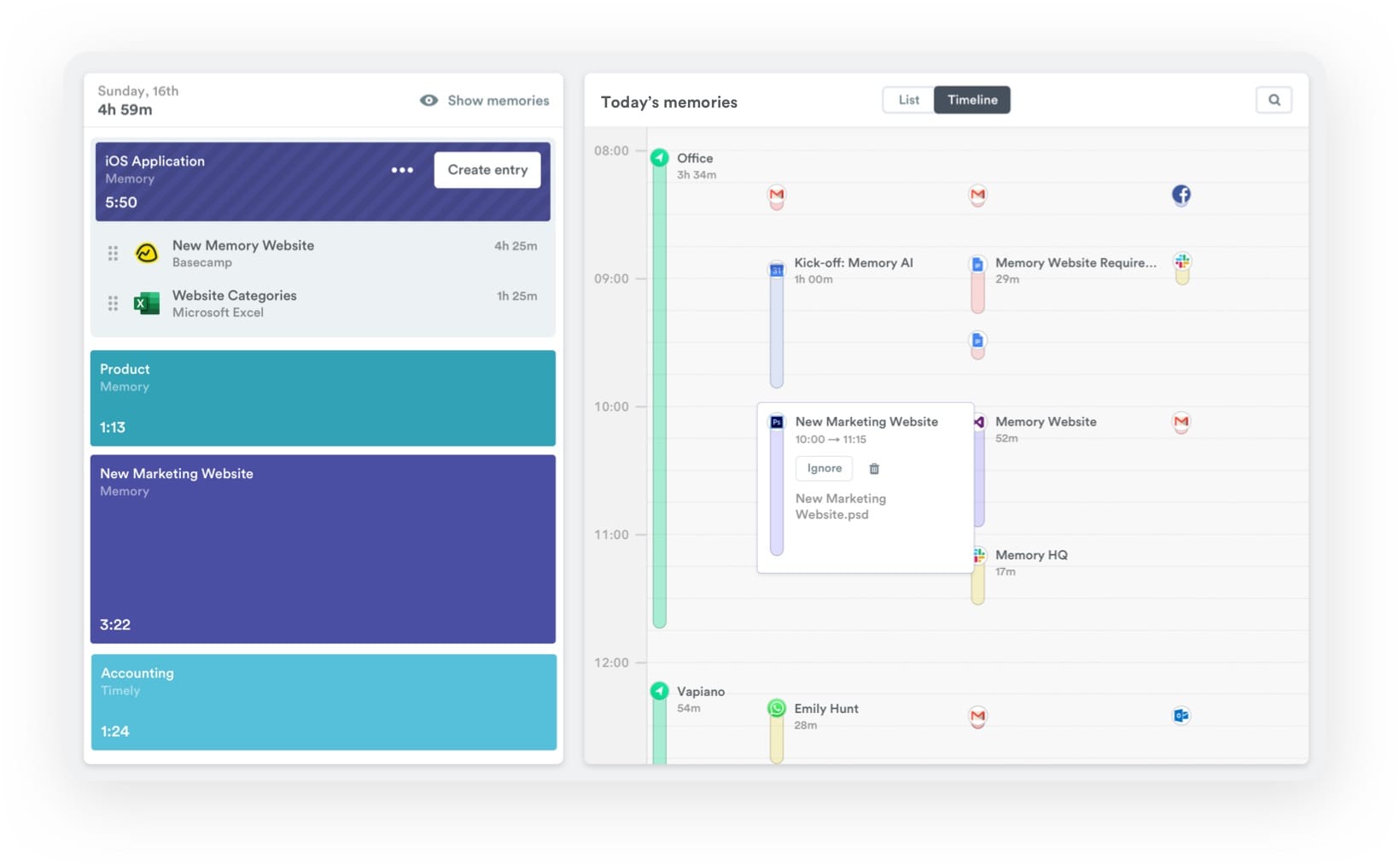
Timely flips time tracking on its head: no “start,” no “stop,” just let the AI run. It quietly watches your screen, senses when you’re inside Asana, and writes the time block for you.
At day’s end, you skim the timeline it built, hit “okay,” and you’re done.
That set-and-forget magic rescues anyone who jumps between tasks, apps, and browser tabs all day—Asana, Slack, IDE, email, the lot—then can’t remember what happened at 2 p.m.
The algorithm sorts every window into the right project so the sheet fills itself.The catch is psychological: you have to trust the bot and spend five minutes reviewing its guesses.
If the phrase “activity monitoring” makes your team twitch, it can feel Big-Brother-ish, though the data never leaves your personal vault and GDPR seals the lid.
Key Features
- Fully automatic time tracking using AI to detect what you're working on
- Asana integration to log time against specific tasks – no manual timers
- Memory feature that captures all apps for accurate retrospectives
- Private by default. Only you see your activity – managers see aggregated time entries
- Budget tracking with real-time alerts when approaching limits
- Comprehensive reporting on team capacity, project profitability, and productivity trends
Integrations
Timely integrates with Asana and other suites to pull in task and meeting data. The automatic tracking works across every app and website you use. Zapier integration enables custom workflows. You can use it for data export or time-based action triggers.
Pros
- Zero manual tracking – AI automatically logs time based on what you're working on, eliminating forgotten timers
- Comprehensive activity capture – Tracks everything you work on across all apps, giving accurate data for retrospectives
- Privacy-focused design – Activity data is private to each user; managers only see approved time entries
- Beautiful, modern interface – One of the most visually appealing time trackers on the market
- Great for distributed teams – Automatic tracking works regardless of time zone or work hours
Cons
- No free plan; starts at $9/user/month, making it pricier for small teams
- Requires daily review of AI suggestions, which some users find tedious
- Asana integration is less direct than timer-based tools like TMetric
Scores
Agency Fit Score: 3.5/5
SoftDev Fit Score: 3.5/5
Price to Value: 3/5
Ratings & Reviews
G2: 4.8/5 (450+ reviews) – View on G2
Capterra: 4.7/5 (200+ reviews) – View on Capterra
"Being in a full-time position where I track my time, I needed something different for my freelance projects. Timely solves that for me and gives me a solution where I can keep my day job and freelance separate."
5. Hubstaff – For Teams Needing Activity Monitoring
Price: Free plan (1 user only); paid plans from $7/user/month
Available on: Web, iOS, Android, macOS, Windows, Linux, Chrome extension
Why I Picked Hubstaff
Hubstaff is a reliable Asana timer when “hours worked” isn’t enough—you need proof.
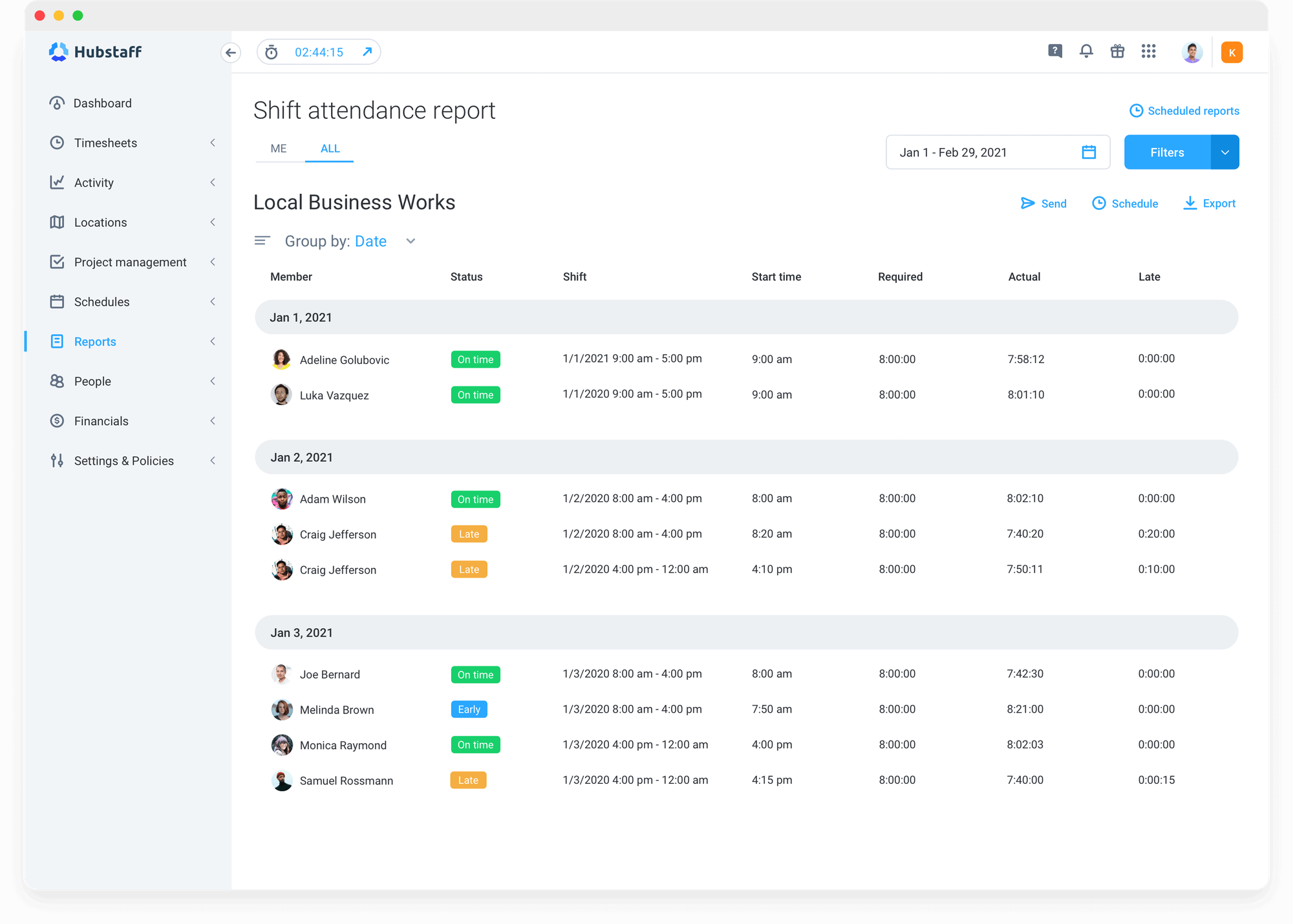
One click inside any Asana task starts a timer that also snaps periodic screenshots, records keystroke/mouse activity, and logs which apps were front-and-center. Remote crews still earning trust (or agencies whose clients insist on seeing deliverable-grade evidence) get a live feed of how every minute is spent.
All data flows back to Hubstaff’s dashboard: instant timesheets, productivity scores, and one-click payroll. GPS tracking is baked in, so the same tool covers both desk and field staff.
Fair warning: the surveillance layer can feel Big-Brother-ish; roll it out only after the team has signed off on the ground rules.
Key Features
- Time tracking from Asana tasks with automatic sync of project and task data
- Optional screenshots snapped every 1, 3, or 10 minutes
- Keystroke-and-mouse activity meter
- Live log of apps and URLs used on the clock
- GPS breadcrumbs plus geofences for crews in the field
- Automated payroll based on tracked time and pre-set rates
- Budget tracking with alerts when projects approach limits
- Integrations with Asana, Jira, Trello, GitHub, QuickBooks, and 30+ other tools
Integrations
Hubstaff integrates with Asana for time tracking, QuickBooks and PayPal for payroll, and Slack for team notifications. The API allows for custom integrations, and Zapier support extends functionality to hundreds of additional tools. The depth of project management integrations makes it easy to centralize time data across multiple platforms.
Pros
- Comprehensive activity monitoring – Screenshots, activity levels, and app usage provide productivity visibility
- GPS and geofencing – Ideal for field teams or mobile workers who need location tracking
- Automated payroll – Process payments based on tracked time with built-in integrations to PayPal and Wise
- Flexible pricing – Desk ($7/user) for basic tracking, Field ($9/user) for GPS features, and Enterprise for custom needs
- Strong mobile apps – iOS and Android apps support time tracking and GPS for on-the-go teams
Cons
- Activity monitoring features can feel invasive; they require careful implementation
- Screenshot capture is controversial and may hurt team morale if not communicated properly
- Reporting is functional but less polished than dedicated agency tools like Harvest
Scores
Agency Fit Score: 3/5
SoftDev Fit Score: 3/5
Price to Value: 4/5
Ratings & Reviews
G2: 4.5/5 (1500+ reviews) – View on G2
Capterra: 4.5/5 (1500+ reviews) – View on Capterra
"My overall experience has been very positive. Hubstaff makes it simple to track project hours accurately and keeps billing transparent. It gives me peace of mind knowing everything is visible and clear to both sides."
6. Clockify – For Budget Constraints
Price: Free plan (unlimited users); paid plans from $5.49/user/month
Available on: Web, iOS, Android, macOS, Windows, Linux, Chrome extension
Why I Picked Clockify
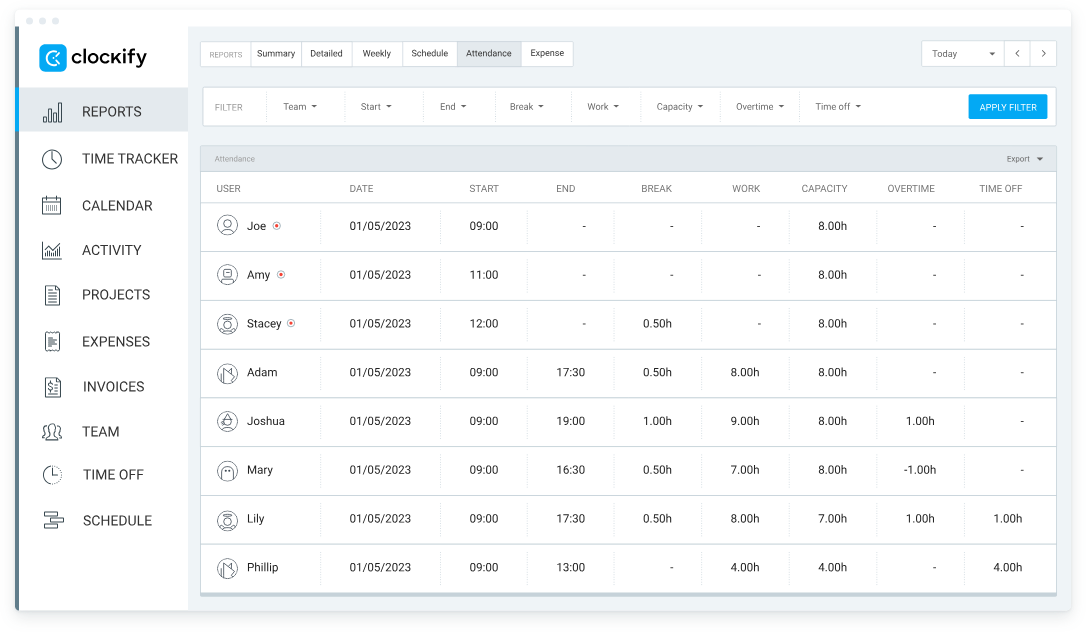
Clockify works well as an Asana time tracker for budget-conscious agencies and development shops that want unlimited seats without a credit card.
The free tier gives you unlimited users, unlimited projects, and every core time-tracking bell and whistle a small crew actually uses.
Install the browser plug-in, hit “start” on any Asana task, and watch the hours land in Clockify’s clean dashboard.
It won’t invoice clients, nag you about budgets, or calculate utilization like TMetric or Harvest, but it nails the basics at price that can’t be beat: $0.
For teams taking their first step into time tracking—or any agency watching every cent—Clockify turns project visibility from a luxury into a freebie.
Key Features
- Unlimited users and projects on the free plan
- Time tracking from Asana tasks via browser extension
- Basic reporting: timesheets, project summaries, team activity
- Billable vs. non-billable time tracking with custom rates
- Kiosk mode for shared workspaces where multiple people log time
- Calendar view to visualize time allocation
Integrations
Clockify plugs straight into Asana, Jira, Trello, GitHub, and 80-plus other apps via browser add-ons. Need something bespoke? Fire up Zapier or dive into the tidy API. All that for free—its integration game punches way above its price tag.
Pros
- Free plan – Unlimited users and projects with core time tracking features
- Cross-platform availability – Desktop, mobile, and browser extensions for every use case
- Kiosk mode – Great for shared workspaces where multiple people track time on a single device
- No learning curve – Interface is straightforward; new users are productive immediately
Cons
- Free plan lacks essential agency features like invoicing, budget tracking, and profitability reports
- Reporting is basic compared to TMetric or Harvest
- Asana integration is functional but less seamless than premium tools
Scores
Agency Fit Score: 3.5/5
SoftDev Fit Score: 4/5
Price to Value: 5/5
Ratings & Reviews
G2: 4.5/5 (150+ reviews) – View on G2
Capterra: 4.8/5 (9000+ reviews) – View on Capterra
"I appreciate how easy it is to export reports and integrate them with my ERP system. The calendar integration has been a real time-saver for me. I was able to get started within minutes, and now I use Clockify nearly every day."
Other Asana Time Tracking Alternatives
- Connecteam – The go-to platform for GPS-enabled time clocks and on-site crew coordination.
- Deel – Streamlines contractor hiring, payroll and compliance for borderless teams.
- Time Doctor – Keeps remote staff focused with real-time productivity alerts and distraction blocking.
- RescueTime – Runs quietly in the background, delivering automatic productivity reports—no timers needed.
- Paymo – Combines timesheets, invoicing and resource planning so agencies can bill faster and plan smarter.
- ClickTime – Built for enterprises that need iron-clad approval chains and audit-ready compliance logs.
- Wrike Time Tracking – Adds native timers to the project views you already use in Wrike.
- Monday.com Time Tracking – Turns Monday boards into a full time-tracking hub without extra logins.
- Replicon – Handles global labor rules, overtime laws and multi-currency payroll for large organizations.
- actiTIME – Shows which client projects truly profit—and which ones drain the budget—for growing agencies.
Some of these tools have Chrome extensions to put a button on tasks, but no 2-way sync. With others, users can export CSV from Asana and import into time trackers, or rig a Zapier bridge, but with no in-context timer.
Summary
After putting six top tools through their paces with live Asana projects, we crowned TMetric the go-to time-tracking add-on for agencies and dev squads.
Its two-way sync, bullet-proof billing engine, and laser-sharp reports flip your task boards into profit dashboards.
Want zero learning curve? Grab Toggl Track. Live and die by invoices? Harvest still rules.
Whether you're running sprints, billing clients hourly, or managing distributed teams, TMetric's Asana integration eliminates the gap between task management and financial visibility.
Bottom line: the “best” tracker is the one that disappears into everyone’s daily flow. TMetric nails that sweet spot—so lightweight your team forgets it’s there, yet powerful enough to invoice every minute and prove which projects really pay.
Selection Criteria & Methodology
We signed up for every tool, connected real Asana projects, and tracked ≥40 h over 30 days. Scores weigh:
- Depth of Asana integration (30 %)
- Invoicing & payroll (25 %)
- Value for agencies & dev teams (20 %)
- Ease of migration & support (15 %)
- Security & compliance (10 %)
Only tools with ≥4.0 G2 rating and public SOC-2 or GDPR statement made the cut.
Ready to stop leaking billable hours?