7 Best Automated Timesheet Apps
Manual timesheets waste over 4 hours per employee each month and lead to costly payroll errors. Automated apps fix this by tracking time in the background, syncing across devices, and generating instant, billing-ready reports - cutting payroll processing time by up to 75%. Here are seven top solutions, all offering automation, multi-device sync, live reporting, billing exports, and strong user ratings.

By Dereck Mushingairi | March 31, 2026
Best For
- For agencies billing clients → Start with TMetric ($7/user) or Harvest ($12/user) for polished invoicing
- For field crews & mobile teams → Choose QuickBooks Time ($8/user) or Hubstaff ($4.99/user) for GPS tracking
- For remote teams on a budget → Try Clockify (free unlimited) or TimeCamp ($2.99/user)
- For personal productivity → Use RescueTime ($12/user) for passive focus tracking
- Can't decide? TMetric offers the best balance of features, price, and ease of setup for most knowledge-worker teams.
Top Automated Timesheet Apps [Compared]
| App | Best for | Stand-out feature | Free plan | Paid/user | Capterra |
|---|---|---|---|---|---|
| TMetric | Agencies/consultancies that invoice fast | 1-click timer + 50+ integrations (Asana, Trello, etc.) | ✅ | $7/mo | 4.7 |
| QuickBooks Time | Field crews that run weekly payroll | GPS geofence + same-day QB payroll push | ❌ | $8/mo | 4.7 |
| Harvest | Knowledge workers who bill hours | Snap-expenses → branded 1-click invoices | ✅ | $12/mo | 4.6 |
| Hubstaff | Remote teams wanting workforce analytics | Silent timer + keystroke-level activity % | ✅ | $4.99/mo | 4.6 |
| TimeCamp | Fully automatic, rule-based time capture | AI keyword rules – no start/stop needed | ✅ | $2.99/mo | 4.7 |
| Clockify | Unlimited users on $0 budget | “Free forever” unlimited users & projects | ✅ | $3.99/mo | 4.8 |
| RescueTime | Individuals who want passive focus scoring | Background productivity scoring + site blocker | ✅ | $12/mo | 4.6 |
1. TMetric: Best For Service Companies

TMetric is an easy-to-use automated timesheet app. It is a cloud-first time tracker that combines one-click timers, activity monitoring, and lightweight project budgeting in a clean interface that non-technical teams can master in minutes.
It is best suited for SMBs that bill by the hour and already rely on tools like Asana, Trello, or ClickUp.
With affordable pricing, zero-maintenance setup, and instant integrations, TMetric gives growing service teams enterprise-level time tracking without the enterprise-level overhead.
Key Features
- Cross-Platform Timer (web, desktop, mobile, browser extension) with automatic idle-time detection
TMetric’s timer starts and stops itself across every device you use, silently trimming away idle minutes so your automated timesheet is always 100 % billable with zero manual edits.
- Project Cost Controls – set hourly or fixed budgets and receive overrun alerts in real time
The moment logged hours threaten to blow the budget, TMetric pings you instantly, so projects stay profitable and your automated timesheet never surprises finance with hidden overruns.
- Flexible PTO Module: custom accrual rules, balance display and web-based leave requests
Vacation, sick days, and comp time accrue and deduct themselves inside the same automated timesheet, eliminating the usual HR spreadsheet shuffle and keeping payroll error-free.
- Billing Engine that turns approved timesheets into client-ready CSV invoices with one click
Once you hit “approve,” TMetric instantly converts every second of logged time into a detailed, branded invoice—no copy-paste, no formatting—making it the fastest path from tracked time to paid revenue.
- Website & App Usage monitoring plus optional screenshot capture for productivity audits
It logs every site and program you touch, then attaches time stamps (and, if you wish, screenshots) to each entry, turning raw activity into an audit-ready timesheet that proves work happened exactly when you said it did.
Pros
- Very gentle learning curve – teams are up and running the same day
- 50+ turnkey integrations (Jira, GitLab, QuickBooks, Zendesk, etc.)
- Detailed, filterable reports (PDF, CSV, Excel) that show profit per project
- Affordable scale-up pricing
- Export timesheets in multiple formats for payroll convenience
Cons
- Employees must manually submit timesheets for approval
- Screenshot feature requires Business plan ($9/user) – not available on cheaper tiers
Pricing
- Free plan available with basic features
- Professional plan at $7 per user/month includes billing, budgeting, and task management
- Business plan at $9 per user/month adds screenshot capturing, payroll, and team dashboards
- Annual and monthly subscriptions available; discounts offered for large teams starting at 40 users
Ratings
- Capterra: 4.7 out of 5
- G2: 4.5 out of 5
Verified User Comment
App provides a solid set of ways to start timers (Chrome extension, web app, mobile app) but if you forget to start the timer, which I often do, the desktop activity monitor makes it so easy to fill in the blanks. - Capterra Reviews
It’s easy to use and integrates smoothly into our daily routine. We especially appreciate how we can assign time to specific projects and clients, it's super helpful for reporting. — G2 Reviews
2. QuickBooks Time: For Field Crews Running Weekly Payroll

QuickBooks Time is a timer that pairs GPS crew tracking with real-time payroll push to QuickBooks.
It is purpose-built for field services, franchises, and any business that pays hourly staff weekly.
Key Features
- GPS geofenced clock-in/out with travel-time mapping
- Drag-and-drop crew scheduler that warns about overtime before it happens
- Photo-supervisor: employees can attach job-site photos to every shift
- Same-day direct deposit when paired with QuickBooks Payroll
- DCAA & DOL compliant audit trail and break-rule engine
Pros
- Native two-way sync with QuickBooks Online & Desktop – no CSV juggling
- Kiosk tablet mode lets an entire crew punch in with one 4-digit PIN
- Overtime alerts per state/union rule
- Mobile offline buffer (up to 48 h) – punches sync when signal returns
Cons
- Expensive for part-time staff: $20 base + ($8 × 15 part-timers) = $140/month, even if they work 10 hours weekly
- The admin dashboard feels dated with slow load times once you exceed 200 employees
- Locked into the QuickBooks ecosystem – switching accounting software means losing seamless sync
- Mobile app drains battery significantly during GPS tracking shifts
Pricing
- $20 base + $8per user/month – GPS, geofence, scheduling on Elite Plan
- $40 base + $10 per user/month on Premium – adds project costing & invoicing
Ratings
- Capterra: 4.7 out of 5
- G2: 4.5 out of 5
Verified User Comment
QuickBooks Time helps in getting the detailed report, it makes scheduling an easy task, and also provides the feature of real time tracking. – G2 Reviews
3. Harvest: For Consultancies Managing Retainer Clients
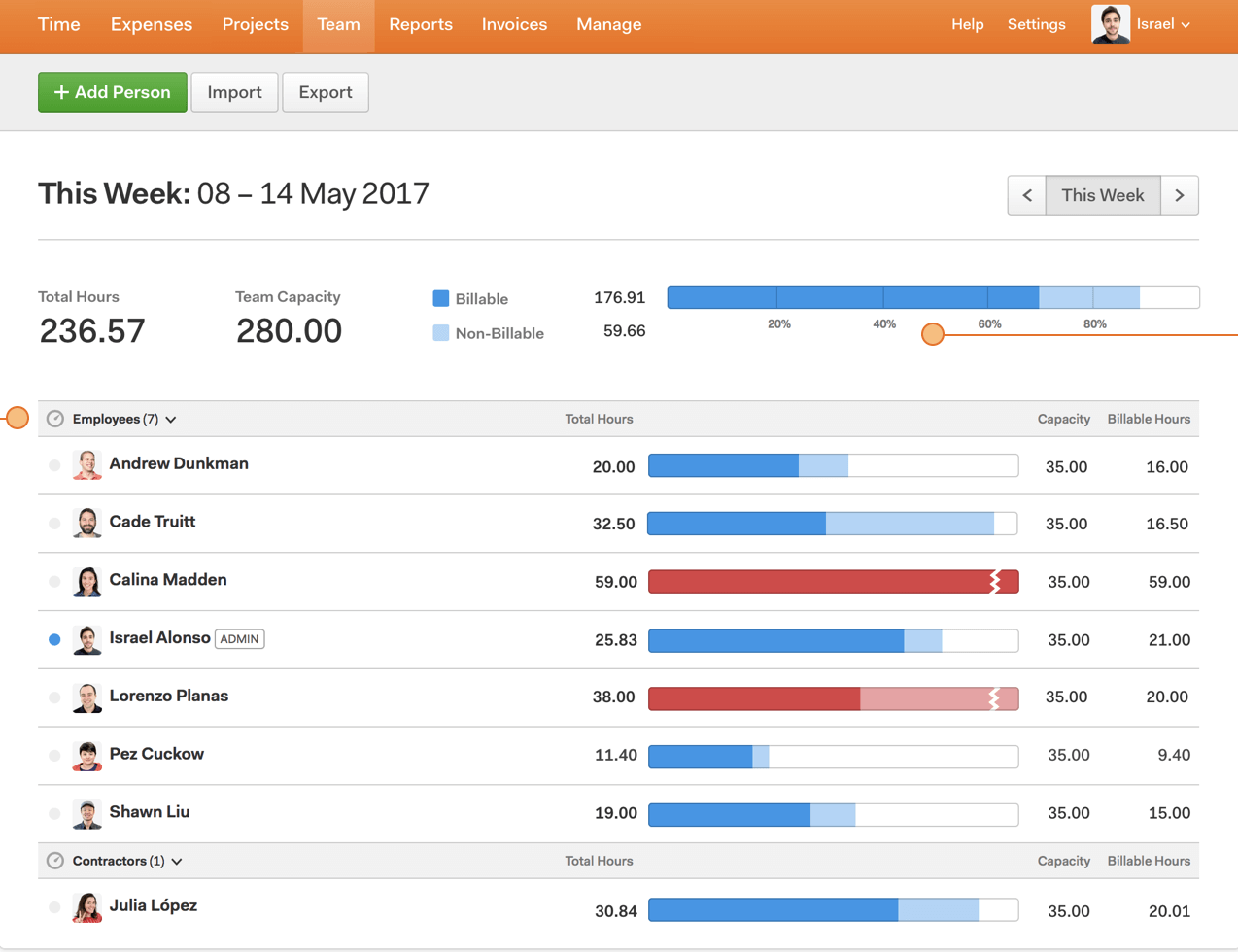
Harvest blends one-click time tracking with lightweight expense logging and beautiful invoicing aimed at agencies and consultancies. The tool’s strength is turning billable hours into branded invoices with ease.
Key Features
- Native Mac, Windows, iOS, Android and browser-extension timers
- Automatic reminders when you forget to start the timer
- Expense snap & store: photograph receipts, auto-sync to projects
- Stripe & PayPal baked into invoices – clients pay online
- Forecast add-on (extra cost) visualizes team capacity vs. sales pipeline
Pros
- Invoices & clients on the free tier
- Clean, client-ready PDFs with your logo & colors
- Retainer tracking to see burn-up vs. prepaid hours in real time
Cons
- Zero GPS or activity monitoring – useless for field teams or accountability tracking
- Can't hide billing rates from team members – awkward if contractors see what you charge clients
- Forecast capacity planning costs extra $10/user/month on top of $12 base price
- No offline mobile timer – must have internet connection to track time on the go
Pricing
- Free for 2 projects
- Pro for $12 per user/month – unlimited projects & team
Ratings
- Capterra: 4.6 out of 5
- G2: 4.4 out of 5
Verified User Comment
Harvest saves our time, where employees can seamlessly log using their phones The tool integrates with other expense management services We seamlessly invoice our expenses and make a robust routine check We consistently breakdown our expenses using Harvest and all inefficiencies are recorded. – G2 Reviews
4. Hubstaff: For Teams Requiring Activity Monitoring
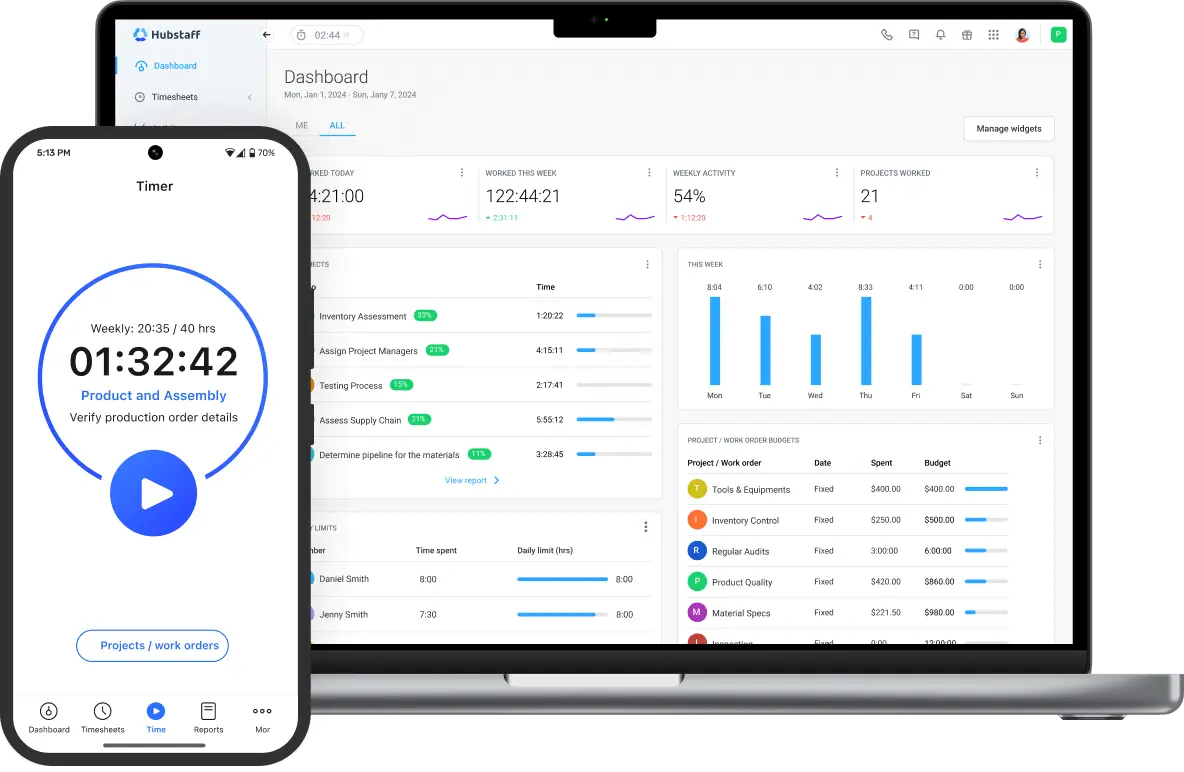
Hubstaff is automatic time tracking plus workforce analytics: keystroke levels, optional screenshots and route recording for remote or mobile teams. Payroll, invoicing and project costing are included.
Key Features
- Silent desktop timer with activity %, app & URL logging
- GPS breadcrumb trail and geofenced job-site arrival/departure
- Auto-payroll via Wise, PayPal, Bitwage or TransferWise
- Project budgets with hourly or $ limits and email alerts
- 30+ pre-built reports (productivity, attendance, payments)
Pros
- Tiered screenshot blur – stay GDPR compliant
- Offline time buffer
- Enterprise API & on-premise option for 250+ seats
- Shift-scheduling module added
Cons
- Activity % tracking (keystrokes, mouse movement) can tank morale if employees feel micromanaged – requires careful rollout communication
- Linux desktop app is 6-12 months behind Windows/Mac in feature updates
- Screenshots and activity monitoring require Desk Pro ($7.50/user) – not included in Starter tier
- No way to pause timer for breaks without stopping it entirely (affects activity scores)
Pricing
- Desk Free – 1 user, limited reports
- Desk Starter for $4.99 per user/month – 1 integration, 24 h support
- Desk Pro for $7.50 per user/month – unlimited integrations, payroll, invoices
- Enterprise for $20 per user/month – SSO, SOC-2, on-premise
Ratings
- Capterra: 4.6 out of 5
- G2: 4.5 out of 5
Verified User Comment
Hubstaff makes it really easy to track time across projects and teams, especially for remote roles. The automatic screenshots and activity levels help provide visibility, and the integrations with tools like Asana and Trello are very useful. I also appreciate how simple it is to generate timesheets and reports for payroll. – G2 Reviews
5. TimeCamp: For Automatic Tracking
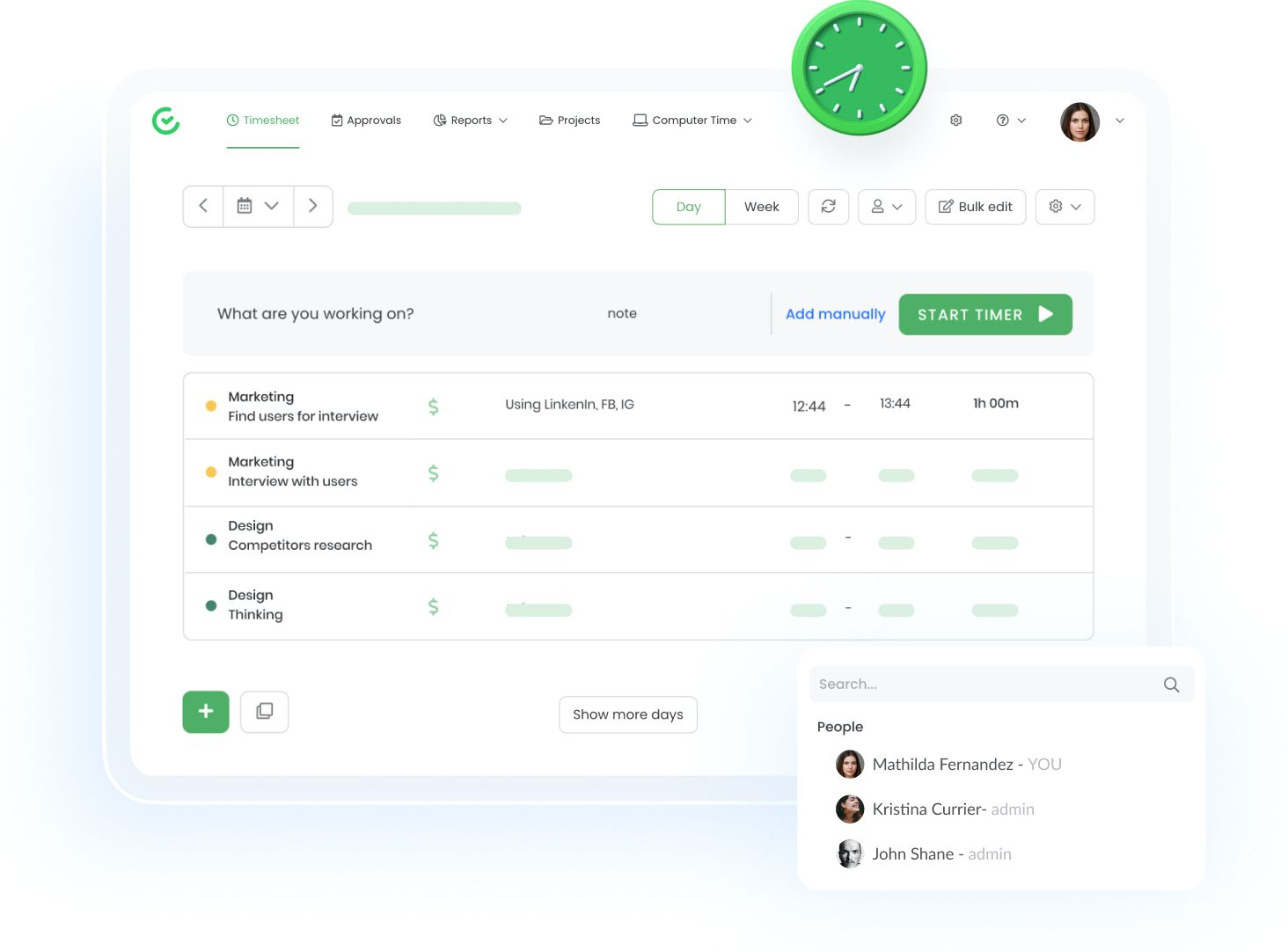
TimeCamp is best known for automatic time capture using desktop keywords and AI rules; it then produces graphical timesheets you can edit with drag-and-drop.
Key Features
- Automatic keyword-based time tracking – no start/stop needed
- Graphical day view – resize blocks like a calendar
- Computer usage analytics: productive vs non-productive apps
- Attendance module with clock-in/out kiosk mode
- Invoice wizard converts hours to PDF or XLS with margin markup
Pros
- Very granular billing rates by person, task, or project
- One-click export to Xero, QuickBooks, Sage
- GDPR compliant – EU data centers available
Cons
- Mobile apps can only view reports – you cannot start/stop timers or edit entries on iOS/Android
- Steep learning curve for keyword automation rules; expect 3-5 hours configuring categories initially
- Automatic tracking can miscategorize time; it requires weekly manual corrections until rules are trained
- Invoice customization is limited compared to dedicated billing tools like Harvest or TMetric
Pricing
- Free for basic tracking
- Starter for $2.99 user/month – billing, invoicing
- Premium for $5.99 user/month – screenshots, integrations
- Ultimate for $9.99 user/month – SSO, on-premise, API
Ratings
- Capterra: 4.7 out of 5
- G2: 4.7 out of 5
Verified User Comment
Good basic, editable, reasonably priced time tracker program for somewhat disorganized individuals with a few clients. Not over-automated, leaves me in control of the program and its results. Seems to be kind of new, but recent improvements have been good. Improving rather than bloating. – G2 Reviews
6. Clockify: For Team Management
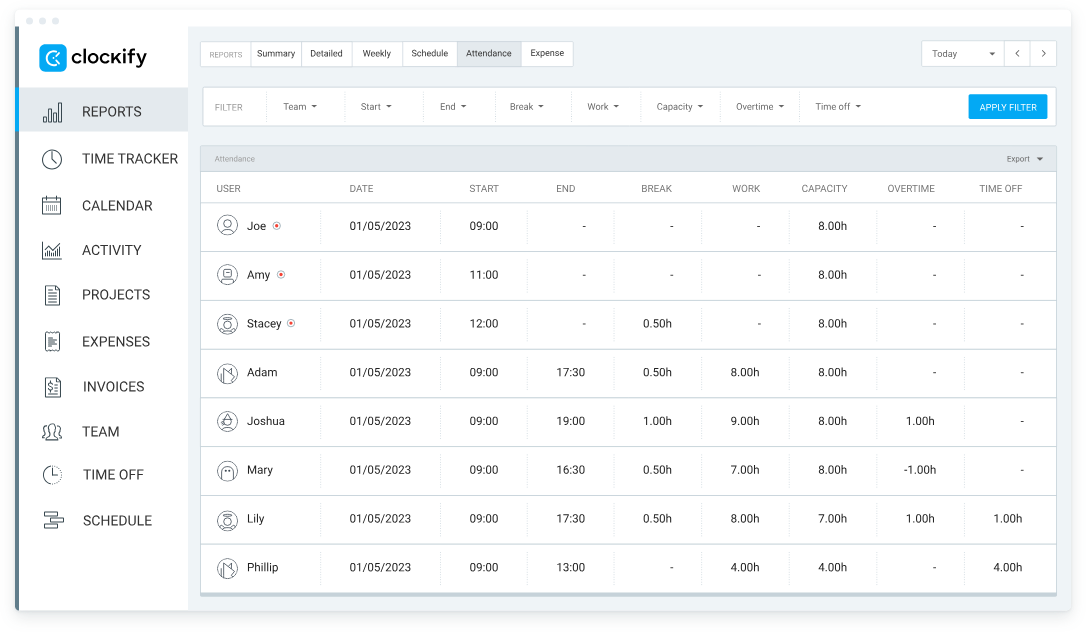
Clockify’s big promise is “unlimited users & projects forever” on the free tier makes it popular with boot-strapped startups and classrooms. Paid tiers offer better functionality as they add administration, scheduling, and screenshots.
Key Features
- One-click timer inside browser, desktop, mobile, kiosk or Chrome/Edge extension
- Shared kiosk mode – entire office clocks in on one tablet
- Time-off module with custom accrual policies and calendar view
- Scheduling & shift swapping with push notifications
- Government-grade security: SOC 2 Type 2, EU-US DPF, two-factor auth
Pros
- Clean, color-coded UI that works in 40+ languages
- OpenRoad map – public Trello board where users vote on features
- API & web-hooks for custom tools
Cons
- Pivot tables, custom fields, and labor cost reports require Standard plan ($5.49/user) – free tier is very basic
- Kiosk mode works but lacks facial recognition or photo verification (easy to buddy-punch)
- Time rounding rules only available on Pro plan ($7.99/user) or higher
Pricing
- Free for unlimited users and projects
- Basic for $3.99 per user/month – add time-off, holidays
- Standard for $5.49 per user/month – screenshots, scheduling, invoicing
- Pro for $7.99 per user/month – labor cost, targets, alerts
- Enterprise for $11.99 per user/month – SSO, audit log, priority support
Ratings
- Capterra: 4.8 out of 5
- G2: 4.5 out of 5
Verified User Comment
I have been using Clokify paid version since 2year and application is very easy to use. I haven't found any major bug excluding couple of UI issues. – G2 Reviews
7. RescueTime: For Personal Focus Improvement
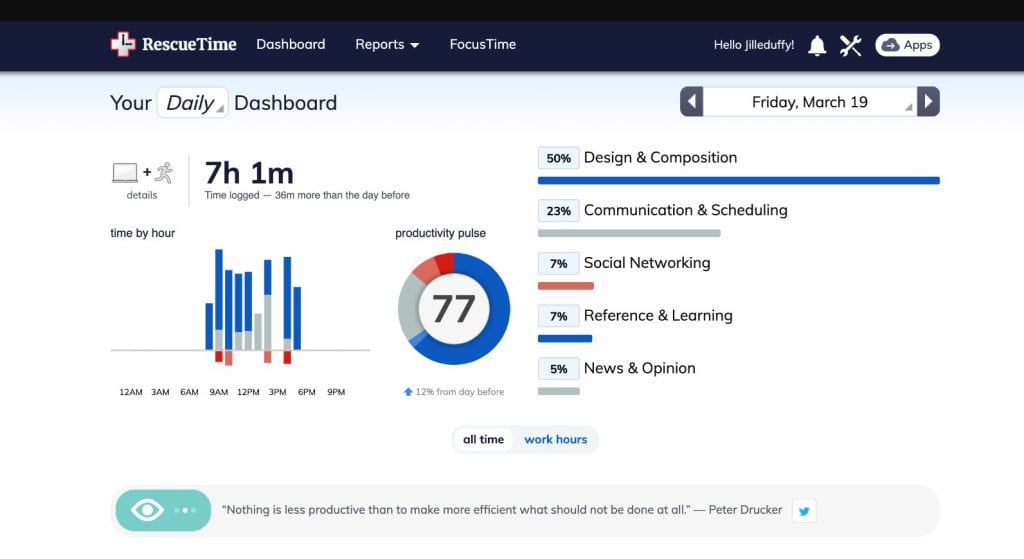
RescueTime is an automatic productivity tracker that scores your focus, blocks distracting sites, and delivers a daily "efficiency pulse".
It is optimized for individuals rather than client billing.
Key Features
- Silent background logger categorizes every app & site into 70+ productivity buckets
- FocusTime session blocker – one click hides social media, news, Slack
- Weekly goals & real-time alerts when you exceed entertainment limits
- Offline time input (meetings, calls) via mobile swipe
- AI assistant “RescueTime Answers” surfaces the biggest distractions
Pros
- Works across macOS, Windows, Linux, Android
- No start/stop buttons – truly passive tracking
- Detailed historical trends (10-year data retention)
- GDPR compliant; all data encrypted at rest
Cons
- Zero client billing features – purely for personal productivity, not business invoicing
- iOS app only tracks screen time due to Apple restrictions; no app-level detail like Android version
- Cannot track time spent in meetings, calls, or offline work unless manually logged
- Focus sessions block entire categories (e.g., "all social media") with no exceptions for work-related accounts
- $12/month for single user only – no team plans or shared dashboards available
Pricing
-
Lite for $0 – 3-month history, basic reports
- Premium for $12 per user/month – focus sessions, alerts, unlimited history
Ratings
- Capterra: 4.6 out of 5
- G2: 4.2 out of 5
Verified User Comment
I've been using Rescuetime for ten years now, and it has been an essential tool for tracking my productivity. The software itself doesn't really ask much from the user (save for the occasional maintenance of "uncategorized" apps and websites - especially if you're in the technology field). Otherwise, the reports have been satisfactory. – G2 Reviews
Our Selection Criteria
We tested 23 automated timesheet solutions across three distinct team profiles: a 5-person design agency, a 20-person field service company, and solo consultants. Each app was evaluated on real projects tracking 40+ hours of actual work.
✅ Automation depth – Timer buttons, idle detection, or time capture (not just manual entry)
✅ Cross-platform availability – Native apps or extensions on at least 3 devices (desktop, mobile, browser)
✅ Export flexibility – CSV/PDF timesheets or direct payroll/accounting integrations
✅ Live reporting – Real-time dashboards showing hours, costs, and project status
✅ Verified ratings – Minimum 4.0/5.0 stars on both Capterra and G2
✅ Transparent pricing – Clear per-user costs published on the company website
What we tested for:
- Setup time (target: under one work hour)
- App reliability during offline work
- Accuracy of idle-time detection
- Invoice generation speed
- Customer support responsiveness (email, chat)
Apps were downgraded for hidden fees, manual-only tracking, poor mobile experience, unresponsive support, or ratings below 4.0 stars.
Sum Up
Use the list as a short-cut: jump to QuickBooks Time for hybrid crews, Hubstaff for field tracking, or Harvest if beautiful invoices matter most.
For win-win in terms of price and functionality, start with TMetric, and get a reliable, low-cost, quick deployment timesheet app.