5 Best Attendance Software for Remote & Hybrid Teams (2026)
If you’re here, you already know the challenge: managing attendance across remote and hybrid teams isn’t simple. People work from different cities, different time zones, and different schedules, and the old ways of tracking who’s working just don’t work anymore.
You need attendance software that’s accurate, effortless, flexible, and built for distributed teams. Tools that keep payroll clean, support hybrid coordination, maintain compliance, and run smoothly alongside the systems your team already uses — like Jira, Asana, and Notion.
This guide gives you exactly that: the tools best suited for teams working in Jira, Asana, Notion, and similar environments.
What is attendance software?
Attendance software is essentially your team’s “who’s working when” system of record. Instead of relying on scattered timesheets or manual updates, it automatically logs who showed up, when they worked, and for how long. It can link hours to specific projects, clients, or shifts, track absences and late starts, and centralize all time-off information. The system also exports clean, structured data for payroll, invoicing, or HR tools.
For remote and hybrid teams, attendance software replaces the old visual headcount with a reliable, always-on view of work hours, no matter where people are working.
Quick questions to ask before you pick a tool
Before you get attached to any feature list, make sure the tool can answer these fundamentals:
- Will my team actually use it
Clocking in should take seconds. No steep learning curves, no confusion. If it’s not effortless, adoption will crash, and your data will fall apart. - Does it fit the way we work
Hybrid schedules, flexible hours, shift rotations, contractors, and part-timers all create different attendance patterns. The system should support them naturally and plug into the tools your team already relies on. - Will the records hold up when HR, finance, or auditors ask for clarity
Attendance data must be clean, consistent, and defensible. No manual fixes, no missing entries, no “we’ll check and get back to you.”
The best attendance tool lets you understand who’s working, when, and under what conditions instantly. Without guesswork, interruptions, or end-of-week surprises.
How we selected our 5 top attendance tools
We built this list with remote and hybrid teams in mind, especially those running on Jira, Asana, Notion, and similar work hubs. Here’s the process we followed.
| Step | What we did |
| 1. Independent review scan | Checked ratings and user feedback on G2, Capterra, and other review platforms. |
| 2. Feature and workflow testing | Evaluated how tools handle time tracking, attendance, time off, scheduling, and reporting in real remote/hybrid scenarios. |
| 3. Pricing & scalability check | Compared pricing at different team sizes and looked at how features scale from small teams to larger organizations. |
| 4. Remote & hybrid readiness | Prioritized tools with strong desktop + mobile experiences, flexible schedules, and strong support for distributed teams. |
5 Best attendance software for remote & hybrid teams
Here’s a quick look at the tools that consistently perform well for distributed teams, each solving the attendance challenge differently:
1. TMetric
🌟 4.6/5
Best for: Remote and hybrid teams needing attendance, working hours, and time-off tracking in one system
Price: Free for up to 2 users; paid plans from about $7–$9 per user/month
Available on: Web, iOS, Android, macOS, Windows, Linux, browser extensions
What makes TMetric stand out
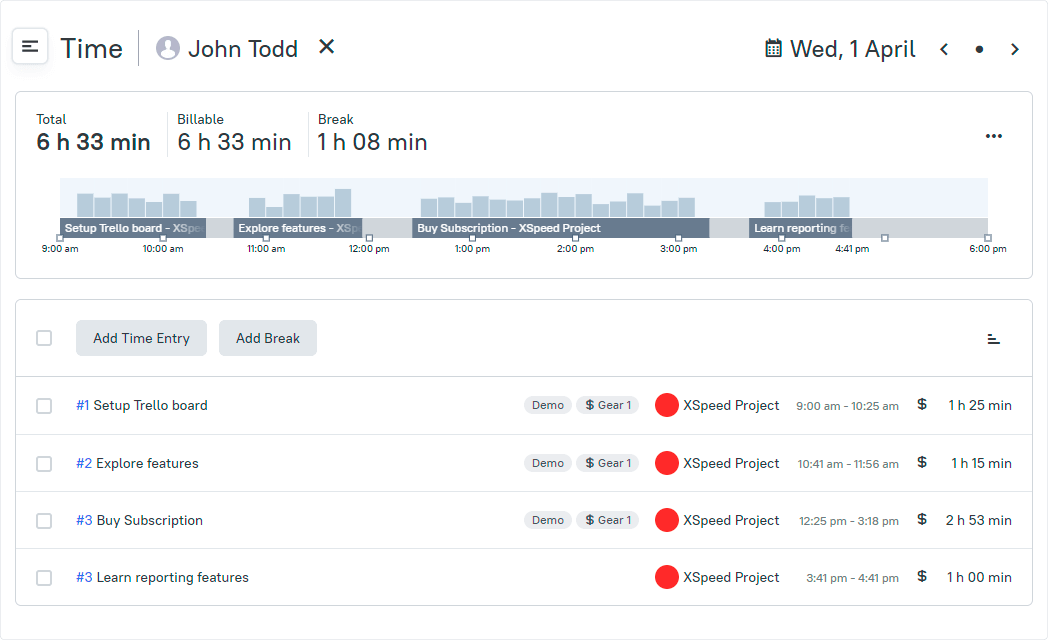
TMetric gives distributed teams a single place to track attendance, daily hours, breaks, overtime, and time off. Employees can start their day from a desktop or mobile, log breaks, switch tasks, and request leave without juggling multiple tools. Managers get immediate visibility into who is working, who is out, and how schedules are being followed, making it easier to support flexible and hybrid work arrangements.
Unlike simple clock-in systems, TMetric links attendance information to actual work activity. This helps companies understand not only when people worked, but how their time aligned with projects or clients: useful for HR, finance, and operations teams that rely on accurate, consistent data.
Key TMetric features
Unified attendance tracking for remote & hybrid teams
TMetric records start times, end times, breaks, overtime, and absences in a clear, consistent format that fits distributed work patterns.
Time-off management with transparent balances
Teams can manage multiple leave types, track accruals, and approve requests in one system. Employees always see their available balance, and managers can easily coordinate coverage.
- Custom leave categories
- Automated calculations
- Approval workflows
- Team calendar visibility
Reliable cross-platform apps
Attendance can be tracked from desktop, browser, or mobile, ensuring accuracy regardless of location or device.
Daily work transparency through linked tasks
Attendance logs connect with the work performed, giving teams meaningful context for the day’s activity without extra admin steps.
Payroll-ready reporting
Structured summaries of hours, absences, and overtime help HR and finance prepare payroll quickly and avoid corrections.
TMetric pricing overview (monthly vs. annual)
| Plan | Monthly cost (billed monthly) | Monthly cost (billed annually) | Key features included |
| Free | $0 | $0 | Basic attendance & time tracking, unlimited projects & clients, reports, desktop/mobile apps, browser extensions |
| Professional | $7 per user/month | $5.83 per user/month | Attendance tracking, billable rates, time-off management, project links, alerts, My Time, calendar sync, client/project/team import |
| Business | $9 per user/month | $7.50 per user/month | All Professional features plus Time Off, Team Timesheets, screenshots, activity tracking, notifications, QuickBooks sync, and advanced integrations (Jira, Redmine, ClickUp) |
| Enterprise | Custom pricing | Custom pricing | All Business features plus secure deployment, custom integrations, dedicated support, and volume discounts |
What TMetric users are saying
“Overall, I've enjoyed using TMetric; it far outperforms any other system I've used in the past, and I'll definitely be sticking with it for the long haul.” — Capterra
Why it's #1
- Designed for distributed teams: Unified attendance, working hours, breaks, and time-off tracking give organizations a single, dependable source of truth.
- Clear operational visibility: Linked tasks and structured reports help HR, finance, and managers understand how time was spent across hybrid schedules.
- Proven and widely adopted: TMetric is used worldwide by remote and hybrid teams that rely on accurate attendance records, cross-device reliability, and strong integrations with tools like Jira, Trello, and QuickBooks.
2. Toggl Track
🌟 4.6/5
Best for: Lightweight attendance tracking for async and flexible teams
Price: Free for up to 5 users; paid plans from about $9 per user/month
Available on: Web, desktop apps, mobile apps, browser extensions
What makes Toggl Track stand out
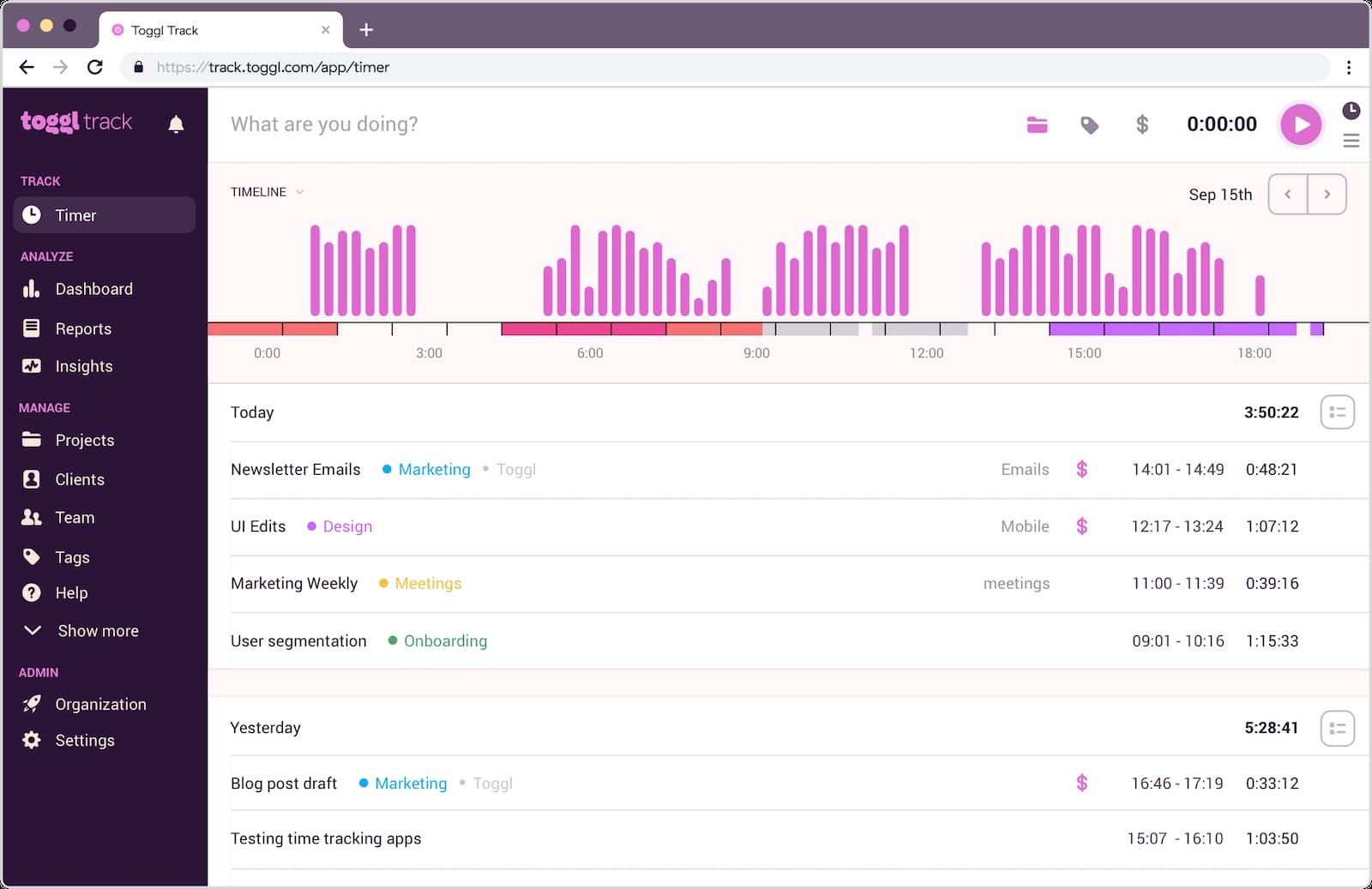
Toggl Track stands out for being simple and intuitive, especially for remote or async teams that keep flexible schedules. Instead of rigid clock-ins, it captures attendance through easy timers and quick manual entries across devices. Hours naturally flow from people’s daily routines, giving managers visibility without adding extra steps. For teams that want reliable attendance tracking with minimal friction, Toggl Track provides a clean, lightweight option that’s easy for everyone to adopt.
Key features
- Quick start/stop timers with manual edits for flexible scheduling.
- Cross-device sync across mobile, web, and desktop.
- Project and client categorization to structure attendance logs.
- Reporting tools that summarize weekly and monthly working patterns.
- Integrations with tools like Asana, Jira, Notion, and GitHub.
Reviews
“Mainly positive. I've used it to track time as both a full-time employee and a contractor. I've never had a major issue.” (Capterra)
3. Hubstaff
🌟 4.5/5
Best for: Hybrid teams needing GPS or location-based attendance verification
Price: Paid plans typically start at about $7 per user/month
Available on: Web, desktop apps, mobile apps, browser extensions
What makes Hubstaff stand out
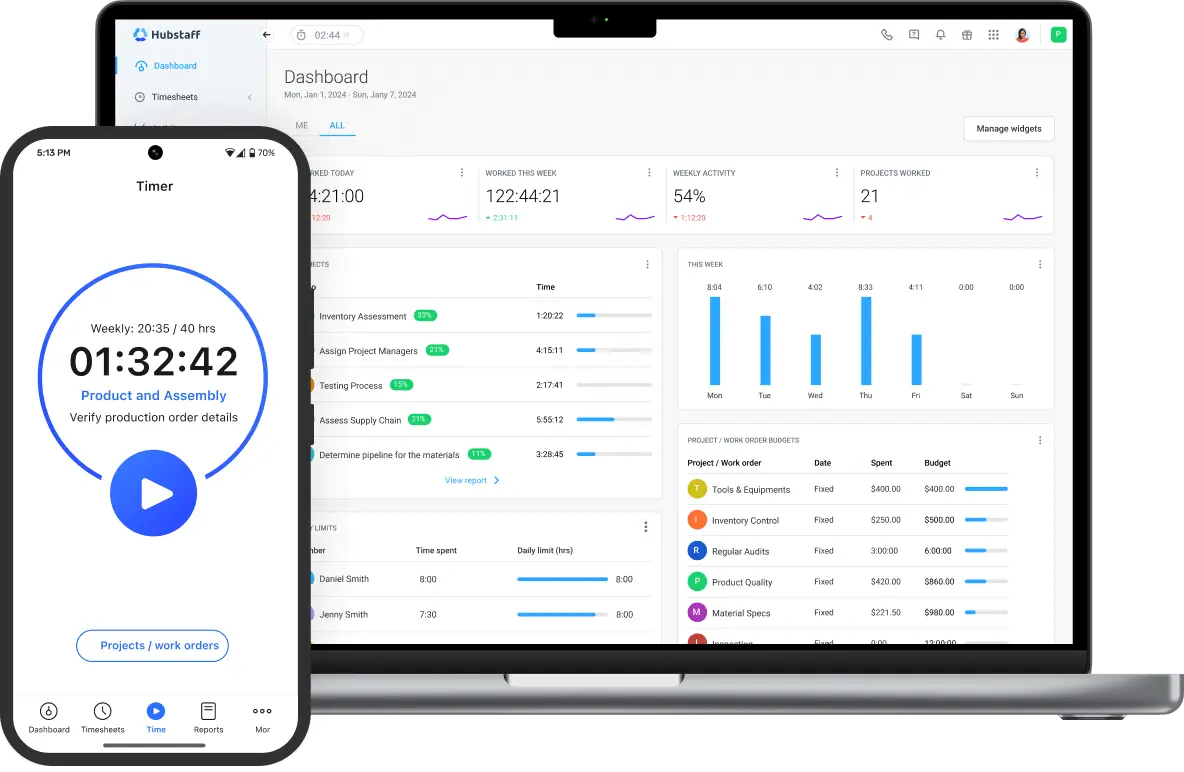
Hubstaff stands out because it adds reliable GPS and geofencing to attendance tracking, making it ideal for hybrid or field-based teams. When employees enter or leave job sites, time tracking can start automatically, reducing manual input. Combined with shift scheduling and alerts for missed or late starts, Hubstaff helps managers coordinate coverage across different locations. For teams where “where work happened” matters just as much as “when,” Hubstaff offers dependable clarity.
Key features
- GPS attendance and geofencing for field or mobile teams.
- Shift scheduling with alerts for missed or late starts.
- Automated online timesheets for payroll readiness.
- Mobile-first attendance tracking for distributed workers.
- Integrations with Asana, QuickBooks, Trello, Jira, and more.
Reviews
“I used it for a couple of projects; it has its pros and its cons, but all my hours were tracked properly, and I didn’t have any issues with the software” (Capterra)
4. Harvest
🌟 4.3/5
Best for: Remote consulting and service teams tying attendance to billable hours
Price: Free for 1 user and 2 projects; paid plans from about $11 per user/month
Available on: Web, iOS, Android, browser extensions, desktop apps
What makes Harvest stand out
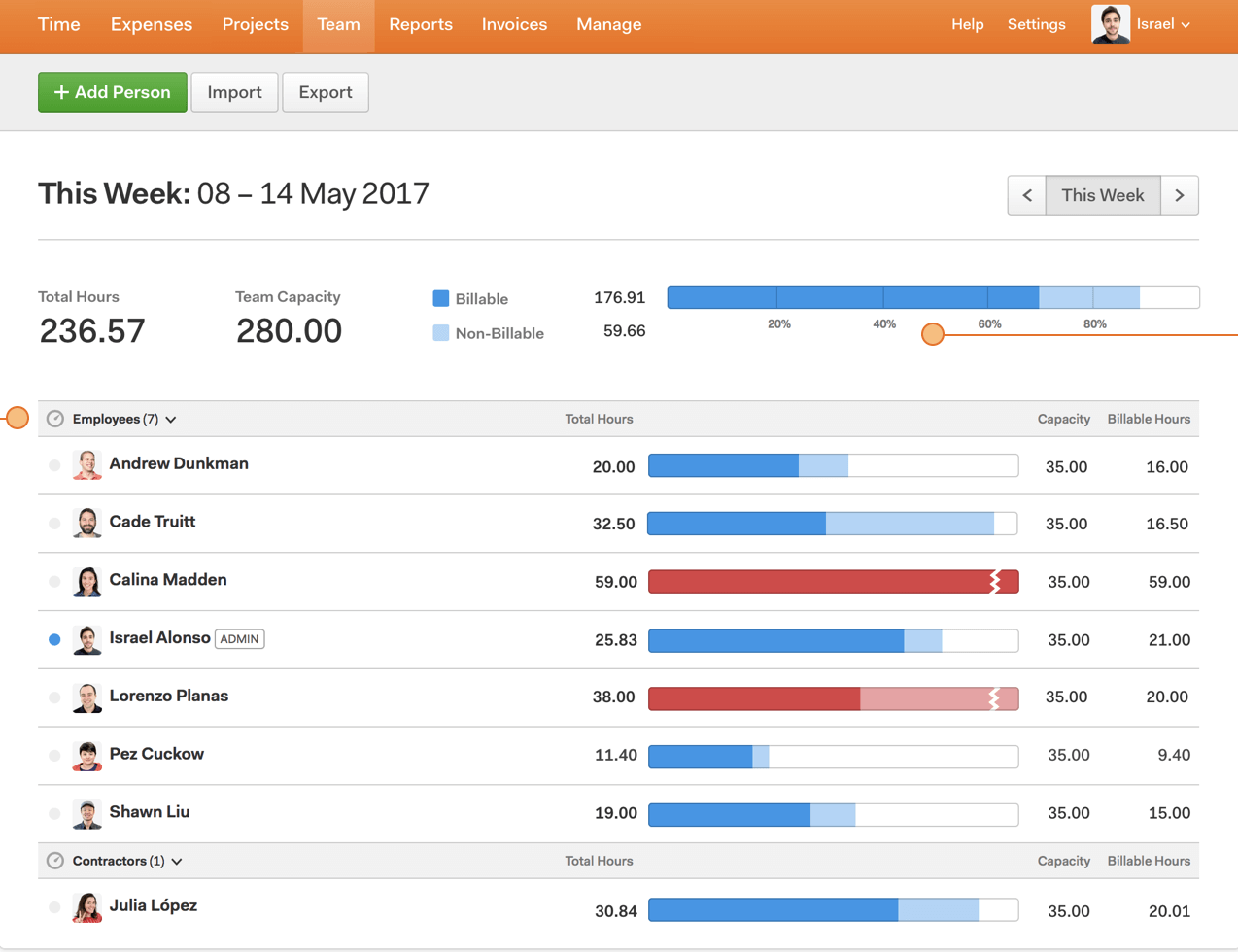
Harvest stands out for teams that want attendance tied directly to billable work. Hours logged feed instantly into project budgets, expense tracking, and invoicing workflows, removing the need for multiple tools. Remote consulting and service teams can easily compare planned versus actual hours and stay aligned with client expectations. For organizations that depend on accuracy across both attendance and billing, Harvest keeps everything connected and easy to manage.
Key features
- Simple timers and manual entry for attendance and hours.
- Project budgets that update as time is logged.
- Expense tracking tied to specific projects.
- Built-in invoicing that pulls directly from logged hours.
- Integrations with Asana, Trello, Slack, QuickBooks, and more.
Reviews
“Harvest has benefitted our business since inception. I tested all the tools, and this is the one we use and recommend to everyone we know with an SMB.” (Capterra).
5. ActivTrak
🌟 4.3/5
Best for: Teams that prefer passive, activity-based attendance monitoring
Price: Free for up to 3 users; paid plans from about $10 per user/month
Available on: Windows, macOS (via agent)
What makes ActivTrak stand out
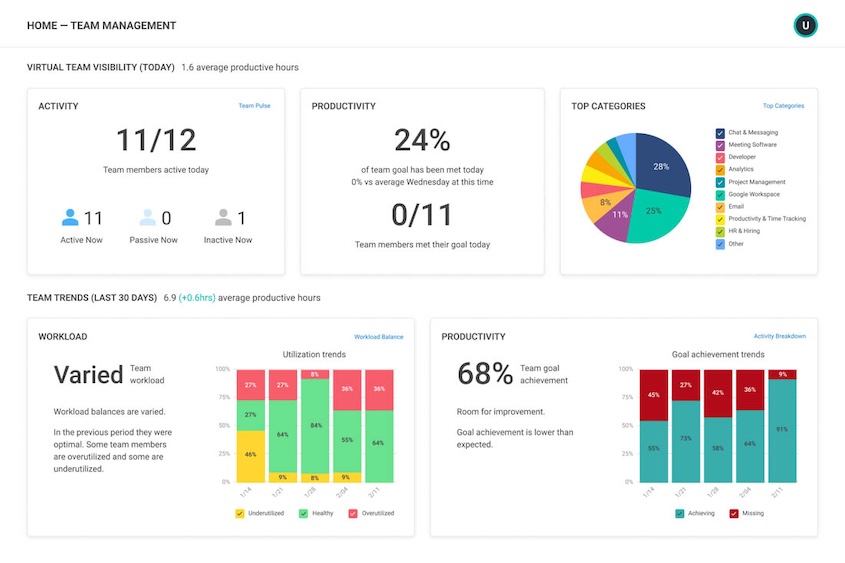
ActivTrak stands out by using natural work activity, not manual check-ins, to understand attendance. It shows when work begins, how focus time is distributed, and where workloads may need adjustment across remote teams. This creates a clear picture of schedules and behavior without requiring employees to log hours. For organizations wanting visibility into attendance patterns and work habits without extra steps, ActivTrak provides insights that traditional clock-in tools can’t offer.
Key features
- Automatic activity-based attendance insights.
- Dashboards showing productivity and focus trends.
- Schedule and policy adherence visibility.
- Workload distribution and utilization tracking.
- Integrations with Slack, Teams, BI tools, and data exports.
Reviews
“Our experience with ActivTrak has been positive. It meets our needs to measure productivity of our teams in the office and working remotely.” (Capterra).
TL;DR
| Tool | Lowest paid plan (per user/month) | Free plan limitations | Ratings (G2 / Capterra) | Agency fit score | SoftDev fit score |
| TMetric | ~$7–$9 | Free for 2 users | ~4.6 / 4.5 | 4.8/5 | 4.7/5 |
| Toggl Track | $9 | Free for 5 users | ~4.6 / 4.7 | 4/5 | 3.5/5 |
| Hubstaff | ~$7 | No team free tier | ~4.5 / 4.6 | 4/5 | 4/5 |
| Harvest | $11 | Free for 1 seat, 2 projects | ~4.3 / 4.6 | 4.5/5 | 3.5/5 |
| ActivTrak | ~$10 | Free for 3 users | ~4.5 / 4.6 | 3.5/5 | 3.5/5 |
Other attendance software options
If none of the main five tools fit your hybrid or remote model perfectly, these attendance platforms are also credible alternatives. Each comes with a clear niche or specialization:
- Clockify: Free-friendly attendance with kiosk mode and straightforward scheduling, ideal for small teams transitioning from spreadsheets.
- Connecteam: Mobile-first attendance built for frontline, deskless, and field teams who rely heavily on GPS and shift-based operations.
- Deel: Designed for global organizations that need attendance tightly connected to international payroll, local compliance, and contractor management.
- Rippling: A full HR, IT, and payroll platform with attendance built in, useful for companies scaling across multiple regions and departments.
- When I Work: Strong scheduling and clock-in tools for hourly, retail, hospitality, and shift-driven teams.
- Time Doctor: Monitoring-heavy attendance used by outsourcing companies needing proof-of-work and continuous visibility.
- ClickUp: Offers lightweight attendance via built-in time tracking for teams that want minimal overhead inside their work hub.
Which attendance tool should you pick?
For teams that want attendance, time tracking, and time off unified in a clean, reporting-ready system, TMetric stands out as the top choice for 2026. It’s intuitive enough for fast adoption yet robust enough to support distributed teams operating on diverse schedules.
Need lightweight attendance for async workflows? → Toggl Track
Need GPS or geofenced job-site tracking? → Hubstaff
Need attendance tied directly to billable hours? → Harvest
Want passive, analytics-driven attendance insights? → ActivTrak
Each tool solves a different attendance problem, so the right pick depends on how your team works day to day.
How much do attendance tools cost in 2026?
Most attendance systems fall into predictable pricing tiers based on features and team needs.
- Core plans usually run between $7 and $12 per user/month.
This covers essential attendance features, mobile apps, basic scheduling, and integrations with project tools. - Free plans exist, but typically with limits.
Often restricted to very small teams, capped users, or reduced features like reporting, scheduling, GPS, or time-off management. - Advanced or analytics-driven plans cost more.
Tools that include GPS tracking, automated scheduling, advanced analytics, or HR/payroll integrations often range from $9 to $15+ per user/month. - For a 20–30 person team, expect a monthly cost in the low hundreds.
Even at mid-range pricing, these tools tend to pay for themselves through reduced payroll errors, better attendance consistency, and improved operational visibility.
In practice, the right plan often saves more hours than it costs, especially for remote teams where manual attendance becomes difficult to maintain.
The takeaway
From TMetric’s unified approach to tracking attendance, hours, and time off, to the more specific strengths of Toggl Track, Hubstaff, Harvest, and ActivTrak, each tool offers something distinct for remote and hybrid teams. Organizations that want a reliable system that works out of the box—clear attendance, consistent reporting, and easy adoption — often find TMetric sets the standard.
The right attendance tool is ultimately the one your team uses consistently. A system that feels intuitive from day one goes a long way toward keeping records accurate and operations smooth. With the right platform in place, attendance becomes a seamless part of the workday rather than a manual chore.