5 Best Time Management Apps for Remote Teams in 2026
Time is the ultimate remote team currency, but most teams are spending it blindfolded. Work gets buried in chat threads, scattered across project boards, and spread over endless calendars. And with everything this fragmented, leaders end up operating without a reliable view of how effort is being spent, making planning far harder than it should be.
What remote teams require are time management tools that bring tasks, time logs, and project workflows into one clear picture. They need tools that make it easy to understand where time is going and how work is actually unfolding.
This guide reviews the best time management apps for remote teams in 2026, especially for those using Slack, Notion, Jira, Google Workspace, or ClickUp.
What to look for in a time management tool
Once you start looking at the tools on the market, it becomes clear that they’re not all built the same. Some track hours well but offer no real insight. Others show productivity trends but fall short on integrations or team coordination. The best tools, though, tend to share a handful of qualities that make them genuinely useful for remote teams. These include:
- Reliable time capture, whether you’re using manual timers or automated tracking.
- Meaningful insights into focus patterns, context switching, and productivity trends.
- Smooth integrations with tools like Jira, Slack, Asana, Notion, and GitHub.
- Strong async support with availability, scheduling, and cross-time-zone coordination.
- Budget and cost visibility for both internal and client-facing projects.
- Reports that highlight trends, not just a list of hours.
When these pieces come together, teams stop guessing. They get the visibility they need to manage focus, balance workloads, and move projects forward with confidence.
Now let’s look at the tools that actually deliver on these qualities.
5 Best time management apps for remote teams
Here’s a look at the tools that consistently deliver clarity, structure, and measurable productivity improvements for distributed teams.
1. TMetric
🌟 4.6/5
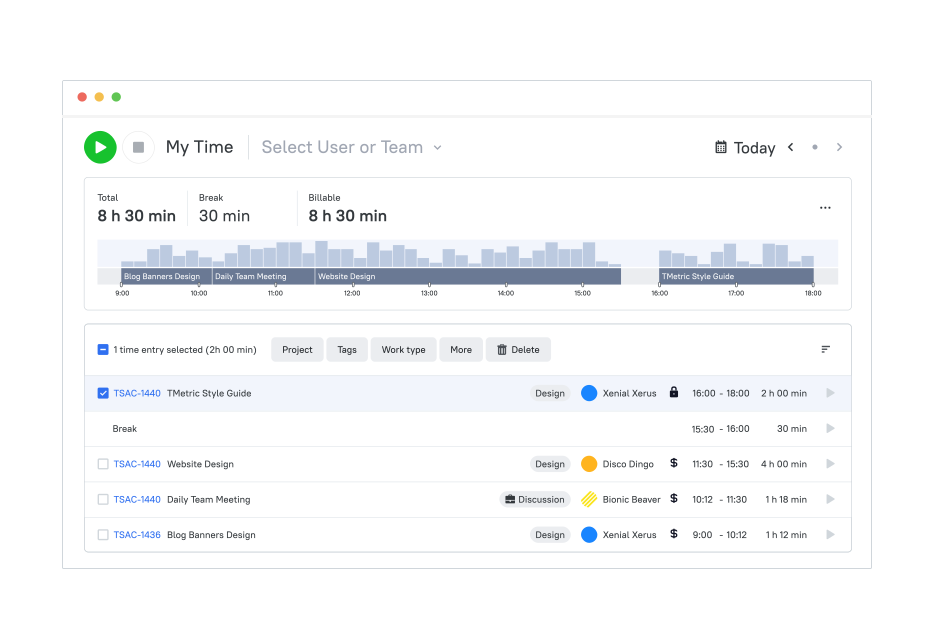
Best for: Remote teams needing accurate time logs, productivity insights, and structured billable hour tracking
Price: Free; paid plans from $7–$9/user/months
Available on: Web, iOS, Android, macOS, Windows, Linux, browser extensions
Why teams choose TMetric
TMetric stands out for delivering exactly what remote teams need: precise time tracking, clear productivity insights, and smooth billing workflows, all without adding extra complexity. It brings structure to distributed work by combining time logs, team dashboards, budgets, and client invoicing inside one system.
Moreover, remote teams appreciate that it’s fast to adopt, easy to manage across roles, and integrates smoothly with 50+ everyday tools like Jira, Asana, Trello, Slack, Notion, GitHub, and more. Instead of adding friction, TMetric quietly keeps operations predictable and transparent.
Key TMetric features
Billable hours & client invoicing
Track billable vs. non-billable time effortlessly and generate detailed invoices based on real-time logs.
- Apply billing rules per client or project.
- Export invoices in a few clicks.
- Reduce errors with built-in reporting.
- Keep invoicing consistent across distributed teams.
Team productivity dashboards
TMetric’s dashboards give remote teams a clear view of activity levels, focus patterns, and workload distribution.
- Understand productivity trends.
- Spot bottlenecks early.
- Improve planning for hybrid or async teams.
- Give managers visibility without micromanaging.
Integrations with project management tools
TMetric integrates with 50+ tools remote teams already use, enabling smoother workflows and accurate context. It works with Jira, Asana, Trello, Notion, GitHub, Bitbucket, Monday.com, Azure DevOps, Slack, QuickBooks, and more. These integrations reduce switching costs and ensure time is tied to real tasks and projects.
Time off & attendance management
Built-in PTO and attendance tracking helps distributed teams stay organized across time zones.
- Track absences, vacations, and availability.
- Keep schedules aligned without spreadsheets.
- Support compliance for global teams.
Budget tracking & profitability reports
TMetric helps teams set budgets and monitor how actual hours compare to expectations.
- Build time or cost-based budgets.
- Watch consumption in real time.
- Understand which projects stay profitable.
- Catch overruns before they become costly.
Flexible permission levels for remote teams
Control access across roles and locations with granular permissions.
- Protect sensitive financial data
- Assign visibility based on responsibilities
- Keep distributed workflows secure and organized
TMetric pricing overview (monthly vs annual)
| Plan | Monthly (billed monthly) | Monthly (billed annually) | Key features |
|---|---|---|---|
| Free | $0 | $0 | Core time tracking, unlimited clients & projects, reports, apps & extensions |
| Professional | $7/user | $5.83/user | Billable rates, budgets, expenses, invoicing, task management, calendar sync |
| Business | $9/user | $7.50/user | PTO tracking, team dashboards, activity insights, screenshots, and advanced PM integrations |
| Enterprise | Custom | Custom | Priority support, security features, custom integrations, high-volume pricing |
What TMetric users are saying
“TMetric gives our remote team clarity we didn’t have before — time logs, productivity insights, and budgets all in one place.” — G2 Reviewer
Why it’s #1
- Built for distributed teams: Clear visibility into time, focus patterns, and workloads.
- Accurate billing workflows: Billable hours, invoicing, and budgets stay aligned.
- Deep ecosystem fit: 50+ integrations and flexible permissions make it easy to adopt across remote teams.

2. Toggl Track
🌟 4.6/5
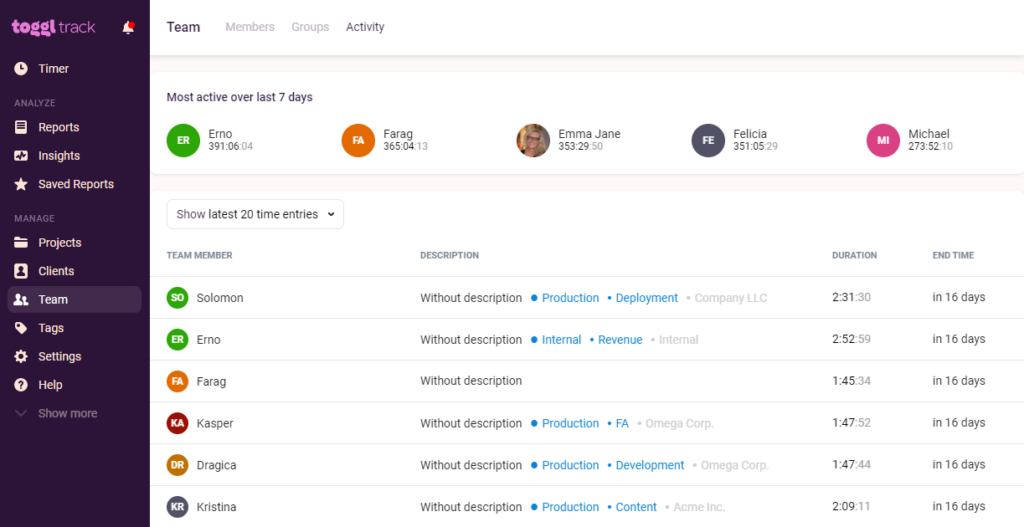
Best for: Teams that want simple, distraction-free time tracking.
Price: Free plan; paid plans from about $9/user/month.
Available on: Web, desktop apps, mobile apps, browser extensions.
Why teams choose Toggl Track
Toggl Track excels by keeping time tracking fast and lightweight. No complicated setup, no heavy features: just clean timers, clear reports, and effortless logging that fits naturally into a remote team’s workflow. Because every timer connects to projects and clients, teams can easily see where hours are going and whether workloads match priorities. It’s a tool built for people who want accuracy without extra admin work.
Key features
- One-click timers and manual time entry across apps and extensions.
- Project- and client-level reporting for clearer time allocation.
- Billable hours and cost calculations for client work.
- Idle detection to avoid accidental overreporting.
- Simple dashboards that highlight time patterns and team activity.
Reviews
“I like that I can easily access it on the computer and/or my phone through the app. It is user-friendly. It also helps me stay on track, and I can run reports and categorize to see what I've been working on. I use it everyday.” — G2 reviewer
3. Clockify
🌟 4.5/5
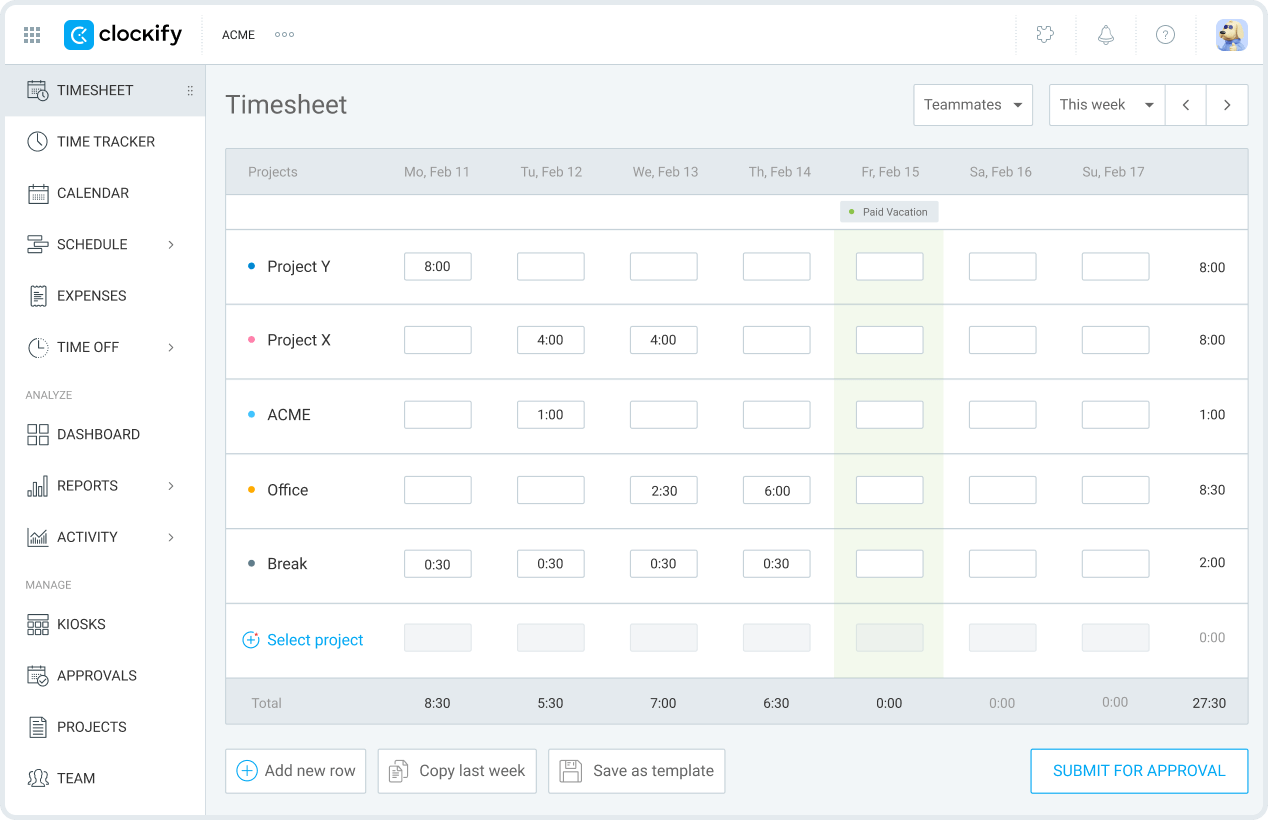
Best for: Remote teams needing a free time tracking solution with unlimited users
Price: Free plan; paid plans from about $3.99/user/month
Available on: Web, desktop apps, mobile apps, browser extensions
Why teams choose Clockify
Clockify is popular with growing remote teams because it offers a generous free plan with unlimited users, something rare among time management tools. Timers, timesheets, basic reporting, and activity tracking give teams everything they need to understand workloads without budget pressure. As teams scale, they can layer on scheduling, approvals, and productivity insights without switching systems.
Key features
- Unlimited users on the free plan.
- Timers, timesheets, and project tracking.
- Activity monitoring for basic productivity visibility.
- Simple scheduling on higher-tier plans.
- Reports that show where hours are spent across tasks and clients.
Reviews
“I value its clarity and discipline. Clockify keeps time tracking straightforward, reliable, and impossible to fudge. It forces accuracy, makes reporting painless, and gives you a clean view of where hours are actually going.” — G2 reviewer
4. RescueTime
🌟 4.4/5
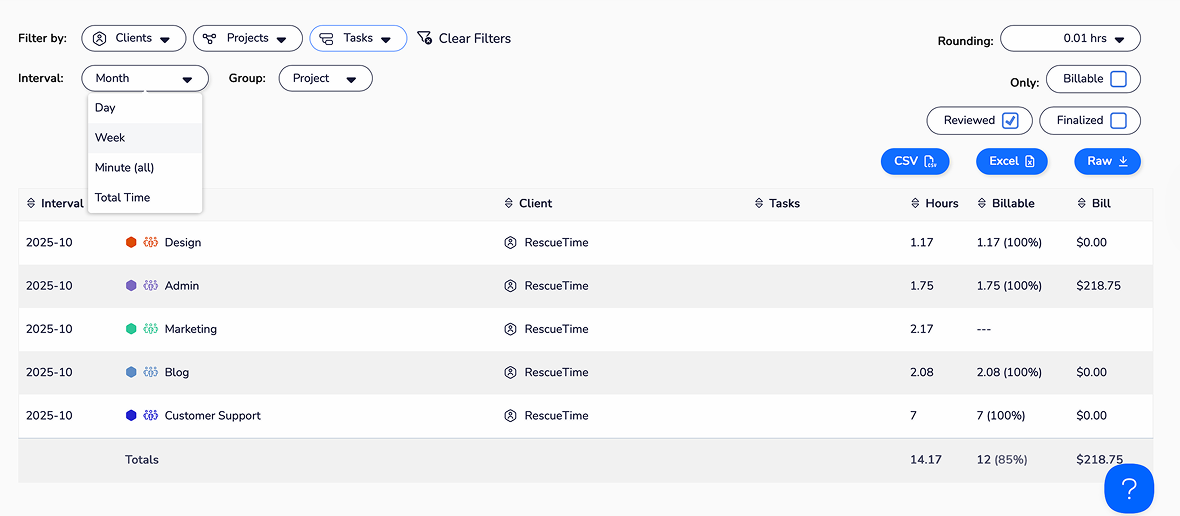
Best for: Teams that want automatic productivity insights without manual time logging
Price: Paid plans from around $12/month
Available on: Web, desktop apps, mobile apps
Why teams choose RescueTime
RescueTime is designed for teams that care about how time is used, not just how many hours are logged. It runs quietly in the background to measure focus time, interruptions, and distraction levels. For remote teams dealing with context switching and different time zones, it gives a realistic picture of daily work habits and helps people understand what improves or disrupts productivity — without requiring manual timers.
Key features
- Automatic activity tracking across apps and websites
- Focus session tools to reduce distraction
- Alerts when productivity drops or interruptions spike
- Weekly and daily performance summaries
- Insights into focus patterns and time-use habits
Reviews
“It's the best app that helps me to set goals and also in time tracking. It has the feature of automatic time tracking, which helps us to understand the hours we worked.” — G2 reviewer
5. Timely
🌟 4.7/5

Best for: Teams that want AI-powered automatic time tracking
Price: Paid plans from about $9–$22/user/month
Available on: Web, desktop apps, mobile apps
Why teams choose Timely
Timely uses AI to automatically map work activity to projects, removing the need to start or stop timers. For remote teams juggling multiple tasks and apps, this eliminates forgotten hours and improves reporting accuracy. Visual timelines make it easy to review the day, while budget tracking and capacity planning help teams understand workload and stay aligned across projects.
Key features
- Automatic AI-powered time capture across tools and tasks.
- Smart suggestions to categorize activity.
- Visual timelines that show how the day was spent.
- Project budgets and alerts for staying on track.
- Capacity planning tools for distributed teams.
Reviews
“Timely recovers hours we used to lose every week. Automatic tracking has been a game-changer for billing accuracy.” — G2, 2025
TL;DR
| Feature/capability | TMetric | Toggl Track | Clockify | RescueTime | Timely |
|---|---|---|---|---|---|
| Rating | ⭐ 4.6/5 | ⭐ 4.6/5 | ⭐ 4.5/5 | ⭐ 4.4/5 | ⭐ 4.7/5 |
| Best for | Remote teams needing accurate logs, productivity dashboards & billing | Simple, distraction-free time tracking | Free time tracking for unlimited users | Automatic productivity insights | AI-powered automatic tracking |
| Starting price | $7–$9/user/mo | ~$9/user/mo | $3.99/user/mo | ~$12/mo | $9–$22/user/mo |
| Free plan | Yes (2 users) | Yes (limited) | Yes (unlimited users) | No | Trial only |
| Time tracking method | Manual + task-based | Manual + one-click timers | Manual timers + timesheets | Automatic background tracking | Fully automatic AI tracking |
| Billable hours & invoicing | ✔ Full billing + invoicing | ✔ Basic billable tracking | ✔ Basic billable tracking | ✖ Not supported | ✔ Strong billing accuracy |
| Productivity insights | ✔ Activity levels & dashboards | ✔ Simple team insights | ✔ Activity monitoring | ✔ Deep productivity analytics | ✔ Visual productivity timelines |
| Integrations | 50+ tools (Jira, Asana, Trello, Notion, GitHub…) | Core PM integrations | PM + basic accounting integrations | Limited | PM + calendar + workflow tools |
| Budget tracking | ✔ Detailed budgets & profitability | ✖ Not included | ✔ Basic budgeting on paid plans | ✖ Not supported | ✔ Budget alerts & burn rate |
| Time Off / attendance | ✔ PTO & attendance built-in | ✖ No | ✔ On higher-tier plans | ✖ No | ✖ No |
| Permission controls | ✔ Advanced | ✔ Basic | ✔ Moderate | ✔ Minimal | ✔ Role-based |
| AI automation | ✖ None | ✖ None | ✖ None | ✔ Auto productivity capture | ✔ Full AI time mapping |
| Platforms | Web, iOS, Android, macOS, Windows, Linux, extensions | Web, desktop, mobile, extensions | Web, desktop, mobile, extensions | Web, desktop, mobile | Web, desktop, mobile |
Other time management options
Beyond the main five, there are several other tools that deserve attention, each offering a unique angle that can be a better match depending on your team’s setup. These include:
- Connecteam: Great for teams with field or frontline staff who need GPS-based time tracking and simple scheduling.
- Deel: Helpful for global teams managing contractors across multiple countries, especially when compliance and time oversight matter.
- Hubstaff: Adds activity indicators and optional GPS on top of time tracking, which some distributed teams use for extra context around their workday.
- Paymo: Blends time tracking with lightweight task management, making it appealing if you want a single place to track both work and time.
- TimeCamp: Offers automatic time capture and basic attendance tools — a good “two-in-one” option for teams needing both.
- Everhour: Best suited for teams working primarily inside Asana or Trello, thanks to its clean in-app timers and simple reporting.
- Harvest: Reliable, straightforward time logging paired with strong invoicing for teams that bill clients regularly.
Which time management app should you consider?
When it comes to picking a time management app, the best choice depends on your team's needs. If you want accurate time logs paired with clear productivity insights and billable-hour workflows that just work, TMetric is the most well-rounded solution for 2026.
- Prefer something lightweight and minimal? → Toggl Track
- Need a strong free plan for a growing team? → Clockify
- Want deeper insight into focus and work habits? → RescueTime
- Prefer automatic time capture so nothing gets missed? → Timely
How much do time management tools cost in 2026?
Most time management platforms fall into a pretty predictable pricing range. Looking at today’s leading tools:
- Core paid plans usually sit between $7 and $12 per user/month. That’s the range for tools like TMetric, Toggl Track, Clockify, and others.
- Free plans exist — but expect some limits. You might get unlimited users but restricted reporting, limited integrations, or no budgeting features.
- Tools with automation or advanced analytics cost a bit more. AI-powered automatic tracking or deeper productivity insights (think Timely or RescueTime Premium) usually push pricing into a higher tier.
- For a 20–30 person team, monthly costs stay in the low hundreds. Even at $7–$10 per user, the return is strong, especially when accurate time logs and better planning prevent lost hours or budget surprises.
In most cases, a good time management tool pays for itself quickly by improving visibility and reducing the guesswork in distributed workflows.
The takeaway
From TMetric’s simple, reliable approach to tracking time and understanding productivity to the more specialized strengths of Toggl Track, Clockify, RescueTime, and Timely, each tool fills a different need. But if you want something your team can start using immediately (accurate logs, helpful insights, and minimal friction), TMetric tends to stand out.
At the end of the day, the best time management app is the one your team actually keeps using. When a tool feels intuitive and fits naturally into the workday, it becomes much easier to stay aligned, avoid overload, and keep projects moving. With the right system behind you, clarity comes naturally, and your team’s time works a whole lot harder for you.
Start tracking time with TMetric. Create your free account now.