Best Attendance Tracking Software Tools (Free & Paid 2026)
Attendance tracking software has evolved into a key tool for managing teams, especially with remote and hybrid work becoming standard. In 2026, businesses have access to a wide range of free and paid solutions that simplify time tracking, improve accuracy, and boost productivity.

By Dereck Mushingairi | May 2, 2026
Anyone who’s handled payroll knows this: attendance hours cause headaches the moment they need justification. Every explanation triggers rework — edits, follow-ups, approvals, and payroll delays. Over time, those small fixes add up to a real operational cost.
That pressure gets worse when attendance is tracked manually. Spreadsheets, shared calendars, and email check-ins leave gaps that only surface later, forcing teams to reconstruct hours after the fact.
Modern attendance tracking software removes that rework. These systems record work time as it happens, align attendance with real schedules, and give teams a clear view of coverage without constant back-and-forth.
This guide compares the best attendance tracking software available today, focusing on accuracy, ease of use, payroll integration, and real-world fit for remote, hybrid, and hourly teams.
Our top picks at a glance
After reviewing a wide range of attendance tracking tools, these five stand out for their reliability, usability, and real-world fit across different team types.
| Tool | Best for | Work model | Attendance method | Payroll readiness | Starting price |
|---|---|---|---|---|---|
| TMetric | Remote & software teams | Remote / Hybrid | Clock-in, tasks | Payroll-ready | $7–$9 per user |
| Clockify | Small teams | Remote / Hybrid | Timesheets | Basic export | Free |
| Hubstaff | Field teams | Field / Mobile | GPS, geofencing | Payroll export | $7 per user |
| Deputy | Shift teams | On-site / Shift | Shift clock-in | Payroll-ready | $4.50 per user |
| When I Work | Frontline staff | On-site / Shift | Mobile clock-in | Basic export | $2.50 per user |
How to find the best attendance tool for your business
Not all attendance tracking tools solve the same problems. Our selections are all proven options, but choosing the right one comes down to fit.
1. Start with where attendance breaks today
Before comparing features, identify friction points:
- Hours corrected before every payroll run
- Managers chasing missing clock-ins
- Attendance data that requires explanation
2. Match the tool to your work model
Attendance needs differ by team structure:
- Remote teams need flexibility and context
- Shift teams need strict schedules and coverage visibility
- Field teams may require location verification
Tools like TMetric work well for remote and software teams because attendance is tied to real work activity, not just clock-ins.
3. Treat payroll as the real test
Attendance tracking exists to make payroll boring. If hours still need interpretation or cleanup every cycle, the system isn’t doing enough. The best tools produce payroll-ready summaries with minimal review.
4. Don’t overlook daily usability
Accuracy depends on adoption. Poor usability leads to bad data. Pay attention to:
- How easy it is to clock in and out
- Whether employees can see their own hours
- How quickly managers can review and approve entries
With these criteria in mind, let’s look at the attendance tools leading the market in 2026.
5 Best attendance software tools for 2026
1. TMetric
Rating: 4.6/5
Best for: Remote and hybrid teams
Price: Free for up to 2 users; paid plans from $7–$9 per user/month
Available on: Web, iOS, Android, macOS, Windows, Linux, browser extensions
What makes TMetric stand out
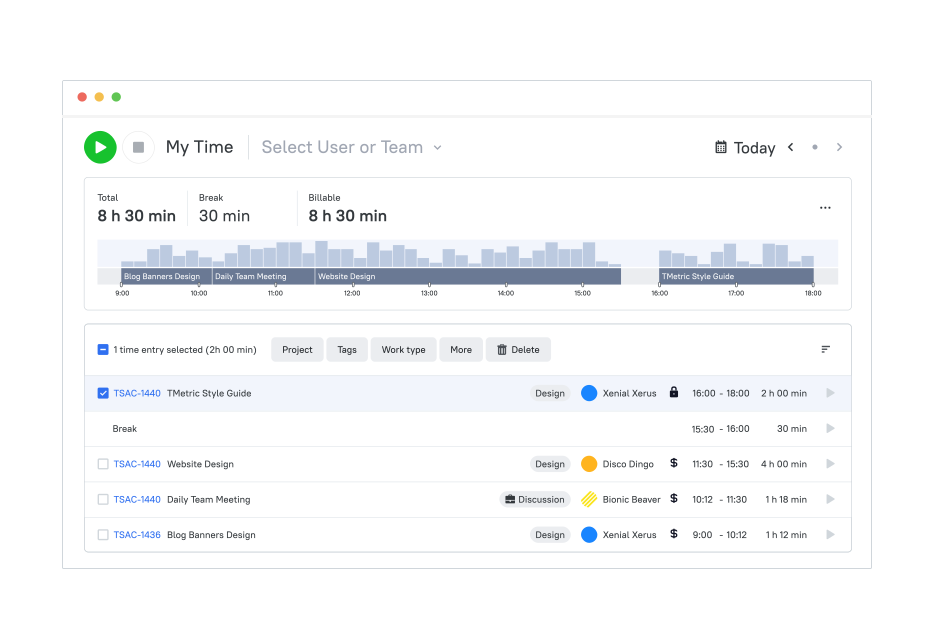
TMetric gives distributed teams a single system to manage attendance, working hours, breaks, overtime, and time off. Employees can clock in from desktop or mobile, log breaks, switch between tasks, and request leave without switching tools.
Managers see real-time attendance status across the team, while HR and finance teams get clean, defensible records that hold up during payroll reviews and audits. Unlike basic clock-in tools, TMetric connects attendance to actual work activity, providing context that simplifies payroll and operational reporting.
Key TMetric features
- Automated attendance tracking
TMetric records clock-in and clock-out times automatically, capturing working hours, breaks, overtime, and absences without manual input. This ensures attendance data remains consistent and reliable across flexible and distributed work schedules. - Centralized attendance dashboard
Managers can view real-time attendance data for the entire team in one place. The dashboard shows who is working, who is absent, and how schedules are being followed, removing the need for manual checks or spreadsheets. - Personalized work schedules
TMetric allows teams to define individual workweeks and preferred daily hours for each employee. This supports different roles, time zones, and working patterns while keeping attendance expectations clear and documented. - Attendance-based payroll reporting
Tracked attendance data feeds directly into payroll-ready reports. By applying pay rates to recorded hours, organizations can prepare accurate payroll summaries and reduce reconciliation errors. - Attendance and overtime reports
Detailed reports make it easy to review employee hours, identify overtime, and spot irregular attendance patterns. These insights help managers address issues early and balance workloads more effectively. - Integrated time-off calendar
Attendance tracking is combined with a shared time-off calendar. Managers can see availability and leave history at a glance, while employees can view balances and submit time-off requests within the same system. - Automated reminders and notifications
TMetric can notify employees about missed clock-ins or schedule deviations and alert managers to recurring attendance issues. This helps maintain consistency without constant manual oversight.
TMetric pricing overview (monthly vs. annual)
| Plan | Monthly cost (billed monthly) | Monthly cost (billed annually) | Key features included |
|---|---|---|---|
| Free | $0 | $0 | Basic attendance & time tracking, unlimited projects & clients, reports, desktop & mobile apps, browser extensions |
| Professional | $7 per user/month | $5.83 per user/month | Attendance tracking, billable rates, time-off management, project links, alerts, My Time, calendar sync, data import |
| Business | $9 per user/month | $7.50 per user/month | All Professional features plus Team Timesheets, screenshots, activity tracking, notifications, QuickBooks sync, advanced integrations (Jira, Redmine, ClickUp) |
| Enterprise | Custom pricing | Custom pricing | All Business features plus secure deployment options, custom integrations, dedicated support, and volume discounts |
What TMetric users are saying
“Overall, I've enjoyed using TMetric; it far outperforms any other system I've used in the past, and I'll definitely be sticking with it for the long haul.” — Capterra
Why it’s #1
- Designed for distributed teams: Attendance, working hours, breaks, and time-off tracking are unified into one dependable system of record.
- Clear operational visibility: Linked tasks and structured reports help HR, finance, and managers understand time usage across flexible schedules.
- Proven and widely adopted: TMetric is used globally by remote and hybrid teams that depend on accurate attendance records, cross-device reliability, and strong integrations with tools like Jira, Trello, and QuickBooks.

2. Clockify
Rating: 4.5/5
Best for: Free attendance tracking for small teams and startups
Price: Free; paid plans from about $4.99 per user/month
Available on: Web, desktop apps, mobile apps, browser extensions
What makes Clockify stand out
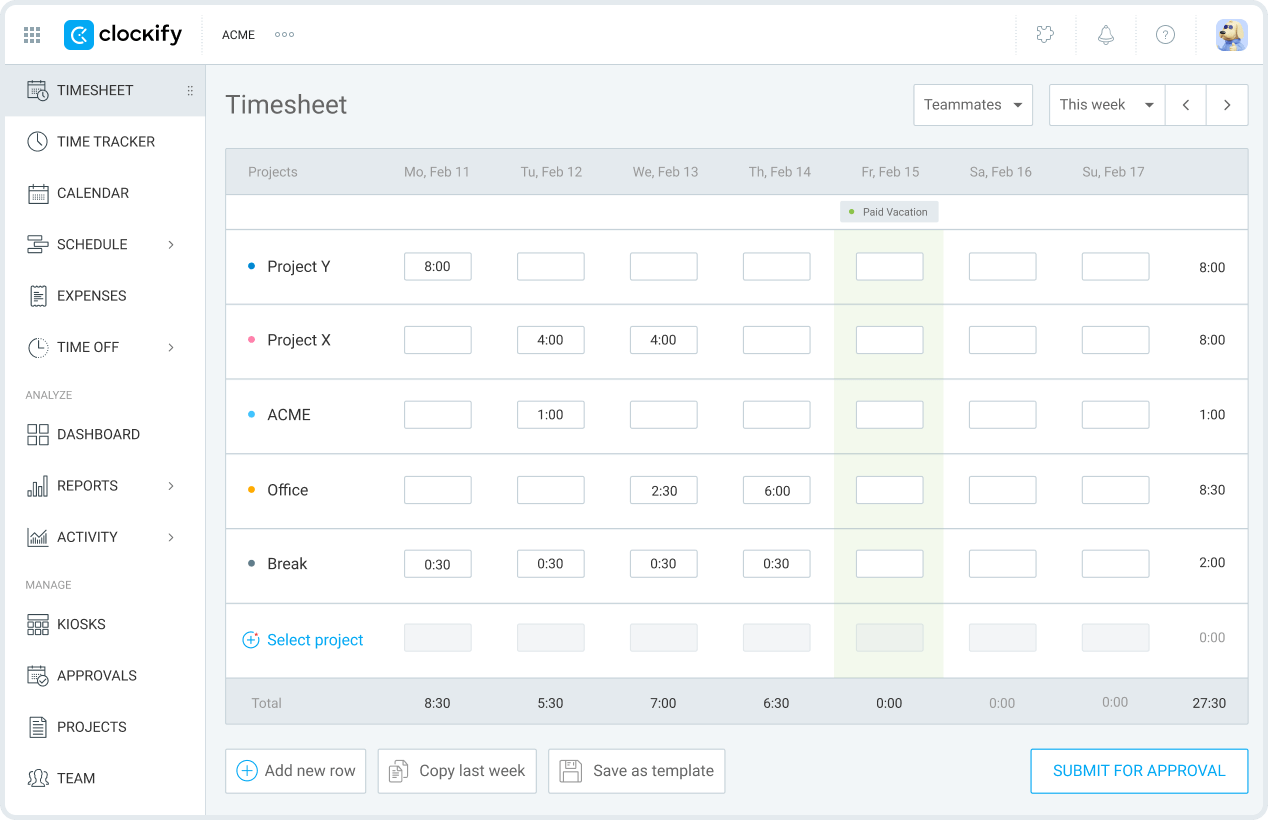
Clockify is best known for offering a genuinely usable free attendance tracking option. Teams can clock in and out, track daily hours, and generate basic attendance reports without paying for seats, which makes it a common first step for companies moving away from spreadsheets or manual logs. The interface is straightforward, and employees can start tracking time with minimal setup.
As teams scale, Clockify remains useful for basic attendance visibility, but more advanced needs (such as approvals, compliance controls, or deeper reporting) require upgrading to a paid plan. For small teams prioritizing cost and simplicity, however, it remains one of the most accessible entry points into structured attendance tracking.
Key features
- Free mobile and desktop time clock.
- Manual and automatic time tracking.
- Basic attendance and hour summaries.
- Cross-device syncing across platforms.
- Simple exports for payroll review.
Reviews
“Clockify is one of the best tools I have ever used . A person does not need a whole bunch of training to just start using this tool. It was designed with ease of use” (Capterra)
3. Hubstaff
Rating: 4.5/5
Best for: Field and hybrid teams that require GPS-based attendance verification.
Price: Paid plans from about $7 per user/month.
Available on: Web, desktop apps, mobile apps, browser extensions.
What makes Hubstaff stand out
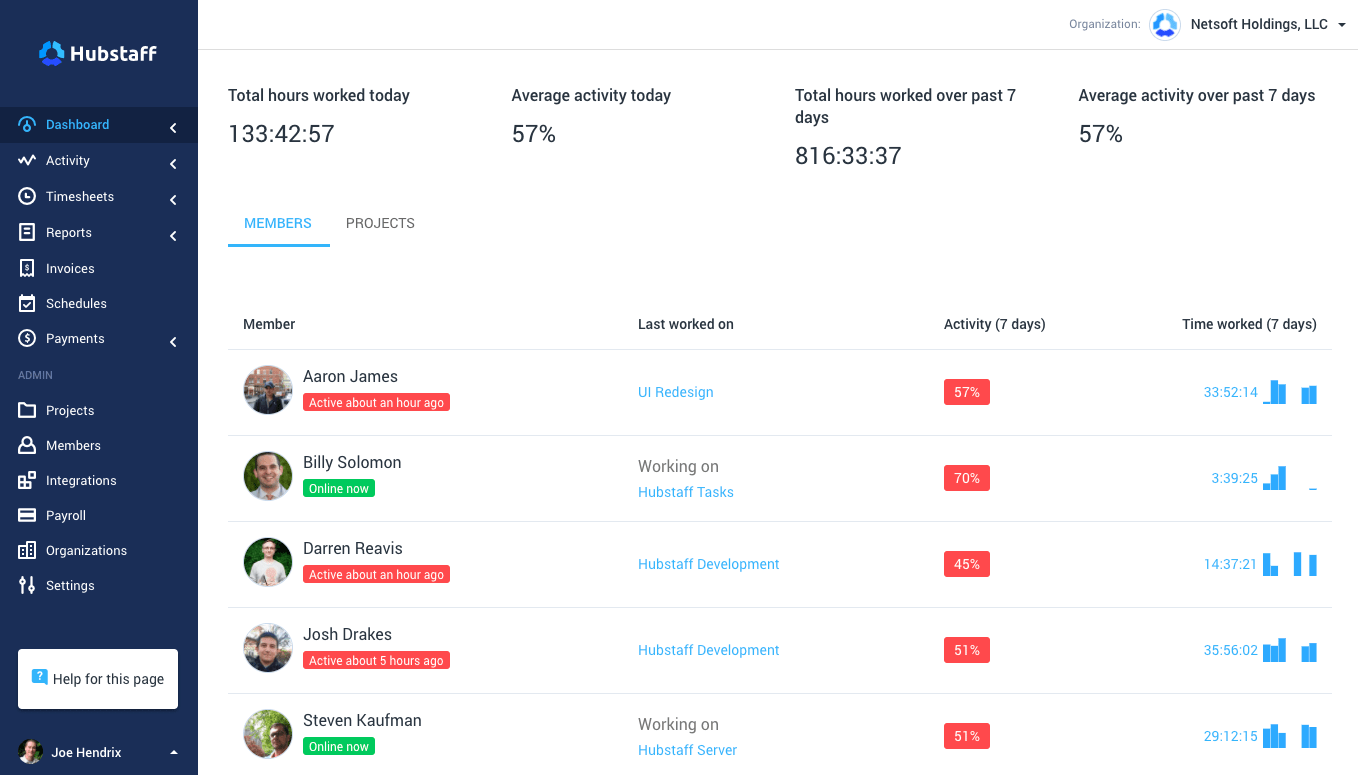
Hubstaff is built for teams where where work happens matters as much as when. It combines attendance tracking with GPS location data and geofencing, making it well-suited for field services, logistics, construction, and location-based roles. Attendance can start automatically when employees arrive at a job site, reducing missed or late clock-ins.
For organizations operating in regulated or distributed environments, this level of verification helps ensure attendance records are accurate and defensible. While Hubstaff’s monitoring features are more robust than most attendance tools, they provide clarity for teams that need strong oversight across locations.
Key features
- GPS time tracking and location history.
- Geofencing-based automatic clock-ins.
- Shift alerts and schedule enforcement.
- Payroll-ready timesheets.
- Mobile-first attendance tracking.
Reviews
“Overall, my experience with Hubstaff has been positive. It’s a reliable tool for time tracking and task management, especially useful for remote work and data annotation projects.” (Capterra)
4. Deputy
Rating: 4.6/5

Best for: Shift-based teams that need scheduling and attendance in one system
Price: Paid plans from about $4.50 per user/month
Available on: Web, iOS, Android
What makes Deputy stand out
Deputy focuses on environments where attendance is tightly linked to shift scheduling and labor rules. It’s commonly used in hospitality, healthcare, and retail, where managers need to assign shifts, enforce breaks, and stay compliant with local labor regulations. Attendance tracking is built directly into scheduled shifts, reducing confusion and missed entries.
By combining scheduling, attendance, and compliance features, Deputy helps managers maintain coverage while keeping payroll data accurate. It’s less flexible for project-based or knowledge work, but it excels in structured, hourly environments.
Key features
- Integrated shift scheduling and attendance.
- Mobile clock-in and clock-out.
- Break enforcement and labor rules.
- Attendance summaries for payroll.
- Schedule-based reporting.
Reviews
“Deputy has most of the functionality we are looking for in a time clock application. Our employees find it easy to use, and the punch details easily export to our payroll system.” (Capterra)
5. When I Work
Rating: 4.4/5
Best for: Hourly retail and restaurant teams managing shifts and attendance
Price: Paid plans from about $2.50 per user/month
Available on: Web, mobile apps
What makes When I Work stand out
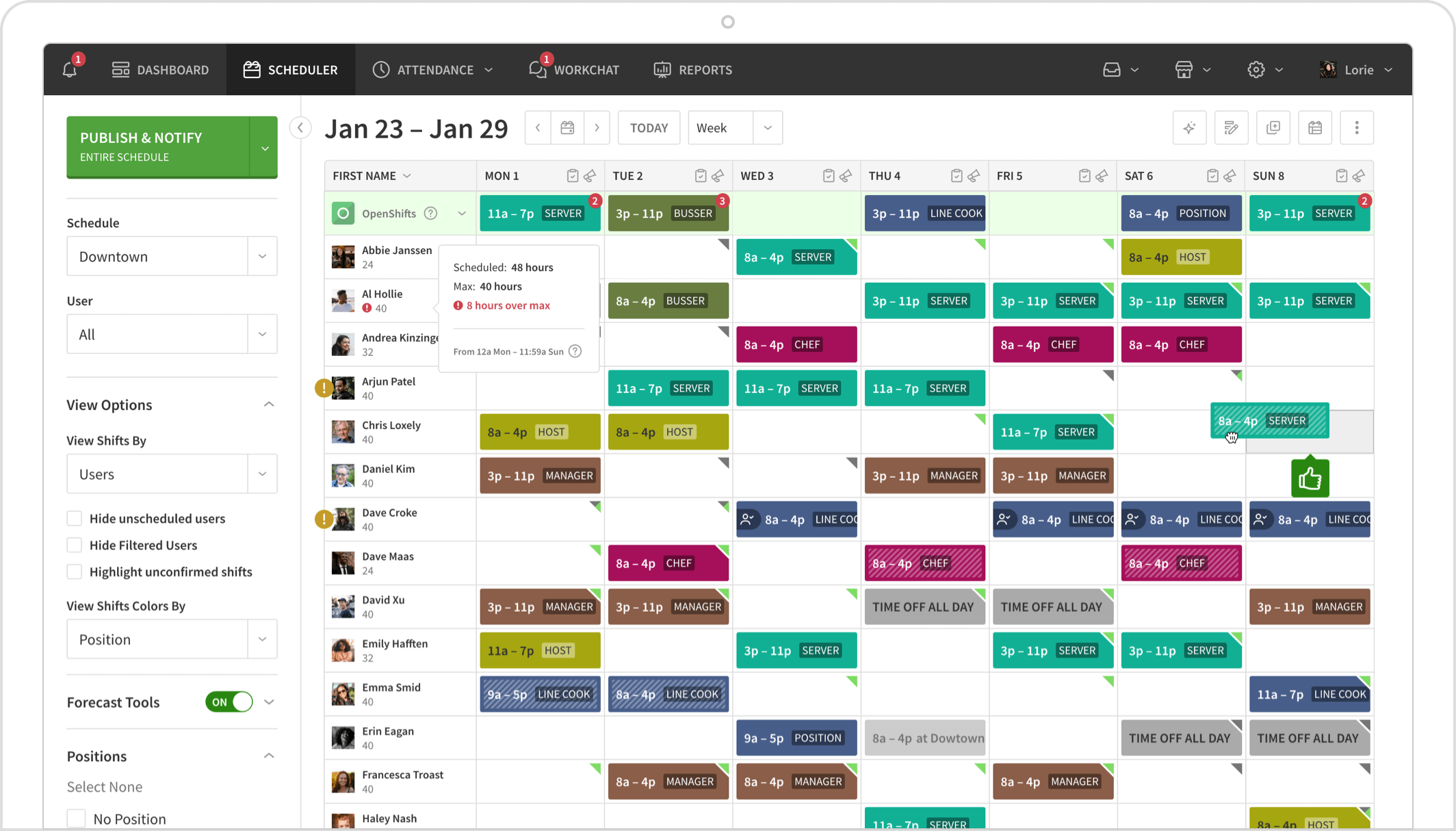
When I Work prioritizes simplicity for frontline teams. Employees can clock in, view schedules, and swap shifts directly from their phones, which makes adoption easy in fast-paced retail and restaurant environments. Managers benefit from clear visibility into who is scheduled, who is working, and where coverage gaps may exist.
The platform is intentionally lightweight. While it doesn’t offer the depth needed for remote or project-based teams, it performs well in shift-driven workplaces where ease of use and quick access matter most.
Key features
- Mobile time clock for hourly staff.
- Shift scheduling and swap requests.
- Attendance summaries by shift.
- Simple manager approvals.
- Payroll-friendly exports.
Reviews
“Easy, organized, and I will be recommending this to others. My staff easily understands what they gave to do, and the locations for clocking in and out are very accurate.” (Capterra)
Other attendance tracking options
- Toggl Track – Lightweight attendance for freelancers
- Homebase – Free scheduling + attendance for single locations
- Replicon – Enterprise attendance and compliance
- Calamari – HR-focused attendance with leave management
- Jibble – Biometric facial recognition clock-in
- TimeCamp – Automatic tracking with attendance reports
- ActivTrak – Passive attendance insights without clock-ins
- Workday Time Tracking – Enterprise HCM attendance module
Attendance tracking software cost insights for 2026?
Attendance tracking software pricing in 2026 is largely predictable, but the value behind the price varies widely depending on how teams work and how tightly attendance connects to payroll and compliance.
Typical pricing ranges
Most modern attendance tracking tools use a per-user, per-month pricing model:
- Free or freemium plans
Usually $0 for very small teams. These plans cover basic clock-in and clock-out functionality but often limit reporting, approvals, and integrations. - Entry-level paid plans: ~$2–$7 per user/month
Common for teams that need reliable attendance capture without advanced scheduling or compliance features. - Mid-tier plans: ~$7–$10 per user/month
This is where most growing teams land. These plans typically include schedules, PTO tracking, approvals, payroll exports, and integrations. - Advanced or enterprise plans: $10+ per user/month
Designed for larger organizations or regulated environments. These often include compliance tools, audit logs, advanced reporting, APIs, and priority support.
What drives the price up or down
Several factors consistently affect how much teams end up paying:
- Team size
Pricing scales with users. Larger teams may negotiate volume discounts, but often require higher-tier features. - Work model
Remote, hybrid, shift-based, or field teams often need more than basic time clocks, which pushes plans into higher tiers. - Payroll and HR integrations
Tools that connect directly to payroll systems, accounting platforms, or HR software typically cost more, but reduce manual reconciliation work. - Compliance and reporting needs
Overtime tracking, audit trails, labor law support, and historical reporting add cost, and are often worth it.
What “cheap” really costs
Low-cost or free tools can work well for simple setups. However, once attendance data needs frequent correction before payroll, the true cost shifts from software fees to operational time — manager reviews, payroll fixes, and follow-ups.
For many teams, paying a few dollars more per user per month is cheaper than rebuilding attendance data every pay cycle.
Takeaway
Attendance tracking software has moved well beyond basic clock-ins. In 2026, the strongest tools support remote and hybrid teams, integrate cleanly with payroll, and produce records that hold up for compliance, without adding friction for employees or managers.
Among the options reviewed, TMetric stands out for agencies and remote-first teams. Its combination of accurate attendance tracking, flexible workflows, and clear, payroll-ready reporting makes it one of the most balanced attendance management platforms available.