11 Best Automated Time Tracking Software
As remote and hybrid work continue to grow, automated time tracking software has become essential for businesses of all sizes. The top solutions offer passive tracking, AI categorization, payroll syncing, and detailed reporting to reduce administrative work and improve accuracy.

By Dereck Mushingairi | January 8, 2026
As hybrid work cements itself and AI moves from buzzword to board-room mandate, the teams that win will be the ones that capture every billable minute without adding another tab to babysit.
The ten tools below automatically turn scattered work across desktops, mobiles and cloud apps into defensible timesheets—so you enter with zero lost revenue and data-driven clarity instead of year-end panic.
11 Top Automated Time Tracking Software: Table of Comparison

TMetric is the best automated time tracker that quietly runs in the background, auto-logging every app switch and idle gap to build a flawless timeline and boost productivity, which makes it popular in small and mid-size teams.
It is a tool that delivers enterprise-level time tracking without the enterprise price tag.
One click turns work time captured data into branded invoices, positioning it as the most effortless, zero-touch time tracker.
Key features
- 1-Click Start/Stop Tracker
Click once and TMetric starts recording every second of work, even if you hop between browser tabs or lose Wi-Fi for a moment, so no billable minute is ever lost.
The timer keeps running quietly in the background and syncs the instant you’re back online, giving you a stress-free, bullet-proof log.
- Timesheets with Approval Workflows
Daily, TMetric turns your tracked time into a neat timesheet and automatically sends it to the right manager for a one-click approval.
You wake up to an already-approved, client-ready report—no copy-paste, no email chase, and zero Friday-afternoon panic.
TMetric has the option to automate rounding to the nearest increment. It can round every entry up or down to the nearest 5, 10, or 15-minute block you choose, erasing messy 3-minute fragments.
Your invoices look cleaner, clients trust the math, and you still capture every dollar without manual edits.
The second you cross the daily or weekly limit you set, TMetric flags the extra time in red and logs it as overtime.
You’ll spot costly overruns early, stay compliant with labor laws, and pay or bill overtime accurately—no spreadsheets required.
Assign a different hourly rate to each client, project, or even team member, and TMetric instantly calculates the exact billable value of every time block.
Watch the revenue total grow live in the dashboard and send invoices knowing every second is priced perfectly.
- Multi-Currency Invoicing
Create an invoice in USD today, flip it to EUR tomorrow, and let TMetric apply the real-time exchange rate automatically.
Your global clients get clear, professional bills in their preferred currency while your books stay balanced in yours.
- PTO Tracking and Leave Management
Request, approve, and track vacation or sick days inside the same timer you already use—no extra logins.
TMetric subtracts approved PTO from each employee’s balance instantly, so schedules and payroll always match reality.
Push every tracked hour, expense, and invoice to QuickBooks with one click; categories, customers, and tax codes land in the right fields automatically.
Month-end closes that used to take days now wrap up before your coffee gets cold.
- App/URL Monitoring + Optional Screenshots
See exactly which apps and websites your team uses while the timer runs, and optionally capture screenshots for full transparency.
Spot distractions, prove productivity to clients, and keep remote work accountable without hovering or micromanaging.
- 50+ Integrations (Jira, Asana, Trello, GitHub, Slack, Notion, ClickUp, etc.)
Start a timer inside Jira, Trello, or any of 50+ tools and TMetric pulls the task title, project, and assignee automatically—no typing twice.
All your favorite apps finally talk to one time tracker, so workflows stay silky smooth and data stays perfectly synced.
Pros
✅ Generous free plan with access to automatic time and project tracking
✅ Generates invoices straight from tracked hours – zero double work
✅ Clean UI – friction-free tracking
✅ Works offline; syncs when back online
✅ Comprehensive PTO Management Module
✅ Easy Billing and Budgeting
✅ Scaling up to the needs of growing businesses
✅ GDPR compliant – built for European data standards of safety
Cons
❌ Screenshot feature requires Business plan ($9/user/mo)
❌ Mobile app lacks bulk editing
Pricing
- Free – 2 seats, unlimited projects, exportable reports
- Professional – $5.83 seat/mo (billing, budgets, calendar sync)
- Business – $7.5 seat/mo (screenshots, PTO, QuickBooks sync)
- Enterprise – custom (volume discounts, priority support)
Ratings
- G2: 4.5 / 5
- Capterra: 4.7 / 5
User Feedback
Offers several features designed to help individuals and teams improve their productivity and manage their time more effectively. The features and benefits of TMetric can vary based on the specific subscription plan or edition you choose. It's always a good idea to review the latest information on TMetric's website or consult their support team to get the most accurate and up-to-date details.- G2 User Reviews
Our main business problem is managing remote work. TMetric allows me to do that easily and transparently. – Capterra User Reviews
2. Timely – For AI-Powered Automatic Time Capture
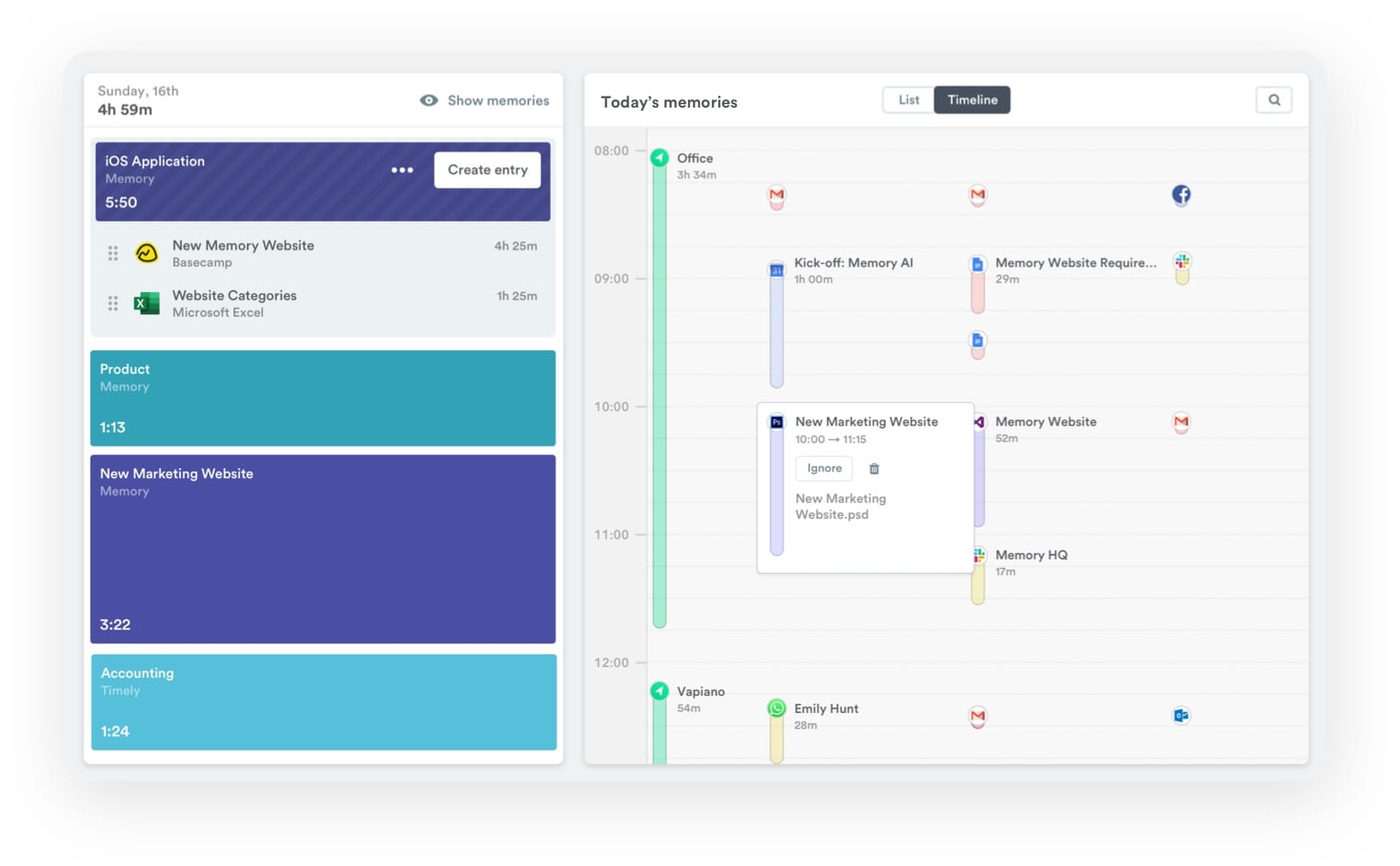
Timely uses AI to automate tracking of your meetings, emails, and browser tabs —then auto-assembles accurate timesheets and gives a smart, hands-free time tracking solution for individuals.
Its Memory tracker runs privately on your device, learning your work patterns to deliver near-perfect billing records with zero admin overhead and, thus, eliminate guesswork.
Key Features
- Memory AI tracker – automatic, privacy-first time capture with zero manual input
- Auto-populated timesheets – AI drafts entries
- Team capacity planning – visual workload dashboard
- Billable vs. non-billable splits – automatic revenue tracking
- Integrations – Google Calendar, Outlook, Asana, Jira, Salesforce, Zapier, etc.
- Detailed productivity insights – app usage, focus hours
- Scheduling & resource management – drag-and-drop project assignments
- Custom reporting – exportable PDFs, Excel, and API access
Pros
✅ Automatic tracking – no timers, no forgotten hours
✅ Privacy-focused – data stays on your device until you choose to log it
✅ Prevents burnout – flags imbalanced schedules
✅ Intuitive UI – minimal learning curve
Cons
❌ Higher price point than basic trackers
❌ No invoicing feature (requires third-party integration)
❌ AI suggestions require 2–3 days to learn your patterns
Pricing
- Starter – $9/user/month (basic Memory, unlimited projects)
- Premium – $16/user/month (budgets, forecasting, team scheduling)
- Unlimited – $22/user/month (advanced reports, API, priority support)
Ratings
- G2: 4.7/5
- Capterra: 4.7/5
User Feedback
I really like that you can integrate your browser and other plugins to ensure it captures work completed across multiple browsers and tools. Being able to break down projects and time by users, with custom tags, and budget allocated by totals or hourly rates is a game changer. It makes evidencing time spent and overtime to clients easier. – G2 Reviews
3. RescueTime – For Individual Productivity & Focus Tracking
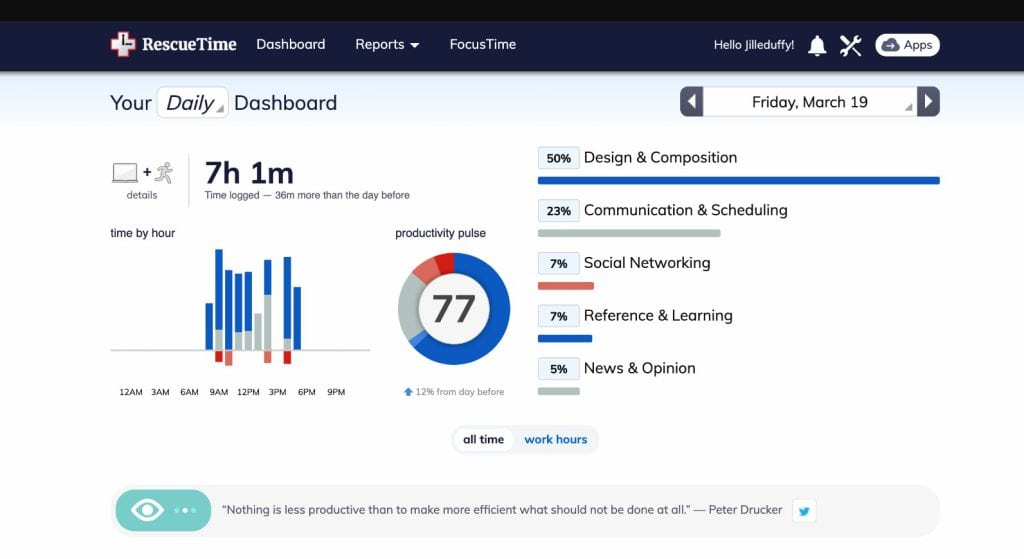
RescueTime silently monitors every application, website, and digital activity in real time, building a crystal-clear picture of where your attention actually goes throughout the day.
It offers intelligent categorization and labels distractions versus deep work – a good choice for individual professionals.
Key features
- Automatic activity tracking – captures data on all visited sites
- FocusTime session module – blocks sites that may distract
- Productivity pulse score – daily/weekly ratings based on your activity patterns
- Goal setting & alerts – notifications when you hit time limits on specific categories
- Detailed reports & trends – visualize productivity patterns over days, weeks, and months
- Categories & labels – auto-sorts activities into productive, neutral, or distracting buckets
- Calendar integration – syncs with Google Calendar to correlate scheduled vs. actual time
Pros
✅ Set-and-forget tracking – easy start & stop
✅ Honest productivity insights – shows exactly where time leaks happen
✅ Lightweight & unobtrusive – barely noticeable system impact
✅ Works across all devices – desktop, mobile, and browser extension sync
Cons
❌ Focus features (FocusTime blocking) require a paid plan
❌ Not built for team tracking or client billing
❌ Limited project-based breakdown compared to business-focused tools
Pricing
- Lite (Free) – basic tracking, limited historical data, productivity reports
- Premium – $12/month or $78/year (FocusTime, unlimited history, goals, alerts)
Ratings
- G2: 4.2/5
- Capterra: 4.6/5
User Feedback
Rescue Time runs on background, where it automatically track time spent in a specific application or system. The tool has a blocking feature that eliminates distractions. We set goals with Rescue mTime, where we get alerts when we are almost achieving them. – G2 Reviews
4. Jibble – For Automated Timesheets & Payroll Accuracy
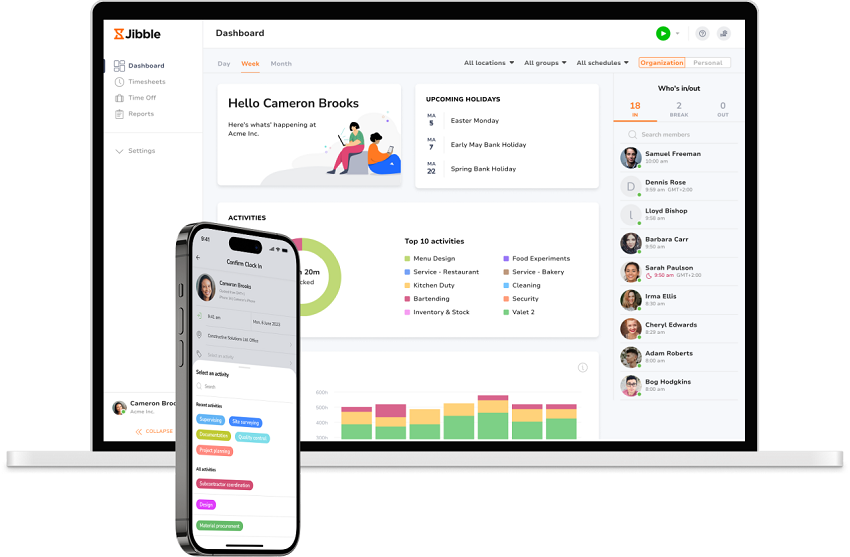
Jibble helps businesses automate time tracking from start to finish, reducing manual clock-ins, missed entries, and payroll errors. Employees can automatically clock in and out based on geofenced job sites or desktop activity, while smart auto clock-out rules help keep timesheets accurate. With powerful attendance automations built in, Jibble makes workforce tracking effortless and reliable for teams of any size.
Key Features
- Verified clock-ins – facial recognition, GPS, PIN, and NFC verification
- Desktop automation – clock in on app launch, clock out on app close, with sleep and lock detection
- Automatic clock-out – triggers based on scheduled time or total hours worked
- Geofence automation – automatically clock in and out when entering or leaving a worksite
- Screenshot monitoring – optional screen captures for accountability and activity tracking
- Offline tracking – continue tracking without internet and sync once reconnected
- Projects & invoicing – track project hours and generate client invoices
- Integrations – Slack, Teams, QuickBooks, Xero, Deel, Zapier, and 50+ more
Pros
✅ Generous free tier with unlimited members and projects
✅ Strong accountability features without intensive monitoring
✅ Cross-platform support – web, mobile, desktop, kiosk and browser extension
✅ Easy to use with an intuitive interface and quick onboarding
Cons
❌ No passive activity tracking (relies on manual or triggered clock-ins)
❌ Screenshot monitoring can feel invasive without transparent communication
Pricing
- Free – Unlimited members, core time tracking, screenshots, geofencing
Ratings
- G2: 4.8/5
- Capterra: 4.8/5
User Feedback
It’s incredibly simple for the team to clock in and out, and everything updates instantly. The interface is clean, and the automated timesheets save a lot of hassle. - Tiago R. G2
5. DeskTime – For Workforce Attendance & Shift Management
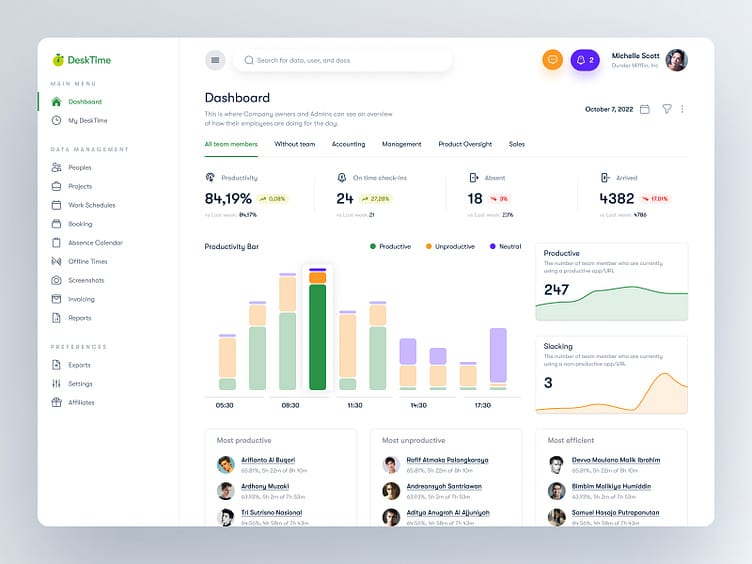
The auto-tracking functionality of DeskTime eliminates timesheet guesswork and gives managers real-time visibility into team efficiency.
Key Features
- Automatic time tracking – zero start/stop buttons; records everything from login to logout
- Productivity calculation – auto-labels apps/URLs as productive, unproductive, or neutral
- Private time – employees can pause tracking during breaks
- Project & task time allocation – optional manual project assignment
- Automatic screenshots
- Shift scheduling – set work hours and track attendance
- Idle time detection – automatically pauses when no activity is detected
- Absence calendar – track vacation, sick days, and PTO
- Custom reports – productivity trends, project time, team comparisons
Pros
✅ True "set and forget" tracking – no manual timers required
✅ Productivity scoring helps easily identify time drains
✅ Shift scheduling + late arrival alerts keep teams accountable
✅ Works across Windows, Mac, Linux, and mobile
Cons
❌ Always-on monitoring may feel invasive to some employees
❌ Screenshot feature requires careful communication to maintain trust
❌ Productivity labels may not suit all job types (e.g., creative roles)
Pricing
- Lite – $6.42/user/mo (basic tracking, productivity calculation)
- Pro – $19.17/user/mo (shift scheduling, screenshots)
- Enterprise – custom pricing (dedicated support, unlimited data retention)
Ratings
- G2: 4.5/5
- Capterra: 4.5/5
User Feedback
The use of the app can be done from home when working remotely. Also found it easy to download from the App Store and Google Play Store. – Capterra User Reviews
6. Insightful – For Employee Monitoring & Analytics
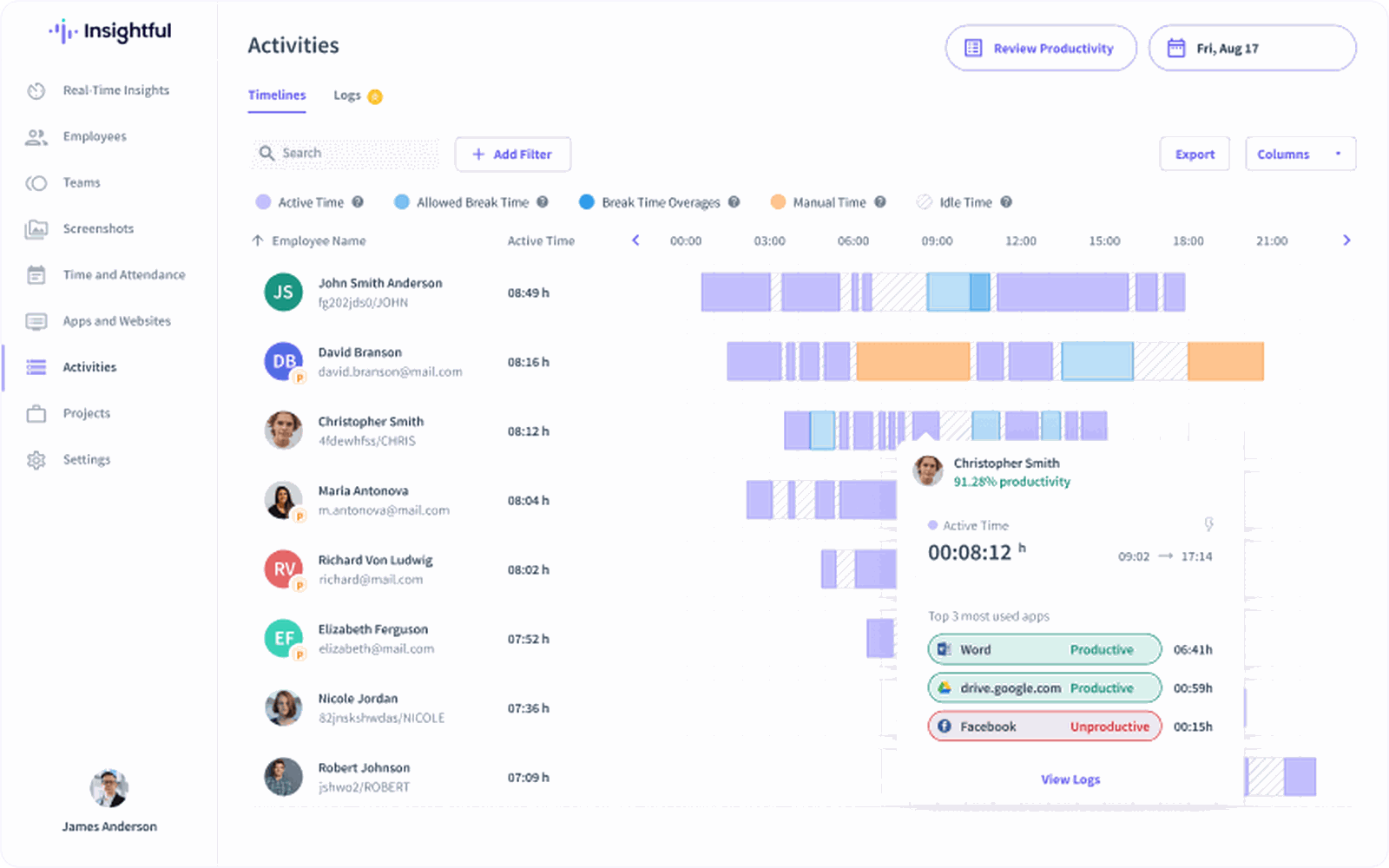
It provides enterprise-grade monitoring and combines automatic time tracking with behavioral insights for accurate productivity benchmarks.
Key Features
- Time & attendance tracking – silent background monitoring from clock-in to clock-out
- Real-time activity monitoring – live view of what employees are working on
- Screenshots – configurable capture intervals with blur options for privacy
- App & website tracking – granular breakdown of time per application and URL
- Idle time detection – automatically pauses during inactivity periods
- Scheduling – attendance tracking with late/absent alerts
- Project & task time allocation – automatic or manual project assignment
- Workforce analytics – department comparisons, trend analysis, capacity planning
- Hybrid work insights – office vs. remote productivity metrics
Pros
✅ Enterprise-level analytics with drill-down dashboards – perfect for scaling teams
✅ Hybrid work tracking shows productivity patterns by location
✅ Customizable privacy settings balance monitoring with employee trust
✅ Dedicated customer success manager on higher tiers
Cons
❌ Stealth mode raises ethical concerns if not transparently communicated
❌ Deep monitoring features may feel intrusive without proper policy framing
Pricing
- Productivity Management – $6.40 per user/month (activities tracking)
- Time Tracking – $8 per user/mo (real-time monitoring)
- Process Improvement – $12 per user/mo (customizable automatic time tracking)
Ratings
- G2: 4.7/5
- Capterra: 4.7/5
User Feedback
Insightful has made tracking employee productivity seamless and highly transparent for our remote team. The automatic time tracking and activity levels give us valuable data without micromanaging... It also helps us optimize workflows and detect process bottlenecks. The ease of setting up teams and permissions was a bonus, and their customer support is responsive and helpful. – G2 Reviews
7. Hubstaff – For GPS Tracking & Global Payroll
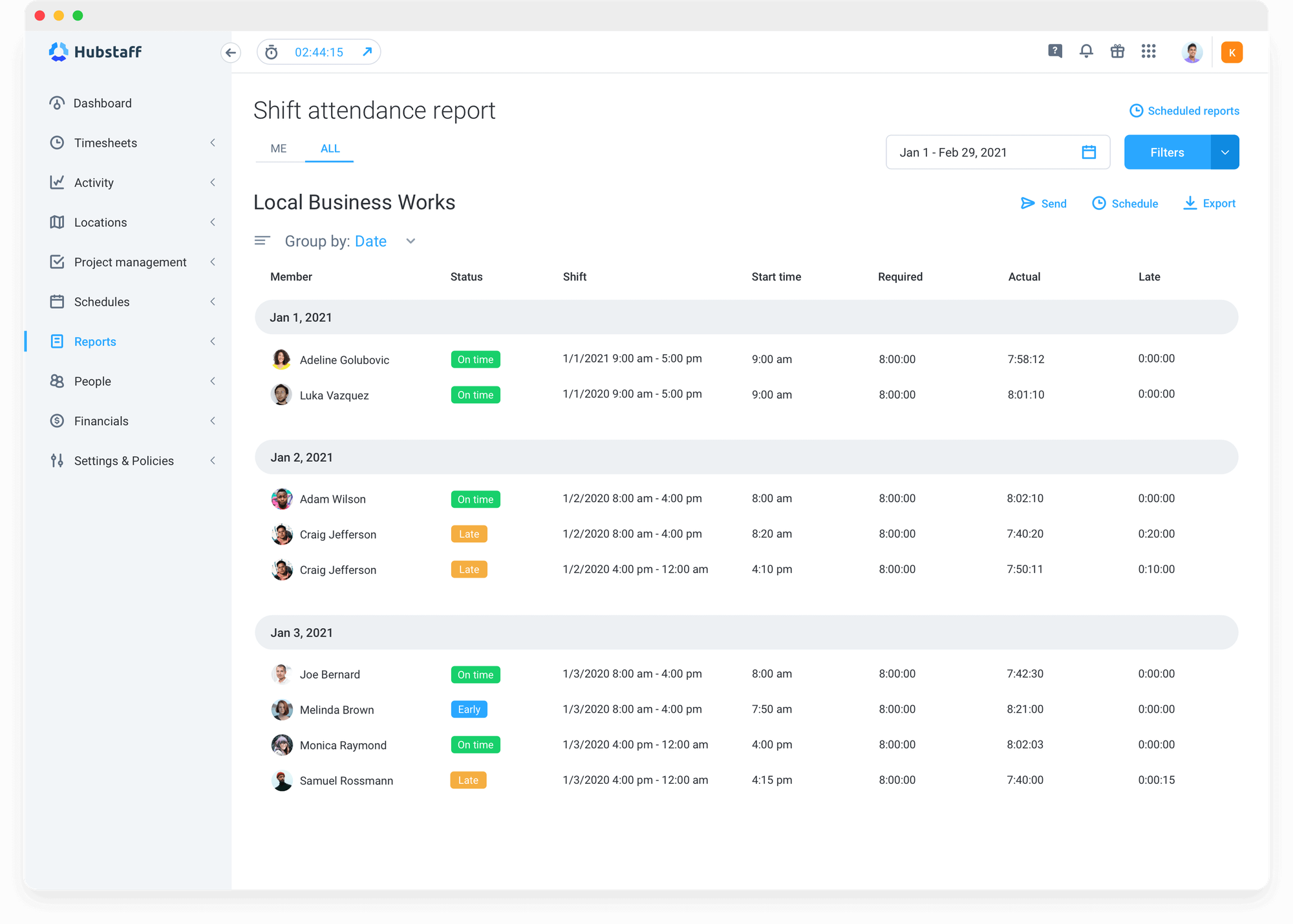
GPS geofencing, online timesheets, and automatic payroll runs. Field teams love it; knowledge workers may find its proof-of-work screenshot frequency and productivity metrics monitoring overkill.
Key Features
- Time tracking – starts capturing time, apps, and URLs on clock-in
- Random screenshots – configurable intervals (1, 3, or 10 minutes) with optional blur
- App & URL monitoring – detailed breakdown of time spent in each application and website
- GPS tracking & geofencing – location tracking for field teams with job site verification
- Zero activity detection – automatically stops tracking during inactivity
- Automatic timesheets – weekly timesheets generated from tracked data with approval workflows
- Payroll – integrates with PayPal, Payoneer, Wise, and Bitwage for one-click payments
- Team scheduling – shift management with availability tracking
- Productivity reports – compare individuals, teams, and projects
Pros
✅ GPS + geofencing is perfect for field service and mobile workforce management
✅ Built-in payroll eliminates third-party payment tools – pay globally in one click
✅ Activity percentages provide objective productivity benchmarks
✅ 14-day free trial with premium features unlocked
Cons
❌ Screenshot monitoring can feel invasive without transparent communication
❌ Activity tracking based on mouse/keyboard may not reflect deep thinking work
❌ Mobile app has fewer features than desktop version
Pricing
- Starter – $4/user/mo (time tracking, limited reports)
- Grow – $7/user/mo (app & URL tracking, timesheets, budgets)
- Team – $10/user/mo (geofencing, payroll)
- Enterprise – $25/user/mo (custom contracts, dedicated support, managed onboarding)
Ratings
- G2: 4.3/5
- Capterra: 4.6/5
User Feedback
I appreciate the feature of the silent app when it works, as it enhances convenience by eliminating the need to start and stop the timer constantly for tracking employee activity. – G2 Reviews
8. Clockify – For Users on Tight Budget
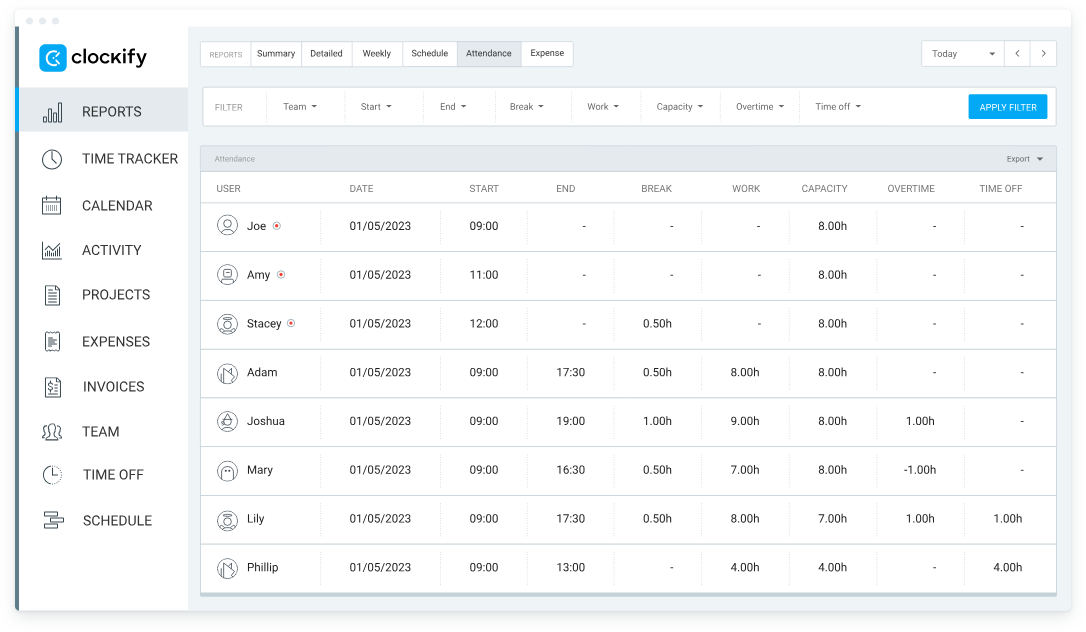
Unlimited users & projects; auto-idle detection and calendar integration. Invoicing & screenshots are paid extras – TMetric bundles them at $5.
Key Features
- Automatic time tracking – desktop app auto-detects apps and websites in use
- Idle time detection – prompts to discard or keep idle periods
- Timesheet approvals – manager review and approval workflows
- Project time tracking – assign time to projects, tasks, and clients
- Kiosk mode – shared device clock-in/out for on-site teams
- Calendar view – visual timeline of tracked time
- GPS tracking (mobile) – location stamps for field teams
- Screenshots (optional, paid plans) – activity proof with configurable intervals
Pros
✅ Free plan is good for a growing team
✅ Browser extension auto-tracks time in web apps without switching windows
✅ Cross-platform support – Windows, Mac, Linux, iOS, Android, browser
Cons
❌ Automatic tracking functionality is limited – it requires a desktop app
❌ Advanced features like screenshots and timesheet enforcement are only on paid tiers
❌ Free plan lacks detailed productivity analytics and custom reports
Pricing
- Free – unlimited tracking (basic reports)
- Basic – $3.99/user/mo (timesheet approvals, labor costs)
- Standard – $5.49/user/mo (scheduling)
- Pro – $7.99/user/mo (budgets, profit tracking, lock timesheets)
- Enterprise – $11.99/user/mo (audit logs, priority support)
Ratings
- G2: 4.5/5
- Capterra: 4.8/5
User Feedback
I have been using Clokify paid version since 2year and application is very easy to use. I haven't found any major bug excluding couple of UI issues. – G2 Reviews
9. Toggl Track – For Freelancer Simplicity & Quick Setup
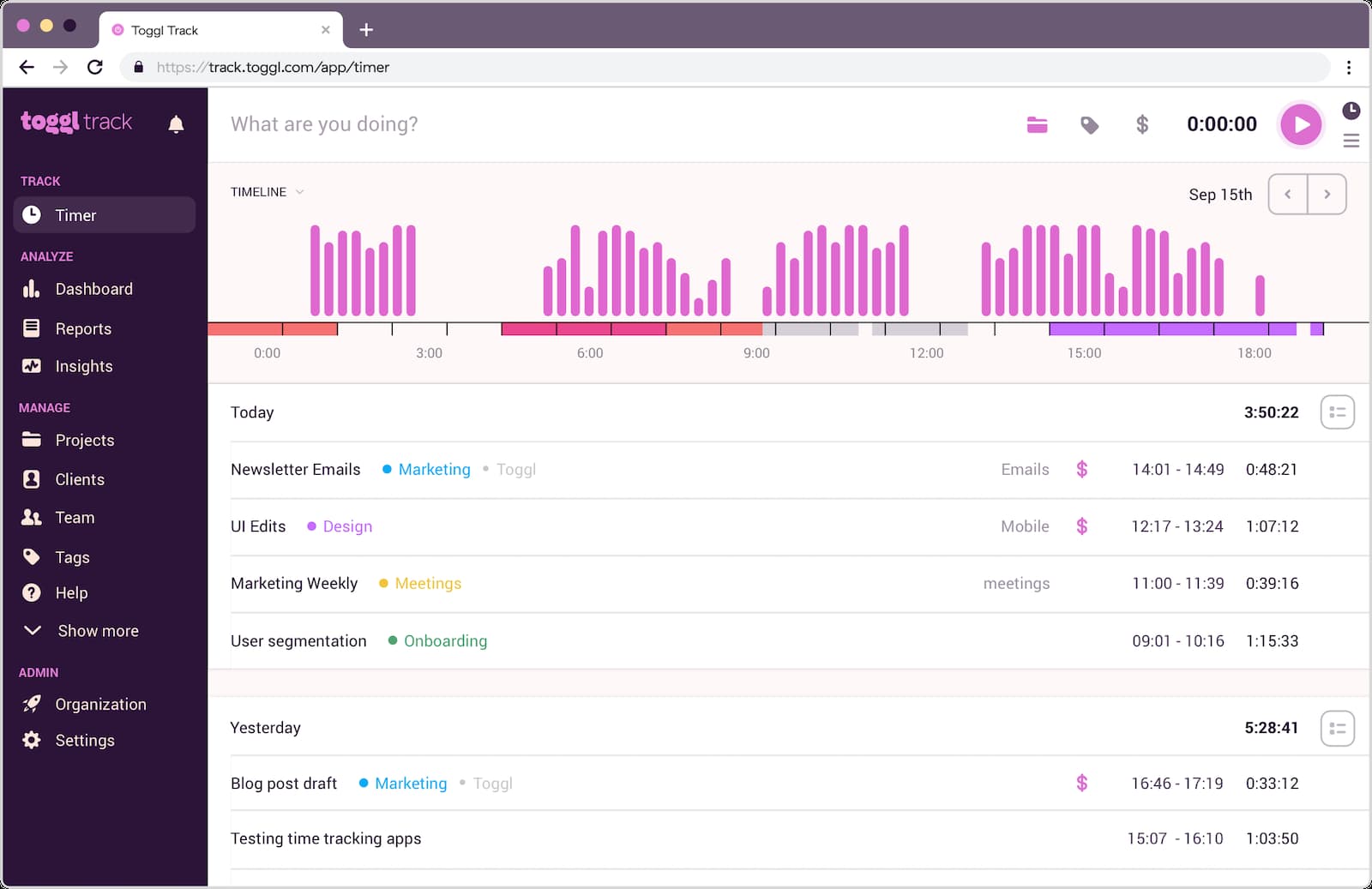
Colorful, quirky, zero learning curve. Automatic idle detection & calendar sync. Reporting depth and billing are weaker than TMetric; pricier at $9 for the full feature set.
Key Features
- One-click time tracking – start/stop timer from desktop, mobile, or browser
- Automatic time tracking (desktop app) – detects apps and idle time, suggests time entries
- Calendar integration – auto-imports calendar events as time entries for quick approval
- Timeline view – visual daily timeline shows all tracked activities
- Idle time detection – prompts to keep or discard inactive periods
- Favorites – save frequent tasks for instant one-click tracking
- Team dashboard – real-time view of who's working on what
- Reminders – notifications to start tracking if you forget
Pros
✅ Intuitive interface
✅ Timeline auto-fill suggests entries based on calendar and past habits
✅ Works seamlessly across all devices with instant sync
✅ Browser extension integrates directly into project management tools
Cons
❌ No screenshot or advanced activity monitoring – relies on trust-based tracking
❌ Automatic tracking features limited compared to surveillance-focused tools
❌ Advanced reporting and team features only available on higher-priced plans
Pricing
- Free – unlimited tracking for up to 5 users (basic reports)
- Starter – $9/user/mo (time audits, billable rates)
- Premium – $18/user/mo (estimates, project templates, alerts)
Ratings
- G2: 4.6/5
- Capterra: 4.7/5
User Feedback
I like that I can easily access it on the computer and/or my phone on the app. It is user-friendly. It also helps me stay on track and I can run reports and categorize to see what I've been working on. I use it everyday. – G2 Reviews
10. QuickBooks Time – For QuickBooks Ecosystem Integration

Native sync with QuickBooks Payroll & invoicing. GPS time clock, scheduling, job costing. Requires QuickBooks ecosystem; if you only need light accounting, TMetric + QuickBooks Online sync is cheaper.
Key Features
- Automatic time tracking – it keeps worktime friction-free
- GPS tracking & geofencing – location-based clock-ins
- Who's Working dashboard – real-time view of active employees
- Job costing – track time and labor costs by project, job, or client
- Crew management – assign teams to jobs with real-time location tracking
- Scheduled shifts – create shifts and receive alerts for late or missing clock-ins
- Kiosk mode – shared tablet/device for on-site team clock-ins with photo verification
- Mileage tracking – automatic GPS-based mileage logging for reimbursement
- Native QuickBooks sync – one-click transfer of timesheets to QuickBooks Online or Desktop for payroll and invoicing
- Mobile time cards – employees can clock in/out, switch jobs, and add notes from smartphones
Pros
✅ Seamless QuickBooks integration eliminates manual timesheet entry for accounting
✅ GPS + geofencing is perfect for field service, construction, and mobile crews
✅ Kiosk mode with photo capture prevents buddy punching
Cons
❌ Best value only for businesses already using the QuickBooks ecosystem
❌ Limited integrations outside of accounting and payroll platforms
Pricing
- Premium – $20 base + $8/user/mo (time tracking, basic reports)
- Elite – $40/mo base + $10/user/mo (geofencing, advanced reports, priority support)
Ratings
- G2: 4.5/5
- Capterra: 4.7/5
User Feedback
QuickBooks Time helps in getting the detailed report, it makes the scheduling an easy task and also provides the feature of real time tracking. – G2 Reviews
11.TimeCamp – For Built-In Margin & Cost Analytics
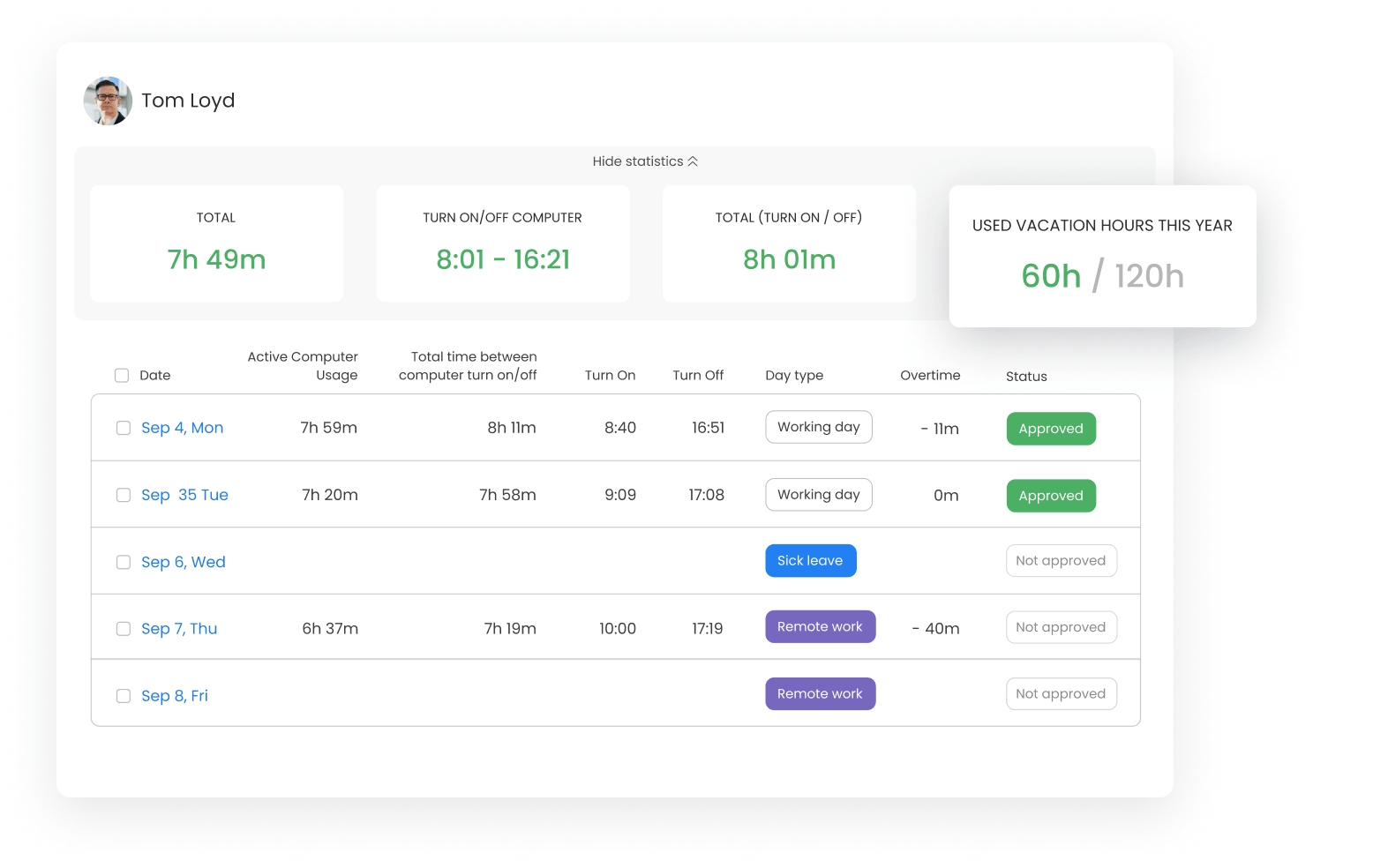
TimeCamp is an automated time tracking app that silently records computer activity, assigns time to projects via keywords, and turns logged hours into invoices—no manual timers needed.
Key features
- Automatic billable / non-billable tags pulled from task keywords.
- Invoicing in one click turns any date range into a branded PDF/Word invoice or exports to other tools
- Real-time margin dashboard: see labor cost vs. revenue per project as the week unfolds—catches scope creep before it eats profit.
- Retainer tracking (burn-down of prepaid hours with automatic client e-mail when 80 % consumed).
- Multi-role hourly rates, overtime rules, and automatic surcharges for rush work.
- Screenshot & activity level granular monitoring.
- Google Calendar sync.
Pros
✅ Profit dashboard shows if a project is worth taking again.
✅ Unlimited users & projects on the free tier (rare for auto-trackers).
✅ Granular privacy toggles keep monitoring transparent.
Cons
❌ Auto-classification needs a short learning window (2-3 days)
❌ Advanced budget alerts only on Pro and up
❌ Mobile screenshot capture not available (desktop only)
Pricing
- Starter – $2.99 user/mo (invoicing, unlimited tasks)
- Premium – $4.99 user/mo (billable hours)
- Ultimate – $7.99 user/mo (timesheet approval, screenshots)
Ratings
- G2: 4.7/5
- Capterra: 4.7/5
User Feedback
As an office manager, it's very easy to teach our employees how to use TimeCamp and it's also very easy to export the timesheets into an Excel file. Overall a very easy and flexible tool to work with. – Capterra Reviews
Selection Criteria Used
- True automation – tool must capture time without manual entry (timer button optional).
- Billing & invoicing – convert tracked hours into branded invoices/accounting exports.
- Scalability – works for freelancers → 100+ staff; offers role-based permissions.
- Integrations – plug into PM (Jira, Asana), accounting (QuickBooks, Xero), comms (Teams, Slack).
- Value – affordable plans with auto-tracking + invoicing included.
- User feedback – minimum 4.0/5 on G2/Capterra with reviews.
Summary
If you want to stop losing billable minutes, you need to start automating your timesheets today.
TMetric delivers the richest feature set for the smallest price: automated tracking, one-click invoicing, payroll exports, and 50+ integrations – all from $7 per user.
👉 Try TMetric for free for 14 days (no card) and join companies that already count every minute with our help.