Time Tracking with Screenshots: 4 Best Tools (& Alternatives)
Time tracking with screenshots has become a popular way to improve transparency and accountability, especially for remote teams. These tools not only track work hours but also capture on-screen activity to provide a clearer picture of productivity. In this guide, we’ll explore the 4 best time tracking tools with screenshots, along with useful alternatives to suit different needs.

By Dereck Mushingairi | December 10, 2026
Choosing the right screenshot-enabled time tracker is less about “Big Brother” and more about picking the moment when a picture truly is worth a thousand logged minutes.
Use the feature when:
- Clients demand proof – Fixed-bid or hourly billing disputes vanish when invoices arrive with blurred, GDPR-friendly screenshots that show work-in-progress without exposing source code or private Slack chats.
- Compliance auditors knock – SOC-2, HIPAA, or GDPR documentation requires immutable evidence that the hours you bill were actually spent inside approved apps; timestamped screenshots become your audit trail.
- Onboarding first-time freelancers – A 30-day “training wheel” period with occasional random snaps helps new contractors learn your task scoping habits, after which you can dial frequency down to zero.
- High-risk, high-cost sprints – If a two-week sprint is budgeted at $50k and one missed deadline triggers penalties, low-friction visuals (every 10 min, auto-blurred) replace daily stand-up micromanagement.
- You’re already losing talent – When devs complain about “useless status meetings,” replace two of those meetings with asynchronous screenshot reviews; teams get time back, managers still see progress.
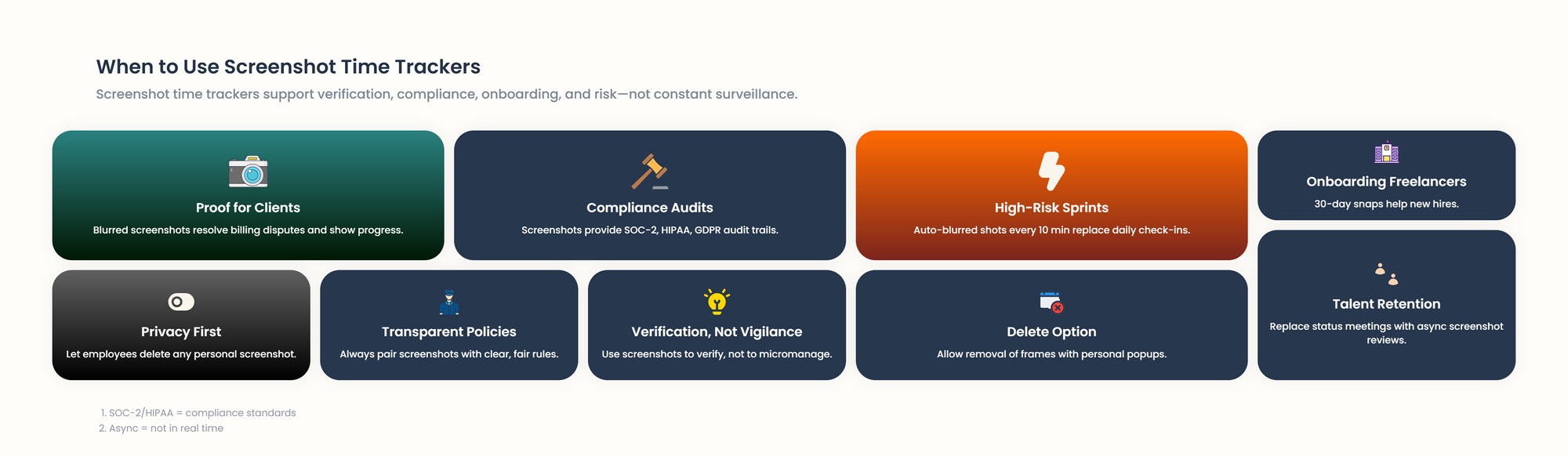
Skip screenshots when trust is high, tasks are creative, or local privacy laws forbid them.
Bottom line: turn screenshots on for verification, not vigilance, and always pair them with transparent policies that let employees delete any frame that catches a personal popup.
Our Top Picks
- TMetric – Ideal for agencies and distributed teams that want screenshot monitoring only when they need it, with privacy kept front-and-center.
- Time Doctor – Tailor-made for far-flung teams that demand deep, data-rich productivity insights.
- Hubstaff – Built for field-service companies that need GPS tracking and occasional screenshots in one package.
- ActivTrak – Geared toward large organizations that prioritize workforce-wide analytics instead of employee-by-employee surveillance.
| Tool | Price | Free Plan | Capterra | Agency Fit | SoftDev Fit | Best For |
|---|---|---|---|---|---|---|
| TMetric | $7–9 | 2 users, core features | 4.7/5 | 5/5 | 5/5 | Agencies & Remote Teams |
| Time Doctor | $7–20 | 14-day trial only | 4.5/5 | 4.5/5 | 3.5/5 | High Accountability Teams |
| Hubstaff | $7–12 | 1 user, limited features | 4.6/5 | 4.5/5 | 3/5 | Field Service & Hybrid Teams |
| ActivTrak | $10–25 | 3 users, 7-day history | 4.6/5 | 3/5 | 4/5 | Large Organizations |
Data Study: Since 2020, time-and-attendance tools have been commanding the workforce-management software market, generating about $2.4 billion — up roughly $700 million from 2018 — and the momentum is only intensifying.
Growth is especially brisk among screenshot-enabled time trackers, as employers demand deeper visibility into remote and hybrid work.
Pricing specifics usually vary, but time trackers with screenshots fall within a higher range of $20+ per user/month.
1. TMetric - Best for Agencies & Remote Teams
Price: Free plan available, paid plans from $7-9/user per month
Available on: Web, iOS, Android, macOS, Windows, Linux
Why I picked TMetric: TMetric is the top screenshot-based time tracker because it treats visual monitoring as an opt-in, not an obligation. Where rival tools always roll the camera, TMetric lets you switch screenshots only for the projects that demand proven billing.
You decide the interval, the images are grabbed quietly, and each one can be checked before it’s shared—no Big-Brother vibe.
Agencies love being able to promise one client full transparency while giving another simple timers, and developers keep coding without the reflex glance over their shoulder.
That on-demand philosophy extends to each privacy setting, which helps teams stay productive and trusted rather than merely watched.
Key Features
- Optional screenshot capture
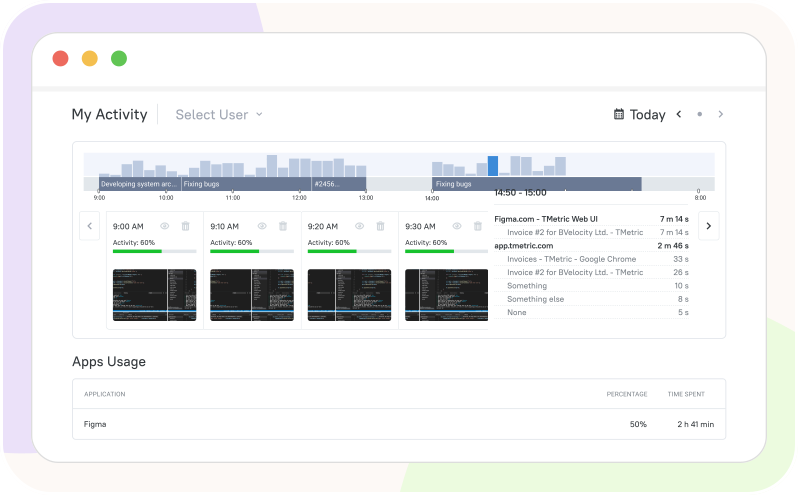
Enable it per project or team member and set the interval anywhere from 5 to 30 minutes.
Because every snap is stored with the matching time entry, you always have visual proof for clients or payroll without extra admin work.
- Accurate Time Tracking
The desktop app integrates with your IDE, design tools, and browser, making it easy to start timers with a single click.
Built-in reminders prompt you to track when you forget, and idle detection alerts you if the timer runs while you're away—so you can adjust entries and keep timesheets accurate without manual cleanup.
- Detailed Time Reports
One click produces a timesheet that breaks the day into projects, tasks, and billable vs non-billable blocks.
Export the sheet to PDF, CSV, or QuickBooks and send the invoice while the work is still fresh in the client’s mind.
- Activity Level Monitoring
Keyboard and mouse strokes are translated into a simple percentage so you can see if a 4-hour block was truly productive.
Managers spot burnout early and employees get objective data to show how focused they really were.
- Client Billing Integration
Turn any approved time entry into a line on an invoice; TMetric pulls the hourly rate, task name, and description automatically.
You can brand the invoice, set payment terms, and mark it as sent without ever leaving the app.
- Privacy Controls
Team members can blur screenshots that show passwords or personal tabs before they ever reach the manager’s screen.
If something still slips through, the employee can delete the individual screenshot within 24 hours without deleting the time entry.
- Offline Time Tracking
Keep coding on the plane – the desktop client logs every minute locally and syncs the moment you reconnect.
You’ll never lose billable hours again, and the sync badge shows exactly how many entries were uploaded.
Integrations
More than 50+ integrations with project management and invoicing tools, including Jira, Asana, Trello, Notion, Basecamp, GitHub, GitLab, Slack, Microsoft Teams, QuickBooks, Xero, and FreshBooks. Browser extensions integrate seamlessly with web-based tools for one-click time tracking.
Pros
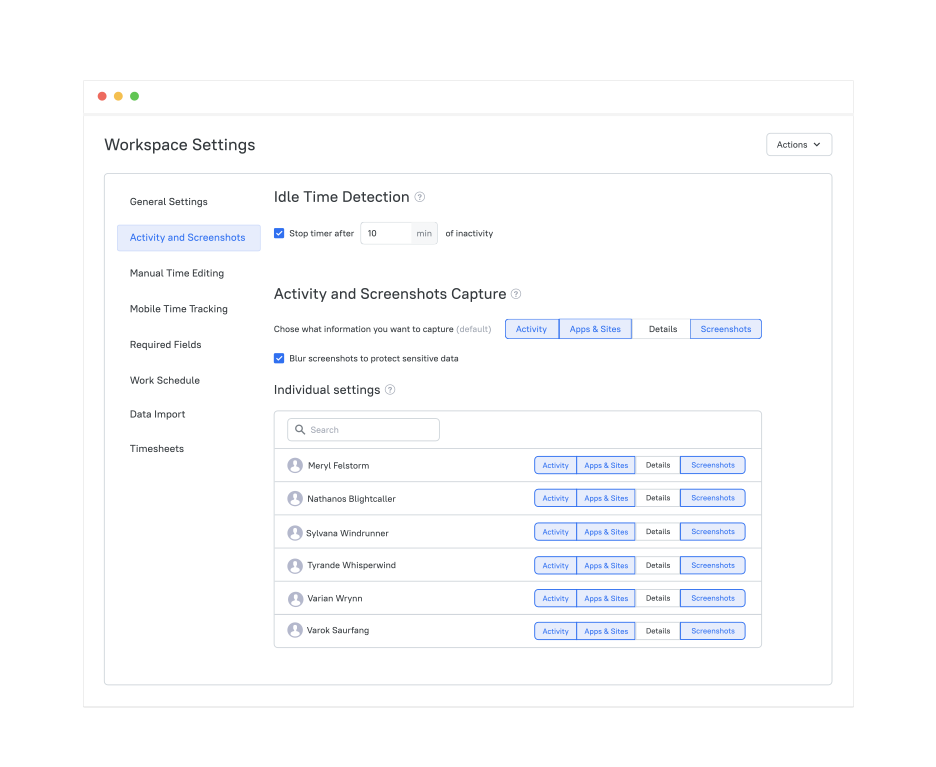
- Screenshot feature is genuinely optional, not forced on employeesWorkspace Settings › Activity & Screenshots – owners can leave capturing OFF globally, enable it per-member, or blur sensitive content.
- Generous free plan supports up to 5 team members with core functionality
Dashboard on the $0 tier – unlimited projects/clients, timer in 50+ apps, PDF/CSV exports. - Intuitive interface requires minimal training for new users
One-click timer, auto-suggested projects, real-time sync – most new hires are tracking in <5 min. - Strong privacy controls give employees agency over their captured data
Members can delete or blur their own screenshots, see every snapshot taken, and download activity logs. - Excellent for agencies that need flexible billing proof without alienating staff
Billable rates, time rounding, branded PDF/CSV exports, and QuickBooks export – clients get clean invoices, staff keep autonomy.
Cons
- Mobile apps lack screenshot capability (desktop only)
- Advanced reporting features require higher-tier plans
Scores
Agency Fit Score: 5/5 | SoftDev Fit Score: 5/5
Ratings
- Capterra: 4.7/5
- G2: 4.5/5
User Comments
I'm spending much less time on invoicing and time tracking than I used to---MUCH less. Used to take me an hour or two monthly to sort everything out and bill clients. Now I'm done in about 10 minutes, tops. - Capterra User Reviews
We like that with a few clicks, my team can log time with TMetric's user-friendly interface, and that reports guarantee billing on the time spent (this also helps us prevent scope creep and set reasonable project budgets). - Capterra User Reviews
Our main business problem is managing remote work. TMetric allows me to do that easily and transparently. – Capterra User Reviews
2. Time Doctor - For Distributed Teams with High Accountability Needs

Price: Plans from $7-20/user per month (14-day free trial)
Available on: Web, iOS, Android, macOS, Windows, Linux
Why I picked Time Doctor: Time Doctor pushes automated screenshot-based time tracking to its limit, assembling one of the most exhaustive employee-monitoring packages on the market.
Built for organizations that treat radical transparency as a core value—especially outsourced squads and call centers where screen captures are routine—the tool snaps random desktop images, logs keystroke-level activity, catalogs every visited site, and can even snap periodic webcam shots.
The all-seeing approach is overkill for many cultures, but remote teams bound by compliance rules or client contracts often conclude that Time Doctor is the only product that checks every box.
Key Features
- Random screen capture – Snaps screenshots at irregular intervals to eliminate timing workarounds.
- App & website monitoring – Auto-labels every site or program as productive, neutral, or distracting.
- Productivity scoring – Calculates daily focus scores from keyboard/mouse activity and app usage.
- Payroll-ready time tracking – Converts logged hours into wages; syncs with Gusto, ADP, Payoneer, Wise.
- Client portal – Share live time sheets and screenshot feeds with customers on demand.
- Distraction nudges – Real-time alerts (when employees stay on unproductive pages).
- Optional video recording – Upgrade from still shots to screen replay.
Integrations
The tool integrates with project management platforms—Asana, Trello, Jira, Monday.com, Basecamp, and Slack—and with payroll services like Gusto, ADP, Payoneer, and Wise for seamless payments.
Pros
- Extremely thorough monitoring satisfies even the most demanding compliance requirements
- Client portal feature is good for businesses to prove work hours
- Robust reporting with exportable data in multiple formats
- Good for remote teams where managers have limited other oversight options
- Mobile apps include screenshot capability
Cons
- Intensive monitoring can feel oppressive and damage team morale
- Higher learning curve due to feature complexity
- More expensive than alternatives, especially at scale
- Employees often perceive it as "Big Brother" software
Scores
Agency Fit Score: 4.5/5 | SoftDev Fit Score: 3.5/5
Ratings
- Capterra 4.5/5
- G2 4.4/5
User Comments
The core features for time tracking are solid and reliable. It does a good job of tracking user activity and providing insights into how time is spent. The productivity rating list, in concept, is very useful because it lets you classify websites as productive or unproductive, which can help with better team oversight. – G2 Reviews
3. Hubstaff - For Field Service and Hybrid Teams
Price: Plans from $7-12/user per month
Available on: Web, iOS, Android, macOS, Windows, Linux
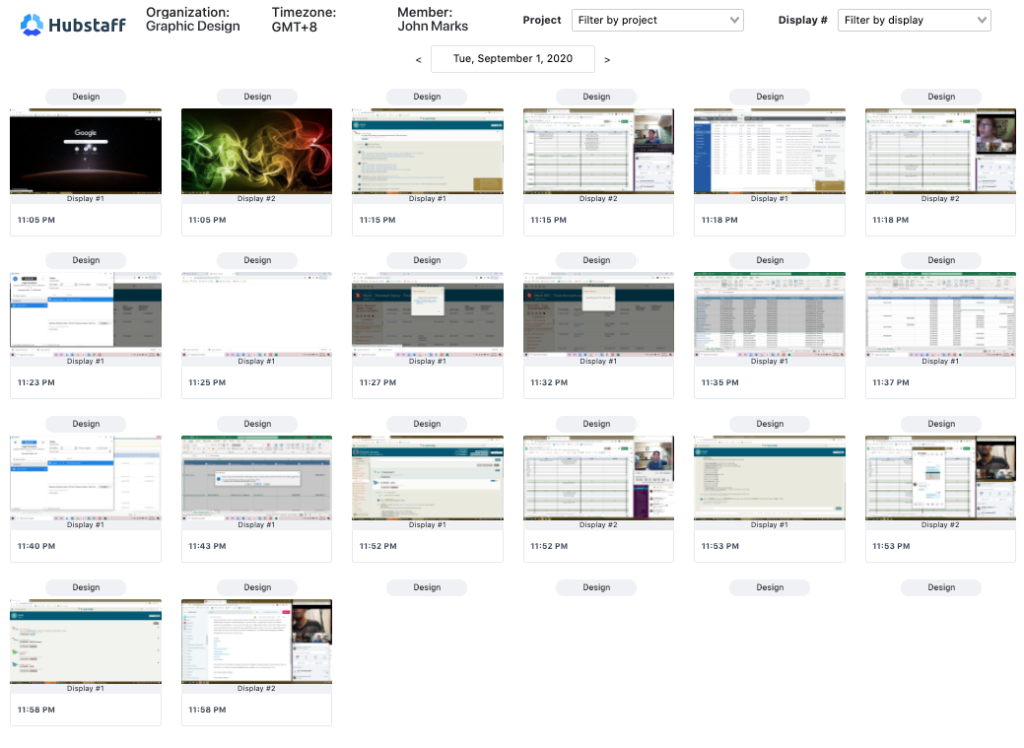
Why I picked Hubstaff: Hubstaff blends time tracking with screenshots and GPS, so one tool can answer “where was the team and what did they do?”—a single source of truth for desk and field staff alike.
Crews on job sites, drivers on routes, and techs at client offices all get the same clear record: location stamps prove presence, screen grabs prove activity, and both feed straight into the timesheet manager approves.
The result feels more like a productivity dashboard than a surveillance feed, giving construction firms, delivery fleets, and IT consultancies verification without the “Big Brother” tone of Time Doctor.
Key Features
- GPS location tracking - Real-time GPS tracking with geofences and route history keeps mobile crews accountable.
- Automatic screenshots - Silent screenshots snap every 1–30 min to show work in progress.
- Activity levels - Keyboard + mouse metrics reveal active vs. idle time.
- Time limits and budgets - Set hour-limits per project and get instant alerts before budgets blow.
- Invoicing - Generate client invoices directly from tracked time
- Scheduling - Shift planning and attendance tracking
- Productivity analytics - Dashboard showing trends across teams and projects
Integrations
Hubstaff connects with 30+ of the most-used business apps—Jira, Asana, Trello, GitHub, QuickBooks, PayPal, Wise, Gusto, Basecamp, Slack and more—so you can start a timer in any of them with a single click via the browser extension.
Pros
- GPS + screenshots = complete field-worker accountability
- Built for hybrid office/remote teams
- Visual dashboard instantly reveals productivity trends
- Integrated scheduler removes the need for extra shift software
- Mobile apps deliver full screenshot capture on the go
Cons
- Some users report that screenshots occasionally capture during idle time
- Higher-tier features require expensive plans
Scores
Agency Fit Score: 4.5/5 | SoftDev Fit Score: 3/5
Ratings
- G2: 4.5/5
- Capterra: 4.6/5
User Comments
I appreciate the feature of the silent app when it works, as it enhances convenience by eliminating the need to start and stop the timer constantly for tracking employee activity. – G2 Reviews
4. ActivTrak - For Workforce Analytics Without Individual Surveillance
Price: Plans from $10-25/user per month
Available on: Web, macOS, Windows
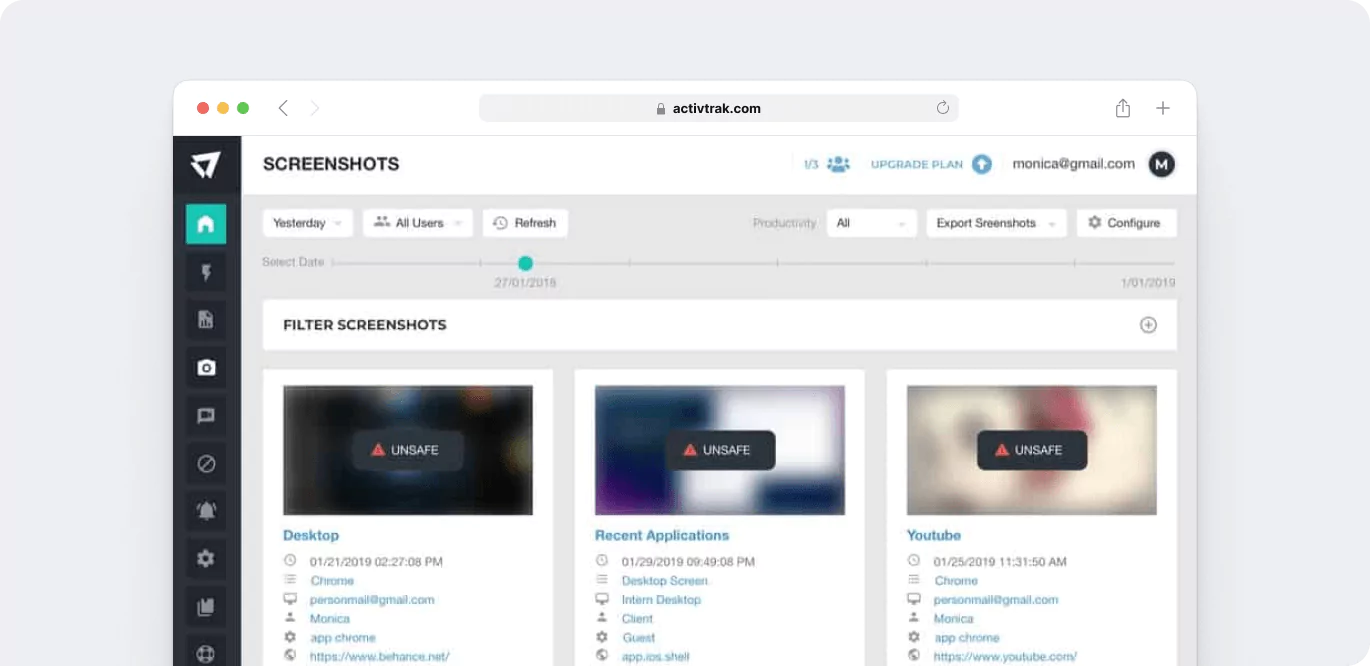
Why I picked ActivTrak: ActivTrak reframes screenshot monitoring as big-picture workforce intelligence instead of employee-level spying.
It still grabs screen images, but the insights are rolled up to team-wide trends—spotting process jams, sluggish apps, or training shortfalls—so companies can streamline work without breeding mistrust.
HR and ops teams get a data-driven view of how tasks really flow, where friction hides, and what skills are missing, all while keeping the culture collaborative rather than watched.
Key Features
- Productivity Scoring – Focuses on team-level performance metrics rather than individual surveillance.
- Application and Website Tracking – Automatically classifies tools and websites as productive or distracting.
- Behavioral Analytics – Identifies work patterns such as multitasking, focused work periods, and collaboration trends.
- Custom Productivity Definitions – Tailor productivity criteria to align with specific roles and responsibilities.
- Coaching Insights – Offers recommendations for process improvements and targeted training opportunities.
- Alert System – Notifies managers of policy violations or unusual activity patterns.
- Privacy by Design – Screenshots are used selectively for verification purposes, ensuring respectful and non-intrusive monitoring.
Integrations
ActivTrak connects with HR systems, including BambooHR, Workday, and ADP for employee data synchronization. Also integrates with Slack and Microsoft Teams for communication pattern analysis.
Pros
- Emphasis on team-level insights reduces "Big Brother" perception
- Excellent for identifying process inefficiencies and training needs
- Strong privacy controls and transparent data usage policies
- Good for large enterprises needing workforce optimization
- Helpful for understanding remote work patterns without micromanagement
Cons
- Limited project-level time tracking compared to dedicated time trackers
- Higher price point than alternatives
- No mobile apps limit the usefulness for hybrid teams
- Screenshot features are less robust than specialized monitoring tools
Scores
Agency Fit Score: 3/5 | SoftDev Fit Score: 4/5
Ratings
- G2: 4.3/5
- Capterra: 4.6/ 5
User Comments
ActivTrak makes it easy to see how our team is spending their time. It’s helpful for keeping track of productivity, especially since we manage a lot of moving parts, office rentals, conference room bookings, and customer support. The dashboard is clear, and the reports are useful for checking in without micromanaging. – Capterra User Reviews
Other Time Tracking Options
For teams with specific needs beyond screenshot monitoring, consider these alternatives:
- Toggl Track – Clean, distraction-free timer built for freelancers and small agencies; zero screenshots, total privacy.
- Clockify – 100 % free for unlimited users; upgrade only if you need screenshot proof.
- DeskTime – Runs in the background, logs hours automatically, and lets you add screenshots only when you want them.
- Teramind – Enterprise shield, which delivers real-time screen capture, behavior AI, and data-loss prevention in one suite.
- Work Examiner – Regulated-industry watchdog that captures every click for bullet-proof audit trails.
- StaffCop – Insider-threat specialist that records keystrokes and flags risky behavior before damage happens.
- Monitask – Startup-friendly price with screenshot snapshots that keep remote teams accountable.
- Time Champ – One of the leaders and favorites, which offers an attendance-plus-productivity tracker with optional screen proof.
- Insightful – Gentle analytics and occasional screenshots paired with coaching insights to grow your team, not spy on it.
- Connecteam – One app replaces three, track time, schedule shifts, and chat with your field crew with GPS functions included.
Screenshot Monitoring: Legal and Ethical Considerations
Legal Requirements by Region
United States
Federal: allowed on company devices with notice
Under the ECPA, when an employer supplies a computer, that device is considered company property, giving the employer broad authority to oversee virtually everything an employee does on it—documents saved, files downloaded, websites visited, and even periods of activity or inactivity.
Since state laws on employee monitoring vary, note that remote workers residing in different states create multi-jurisdiction compliance issues, which require thorough legal review before activation.
European Union
GDPR: explicit consent + data minimization
GDPR lets employers screenshot staff only with explicit consent or vital interest, and only the minimum data.
Works councils must green-light the tool first.
Workers can view their images anytime; companies must auto-delete them at the earliest possible date.
United Kingdom
Employee consultation required
Employment law insists that any screenshot monitoring stay strictly proportionate to the business aim.
The ICO requires a DPIA upfront and mandates full transparency about what will be captured and why.
Staff must be consulted first, and the exact monitoring rules spelled out in their contracts.
Canada
PIPEDA / Fair Work: least-invasive method + clear notice
PIPEDA demands both consent and a legitimate business reason before any employee can be monitored, while Ontario and Quebec impose even tighter provincial rules.
Employers must choose the least intrusive means that still achieves the business objective.
Australia
Fair Work Act limits workplace surveillance
Employers must provide written notice before implementing screenshot monitoring systems.
The Privacy Act applies to the storage and use of screenshot data, requiring reasonable security measures and limiting secondary uses.
Ethical Screenshot Monitoring – 6 Quick Practices
Transparency First
- Written policy before rollout
- Show sample shots at onboarding
- Invite staff to shape the rules
Minimal Capture
- 10-15 min intervals, not video
- Auto-pause on breaks & after hours
- No personal/BYOD screenshots
Employee Control
- One-click blur or delete
- Full self-view portal
- Clear appeal channel
Purpose Limitation
- State exact use (billing, compliance)
- Never for surprise performance reviews
- No external sharing
Storage Security
- AES-256 encrypt at rest & in transit
- Role-based access only
- 30-90 day auto-delete
Regular Review
- Quarterly necessity check
- Anonymous staff survey
- Sunset if value < morale cost
Summary
Screenshot monitoring can save billable proof and keep clients happy—but only if it’s optional, transparent, and secure.
Among all contenders, TMetric remains the best time tracking software with screenshots for agencies and dev teams that want real-time insights without sacrificing privacy.
Start free, turn screenshots on only where you need them, and scale ethically.
Ready to try? 👉 Create a free TMetric workspace in 2 minutes and import your existing projects instantly.
Learn more: TMetric Time Tracker with Screenshots
Selection Criteria Methodology
We evaluate each tool's screenshot implementation specifically for the balance between accountability and employee trust.
We analyzed 35 screenshot-capable tools, scored them on such criteria as:
- Privacy controls
- Integration depth
- Key features for businesses
- Value per seat
- Real-user ratings from G2 & Capterra.
Tools had to offer automated screenshots, a public price list, and ≥ 50 verified reviews.