Top 10 Best Attendance Tracking Software Tools (Free & Paid Options)
Accurate attendance tracking is essential for managing teams efficiently, especially in remote and hybrid work environments. In this guide, we’ll look at the top 10 best attendance tracking software tools, including both free and paid options, to help you choose the right one for your needs.

By Dereck Mushingairi | January 25, 2026
It doesn’t matter if you are in charge of a 4-person design shop in Austin, or heading a 300-agent security firm on three continents, or even teaching 120 freshmen in a Chicago high school, one thing is non-negotiable: you must know who was present, when, and how long.
Attendance tracking software refers to the electronic logbook that is used in place of clipboards, punch cards, and the much-hated reply-all email roll-call.
It records clock-ins/outs, flags no-shows, exports timesheets, and—when configured correctly—syncs every minute with payroll, billing, or grading systems.
When 68% of knowledge workers still operate hybrid schedules and field teams rely on mobile data, the best attendance tracking software is no longer a nice-to-have— it’s infrastructure.
This guide cuts through marketing fluff to deliver a side-by-side comparison of nine proven tools, each positioned around the single question every buyer asks: “What is this actually best for?”
We cover free attendance software for bootstrapped startups, biometric attendance apps for high-security sites, and full-suite HR platforms that let you onboard, insure, and pay employees in one dashboard.
By the end, you’ll know exactly which attendance tracking system fits your team size, budget, compliance needs, and tech stack.
What Makes Great Attendance Tracking Software?
Before we dive into the shortlist, let’s align on the six non-negotiables that separate market leaders from the rest.
Time and Attendance Sync
The best tools treat time tracking and attendance tracking as two sides of the same coin. They let employees start a timer when work begins and mark them “present” automatically, eliminating double entry for managers.
Real-Time Reporting and Dashboards
Managers do need lots of features for monitoring atendance - they include live headcounts, late-arrival alerts, and overtime thresholds pushed to their phones before the 9 a.m. stand-up. Hence, look for customizable widgets and one-click CSV or PDF exports.
Verification Methods: Geolocation, QR, Biometrics
Remote employee attendance is only trustworthy when paired with verification. Options range from simple GPS stamps and selfie check-ins to facial recognition time clocks and palm-vein scanners.
Integration with HR, Payroll, Project Management
An attendance management solution should speak natively to the apps you already pay for—QuickBooks, ADP, Gusto, BambooHR, Jira, Slack, or Google Workspace—so data flows without Zapier gymnastics.
Mobile Accessibility and User Interface
Deskless workers clock in from construction sites, delivery vans, or classroom corners. The mobile app must work offline, sync later, and require zero training.
Privacy, Data Security, and Compliance
GDPR, CCPA, HIPAA, FERPA—the alphabet soup matters. Choose vendors that offer on-premise deployment, single-tenant clouds, SOC-2 Type II reports, and EU data residency.
Tip: If you’re already using TMetric for project time tracking, its built-in attendance automation satisfies five of the six criteria above out of the box.
Learn more: TMetric attendance tracking software, automated employee timesheet app.
Top Attendance Tracking Software
Below are nine tools we tested hands-on for two weeks each.
Each of the entries will have:
- An at-a-glance conclusion
- Feature bullets
- Optimal user size
- Clear pricing (annual vs monthly pricing differences may apply).
1. TMetric – Best for Agencies & Project-Based Teams
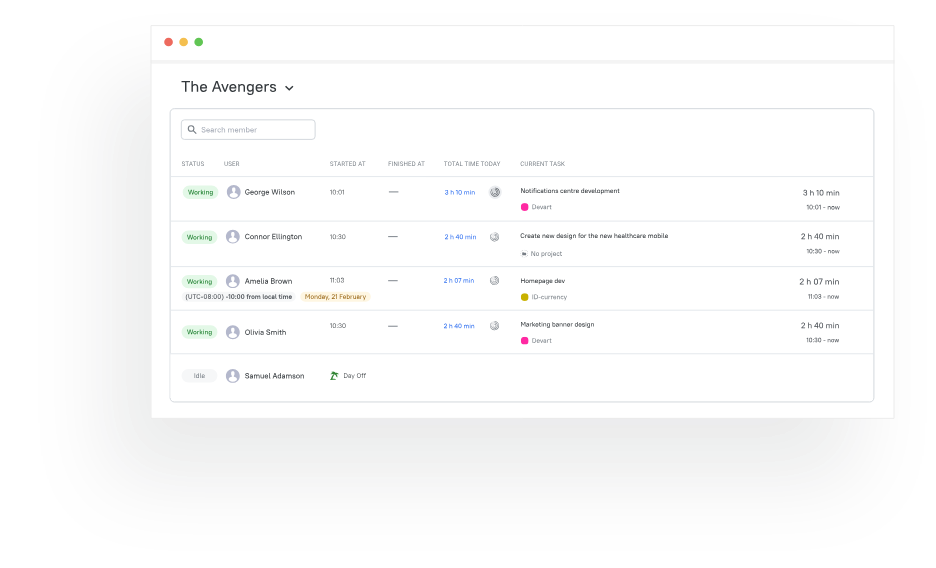
Summary: In any work environment, TMetric can easily double as a lightweight project time tracker and an employee attendance tracker. Creative agencies love it because a one timer feeds both client invoices and HR timesheets. TMetric wins if you need deep project profitability tied to attendance.
Feature Highlights
• One-click timer that marks attendance automatically
• Real-time dashboards showing who’s online, idle, or off
• Jira, Trello, Asana, ClickUp, and 50+ integrations
• Flexible workday rules: late-in, early-out, half-day thresholds
• GDPR-ready EU servers + SOC-2 Type II. To check that a user is allowed in, TMetric looks at the special “bearer token” the user’s app sends along with each request. If the token is valid, the user can get in; if not, access is denied.
Ideal For: 5–250-person agencies, consultancies, or software shops billing by the hour.
Pricing: Free for individuals and teams of 2; Professional $5.83/user/month; Business $7.50/user/month.
TMetric Angle: If you already track time for client profitability, turning on attendance is literally a toggle—no new tool to learn.
2. Buddy Punch – All-in-One Workforce Management Platform
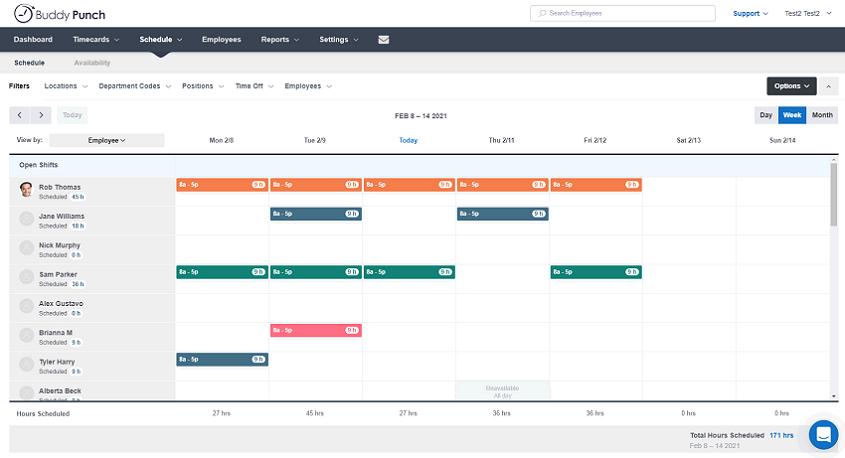
Summary: Buddy Punch combines employee time and attendance tracking, scheduling, PTO tracking, and payroll into a single affordable platform. It stands out for its flexibility around leave policies and ease of setup.
Feature Highlights
• Time and PTO tracking with automated accruals
• Custom leave policies with blackout dates and approval workflows
• PTO balances visible anytime via web or mobile app
• Approved time off automatically added to timesheets
• Scheduling view that displays employee time off at a glance
Ideal For: Businesses of any size needing flexible, easy-to-launch PTO and time tracking without enterprise complexity.
Pricing: Starting from $4.49/user/month (Subscription); Free Trial available.
3. Connecteam – All-in-One Solution for Deskless Teams
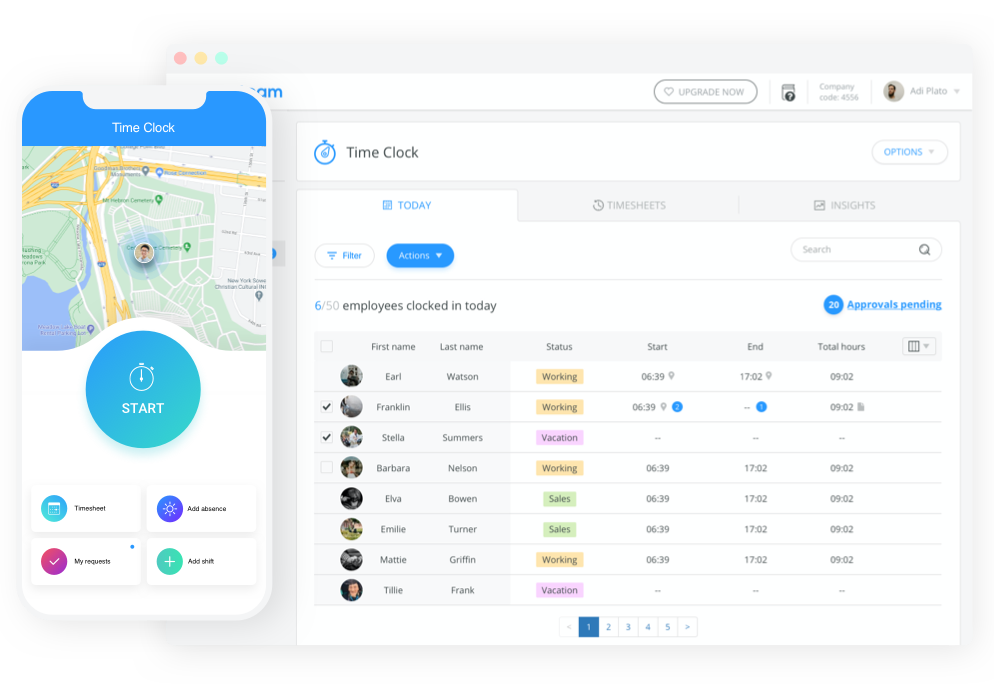
Summary: Connecteam combines several functions - it is an attendance tracking system with shift scheduling, It also has training modules, and internal comms - all in a single mobile-first hub. Connecteam wins on breadth.
Feature Highlights
• GPS, kiosk mode, and geofenced clock-ins
• Drag-and-drop scheduler that warns about overtime or double booking
• Built-in chat and knowledge base for field staff
• Payroll-ready exports to Gusto, QuickBooks, Paychex
Ideal For: 10–1,000+ hospitality, retail, healthcare, or security workers without desktop access.
Pricing: Free up to 10 users; Basic $29/month flat (up to 30 users); Advanced $49/month.
4. Jibble – Great for Biometric & Verified Clock-Ins
Summary: Jibble markets itself as “the facial recognition time clock that fits in your pocket.” Snap a selfie at clock-in; AI verifies it’s really you.

Feature Highlights
• Offline biometric attendance app with face match & palm recognition
• QR and NFC tag support for shared tablets
• Detailed audit trail to satisfy ISO-27001 auditors
• Slack and Microsoft Teams bot for quick “in/out” commands
Ideal For: 5–500-person construction, manufacturing, or healthcare teams where buddy-punching is a risk.
Pricing: Free forever for unlimited users; Power-ups (facial recognition) from $2.50/user/month.
5. Clockify – Budget-Friendly Time & Attendance Tracker
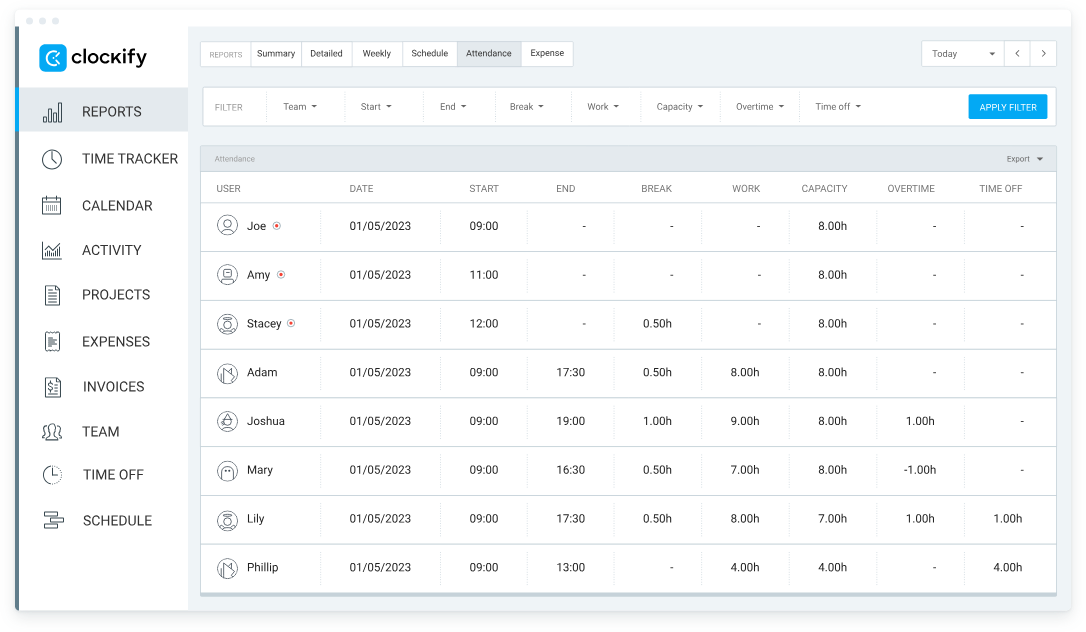
Summary: Free attendance software was transformed by Clockify years back and still provided the most generous free one.
Feature Highlights
• Unlimited users, projects, and time entries on the free plan
• Computerized kiosk mode, web browser version and mobile applications.
• Timesheet approach to approvals.
Integrations with 80+ apps such as Notion, and Monday.com.
Perfect For: Freelancers, Non-Governmental Organizations, and bootstrapped start ups that are mindful over its costs.
Pricing: Free; Basic $4.99/user/month adds time-off; Standard $5.49 adds invoicing.
6. Rippling – Best for HR/IT Integration
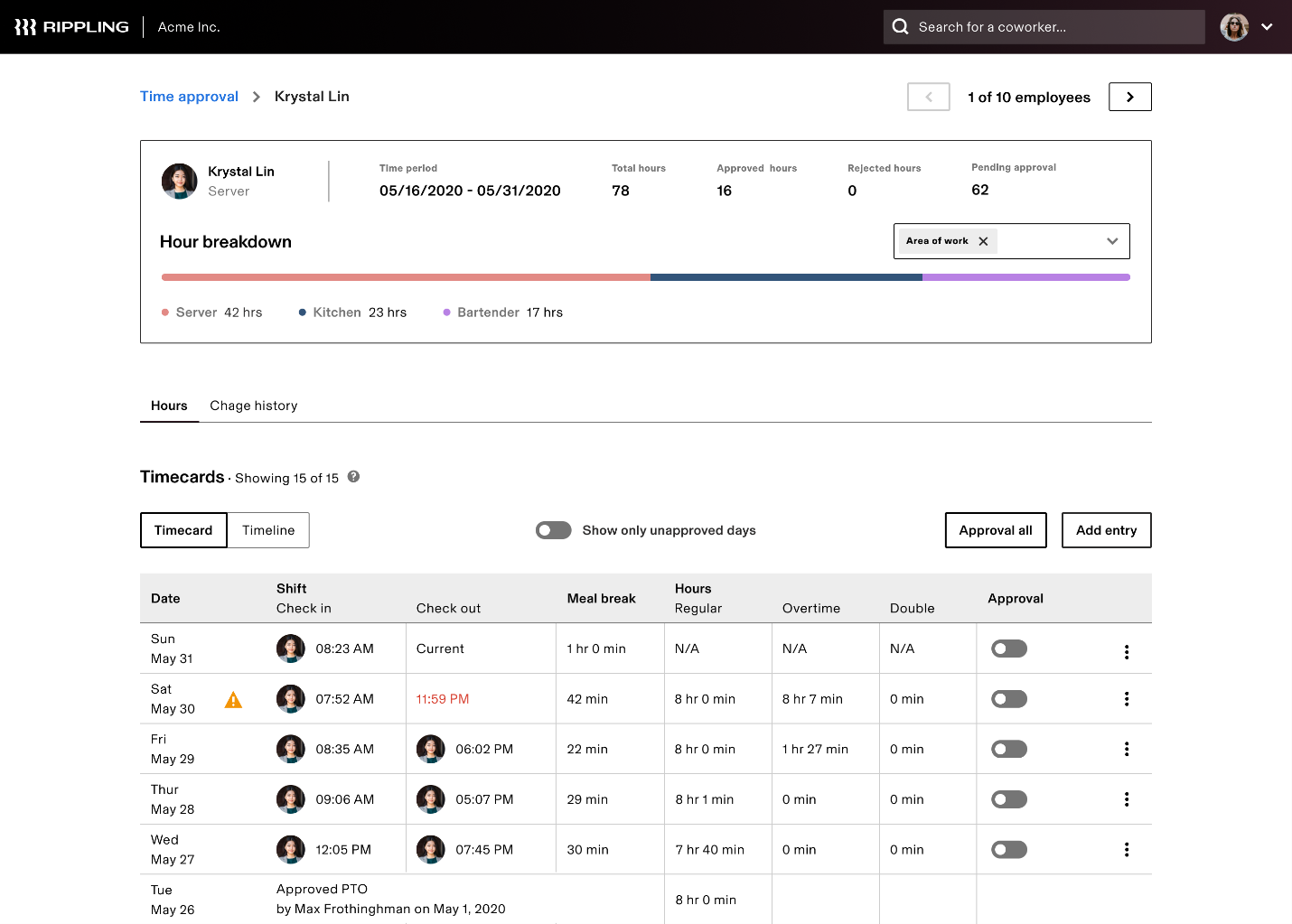
Summary: Rippling unifies HR, IT, and Finance so you can hire, set up a laptop, and enroll an employee in benefits from the same screen that records their first clock-in.
Feature Highlights
• Pre-built time clock software synced to payroll in <60 seconds
• Device management: push security patches at the same time you track attendance
• 500+ app integrations including NetSuite, Sage, and Slack
• Advanced compliance for SOX, HIPAA, and FedRAMP
Ideal For: 25–5,000 employee companies that want one source of truth for HR and IT.
Pricing: Starts at $8/user/month (minimum 25 users) plus add-on modules.
7. TimeCamp – Ideal for Automated Time & Attendance Reports
Summary: TimeCamp is the tool that brings users “set-it-and-forget-it” tracking experience. Desktop and mobile apps monitor computer activities with ease. Provided attendance corrections are a significant bonus.

Feature Highlights
• Automatic time clock and idle time detection functionality
• Attendance reporting on the level of daily, weekly, by project, by billable rate usage
• A range of integrations, such as Asana and Zendesk, is 30 and more.
• Role-based permissions - separately, for managers and clients
Ideal For: Remote software teams, digital agencies, and organizations wishing to streamline timesheet management.
Pricing: Free for unlimited users (limited features); Starter $2.99/user/month; Premium $4.99.
8. MyAttendanceTracker – Top Pick for Educators
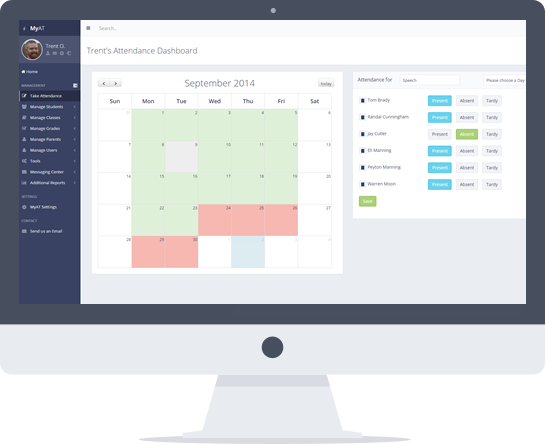
Summary: MyAttendanceTracker replaces paper gradebooks and period-by-period attendance sheets – an ideal tool for the education sector and teachers.
Feature Highlights
• One dashboard for daily and semester attendance
• Parent portal - it keeps dots connected since it automatically sends emails with absence alerts
• Seating charts and behavior notes will be linked to each student record
• FERPA-compliant hosting and yearly data archival
Ideal For: K-12 classrooms, tutoring centers, and after-school programs.
Pricing: Free basic plan; Pro $15/month per school site.
9. OneTap – Best for Events and QR Check-ins
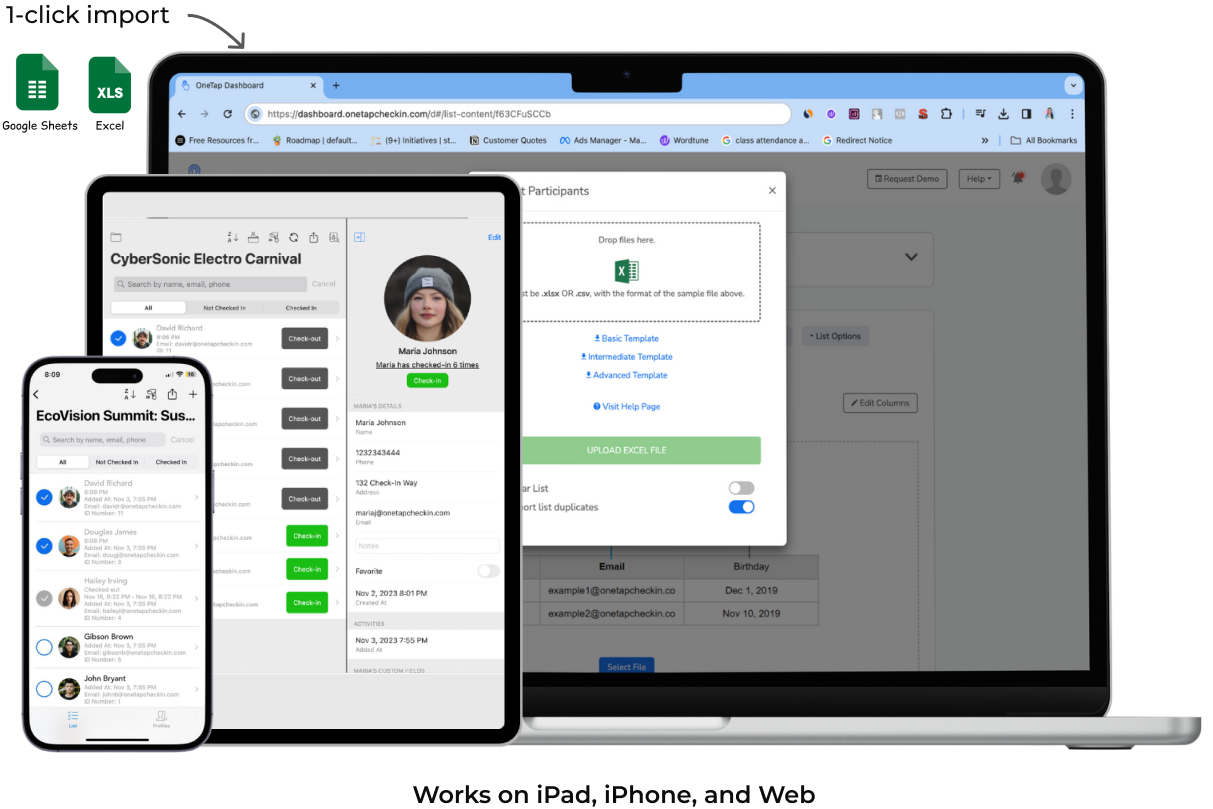
Summary: Originally a conference check-in application, OneTap has become a lightweight attendance tracking system that supports pop-up events, churches and yoga studios.
Feature Highlights
• Instant QR code generation and scanning (no app install for attendees)
• Real-time headcount with automatic fire-code warnings
• CSV export to Mailchimp, Salesforce, or Google Sheets in two taps
• Offline feature that makes a sync when Wi-Fi is reconnected.
Best Use: Ideal with event organizers, community groups or gyms with under 200 people in their classes.
Pricing: Free up to 50 events; Pro $19/month unlimited.
10. Hubstaff – Comprehensive Tool with GPS & Productivity Insights
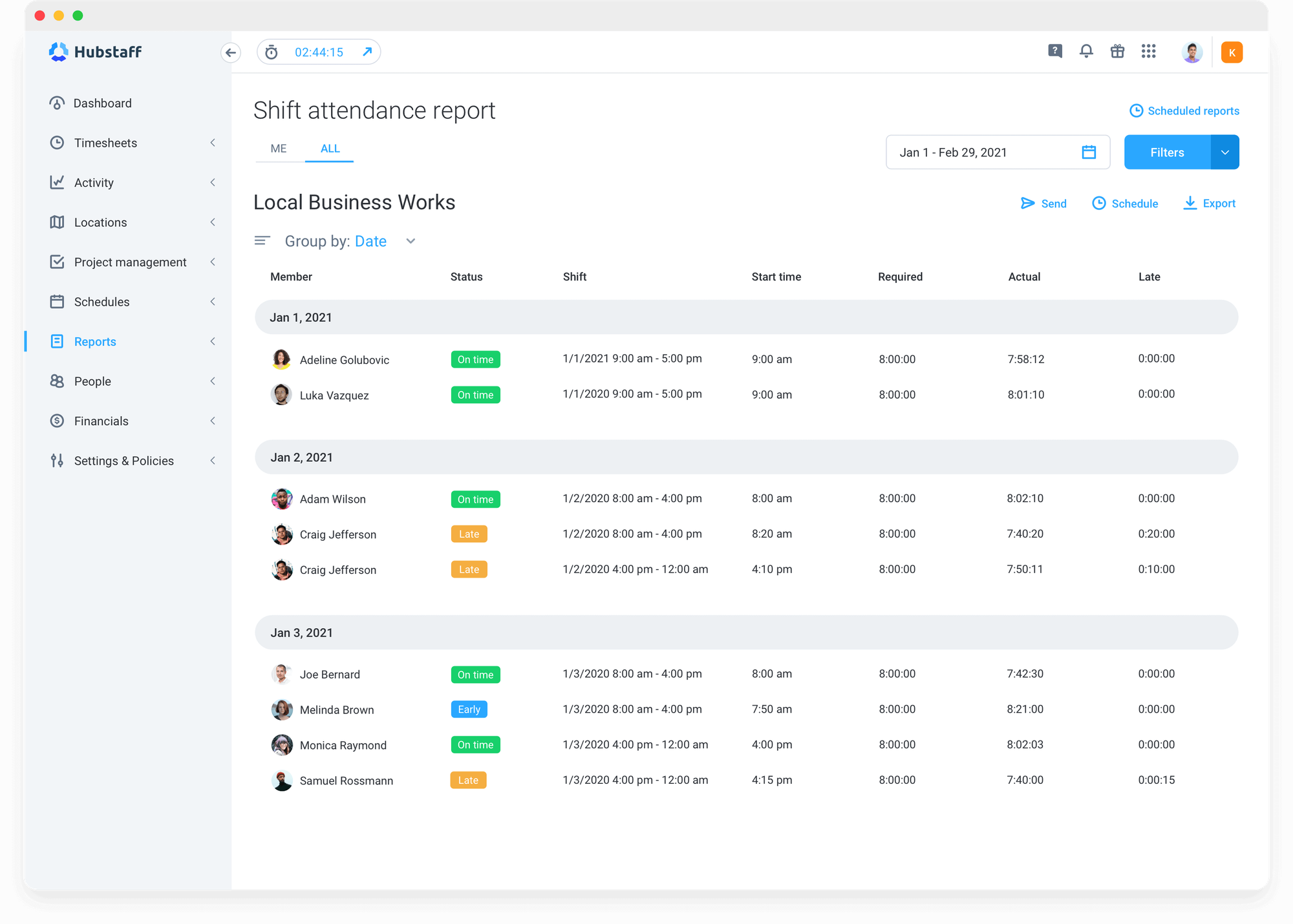
Summary: Hubstaff combines gps time tracking with optional screenshots, application usage, and URL tracking- ideal with distributed teams that bill properly.
Feature Highlights
• Field employees outdoor tracking by GPS time in a breadcrumb format.
• GPS fence employment offer auto-timing actions on entry.
• Payroll integrations with Wise, PayPal, Payoneer, Gusto
• Productivity scores and project budgeting
Ideal For: Remote agencies, e-commerce fulfillment, or delivery fleets of 10–2,000 staff.
Pricing: Free for one user; Starter $4.99/user; Grow $7.50; Team $10.
Feature Comparison Table
| Tool | Free Plan | Verification Methods | Key Integrations | Best For |
|---|---|---|---|---|
| TMetric | ✅ | API bearer-token authentication | Jira, Trello, Asana | Agencies & project teams |
| Buddy Punch | ✅ | Biometric scans, location tracking | QuickBooks, Gusto, Slack | Field and shift-based teams |
| Connecteam | ✅ | Two authentication factors | Gusto, QuickBooks, ADP | Deskless & field teams |
| Jibble | ✅ | Facial recognition, QR | Slack, Teams | High-security biometric sites |
| Clockify | ✅ | 6-character verification code | Slack, Google Suite | Budget-conscious teams |
| Rippling | ❌ | MFA, including geolocation | NetSuite, Sage, 500+ | HR/IT unified platforms |
| TimeCamp | ✅ | 2FA | Asana, Zendesk, 30+ | Remote agencies needing automation |
| MyAttendanceTracker | ✅ | Manual (email/password) | Google Classroom, email | Schools & educators |
| OneTap | ✅ | QR code scan | Mailchimp, Salesforce | Events & community classes |
| Hubstaff | ✅ | 2FA for Teams | Gusto, PayPal, Wise | Remote teams with productivity focus |
How to Choose the Right Attendance Tool
Remote vs. Office-Based Teams
Remote teams need GPS time tracking and offline sync; office teams may prefer kiosk or facial recognition time clock options to prevent buddy-punching.
Privacy Requirements
Healthcare and EU-based organizations must choose vendors with GDPR and HIPAA compliance. Biometric attendance apps should offer on-premise storage or zero-knowledge encryption.
Scalability & Pricing Considerations
Some free attendance software becomes expensive once you exceed 50 users. Calculate three-year TCO, including add-on modules like scheduling or payroll.
Integration Ecosystem
If your payroll runs on ADP, picking Rippling or Connecteam saves weeks of custom API work. Conversely, if you live in Jira, TMetric’s native integration is priceless.
Support & Onboarding Experience
Look for live chat, phone support, and self-service academies. Jibble and Connecteam both provide 24/7 chat, even on free plans.
TMetric as Your Attendance & Time Tracking Solution
TMetric closes the gap between “how long did it take” and “who was actually there.”
Professionals admit that before TMetric, teams used one tool for client hours and another for HR attendance. Reconciling the two every Friday took two hours. With TMetric attendance toggle, it’s automatic.
Managers can see live who’s in, who’s late, and export payroll in 30 seconds.
Ready to test drive? Start tracking attendance with TMetric today—free for teams up to 5 users, no credit card required.
Choosing Software That Scales with You
The best attendance tracking software is the one you can roll out this afternoon without a 200-page manual and still trust at headcount of 2,000 employees.
Prioritize verification methods that match your workforce realities, insist on integrations that remove duplicate data entry, and never compromise on compliance.
Whether you pick the free tier of Clockify or the enterprise muscle of Rippling, run a 14-day pilot with real users and real data before you sign an annual contract. Your future self—and your payroll clerk—will thank you.
Helpful Links
• TMetric attendance tracking software
• Automated employee timesheet app
• Payroll software for small business
• Productivity tracker