Timesheet App for Employees

  • Core time tracking
  • Project-level analytics
  • Easy approvals
  • Accurate payroll
  • Simplified reporting
  • Mobile app
Fully functional 14-day trial | No credit card needed

Trusted by over 10 000 companies worldwide

  • Endygo
  • ITsyndicate
  • Pulso
  • 050media
  • JOT Digital
  • Freshlab
  • Mvad
  • Swaven

Why Teams Choose TMetric as Their Timesheet App

Without TMetric

  • I have to rely on my memory to log work hours.
  • Extra work and five-minute tasks go untracked and unpaid.
  • Billing is based on estimates, leading to a lack of client trust.

With TMetric

  • Every minute of work is tracked automatically.
  • My overtime and micro-tasks are always accounted for.
  • I can generate detailed reports and clear invoices.

TMetric - Your Best Solution for a Timesheet App

TMetric logs every billable minute to ensure accuracy and trust.

Save time 4hrs a week are spent on manual time entry
Faster billing 85% of time is saved by avoiding manual spreadsheet work

Key Features of the TMetric Timesheet App

Automatic digital timesheet generation

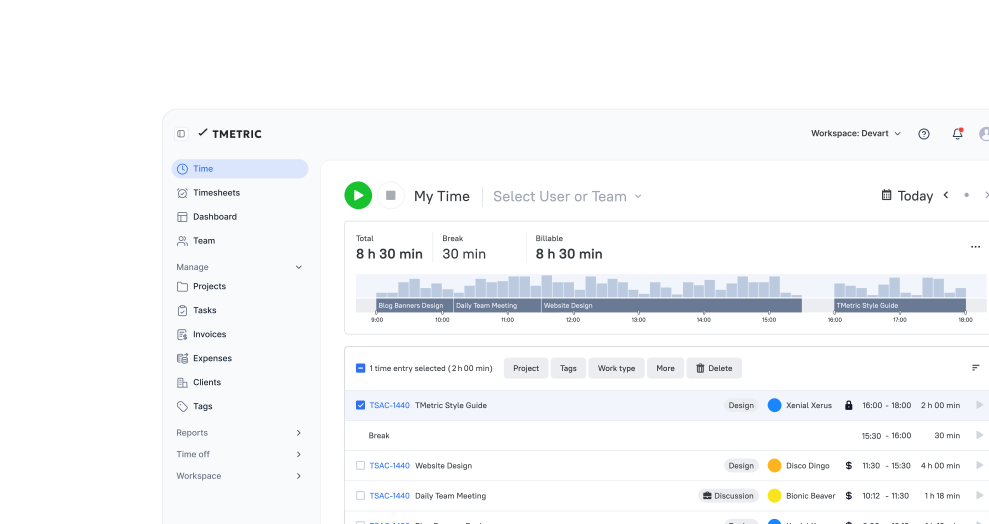
TMetric automatically turns the time‑tracking data into ready-to-use timesheets, without any manual entry.
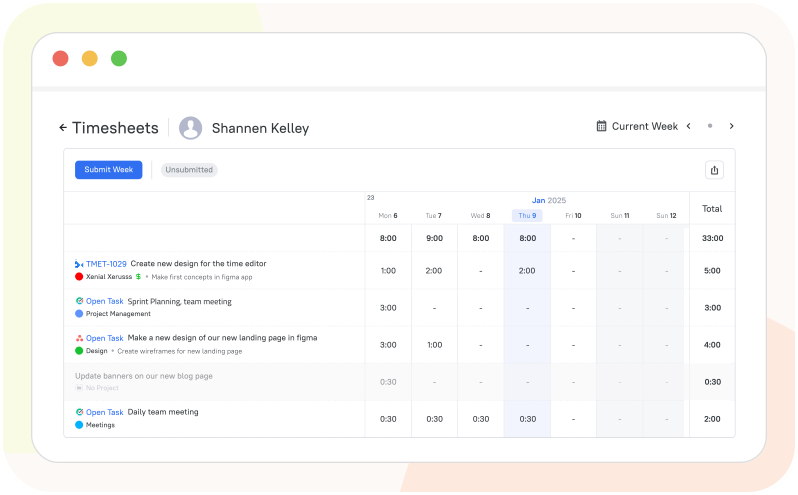
  • Track work time using desktop, web, or mobile apps
  • Work hours, breaks, and overtime are logged automatically
  • TMetric compiles tracked time into accurate timesheets
  • Review, approve, or request changes to timesheets
Automatic digital timesheet generation

Timesheet approval workflow

TMetric allows you to ensure that recorded work hours are accurate, reviewed, and approved before payroll.
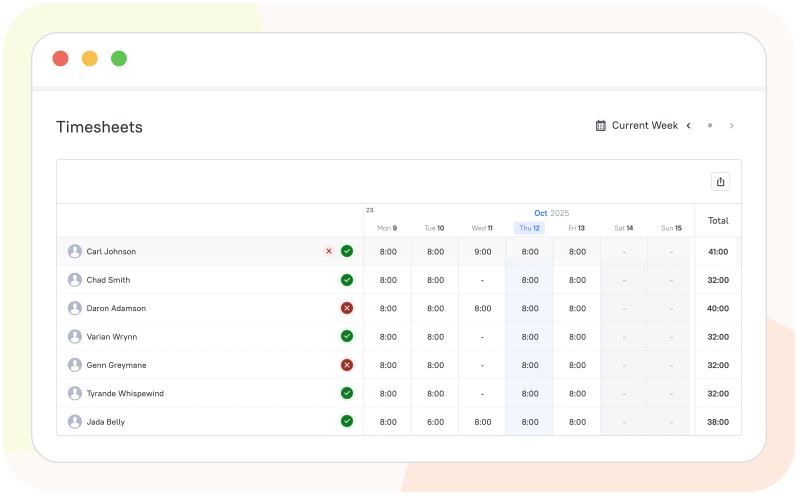
  • Employees submit timesheets at the end of the tracking period
  • Managers review recorded hours and activity
  • Timesheets are approved, rejected, or returned for correction
  • Approved timesheets are finalized for payroll or reporting
Timesheet approval workflow

Built-in attendance, PTO, and leave tracking

TMetric provides all-in-one attendance, PTO, and leave tracking within employee timesheets and reports.
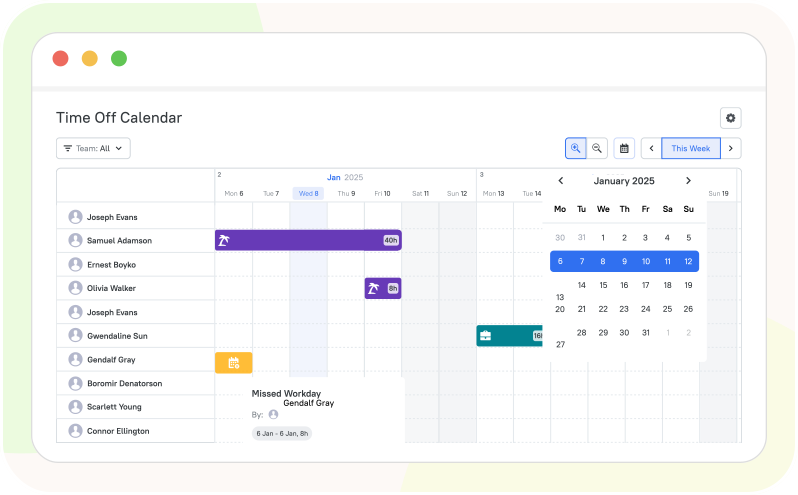
  • Add and configure time-off policies for your employees
  • Review incoming time-off requests, approve or reject them
  • View and manage time off using the Time Off Calendar
  • Time off appears in timesheets as non-working time
Built-in attendance, PTO, and leave tracking

Payroll and billing exports

TMetric lets you export data from approved timesheets to CSV or PDF for reporting or accounting.
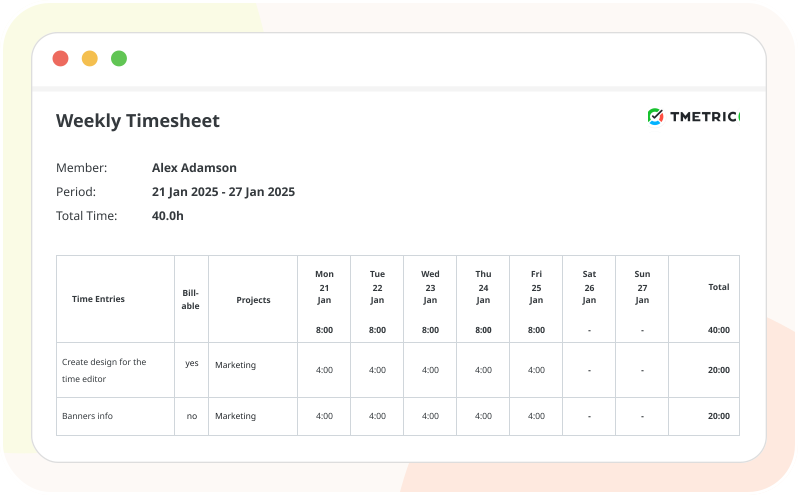
  • View any team member’s timesheet once it’s approved
  • Export the timesheet to your preferred file format (CSV or PDF)
  • Use the exported file for reporting, payroll, or accounting
  • Generate and send invoices to receive payment from your clients
Payroll and billing exports

Seamless Integrations for a Unified Workflow

Time is captured directly from where your team works - no switching tabs, no manual entry.

See all integrations

See TMetric in Action

TMetric streamlines your team's workflow, providing a clear day-by-day overview of time entries, automated submission, and an efficient approval process for managers.

Frequently Asked Questions

How does the TMetric employee timesheet app capture and organize work hours?

Employees start and stop their timers in the TMetric web, desktop, or mobile apps. TMetric records work hours, breaks, overtime, and billable versus non-billable hours. Once captured, TMetric organizes the data into digital timesheets, categorizing entries by employee, project, task, and date.

Does TMetric support weekly timesheet approvals from managers?

Yes, it does. Just select the Weekly option from the Approval period dropdown menu of the timesheet settings.

Can I track both billable and non-billable hours in TMetric?

Yes, you can. TMetric lets you mark time entries as billable or non-billable for accurate reporting.

Does TMetric timesheet app integrate with project management tools like Jira or Trello?

Yes, TMetric can integrate with project management tools like Jira and Trello. You can track time on tasks from these tools directly in TMetric and have the data organized into your timesheets.

How does TMetric handle overtime, breaks, and attendance in timesheets?

TMetric automatically tracks attendance, logs breaks, and calculates overtime, then organizes all this data into detailed, accurate timesheets for review, approval, and payroll.

Can employees submit timesheets from the TMetric mobile app?

Employees can track working time with the TMetric mobile app and submit their timesheets through the web app.

Does TMetric offer payroll-ready reporting and export options?

Yes, it does. In TMetric, you can generate detailed time reports, including billable hours, overtime, and cost data. These reports can be exported in common formats such as CSV or PDF, making them easy to use with payroll systems, accounting software, or client billing.

Is there a free plan available for the TMetric employee timesheet app?

Yes, you can try TMetric free for 14 days, with complete access to payroll features like time calculations, cost rates, and timesheet approvals, and add unlimited users to experience the full Business plan.

Take control of your team's time and payroll

Turn time data into ready-to-use timesheets and simplify payroll

Start free trial
Take control of your team's time and payroll