Timesheets
DeskTime centers on automatic tracking, with offline time approval in its Premium plan. TMetric combines a timer, manual entries, and team timesheets with attendance, so managers review hours before payroll or invoicing.
Looking for a DeskTime alternative with project budgeting, invoicing, and deep integrations? Meet TMetric.
Start Free Trial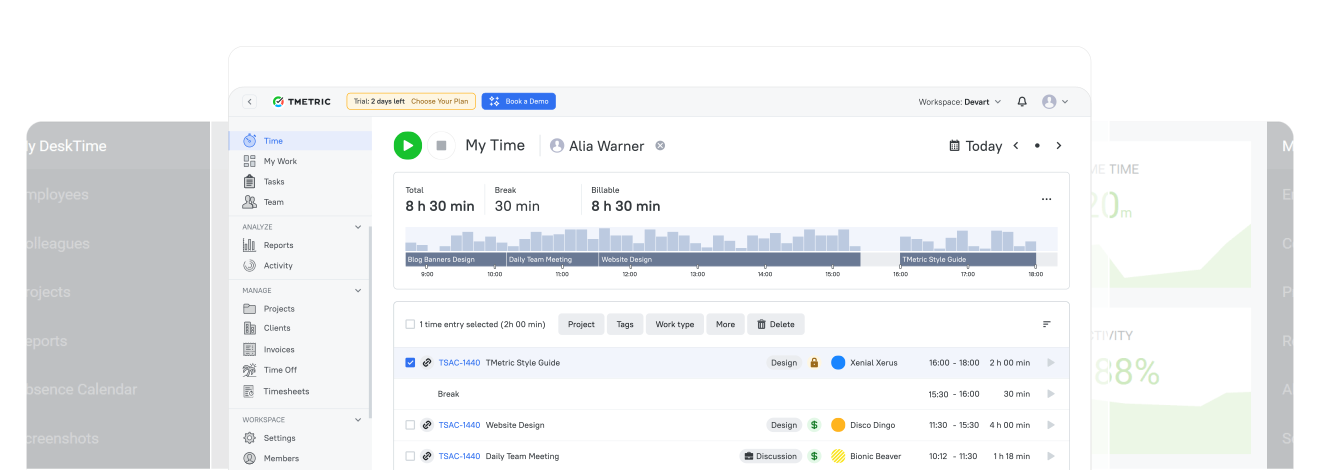







TMetric is a DeskTime alternative for teams that manage billable client projects. It connects tracked time with project budgets and alerts, billable rates, expenses, and invoicing, and works with Jira, Trello, Asana, ClickUp, and GitHub among 50+ integrations. As a DeskTime competitor, TMetric also has a Free plan for up to 2 seats, which makes it a practical free alternative to DeskTime for small teams, while DeskTime offers a free trial only. It is a simple way to switch from DeskTime without changing how your team tracks time.
| Comparing TMetric vs DeskTime |

|

|
|---|---|---|
| Minimal price of a paid plan | $5.83 | $6.42 |
| Time tracking | ||
| Reporting | $ | |
| Task management | $ | |
| Team management | $ | |
| Integrations with 50+ web apps | $ | |
| Unlimited projects and clients | $ | |
| Budgeting for projects | $ | |
| Time tracking permissions | $ | $ |
| Billable rates and money tracking | $ | $ |
| Invoicing | $ | |
| Activity levels for employees | $ | $ |
| Apps and sites usage reports | $ | |
| Screenshots capturing | $ | $ |
| Client logins for access to reports | $ | |
| Paid time off tracking | $ | $ |
| Payroll for employees | $ |

DeskTime centers on automatic tracking, with offline time approval in its Premium plan. TMetric combines a timer, manual entries, and team timesheets with attendance, so managers review hours before payroll or invoicing.

DeskTime calculates project costs from hourly rates and also supports invoices. TMetric adds expenses and project budgets with alerts to the same workflow, starting in the Professional plan, so billing stays connected to project financials.

DeskTime puts productivity scoring of apps and sites at the center, with screenshots in Premium. TMetric offers activity levels, app and site usage, and optional screenshots (app usage and screenshots in Business), alongside project and billing data.

Both tools integrate with popular software. TMetric focuses on project management and development workflows, with timer buttons in 50+ web apps and sync with tools such as Jira, Trello, Asana, ClickUp, and GitHub.
TMetric helps us to track and manage our work time on different projects. It has provided us with a comprehensive overview of how our time is allocated across various tasks. Its reporting features have been particularly helpful in providing us with valuable insights into our work patterns, which has resulted in increased efficiency and productivity.
Linda Förster, project manager at Medudy


We’ve found TMetric to be both user friendly and robust. It was easy to setup which allowed us to begin leveraging the tool immediately. It also provides multiple layers of reporting which provides value to our organization on a number of different levels.
Brian Reilly, BankBound

TMetric is faster, more convenient and cheaper, the support is responsive and they fixed some bugs quickly.
Swen Roethlisberger, Floowedit

I recently transitioned from full-time employee to ‘consultant’. Needed an app to track projects, tasks and generate billing based on our agreement. TMetric handles this elegantly and I can access from my iPhone, iPad or PC- awesome!
Jim Rolph, Manufacturer's Representative at Gorman Company

After five months we are very happy with the app and will gladly renew the service. We are still finding new uses for it within our organization and it’s been pivotal for helping us gather better decision-making information, grow our topline and reduce our bottomline.
Galeno Chua, The Idea Founding Principal

There are plenty of available applications to monitor working time. We chose TMetric because of the suitable price and compatibility with Trello and Google Documents, which we use every day in our company.
Patryk Hoffmann, MyLead

TMetric offers a one-click timer, manual entries, and billable and non-billable tracking by project and client, with activity data from the desktop app. DeskTime centers on automatic tracking of apps and URLs, with a web timer and offline time options. Choose by how much of your tracking you want automated.
TMetric combines tracked time, billable rates, labor costs, and expenses in profitability reports, so you can see which projects and clients earn the most, not just how much time they take. DeskTime calculates project costs from hourly rates and compares them with an estimated budget. Choose TMetric if you need margins and expenses next to your tracked hours.
Both tools offer productivity insights. DeskTime puts productivity scoring and automatic app and URL tracking at the center, with screenshots in Premium. TMetric offers activity levels, app and site usage reports, and optional screenshots on the relevant plans, alongside project and billing data. The difference is product focus, not whether monitoring exists.
DeskTime supports project costs with hourly rates and an estimated budget, and can issue invoices. TMetric adds money and time budgets with email alerts, recurring budgets, and expenses, with invoices created from the same tracked time starting in the Professional plan. Choose TMetric if project financials are central to your work.
TMetric offers a clean dashboard focused on logging time, tracking tasks, and generating reports. DeskTime’s interface includes additional monitoring views such as productivity, screenshots, and attendance, which suits teams that use those features every day.
Powered by  A software vendor with 29 years of experience.


