Profitability Report
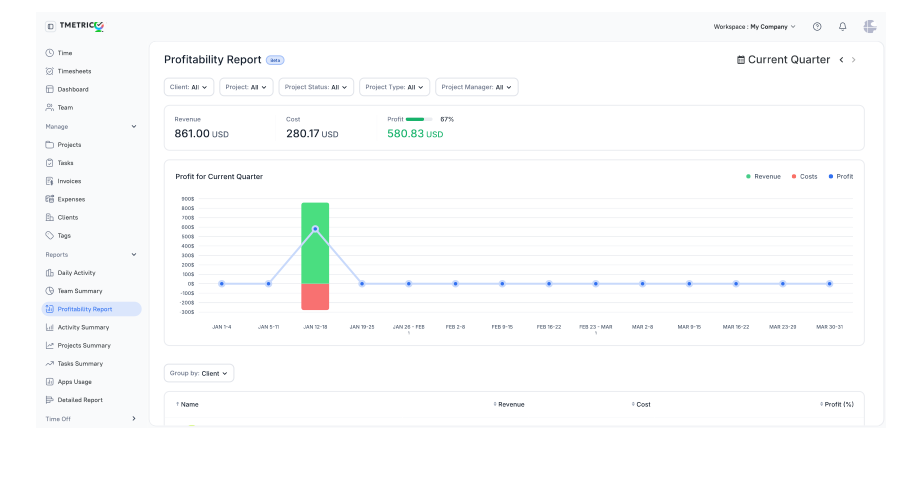
The Profitability report includes data on revenue, cost, and profit, allowing you to see how much your company earns and how to correctly adjust rates and resources for future growth. The report displays data in a table organized by project, revenue, cost, and profit.
Note: At present, only projects using the workspace currency are included in the calculations.
Time Range
You can set a custom time range using the date picker in the top-right corner of the report. The report data will then be displayed according to the selected date or date range.
Filters
You can customize the report results by selecting from the following filters: Client, Project, Project Status, Project Type, and Project Manager.
The selected filters are applied the next time you open the report.
Chart
The report features a visual chart that combines a bar chart and a line graph to provide a clear profit overview. You can see how your profit changes over time.
The chart can be customized by turning values on or off and selecting dates to display the data you need.
First, select a date range in the date picker above to view your profit for that period. Then, click the appropriate value (Revenue, Costs, Profit) above the chart on the right. By default, they are all turned on.
Columns
The Profitability report includes the following columns:
- Project - the project for which the data is collected and organized.
- Revenue - total revenue (billable hours x billable rates) + billable expenses for the selected period of time.
- Cost - total expenses (time tracked x cost rates) + expenses (billable and nonbillable) for the selected period of time.
- Profit - the overall profit of a project for the selected time period. This value is calculated using the formula: Profit = Revenue – Cost
- Profit Bar - shows the relative profit for each project.
- Profitability (Profit) % - shows what portion of revenue becomes profit, expressed as a percentage. It’s calculated as: Profit/Revenue × 100
Note: If you have Fixed Fee projects in the workspace, some calculations may be inaccurate in the report if the Start and End Dates for these projects are not set.
Groups
Grouping arranges table data in a clear, logical way based on your current needs. You can group your data using the following categories: Client (default), Project, and User.
Once the report is generated, you can assess project effectiveness, quickly identify unprofitable areas, and make decisions to improve financial performance and allocate resources more efficiently.
Didn’t find what you were looking for?
If you didn't find what you were looking for, you can make a support request or email us to [email protected]. We'll be glad to help you personally.